Foot traffic doesn’t happen by accident. If you run a barbershop (solo chair, high-street shop, or a multi-location brand) promotion should turn attention into booked appointments, repeat clients, and steadier cash flow. Below are barbershop promotion ideas you can run this week, with clear steps, tools, realistic budgets, and a faster booking flow to build barbershop clientele.
Quick win? Set up online booking before you promote anything. If customers can’t find where to book, all your effort goes wasted. Try Koalendar’s free forever plan to accept bookings in minutes—no card needed.
#1: Google Business Profile for local bookings
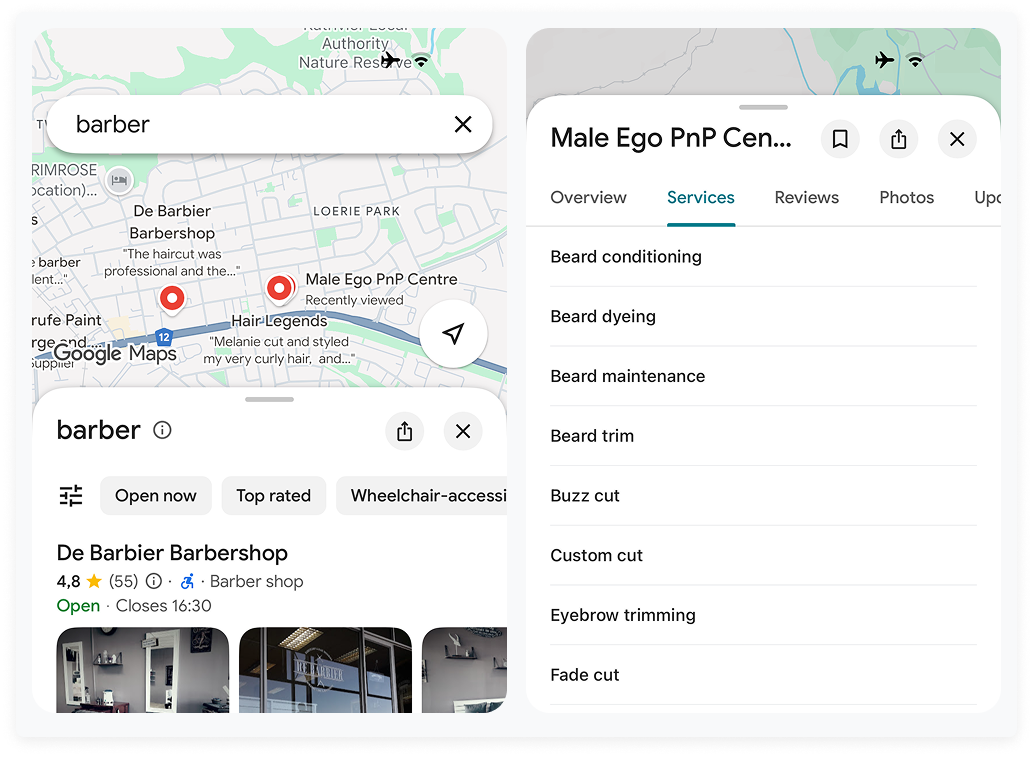
Become the shop that shows first for local searches and lets people book instantly. Complete your Google Business Profile, list clear services and prices, and connect a Book button that opens your Koalendar page. You turn “barber near me” into confirmed slots without a phone call.
How to set it up (step-by-step)
· Claim & verify your profile, choose Barbershop as primary; consider Hair salon/Hairdresser as secondary
· Complete services with clear names and prices (e.g., Skin fade — 30 min; Beard trim — 15 min)
· Add a booking link directly on the profile so searchers can book without phoning
· Post weekly: last-minute availability, new stylist, seasonal offer, or fresh photos
· Keep hours accurate, including bank holidays; enable messaging only if you can reply fast
Tools you can use
· Your Google Business Profile (free)
· You can add a booking link to your Google Business Profile that opens your Koalendar page.
Budget ranges
$0–$65/month (mostly time).
How it helps
A high-street shop adds a “Book” link to GBP, uploads three “before/after” skin fades, and posts a Friday-only offer. Saturday calls drop, but bookings rise because people self-book while commuting.
#2: Get reviews to build barbershop clientele
Turn a great cut into online proof that wins the next client. Ask for a quick Google review at the chair, make it effortless with a mirror QR, and follow up the same day. Fresh reviews lift local trust and nudge searchers to book. They count too, 72% of customers said they searched for salons on Google, so the better your reviews, the more likely the booking.
How to set it up (step-by-step)
· Ask in-chair when the cut is done: “Mind leaving a quick Google review?”
· Place a QR code at each mirror that opens your review link
· Send a same-day follow-up message with the review link
Tools you can use
· Koalendar follow-up emails (available on paid plans) to request a review the same day; add SMS on paid plans if you need it
· QR generator, or NFC cards, a physical card embedded with a Near Field Communication chip that, when tapped by a customer's smartphone, instantly directs them to your Google Business Profile review page
Budget ranges
$0–$50/month; NFC review cards $40–$100 one-off.
How it helps
A neighbourhood shop adds a mirror QR and asks every happy client for a review. Within four weeks, they move from no reviews to glowing words from happy customers, and walk-ins say they chose the shop after reading replies from the owner.
#3: Social content that actually books
Social media is powerful. Post work that sells itself and makes booking the next tap. Share sharp before and afters and quick tips, tag your neighbourhood, and point your bio and reels to your Koalendar booking link.
How to set it up (step-by-step)
· Cadence: 3–5 posts/week; save Story Highlights by service (Fade, Beard, Kids)
· Content: sharp before/afters, quick tips (“how to keep your fade sharp”), and client-approved clips
· Geo tags: tag your neighbourhood, landmarks, and partner businesses
· Booking: link in bio goes straight to your Koalendar page; drop “Book now” in Stories
Tools you can use
· Instagram/TikTok native tools; Canva for layouts; a Koalendar booking page per stylist to spread demand
· A simple phone-and-light photo setup (ring light, tripod)
Budget ranges
$0–$265/month; occasional boosted local posts $65–$200.
How it helps
A quiet Tuesday gets filled after a static post shows a beard trim transformation with a “2 slots left book now” call to action, linking directly to booking. Even better, short-form video doesn’t just rack up views; it creates bookable demand when the content shows transformation with a clear path to book. In Québec , barber Ophélia-Anna Nagar says TikTok content led to an explosion in teenage clients, with barbers reporting younger walk-ins who arrive with specific viral styles to request — evidence that social content is shifting real-world service mix and traffic, not just engagement.
#4: Service + neighbourhood SEO pages that convert
On your website, publish focused pages for the services people actually search for near you, with an obvious booking link. Clear copy, prices, FAQs and an embedded Koalendar widget turn mobile searches into appointments.
How to set it up (step-by-step)
· Create short, useful pages: “Skin fade in [Neighbourhood]”, “Beard trim near [Landmark]”
· Maximum 300–600 words, a photo, prices, FAQs, and a booking button above the fold
· Reuse a single page template across services/areas; interlink related services and your main booking page
Tools you can use
· Your CMS: a Koalendar embed on every web page so visitors can book without leaving
· A basic SEO plugin
Budget ranges
$0–$665 one-off for writing/design; $0–$65/month for hosting/apps.
How it helps
A shop near a football ground adds “Skin fade near [Stadium]” and sees match-day bookings jump because away fans search on mobile and book on the spot.
#5: Referral and loyalty programmes
Reward word of mouth and make it easy to come back. Keep the offer simple: ‘refer a friend and both save’, or ‘earn a free cut after five visits’ and track it with a code or a field in your booking form.
How to set it up (step-by-step)
· Keep it simple: “Refer a friend, both get $10 off” or “Book 5 cuts, the 6th is free.”
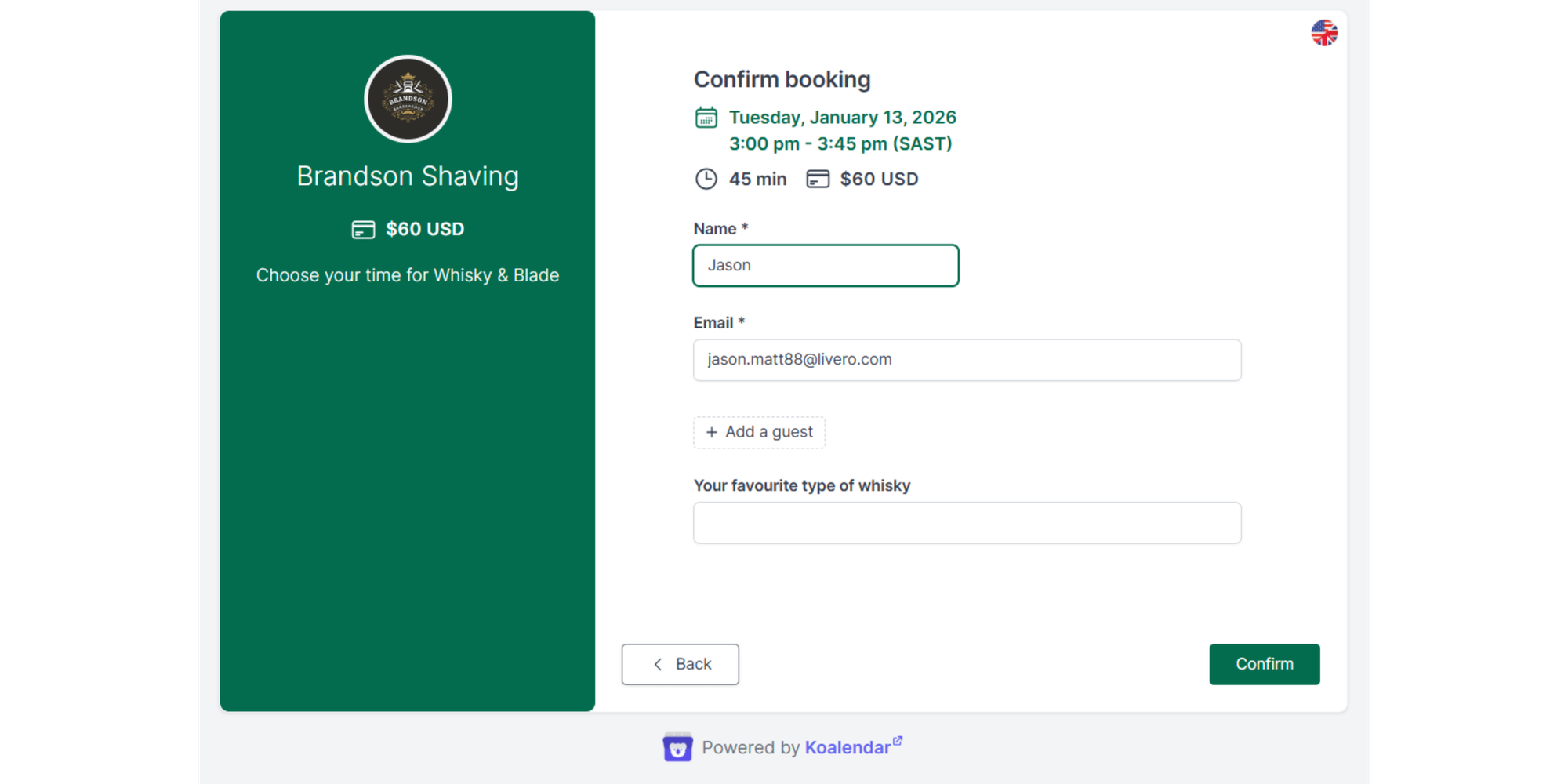
· Track redemptions with unique codes or a field in your booking form
· Announce on mirrors, receipts, and post-visit emails. Review the offer each quarter
Tools you can use
Koalendar custom questions/fields.
Budget ranges
$0–$200 setup; incentive only when redeemed.
How it helps
A three-chair shop tests “Bring a mate, both get $10 off this week.” Regulars convert their friends or work colleagues. Empty slots fill up.
#6: Partnerships and pop-ups
Meet new clients where they already are. Partner with a gym, café, office or hotel, run a compact pop-up with fixed slots, and give an exclusive code that brings people into the main shop next time. Take bookings on the spot so interest doesn’t fade.
How to set it up (step-by-step)
· Shortlist partners with reliable footfall: gyms, cafés, hotels, offices, local events
· Run a pop-up once a month with a fixed number of slots; co-promote on both feeds
· Give an exclusive code for attribution, and include a next-cut offer to bring them into your shop
Tools you can use
· Koalendar ready-made event pages with fixed 20-minute slots and buffers
· Pop-up kit: signage, card reader
Budget ranges
$65–$535 per event (space/kit), plus staff time; optional partner promo £65–$260.
How it helps
A Saturday hotel lobby pop-up fills 10 slots from convention attendees; each gets a card with a QR to book at the main shop next week.
#7: Reduce no-shows
Protect your diary and free up last-minute slots. Send automatic reminders 24 hours and 3 hours before, with a one-tap reschedule link so clients move their time rather than not show. You’ll cut no-shows and keep the day smooth.
How to set it up (step-by-step)
· Send automatic reminders 24 hours and 3 hours before the appointment
· Include a reschedule link so clients free the slot if they can’t make it
· Track no-show rate monthly and adjust timing
· Switch on automated email and SMS reminders in Koalendar to cut missed appointments before they happen
Tools you can use
· Koalendar email reminders (and SMS on paid plans) with customisable, branded notifications
· A simple spreadsheet to track no-show % and utilisation
Budget ranges
Email: included on paid plans. SMS: additional cost per message.
How it helps
After enabling two reminders and tidy copy (“See you tomorrow - need to move it? Tap here”), a shop frees up late cancellation slots a week that otherwise would have gone empty.
Compliance tip (US & international): Keep appointment reminders strictly transactional. In most places they count as “service/transactional” messages only when they include facts, time/date, location, prep notes, and a reschedule/cancel link, and no promotion. If you add a discount, upsell or review request, treat it as marketing: obtain the right consent and include an opt-out.
#8 Outdoor advertising
Stand out on the street and pull in walk-by traffic. Simple, well-placed outdoor advertising can remind locals you’re nearby, open, and taking appointments.
How to set it up (step-by-step)
- Use a bold A‑frame board outside your shop with clear services + price highlights
- Add a QR code that links directly to your Koalendar booking page
- Test sidewalk flags, window vinyls, or sandwich boards to catch attention from different angles
- Keep messaging short: “Skin fades. Beard trims. Book in 10 seconds”
Tools you can use
- QR code generator
- Simple signage printers or local print shops
- Koalendar booking link for QR placement
Budget ranges
$50–$300 depending on signage quality.
How it helps
A high‑street shop adds a strong A‑frame with a QR code, resulting in lunchtime walk-by customers booking directly from their phones instead of planning “to come back later.”
#9: Premium experiences
Small upgrades can elevate the experience and make clients feel looked after. Premium touches give clients a reason to return and talk about your shop.
How to set it up (step-by-step)
- Offer complimentary drinks (espresso, sparkling water, soft drinks)
- Improve atmosphere: lighting, playlists, clean scent diffusers
- Provide hot towel finishes or upgraded neck shaves
- Add a loyalty-only perk: “Members get a premium drink + hot towel every visit”
Tools you can use
- Small beverage fridge
- Cheap but stylish glassware
- Koalendar custom booking questions for premium add-ons
Budget ranges
$30–$300/month depending on consumables.
How it helps
A shop introduces a complimentary espresso moment. Clients call it out on Google reviews, which boosts trust and attracts premium-paying customers looking for a barbershop with personality.
#10: Influencer partnerships (ambassadors)
You don’t need huge influencers—micro‑creators in your city can bring consistent, real traffic.
How to set it up (step-by-step)
- Identify local lifestyle creators (1k–20k followers)
- Offer a free monthly cut in exchange for 2–3 posts/stories
- Create a trackable booking code exclusive to that influencer
- Highlight their content in your shop and socials
Tools you can use
- Koalendar event pages for ambassador-only bookings
- UTM codes or simple discount codes to track results
Budget ranges
$0–$150/month depending on services.
How it helps
A micro‑influencer posts a haircut transformation and tags the shop. Within hours, the shop sees bookings spike with the influencer’s discount code.
#11: Paid advertising (Facebook, Instagram & Google Ads)
If you want predictable client flow, paid ads can help you fill gaps fast.
How to set it up (step-by-step)
- Start with a simple, local Facebook/Instagram ad showing a before/after + “Book Now.”
- Target a 1–3 mile radius around your shop.
- On Google Ads, run a Local Services or keyword-based campaign like “barber near me.”
- Always send traffic to a frictionless booking flow—your Koalendar page.
Tools you can use
- Facebook Ads Manager
- Google Ads
- Koalendar booking pages for ad landing
Budget ranges
$5–$20/day depending on goals.
How it helps
A shop invests $5/day in Instagram ads promoting a “New Client Skin Fade.” Within a week, mid-week slow periods start to fill reliably.
#12: Seasonal and holiday promotions
Seasonal events create natural moments to promote your services.
How to set it up (step-by-step)
- Offer themed packages: “Christmas Cut + Beard Trim,” “Back-to-School Fades,” “Valentine’s Grooming Set”
- Promote via posters, email, and social media
- Add limited slots on your Koalendar booking pages
- Use custom fields to track promo redemptions
Tools you can use
- Koalendar custom questions and event pages
- Simple seasonal graphics via Canva
Budget ranges
$0–$100 depending on creative assets.
How it helps
A shop launches a Father’s Day grooming package, leading to a surge in gift-card purchases and advance bookings.
#13: Branded merchandise
Branded items build loyalty and turn your clients into walking adverts.
How to set it up (step-by-step)
- Start with small items: stickers, combs, beanies, wash bags.
- Sell them or include them as part of referral rewards.
- Display them near reception with clear pricing.
- Add merch options to your Koalendar booking confirmation page.
Tools you can use
- Local print shops or online merch printers
- Koalendar confirmation pages for upsell links
Budget ranges
$50–$500 depending on inventory.
How it helps
A shop launches a line of branded beanies. Clients love them and post photos wearing them—giving the shop ongoing organic visibility.
Quick-pick table: channels, budgets, effort, outcomes
| Budget | Effort | Expected outcome (first 90 days) | |
| Google Business Profile | $0–$65 | Low–medium | More discovery, calls, and “Book now” clicks |
| Get reviews | $0–$50 | Medium | Stronger local trust and higher conversion |
| Instagram/TikTok | $0–$265 | Medium–high | Awareness + bookings via link-in-bio; fills mid-week gaps |
| Local SEO pages | $0–$665 one-off | Medium | Service + geo pages that turn local searches into bookings |
| Referrals/Loyalty | $0–$200 + incentive cost | Low | Lower CAC; higher repeat visits |
| Partnerships/Pop-ups | $65–$535/event | Medium | New audiences with attributable code-based bookings |
| Reminders (email/SMS) | Varies by plan/messages | Low | Fewer no-shows; steadier days |
| Outdoor advertising | $50–$300 | Low | Increased appointments |
| Premium experiences | $30–$300/month | Low | Improved customer experience + appointments |
| Influencer partnerships | $0–$150/month | Medium | Appointments boost |
| Paid advertising | $5–$20/day | Medium | Predictable demand + new client flow |
| Seasonal and holiday promotions | $0–$100 | Low-medium | Boosted bookings around seasonal peaks |
| Branded merchandise | $50–$500 | Low–medium | Brand visibility + higher loyalty |
If you run multiple locations
· Create a booking page per branch and per stylist, linked from each branch’s Google profile.
· Standardise service names and lengths to keep analytics clean (e.g., Skin fade — 30 min everywhere).
· Give each branch a short local page with an embedded booking widget and unique photos.
How Koalendar helps barbershops grow
· Instant confirmations reduce phone tag and walk-away risk from searchers who are ready to book.
· Branded notifications keep emails/texts on-brand and clear, so clients trust them.
· Email & SMS reminders (on our paid plan) and easy rescheduling help reduce no-shows without extra admin.
· Per-stylist and per-service pages balance demand and cut bottlenecks during rush hours.
· Mobile-first pages + QR codes let walk-ins scan and book at mirrors or the front desk.
· Simple analytics & exports help you track what’s working and where to add capacity.
Simplify your bookings and grow your barbershop clientele with
Koalendar. Try Koalendar free — no card needed.
Set up your barbershop with Koalendar, fast:
1. Create a free Koalendar account
2. Add services with durations and buffers (e.g., Skin fade - 30 min)
3. Create booking pages per stylist and per service to balance demand
4. Configure notifications with instant confirmations; add automated email/SMS reminders when you’re ready (available on paid plans)
5. Embed booking on your site and add your link to Google Business Profile and your Instagram bio
We can help you to book sessions, reduce no shows and grow your clientele. Explore what Koalendar can do for your barbershop here.
Conclusion: promote smarter, book more, reduce no-shows
If you’ve wondered how you promote a barbershop, start where intent is highest: Google Business Profile and fresh reviews. Layer on social media proof, and simple referral offers. Then reduce no-shows with clear, branded reminders and easy rescheduling. Koalendar removes friction at the “book now” moment, helping solo chairs and multi-location teams turn busy people into loyal clients.