If your days are ruled by back-to-back meetings, interviews, or client sessions, the last thing you need is a clunky booking tool slowing you down. Maybe YouCanBookMe has been “good enough” so far—but you’re starting to bump into limits, extra costs, or missing integrations.
That’s where YouCanBookMe alternatives come in. There are now dozens of modern online appointment scheduling tools that automate booking, reduce no-shows, and give your calendar a much calmer look.
Key takeaways:
- The best scheduling tools do more than “book time.” Look for real-time calendar sync, automated reminders, flexible availability rules, and easy rescheduling to cut admin and reduce no-shows.
- Different tools win in different scenarios:
- Simple, reliable scheduling: Koalendar,
- Service businesses with payments + packages: Acuity Scheduling, SimplyBook.me
- Group coordination: Doodle, Microsoft Bookings
- Don’t just compare feature lists—test your shortlist in real life. Run a week of actual bookings and see how your calendar (and your clients) feel.
- A “good” booking page is the one people understand instantly. Clarity, mobile-friendliness, and a smooth user experience beat fancy settings you’ll never touch.
- Koalendar stands out if you want a calm, no-drama upgrade: intuitive setup, strong free plan, reliable calendar sync, and pricing that makes sense for solo pros, schools, and small teams.
Overview of top online appointment scheduling tools
 |  |  |  |  |  |  |  |  | |
| Key benefits | Super simple UI, fast setup, reliable calendar sync, strong automation and reminders, generous free tier | Customizable booking pages, solid time-zone handling, good for multi-calendar setups | Popular ecosystem, polished UX, routing and round-robin for revenue teams, strong integrations | Built for services: intake forms, packages, recurring sessions, robust payments | Very customizable booking pages, supports memberships, coupons, gift cards, branded apps | Excellent for group polls, finding common times, and simple booking pages for multiple people | Lightweight business appointment software, easy to embed and share, good for simple workflows | Generous free team plan, multi-staff support, built-in video and payments | Deep Outlook/Teams integration, enterprise-grade security, good for internal & external appointments |
| Best for | Teachers, coaches, consultants, recruiters, and small teams that want “set and forget” scheduling | Solo professionals and small teams needing flexible booking links and deep customization | Sales, CS, product and GTM teams running lots of external meetings and demos | Service-based businesses like coaches, therapists, salons, healthcare, wellness | Niche or multi-location service providers wanting a very tailored booking experience | Boards, committees, cross-functional teams, and anyone coordinating large group meetings | Startups, consultants, and lean teams that want straightforward booking without extra complexity | Small teams and local service businesses needing shared calendars on a budget | Organizations already on Microsoft 365 (corporate, government, universities, schools) |
| Pricing snapshot* | Free forever plan Paid starts at: ~$6.99/user/month (annual) | Limited free plan Paid starts at: ~$9/month | Limited free forever plan Paid starts at: $10/seat/month (Standard, annual) | No free plan, only free trial Paid starts at: ~$16/month (Emerging) | Limited free plan available Paid starts at: ~$8.25/month (annual) | Limited free plan Paid starts at: about $6.95/user/month (Pro, annual) | Limited free plan Paid starts at: roughly $9–10/member/month (Premium) | Limited free plan Paid starts at: ~$5/user/month (annual) | No free plan Paid starts at: effectively from about $6–7.20/user/month via Microsoft 365 Business plans |
The market for online appointment scheduling tools has exploded. To keep things simple, we’ll focus on the tools that consistently show up for professionals, small businesses, and schools looking for apps like Youcanbookme.
You’ll see a few broad categories:
- All-rounders: Great for 1:1 and group meetings across industries (Koalendar, Calendly)
- Service-focused platforms: Popular with coaches, salons, healthcare, and other appointment-heavy businesses (Koalendar, Acuity Scheduling, SimplyBook.me, Setmore)
- Group or team schedulers: Ideal when you’re coordinating many people or finding times for entire teams (Doodle, Microsoft Bookings)
Why consider YouCanBookMe alternatives?
Appointment scheduling software is no longer a “nice to have.” It’s a core part of how modern teams work. The global appointment scheduling software market is projected to more than triple in value by 2032, driven by businesses that want to automate bookings, sync calendars, and reduce admin work.
So if your scheduling tool isn’t quite keeping up, it’s not just an annoyance—it’s a productivity leak.
Limitations of YouCanBookMe
YouCanBook.me is a solid pioneer in the scheduling space, but many teams eventually run into friction, such as:
- Limited flexibility on the free plan You may need to upgrade sooner than expected to unlock features like branding, advanced reminders, or multiple team members.
- Complexity as your use cases grow As you add group events, multiple team calendars, or different locations, setup can become harder to manage compared with newer, more streamlined tools.
- Branding and user experience constraints If client experience matters to you (and it should), you may want more control over the look and feel of your booking pages than YouCanBookMe offers out of the box.
- Integrations that don’t go far enough You may need deeper or easier integrations with tools like Zoom, Google Meet, Stripe, CRM platforms, or marketing stacks—without a tangle of workarounds.
- User experience issues The interface can be less intuitive, leading to a steeper learning curve. This can hinder productivity, especially when onboarding new team members.
All these factors might push businesses to explore other business appointment software options. Finding a tool that offers flexibility, affordability, and user-friendly design can lead to better scheduling outcomes.
Advantages of exploring other options
Switching from a familiar tool can feel like a hassle. But the upside is huge when you pick a better-fit solution:
- Time savings: The right online scheduling tool can free staff from manual back-and-forth, letting them focus on revenue-generating or mission-critical work.
- Fewer no-shows: Automated reminders and confirmations improve attendance and reduce wasted time.
- Happier employees and clients: Less admin and smoother customer experiences have been linked to better engagement and overall performance.
- Future-proof workflows: As AI and automation become standard in scheduling apps, teams that upgrade earlier see productivity boosts and better time management.
In short: the right YouCanBookMe replacement doesn’t just book meetings. It gives you back hours each week and makes your business feel more organized.
In-depth look at the best YouCanBookMe alternatives
Each of the eight alternatives to YouCanBookMe offers distinct advantages. These options cater to various business sizes and specific needs, ensuring everyone finds a suitable match.
From simple interfaces to customizable features, these tools present diverse capabilities. They highlight everything a modern business requires to enhance time management and client interactions. Below, we'll explore these options in detail, focusing on their unique selling points and key features to guide your decision-making process.
Koalendar: Simplicity you can trust
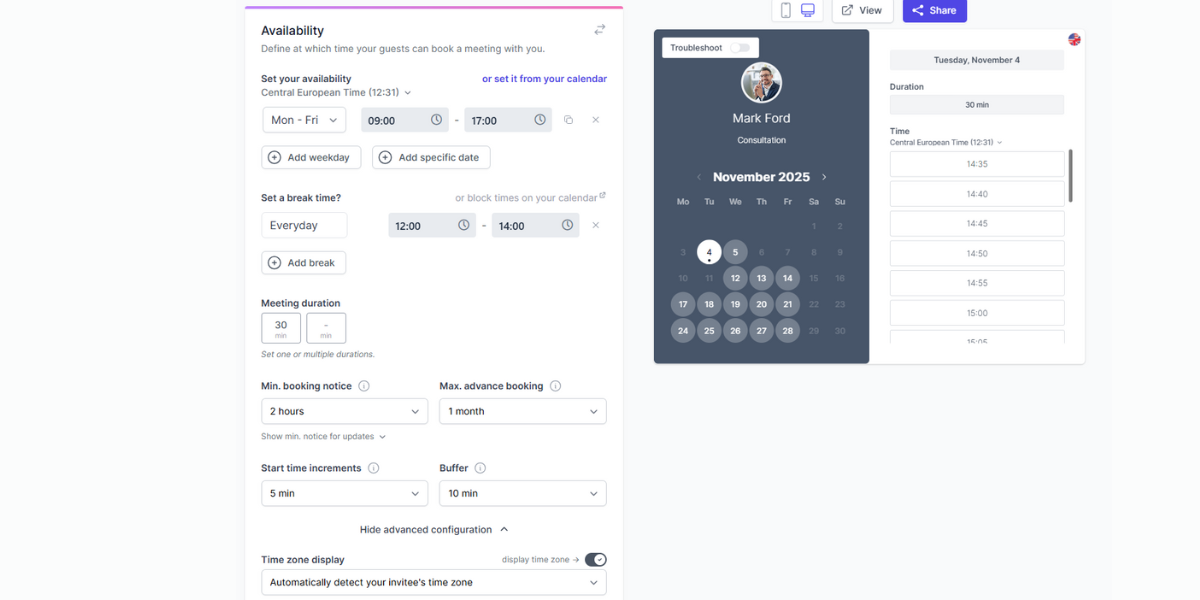
Best for: Educators, coaches, consultants, recruiters, small teams, and solo pros who want simple, clean scheduling that “just works.”
Koalendar is built around a clear promise: make scheduling effortless. It focuses on intuitive design, a gentle learning curve, and everyday workflows like:
- Booking 1:1 meetings, sessions, or classes
- Running group events or webinars
- Sharing booking links in email, on your website, or in your email signature
- Syncing with Google Calendar and commonly used meeting tools
Users often highlight:
- Ease of use: Minimal setup, friendly interface, and a short learning curve even for non-technical users.
- Reliable calendar sync: Real-time sync with Google Calendar (and other tools) to prevent double bookings.
- Strong free plan: Generous free tier with unlimited 1:1 and group bookings, reminders, and multi-language support.
- Thoughtful affordability: Paid plans priced for schools, freelancers, and small teams rather than just large enterprises.
Koalendar is designed to feel like a helpful colleague, not a complex SaaS platform. The tone, UI, and features are all focused on reducing admin stress, not adding more complexity.
Ideal if you want: A no-drama YouCanBookMe alternative that’s easy to roll out across a team and simple enough for busy parents, clients, service providers, or schools to use without instructions.
Calendly: A leader in online booking systems
Best for: Sales teams, customer success, and B2B organizations that schedule a lot of external meetings.
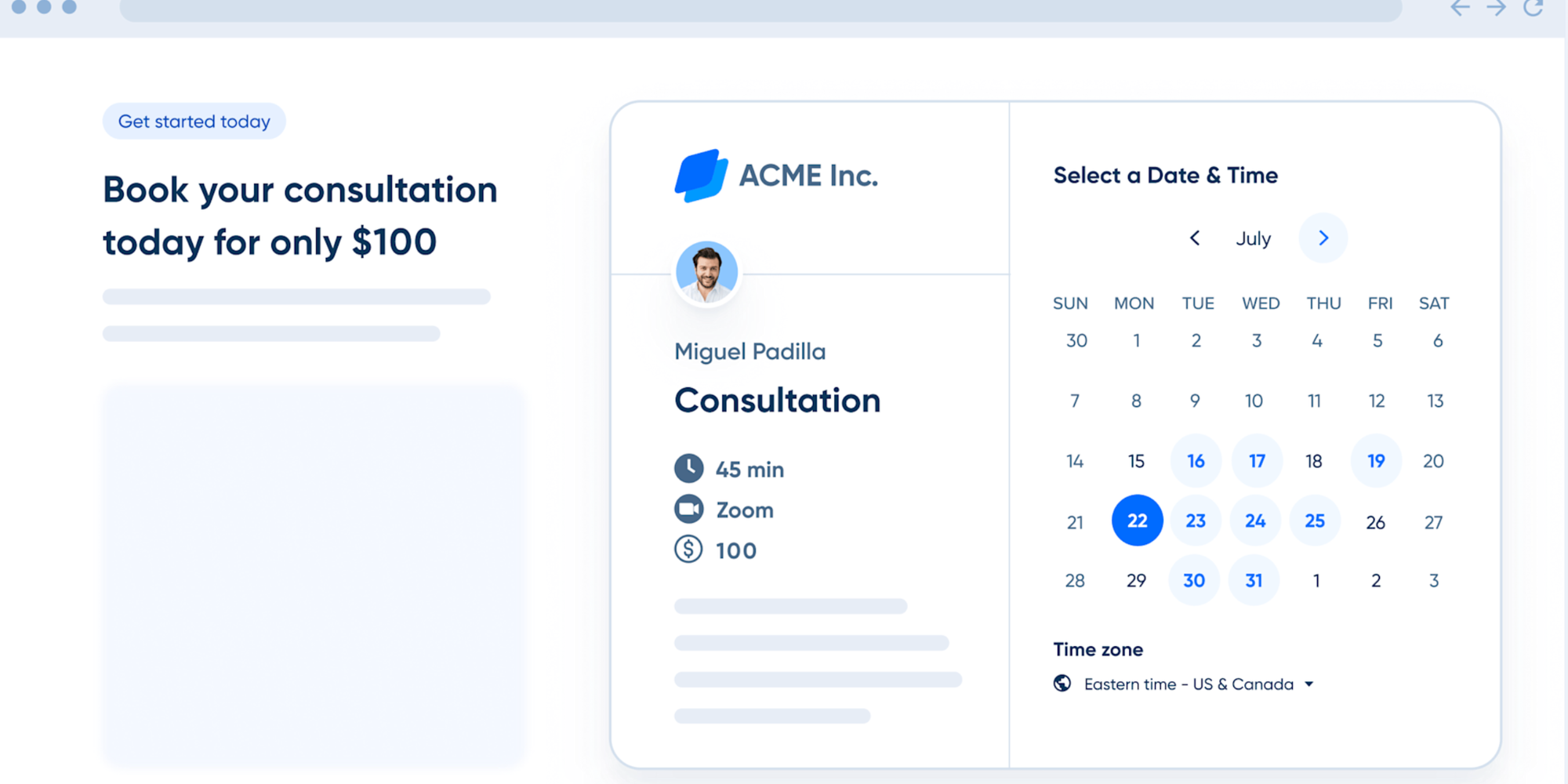
Calendly is one of the most well-known online booking systems and a frequent choice for teams looking for apps similar to YouCanBookMe. It offers:
- Multiple event types (15-minute intro calls, 30-minute demos, etc.)
- Round-robin scheduling for sales teams
- Pooled availability across team members
- Integrations with Zoom, Google Meet, Microsoft Teams, and CRMs
Pros
- Strong brand recognition and ecosystem
- Polished UI and robust features for group and team scheduling
- Integrations with popular sales and marketing tools
Cons
- Costs can add up quickly for larger teams
- Some advanced options (like routing forms or round-robin) are locked to higher-tier plans
- The interface can feel slightly heavy if you just want simple appointment booking
Calendly is a great alternative to YouCanBookMe if you’re building a structured meeting flow—especially for sales, onboarding, or demos.
Acuity Scheduling: Perfect for service-oriented businesses
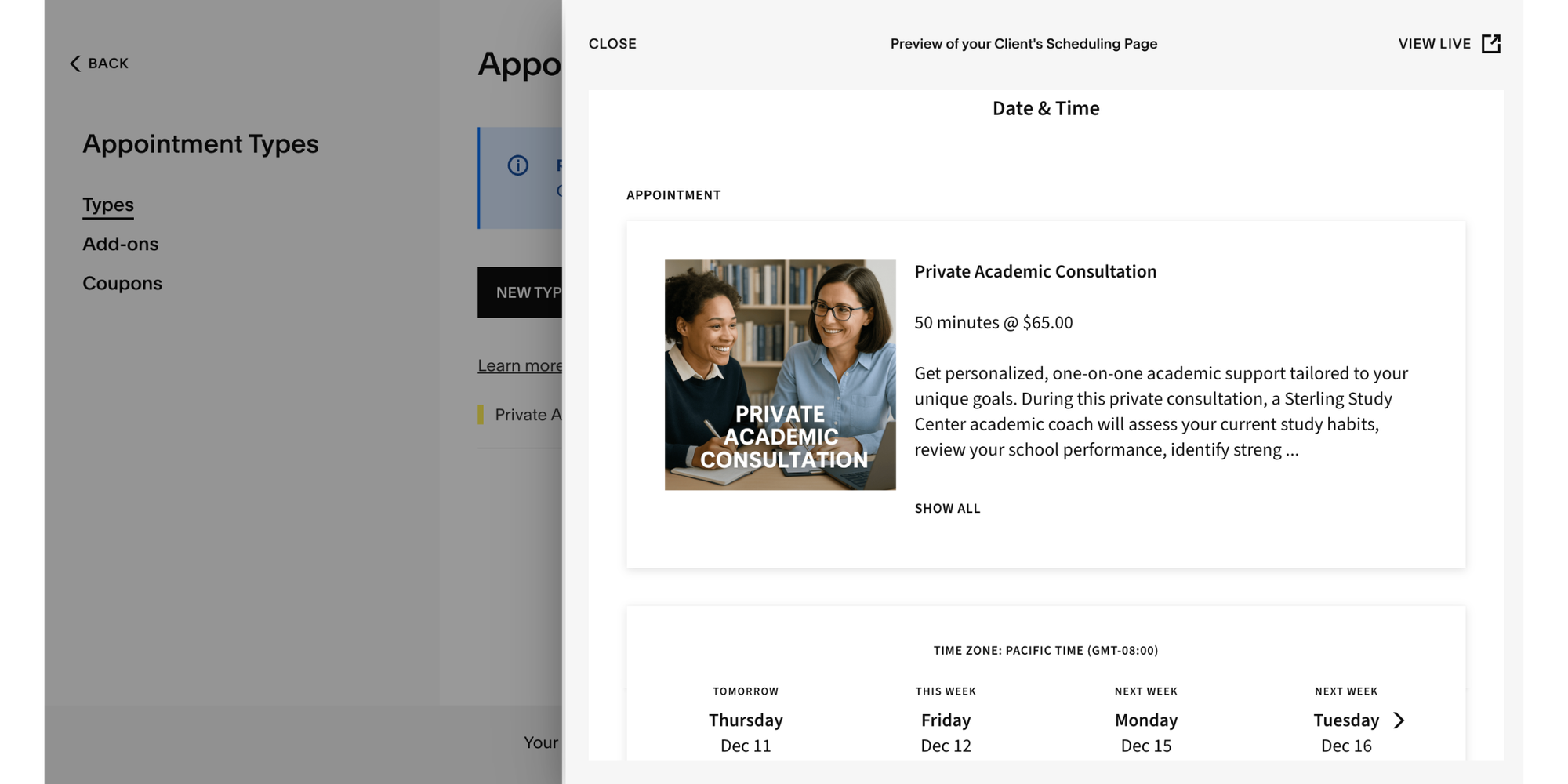
Best for: Coaches, therapists, salons, wellness providers, and service-based businesses that need scheduling + payments.
Acuity Scheduling (by Squarespace) focuses on appointment-driven services, with strengths like:
- Built-in intake forms and questionnaires
- Packages, memberships, and subscription options
- Direct payment processing through Stripe, Square, or PayPal
- Multiple locations and staff, each with their own availability
Pros
- Deep support for service workflows (e.g., recurring sessions, intake data, and fees upfront)
- Strong payment and package options
- Useful automations like follow-up emails or pre-appointment instructions
Cons
- Interface can feel overwhelming for simple use cases
- Some features require higher-tier plans
- More complex setup than lightweight YouCanBookMe alternatives
Acuity is ideal when your main focus is paid appointments, not just meetings—and you want your scheduling tool to handle a big chunk of your operations.
SimplyBook.me: A customizable solution for unique needs
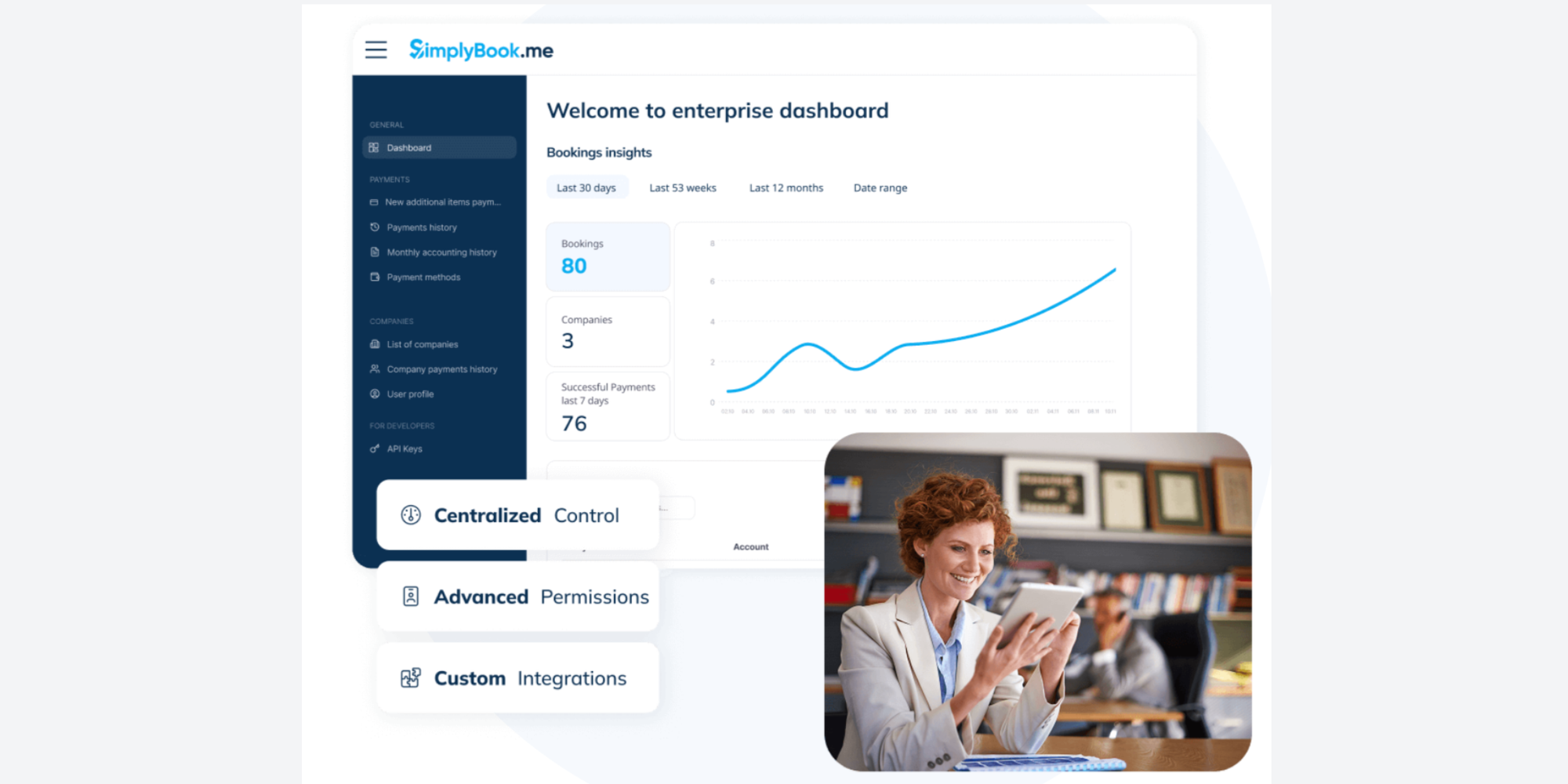
Best for: Niche service providers, multi-location businesses, and anyone who needs highly customizable booking pages.
SimplyBook.me is a flexible platform that can adapt to a variety of industries—think clinics, beauty salons, repair services, or education providers. It’s often chosen as a YouCanBookMe alternative when teams need more customizability.
Key features include:
- Branded booking websites and widgets you can embed in your site
- Add-ons like coupons, membership systems, and gift cards
- Support for classes, workshops, and individual services
- Integrations with payment gateways and marketing tools
Pros
- Highly customizable booking experience
- Good for both 1:1 and group events
- Suits many industries with different needs
Cons
- Interface can feel busy compared with simpler tools like Koalendar
- Overkill if you just need basic scheduling
- Pricing can be complex depending on add-ons
If you’ve outgrown basic tools and want your scheduling to match a unique brand or service model, SimplyBook.me can be a powerful YouCanBookMe competitor.
Doodle: Excelling in polling for group scheduling

Best for: Teams, boards, and organizations that need to find a meeting time that works for many people.
Doodle is less about individual booking pages and more about coordinating groups. If you’re constantly sending “What time works for everyone?” emails, you’ve probably seen or used a Doodle poll.
Core strengths:
- Poll-based scheduling to find the best time among many guests
- Integration with major calendars to avoid conflicts
- Options for booking 1:1 meetings as well
- Great for cross-department or external stakeholder meetings
Pros
- Fantastic for large groups and committees
- Simple experience for invitees—just pick times that work
- Can reduce endless email threads for meeting coordination
Cons
- Not a full replacement for a dedicated online appointment scheduling tool for client bookings
- Less focused on branding or payments
- Poll-based approach may not fit one-to-many service businesses
For organizations that live in group calendars—boards, non-profits, project teams—Doodle is a strong alternative to YouCanBookMe for group scheduling, while you might pair it with another tool for client appointments.
Appointlet: Best for simple business
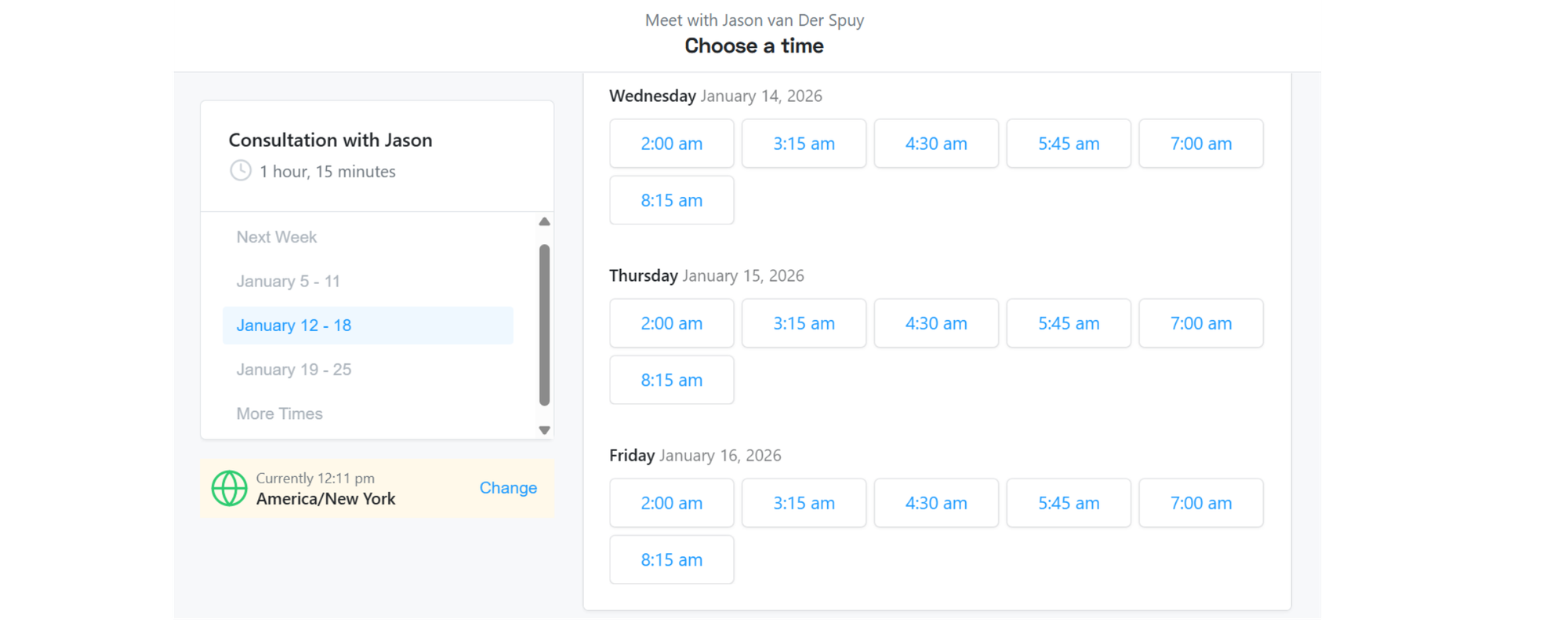
Best for: Small teams and consultants who want straightforward business appointment scheduling without bloat.
Appointlet positions itself as a clean, no-frills business appointment software solution. It’s a good fit if you want something more flexible than YouCanBookMe but still light and easy.
Highlights:
- Shareable booking links and embeddable forms
- Integration with Google Calendar, Office 365, and popular video tools
- Basic customization for branding and confirmation emails
- Option to collect payments for some use cases
Pros
- Simple, lean interface
- Good value for small businesses and startups
- Easy to get up and running quickly
Cons
- Less advanced automation than some competitors
- May not scale as easily for complex, multi-location teams
- Limited design control compared with more customizable tools
If you’re evaluating multiple apps like YouCanBookMe , Appointlet is a solid middle-ground: more flexible than bare-bones tools, less complex than enterprise platforms.
Setmore: Good for small teams
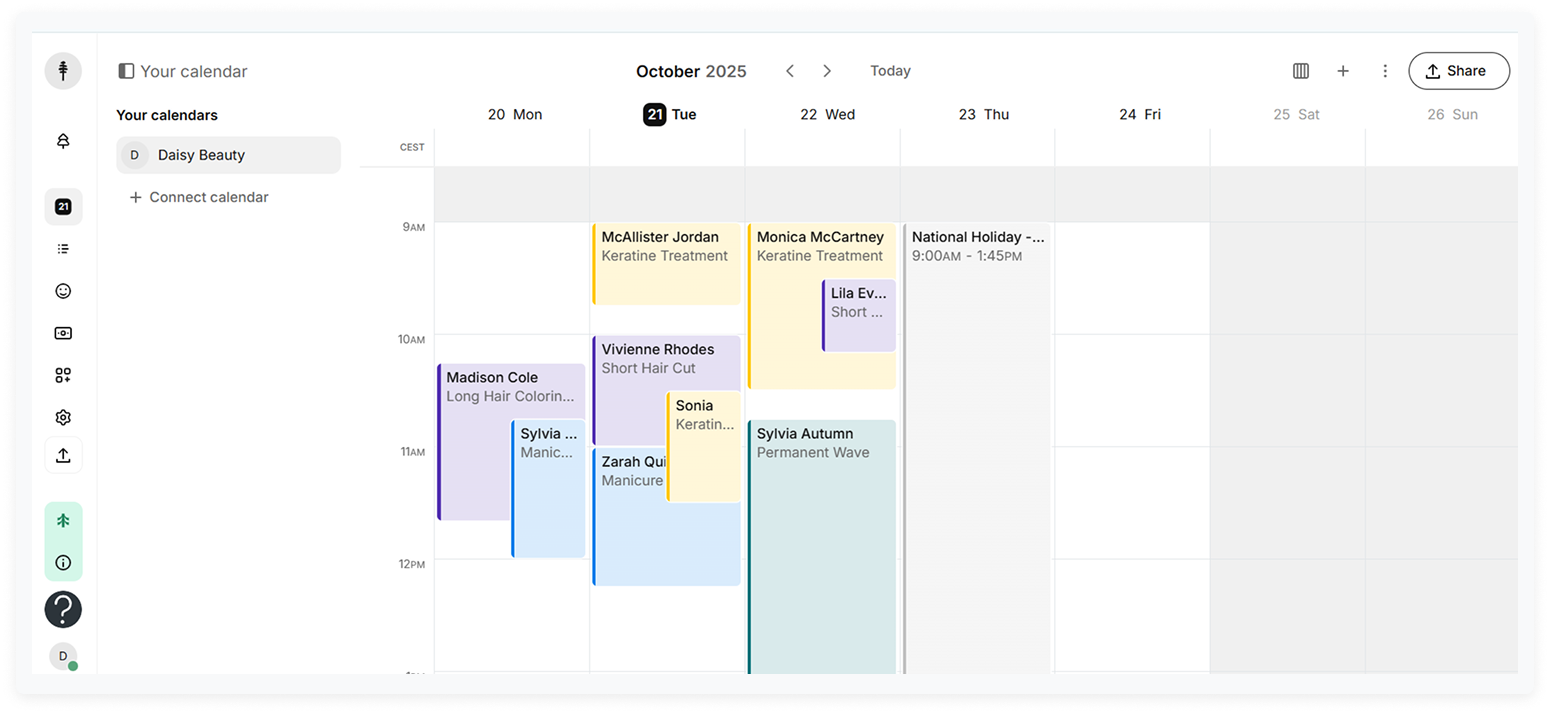
Best for: Small teams looking for a generous free plan and built-in video options.
Setmore is often chosen for its free tier, which supports multiple staff logins and core booking features—making it appealing for small teams or bootstrapped businesses.
Key features:
- Free plan with multiple users and unlimited appointments (with some feature limits)
- Booking page and website widget
- Video appointments via Teleport or integrations with other tools
- Payment collection using Stripe or Square
- Payment collection using Stripe or Square
Pros
- Very appealing free plan for teams
- Good blend of scheduling and payment features
- Works well for service businesses and small offices
- Good blend of scheduling and payment features
- Works well for service businesses and small offices
Cons
- Interface can feel a bit dated compared with newer tools
- Feature set can be uneven across free and paid tiers
- Might require more configuration for polished branding
- Feature set can be uneven across free and paid tiers
- Might require more configuration for polished branding
Setmore shines when you want a budget-friendly YouCanBookMe alternative that still supports a small team with shared calendars.
Microsoft Bookings: Ideal for Microsoft 365 Users
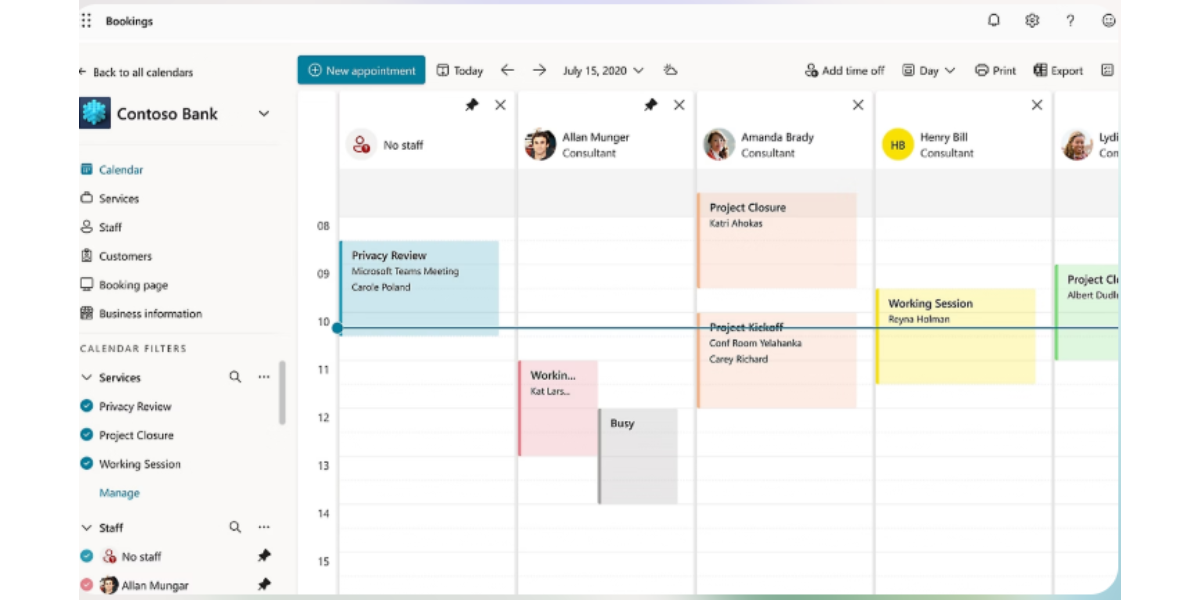
Best for: Organizations already using Microsoft 365 that want scheduling tightly integrated with Outlook and Teams.
Microsoft Bookings is technically another full YouCanBookMe alternative, but it makes the most sense as a bonus option if you’re already invested in Microsoft’s ecosystem.
Benefits include:
- Deep integration with Outlook calendars and Microsoft Teams
- Centralized booking for departments like HR, support, or student services
- Enterprise-grade security and compliance
- Included or discounted with certain Microsoft 365 plans
Pros
- Familiar environment for IT and staff already using Microsoft tools
- Strong security posture
- Good for internal and external bookings in corporate or education settings
Cons
- Less intuitive than many modern, standalone scheduling apps
- Limited branding and customization
- Overkill for freelancers or small business owners not using Microsoft 365
If your IT policy strongly favors Microsoft products, Bookings can be a convenient YouCanBookMe replacement that fits neatly into your existing stack.
Comparison of features and pricing
Every tool above can help you schedule meetings, but they differ a lot in focus, flexibility, and cost. Here’s a quick comparison of what typically matters:
Core features to compare
· Calendar sync: Google Calendar, Outlook, iCloud, etc.
· Meeting types: 1:1, group, classes, round-robin, pooled availability
· Reminders & notifications: Email, SMS, in-app, custom sequences
· Payments: Stripe, PayPal, Square, subscriptions, packages
· Branding: Custom domains, colors, logos, white-label options
· Integrations: CRM, video conferencing, marketing platforms, Zapier/Make
· Team features: Multi-user accounts, permissions, reporting
Pricing patterns you’ll see
- Free plans
- Koalendar, Setmore, Doodle, and others offer free tiers with unlimited or generous scheduling limits.
- These are ideal if you’re just getting started or have a small team.
- Per-user or per-feature pricing
- Tools like Calendly and Acuity typically charge per user or per seat; advanced features (like routing, advanced analytics, or payment workflows) live on higher tiers.
- Service business tiers
- Platforms such as Acuity and SimplyBook.me often price around the number of locations, staff, or services you offer.
When you compare online appointment scheduling tools, think in terms of total cost of ownership: the base price plus the integrations, add-ons, and time spent maintaining your setup.
Koalendar, for example, aims to keep pricing transparent and accessible, especially for educators, freelancers, and small teams that need powerful scheduling without enterprise-level costs.
How to choose the right appointment scheduling tool
Choosing the right YouCanBookMe alternative isn’t about picking the most feature-packed tool. It’s about matching the tool to how you actually work.
Here’s how to think it through.
Considerations for time management
Your scheduling app should act like a quiet assistant, constantly protecting your time.
Look for:
- Smart availability rules
- Buffer times between meetings
- Daily meeting caps
- Working hours and time-zone controls
- Automated workflows
- Auto-confirm or auto-approve bookings
- Automated reminders and follow-ups
- Easy rescheduling links for guests
- Analytics & insights
- At a glance: how many meetings per week, which services are most booked, who’s overbooked
Scheduling software has been shown to improve time management significantly, especially when it’s integrated into broader workflows. When evaluating online appointment scheduling tools, ask: Will this actually reduce the time I spend on email and admin?
Integration with existing business tools
A great scheduling app is even better when it plugs into the tools you already use.
Key questions:
- Calendars: Does it sync in real time with Google Calendar, Outlook, or Apple Calendar?
- Video conferencing: Can it auto-generate Zoom, Google Meet, or Teams links?
- CRM & email: Can it update contacts and deals in your CRM, or trigger email sequences?
- Automation: Does it connect easily via Zapier, Make, or native integrations?
For example:
- Sales teams may prioritize Calendly or Koalendar for their CRM and email integrations
- Service providers might lean toward Acuity or SimplyBook.me for payments and client management
- Microsoft-heavy organizations will often prefer Microsoft Bookings to keep everything inside their 365 environment
User experience and customer support
Even the best feature list won’t matter if your clients or parents find the booking page confusing, or your staff struggle to set things up.
Pay attention to:
- Booking page clarity
- Is it immediately obvious what to do?
- Can guests see their time zone and meeting location clearly?
- Mobile experience
- Do pages load quickly on phones and tablets?
- Are forms and buttons easy to tap?
- Onboarding & support
- Are there clear guides and templates?
- Do you have access to responsive support, even on free plans?
According to a Harvard research on employee experience, reducing friction and stress in daily tools is a big contributor to productivity and retention. A simple, friendly interface—like Koalendar’s—can have a bigger impact than a long list of advanced settings you’ll never use.
Conclusion: Finding your perfect scheduling app
Choosing between YouCanBookMe alternatives doesn’t have to be overwhelming. Start by asking:
- Do I mainly need simple, reliable meeting scheduling?
- Do I run a service-based business and need payments, packages, or memberships?
- Am I coordinating large groups or teams across different time zones?
- Which tools integrate best with my existing stack?
From there, shortlist 2–3 options and run a quick trial with real meetings—don’t just evaluate from a feature page. Pay attention to how your clients or colleagues respond, how much manual work disappears, and how your calendar feels after a week or two.
If you’re looking for a balance of simplicity, flexibility, and fair pricing, Koalendar is a standout YouCanBookMe alternative. It’s built to automate scheduling, reduce no-shows, and help you reclaim your time—without overwhelming you with complexity.
When you’re ready to simplify your scheduling and give your calendar some breathing room, Koalendar is a friendly, powerful solution worth trying first.