

Modern tanning salons run on tight schedules, busy days, and high client expectations — which is why choosing the best tanning salon software is so important. Whether you’re managing a single tanning bed or a multi-location operation, the right software ensures smooth scheduling, organized client records, smart resource allocation, and a professional experience that keeps people coming back.
This guide puts 8 of the leading tanning salon software platforms and a scheduling-first tool, Koalendar side-by-side to highlight which ones are best for every salon type — from solo bed studios to rapidly expanding multi-bed locations.
TL;DR (summary)
You’ll get a concise breakdown of features, pros and cons, pricing, and a decision guide tailored by salon size and their distinct needs. For solo and smaller tanning salons, Koalendar offers powerful scheduling capabilities and a generous forever free plan.
Key takeaways:
- The right software depends on your salon’s size, complexity, and growth plans
- Full-suite platforms like Mangomint, Tan-Link, and Vagaro offer robust features for larger or membership-heavy salons
- Smaller salons benefit most from simple, affordable tools such as Koalendar or Square POS
- Online booking, client management, scheduling reliability, and POS integration are essential features to evaluate
- Starting simple and upgrading as you grow is often the most cost-effective strategy
What is tanning salon software?
Tanning salon software is a digital system designed to help tanning businesses manage appointments, track client sessions, organize memberships, handle payments, and streamline daily operations.
Instead of juggling spreadsheets, clipboards, or multiple apps, tanning salon software centralizes everything in one easy-to-use platform. This saves time, reduces mistakes, and creates a smoother experience for both staff and clients.
Importance of tanning salon software in modern businesses
Today’s salon owners face more competition, more client expectations, and less time than ever. This is why reliable software isn’t just “nice to have” anymore — it’s essential.
Here’s why:
- Clients expect online booking, reminders, and quick check-ins
- Salons need accurate bed scheduling to prevent double-booking
- Memberships, packages, and retail require organized POS and billing
- Personalization matters — software helps track preferences and history
- Owners need clear analytics to make smart, profitable decisions
The right platform doesn’t just help you run your business — it helps you grow it. This is the real power behind choosing the best tanning salon software for your salon’s unique needs.
Key features of the best full-suite tanning salon software
Full-suite tanning salon software provides everything a growing salon needs under one roof. While lightweight tools focus on scheduling, full-suite platforms offer deeper management capabilities for larger or busier operations.
Below are the core features that matter most.
1. Appointment scheduling
Tanning beds are a shared amenity. A real-time calendar prevents double-bookings, helps manage closely scheduled appointments, and ensures a positive customer experience. Online 24/7 scheduling capabilities makes everyone’s lives easier, reducing phone calls, and minimizing administrative work. This is why scheduling is the heart of a great tanning salon. Good software should:
- Prevent double-bookings
- Sync with calendars in real time
- Support staff scheduling
- Manage room or bed availability
- Offer automated reminders and confirmations
This reduces no-shows, boosts bookings, and helps keep daily operations flowing smoothly.
2. Customer management
Client profiles are essential for building relationships and improving service quality. Full-suite platforms typically store:
- Tanning preferences and skin type notes
- Session history
- Membership or package details
- Purchase history
- Waivers, forms, or health questionnaires
This creates a personalized, professional experience your clients will love.
4. Point of Sale (POS) integration
A built-in POS system helps salons process payments and manage sales effortlessly. Top POS features include:
- Support for memberships and recurring billing
- Retail product sales and inventory updates
- Discounts, promotions, and gift cards
- Contactless payments and digital receipts
This ensures quick checkout experiences with accurate financial records.
5. Marketing and promotions tools
Marketing tools help salons stay connected with clients and boost repeat visits. Automated SMS or email reminders, loyalty programs, promotions, and holiday discount events are all great ways to boost customer engagement. The best platforms offer:
- Email and text promotions
- Automated reminders
- Loyalty and rewards programs
- Custom branding for booking pages
- Holiday and seasonal campaign tools
These features help increase retention and keep calendars full.
6. Reporting and analytics
Data-driven insights help salon owners understand:
- Busiest hours and days
- Bed utilization
- Top services and products
- Revenue trends
- Staff performance
- Membership retention
Knowing what’s working — and what’s not — allows for smarter decision-making and more profitable operations.
7. Mobile and online booking
Clients expect convenience, and online booking is now a must-have. Full-suite software typically includes:
- Mobile-friendly booking pages24/7 self-service scheduling
- Automated confirmations
- Client account access for managing packages or memberships
This reduces phone calls and frees up staff while making booking easier than ever.
Software based on your salon type and unique needs
In a hurry? Here are our recommendations by salon type
- Solo or single bed salon: Koalendar or Square POS are both simple, low-cost options that can be set up fast.
- Small salon (1–2 beds, maybe a little retail): Vagaro, TanTrack, or SalonTouch all offer balanced features without excessive overhead.
- Salon with retail or product sales: Lightspeed Retail or Vagaro for better inventory and sales management.
- Medium to large salons with memberships or many beds: Mangomint, Tan-Link, or Vagaro all offer robust features to support large-scale operations and continuous growth.

Overview of leading software solutions
Instead of simply repackaging what other “best tanning salon software” lists recommend, we wanted this guide to be genuinely useful for busy tanning professionals. So we took a more practical approach.
Here’s how we narrowed it down:
- We started with the tools that show up consistently in industry reviews
- Then we filtered out software that isn’t actually designed for tanning salons
- Finally, we focused on platforms that real salons rely on — ones with clear pricing, dependable scheduling, and features that fit different salon sizes
From there, these seven options stood out as the most relevant for tanning salons today:
- Koalendar
- Mangomint
- Vagaro
- Tan-Link
- SalonTouch
- Square POS
- Lightspeed Retail
- TanTrack
Ready to see how they stack up? We’ll show you where each one shines and point out limitations to keep in mind.
But remember, the best fit for the salon next door may not be right for you. It really comes down to your salon’s specific needs, goals, and size.
Top tanning salon software solutions
Koalendar — Best scheduling-first option for solo and small tanning salons
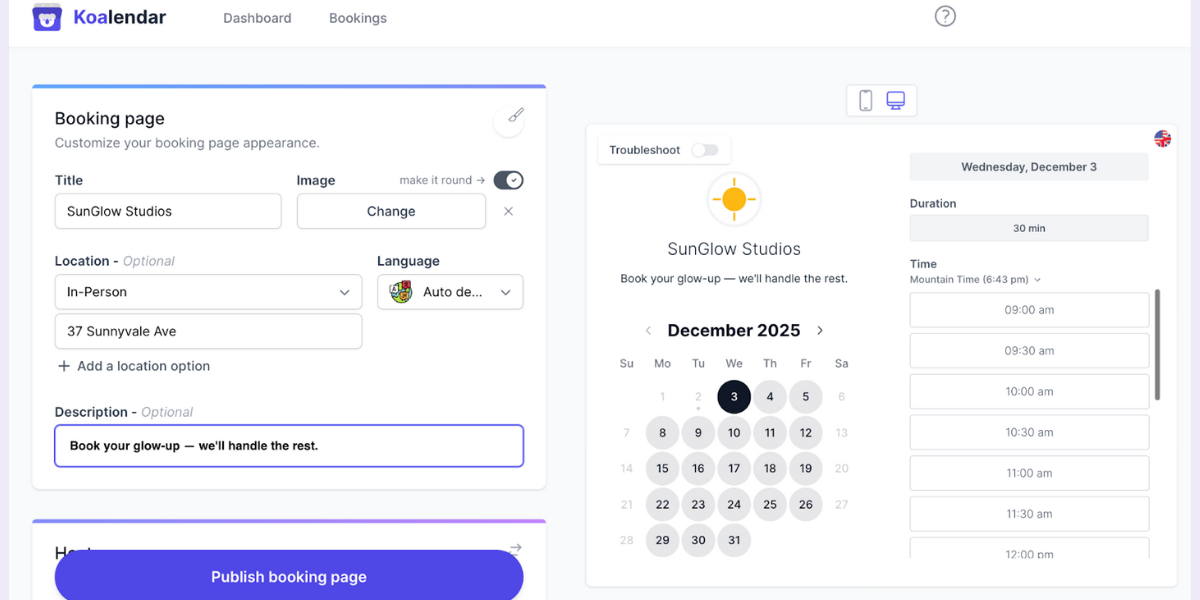
Koalendar is a clean, lightweight scheduling tool built for small teams and solo operators who want easy online booking with payment options without the complexity of full salon management systems.
It’s designed to help you get up and running quickly, with simple calendars, branded booking pages, and a low learning curve. Made with spa and tanning studios in mind, Koalendar is perfect if you need dependable tanning bed scheduling and not a full POS or inventory suite.
Key features
- Real-time calendar sync with Google, Outlook, and iCloud to prevent double-bookings
- Unlimited booking pages and unlimited appointments
- Customizable booking forms with client questions, preferences, or session notes
- Automated email confirmations and reminders (depending on plan)
- Simple payment collection and deposits available through integrations
- Embeddable booking widgets for your website or social profiles
- Clean, intuitive interface made for quick setup and easy daily use
Pros
- Very fast setup. No long onboarding or complicated tools to learn.
- Great for salons that only need scheduling and not full POS or inventory.
- Extremely affordable, with a generous free plan for small operators.
- Clean, modern booking pages that look professional and are easy for clients to use.
Cons
- Does not include built-in POS or retail management features
- Not designed for salons with complex staff scheduling, payroll, or large inventories
- Limited advanced marketing tools compared to full-suite salon software
Pricing overview
- For salons wanting cost control, Koalendar doubles as free tanning salon software thanks to its generous Free Forever plan, giving you core scheduling without any monthly charges
- Pro plan starting at $6.99/month, adding reminders, integrations, payments, and branding capabilities
Best for:
Solo tanning bed operators or small tanning studios that want fast, simple, reliable booking without paying for features they don’t need.
Koalendar is ideal if your main priority is streamlined scheduling rather than full salon management.
Mangomint — Best for full-featured mid to large salons
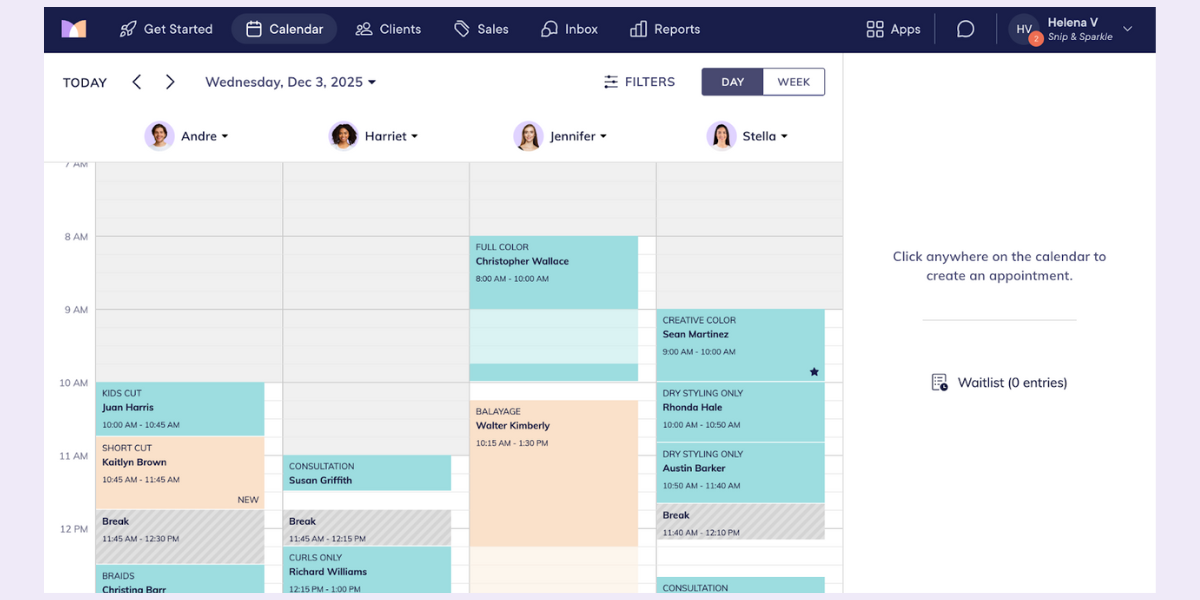
Mangomint is a powerful all-in-one platform built for salons that need advanced scheduling, POS, inventory, and staff tools. It’s a great match for busy, growing tanning salons.
Key features
- Comprehensive salon management: scheduling, POS, inventory tracking, memberships/packages, client profiles, resource scheduling (beds / rooms), and session history.
- Marketing tools: automated SMS/email, promotions, package upsells.
- Payroll and staff management: time tracking, commission calculations, role permissions, and scheduling for salons with multiple providers.
- Advanced analytics and reporting: revenue, utilization, client retention, performance metrics.
Pros
- All-in-one: takes care of all major aspects of salon operations including POS, scheduling, client management, inventory, marketing, and reporting.
- Advanced scheduling options: designed to prevent double-booking tanning beds and manage maintenance and cool-down periods.
- Growth oriented: ideal for salons expanding beyond a single bed or offering various services.
Cons
- Monthly subscription fees are on the higher side, justified by its comprehensive feature offerings. According to their pricing page, the “Standard” plan best for mid-size teams is $245/month.
- Could be too much for solo tanning studios or smaller salons that don’t require inventory capabilities, POS, or staff management.
- More in-depth onboarding. There may be a steep learning curve to getting the hang of all of the features.
Pricing overview
- $165/month for small teams
- $245/month for mid-size, fully equipped salons
- $375/month for large enterprises.
Best for:
Medium to large tanning salons with retail sales, multiple beds, staff, and in need of effective operations. Mangomint is a complete salon management solution.
Vagaro — Best all-in-one for small to medium-sized salons
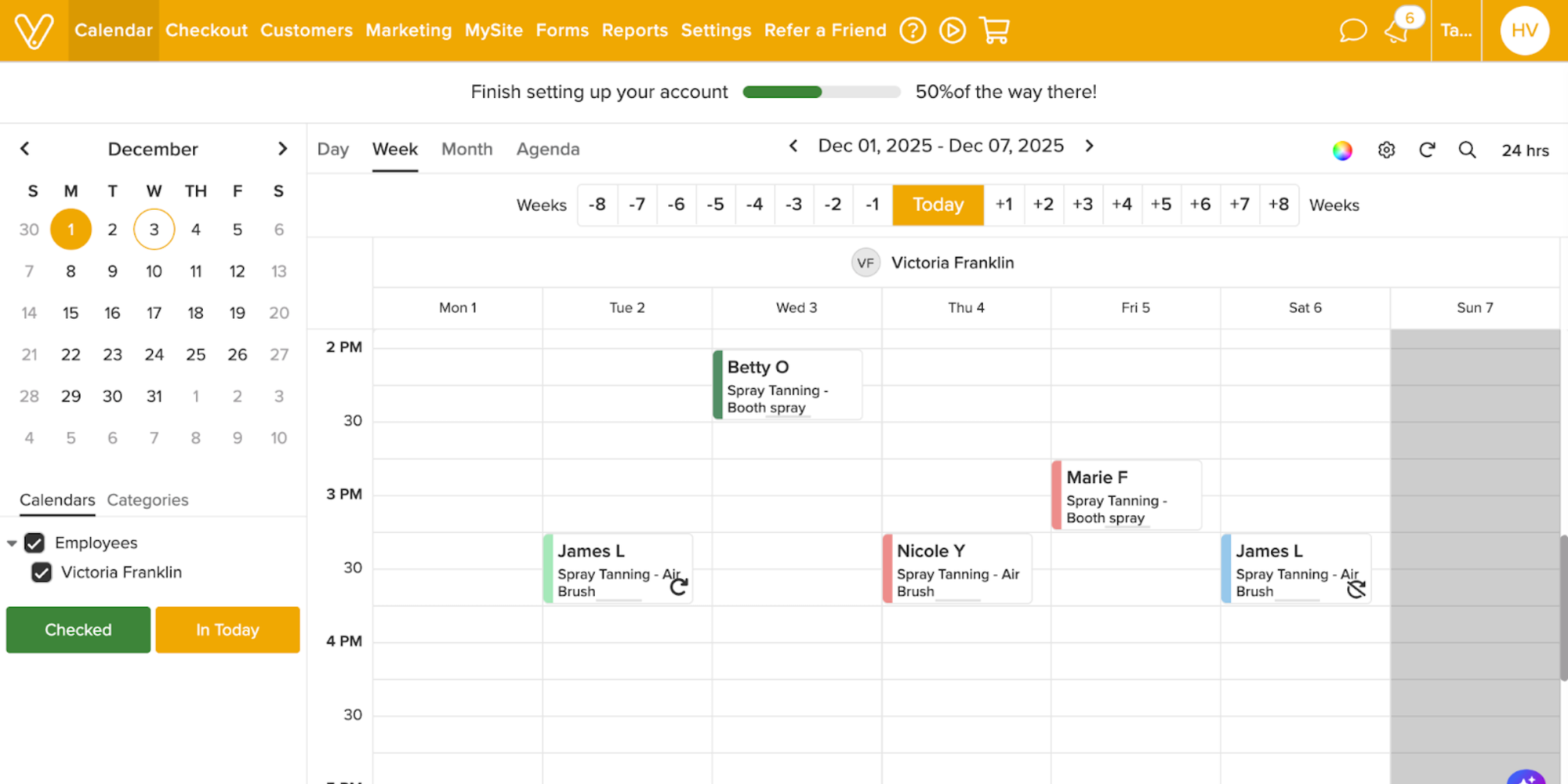
Vagaro is a flexible, easy-to-use option that fits well with small and medium salons. It offers a nice balance of scheduling, client management, and POS features without being overwhelming.
Key features
- Online scheduling and booking capabilities, with 24/7 client self-booking and customer service support
- POS with integrated payment processing, service checkouts, retail product sales
- Client management to keep client history, preferences, and profile records
- Marketing tools include targeted promotions, SMS/email campaigns, customizable booking page, and branding options
- Offers multi-location and staff management capabilities as needed
Pros
- Accessible entry-level pricing. Nice balance between cost and features.
- Intuitive interface, easy-to-use calendar, and booking platform. No steep learning curve.
- Scalable: you can easily add more team members and calendars as your salon expands.
- All the main features necessary for a tanning salon without unnecessary complexity.
Cons
- A lot of useful features are extra. This means total software fees can add up as you include more functionalities (extra calendars, POS hardware, advanced marketing, etc.).
- Software performance can be affected if too many add-ons are running at once.
Pricing overview
- The base plan starts at $23.99/month. Additional calendars, users, and service locations increase monthly cost.
Best for:
Small to medium tanning salons or studios looking for a balanced, all-in-one platform that isn’t overly complex. Perfect for tanning salons with just a few beds, light retail, and a smaller staff.
Tan-Link — Best for membership-heavy tanning salons
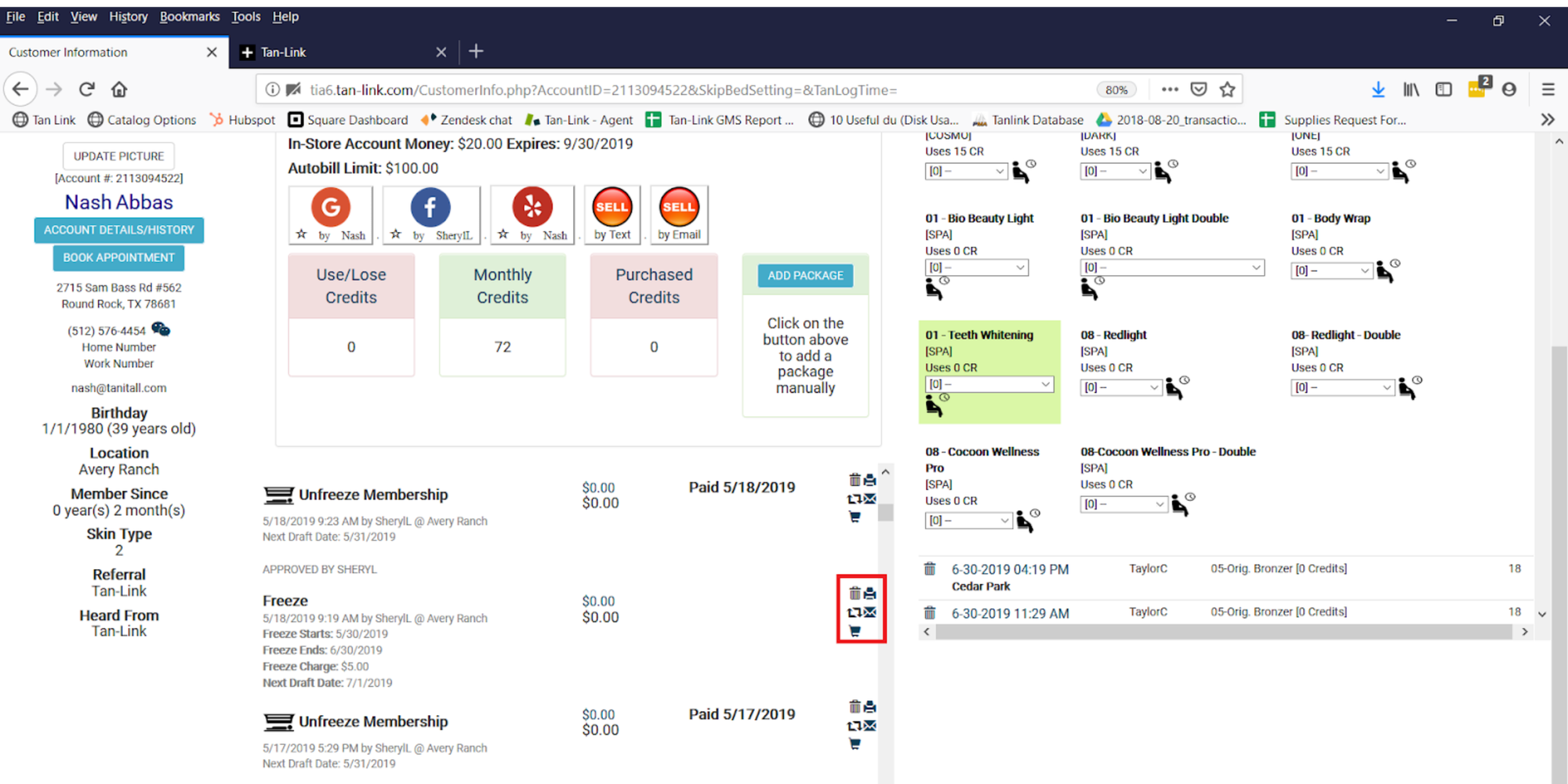
Tan-Link is designed specifically for tanning businesses, especially those that rely on memberships, recurring billing, or self-service kiosks. It’s a strong choice for membership-heavy salons.
Key features
- Tan-Link is known for excelling in membership and package management for salons
- Designed to support tanning-specific needs with its self-service kiosk, online booking features, POS, membership and package management, reporting, multi-location support, and EFT recurring billing
- Capabilities make it best for tanning salons that depend on packages, recurring memberships, and self-serve access
Pros
- Optimized tanning-specific workflows: recurring billing, memberships, self-service kiosk. Great for 24/7 tanning salonsIdeal for multi-location salons or those with a bigger, membership-based customer base
Cons
- Offers more specialized functionality, which can mean less general salon features (depending on the selected plan)
- Not as extensively reviewed as other, bigger name software options. Fewer customer testimonials out there
Pricing overview
- Entry-level “Essential Salon” plan starting at $129/month (per single listing).
Best for
Tanning salons focused on memberships or recurring tanning subscriptions, specifically those operating self-service kiosks or multi-site offerings.
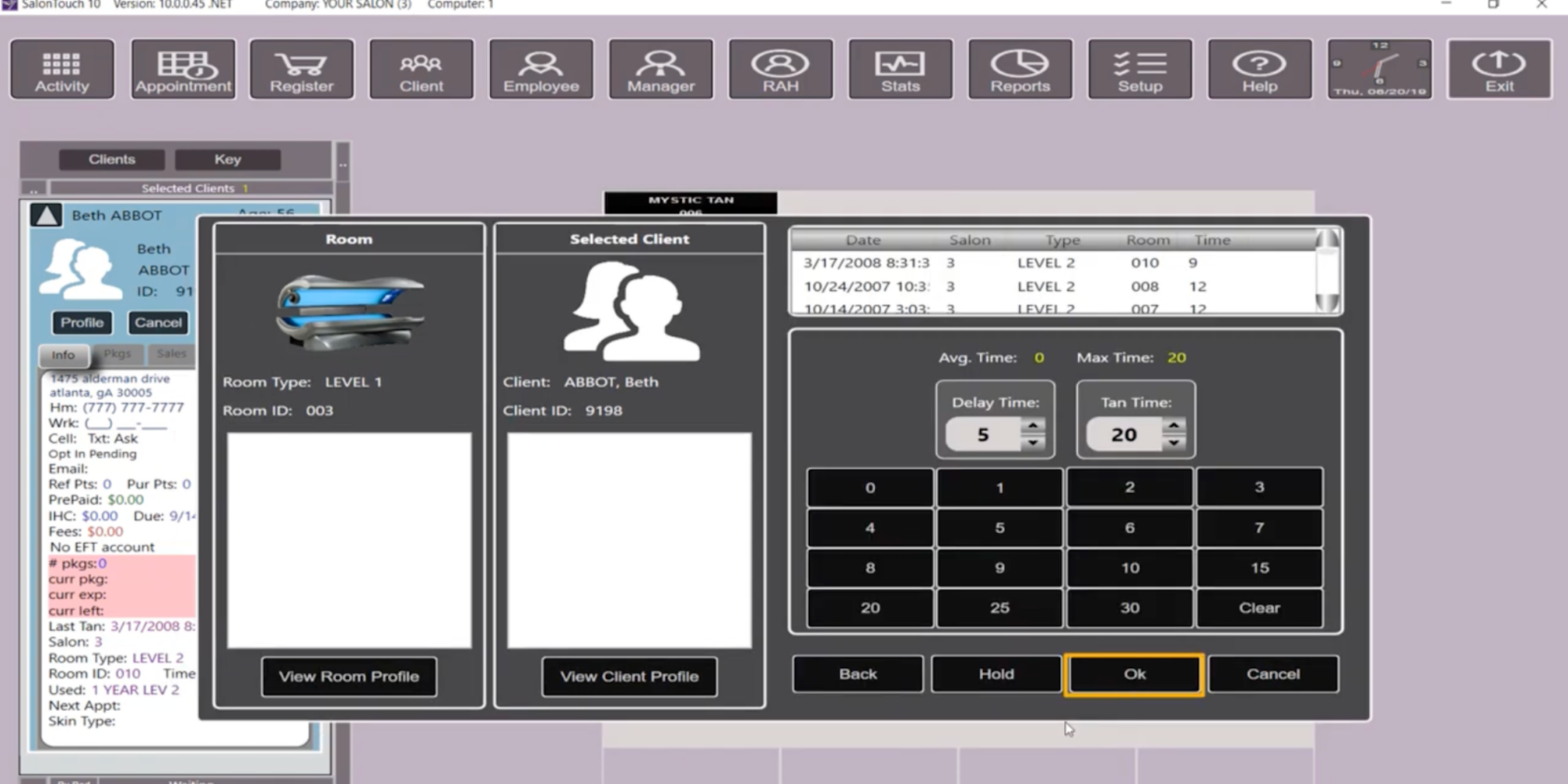
SalonTouch — Customizable solution for versatile operations
SalonTouch is a customizable, budget-friendly option that works well for salons offering tanning plus other services. It’s adaptable and easy to shape to your workflow.
Key features
- SalonTouch provides client management, appointment scheduling, POS functionality, inventory tracking, and offers single or multi-location service setups.
Pros
- Customizable and flexible software option that easily adapts to a diversity of salon workflows (beyond tanning salons).
- Accessible entry-level pricing compared to full-suite software.
Cons
- Less tanning-specific features as compared to Tan-Link.
- Setup can be more involved and you may need to customize it to fit your tanning salon needs.
Pricing overview
- Some subscription options start as low as $29.99/month.
Best for
Salon managers looking for the flexibility to use software for hybrid business (tanning and additional services), or who want an affordable and customizable option.
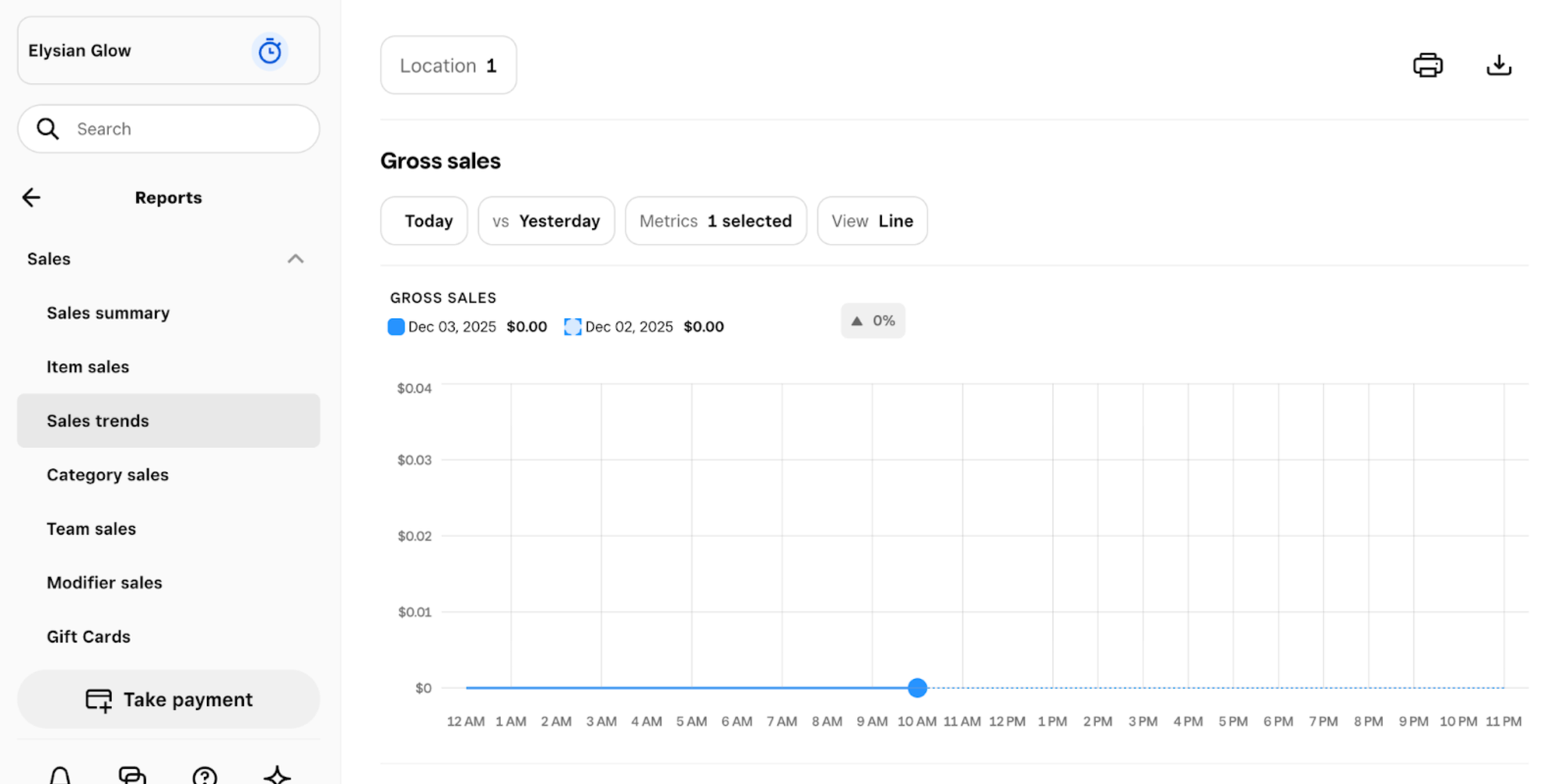
Square POS — Budget-friendly for small or solo salons
Square POS is a simple, affordable choice for solo or small salons that mainly need scheduling and payment processing. It’s quick to set up and easy to use.
Key features
- Square POS offers integrated payment processing, primary scheduling capabilities, inventory management, and basic POS.
- Perfect for small salons or a solo operator as it includes basic customer management, gift cards, and multi-channel retail.
Pros
- Highly affordable and with a free option, the barrier to entry is low.
- Intuitive user interface, quick setup, perfect for small or single-bed tanning salons.
- Offers integrated payment processing and basic POS without excess features.
Cons
- A lighter set of tanning-specific features. It does not allow advanced bookings for beds, and there is no specialized resource or membership management support.
- As your tanning salon grows, you’ll likely outgrow the standard feature set.
Pricing overview
- Square Free is their available free tier.
- Square Plus sits at $49/month.
- Square Premium goes for $149/month.
- Both of the paid tiers range higher if you choose add-ons. Final pricing also depends on register count and extra features.
Best for
Smaller and solo tanning salons looking for a simple booking/payment system and no-fuss POS. Perfect for a salon on a limited budget whose needs are not too complicated.
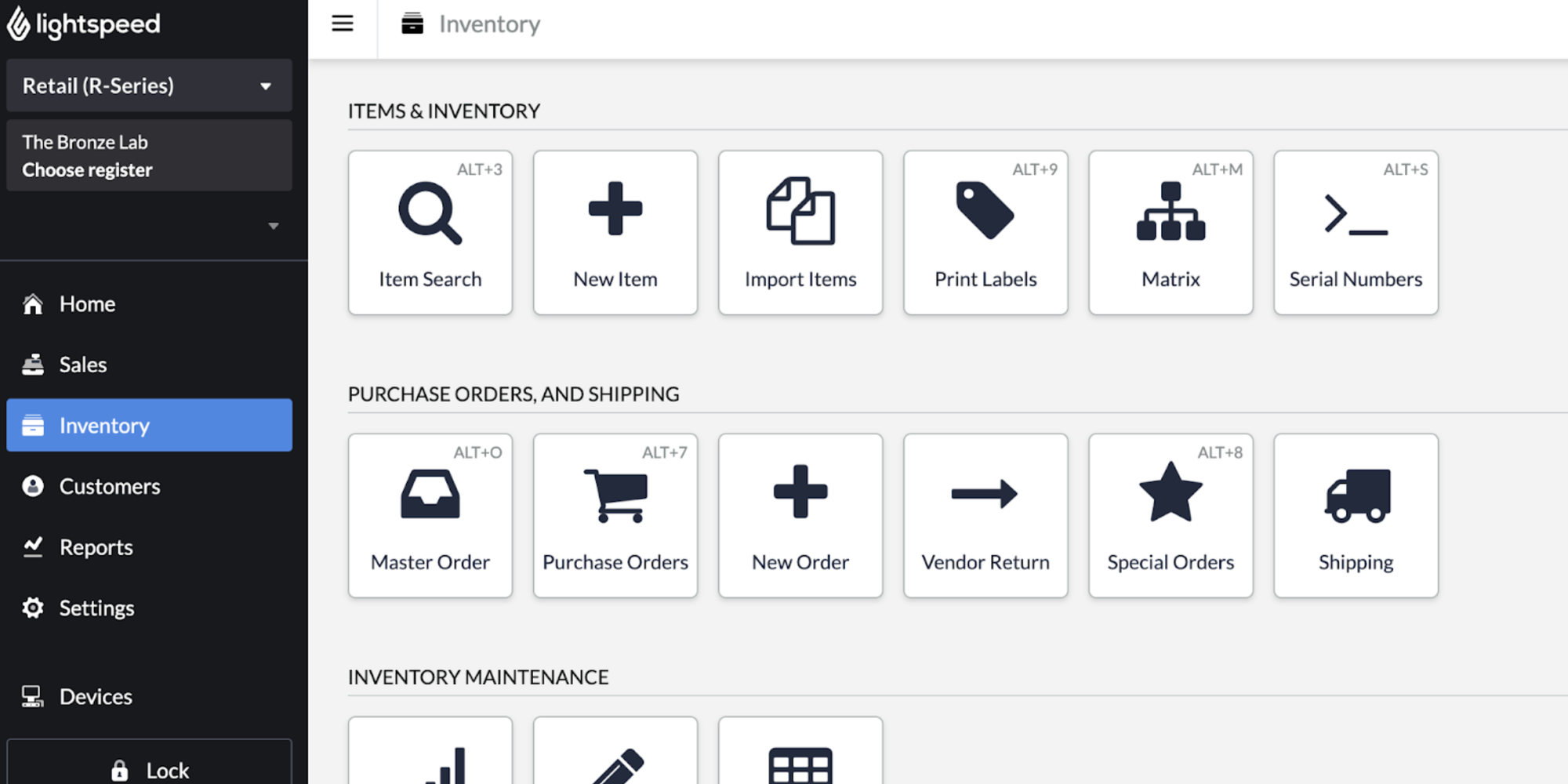
Lightspeed Retail — Best for inventory-heavy salons or retail and tanning combo
Lightspeed Retail is ideal for salons with strong retail sales, offering excellent inventory and product management alongside service-based features. Great for salons with multiple revenue streams.
Key features
- Lightspeed Retail is better suited for businesses that are more product-retail oriented (selling accessories, lotions, and such), in addition to services.
- A top pick for tanning salons focused on stock and retail management.
It features inventory management and tracking, POS, multi-channel sales, and integrates well with service-based scheduling when used with salon add-ons.
Pros
- Excellent inventory management. Perfect for salons with high retail sales.
- Strong fit for tanning salons focused on both tanning services and selling retail products (protective accessories, skincare, aftercare lotions, etc.).
- Ideal for salons with considerable retail operations or multiple revenue streams looking to scale up.
Cons
- Not as specialized for tanning bed bookings and client records compared to salon-specific software tools.
- May need add-on modules or integrations to manage appointments and handle clients easily.
Pricing overview
- Exact pricing depends, though it tends to be on the higher-end given its inventory- and retail-focused scope.
Best for
Tanning salons that also specialize as retail shops (tanning products, lotions, etc.) requiring comprehensive sales management and robust inventory capabilities — beyond membership and scheduling features.
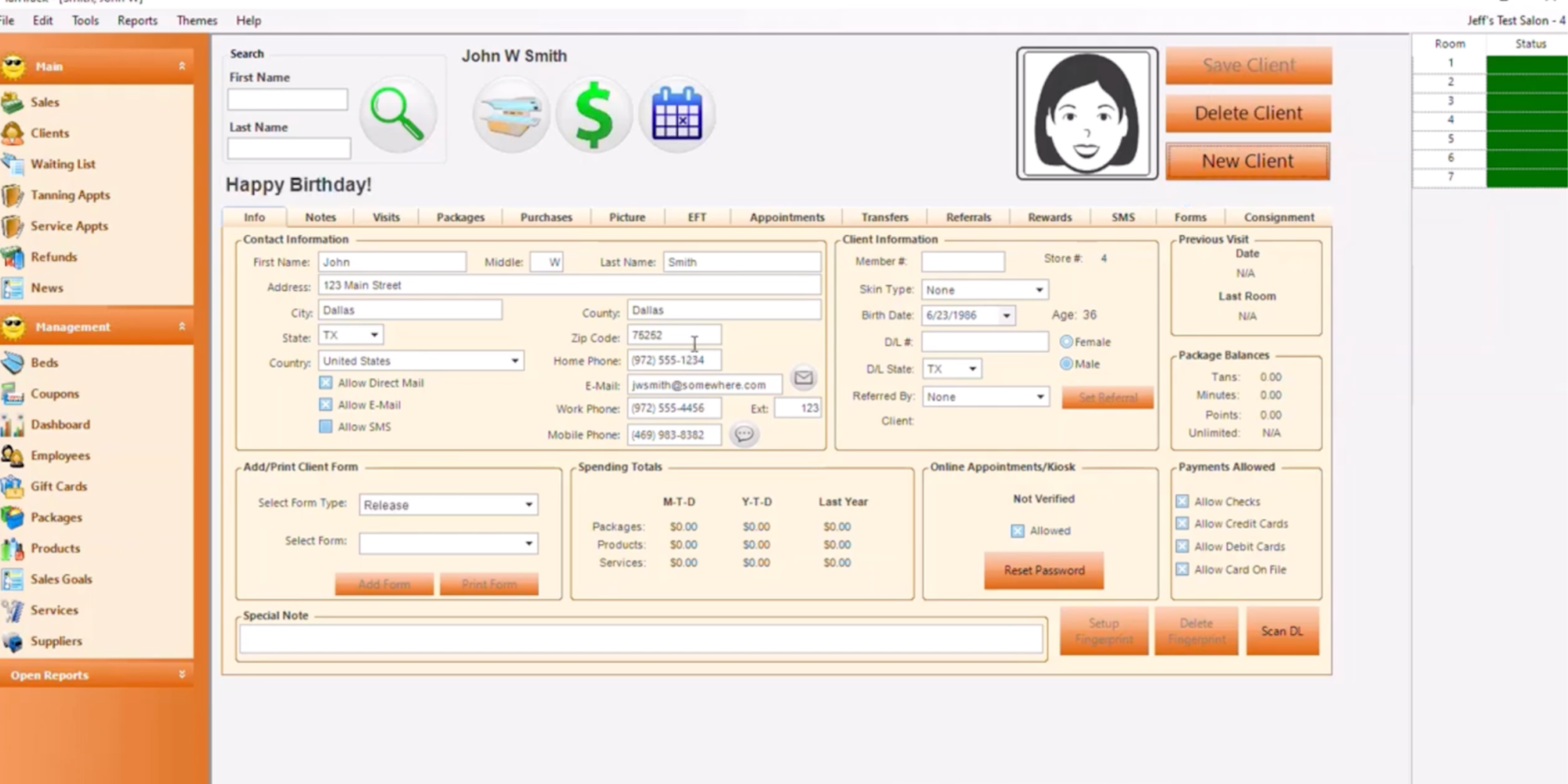
TanTrack — Simple tanning-centered specific option
TanTrack is built entirely around tanning salon needs, with features like bed scheduling, memberships, and equipment management ready to go. It’s one of the most tanning-specific options available.
Key features
- TanTrack boasts extensive tanning-specific software capabilities including membership management, online booking, automated session reminders, equipment management, and self-service kiosks.
- The software is specifically designed for tanning salons rather than for general salons or spas.
Pros
- The fact that it’s made exclusively for tanning salons means it’s ideal for membership management, bed-scheduling, and streamlined tanning workflows.
- Tailored to tanning salon operations, it offers a more intuitive tanning-focused experience than general salon software.
Cons
- Lacking broader salon feature functionality (e.g., less emphasis on marketing, retail, and multiple services).
- Reduced flexibility when it comes to expanding to other spa/beauty services (such as skincare, spray tanning, etc.).
Pricing overview
- The Starter Plan goes for $99.99/month per location.
- The Bundle Plan is priced at $129.99/month per location.
- The Pro & Multi-Location is custom priced.
Best for
Salons focused exclusively on tanning, specializing in UV and spray tanning services, particularly those with self-service kiosks and memberships.
Choosing the right tanning salon software for your business
Factors to consider
Finding the best tanning salon software isn’t just about choosing the tool with the most features — it’s about selecting one that fits your salon:
- Workflow – Does it simplify daily operations?
- Size – Is it suited for a solo bed, small studio, or multi-bed salon?
- Long-term goals – Will it scale as you expand services, add beds, or grow locations?
When comparing salon scheduling software, consider how well it:
- Supports 24/7 online scheduling and easy client self-booking
- Helps you increase bookings by making scheduling more accessible
- Allows you to apply proven growth tactics, such as these strategies to get more bookings online
Also evaluate whether the software covers your essential operational needs:
- Reliable scheduling that prevents double-bookings
- Client management including preferences, memberships, and session history
- Resource tracking for beds, booths, and equipment availability
Finally, ensure the system aligns with your unique service model, whether you’re:
- A small, appointment-only studio, or
- A larger salon offering memberships, retail sales, and multiple tanning stations.
Budget considerations
Software costs can vary significantly, and price doesn’t always equal value. Many all-in-one platforms charge higher monthly fees to cover features you may never use, while simpler scheduling tools may provide everything your salon actually needs at a fraction of the price.
Start by identifying the must-have capabilities for your salon today. Going with an affordable tool with transparent pricing helps you avoid hidden fees, unexpected upgrades, or add-ons that drive up your monthly bill. Whenever possible, experiment with free tanning salon software tiers first so you can see how a platform fits your workflow before upgrading.
Scalability for business growth
Your salon today may look very different from what you envision in two or three years. That’s why scalability matters. If you anticipate expanding — by adding more beds, retail products, services, locations, or staff — you’ll want software that can grow with you.
Some platforms, like Mangomint or Tan-Link, are designed with multi-location and membership-heavy operations in mind. Others, like Koalendar or Square, are perfect starting points for smaller salons that may upgrade later as their operations scale.
User-friendliness and learning curve
Ease of use can make or break your daily workflow. Complex systems often require lengthy onboarding or continual staff training, which can slow you down, especially in busy tanning salons where time is limited.
Look for intuitive interfaces, simple setup, and fast adoption. User-friendly software helps minimize errors, ensures consistent booking experiences, and reduces frustration for both staff and clients. Salon owners often cite ease of use as one of the biggest deciding factors when choosing new software.

How to choose the right software for your salon: A decision guide
Match software to salon size and business needs
| Typical situation | Best choice (Primary recommendation) | Other good options | Why this choice works best | |
| Solo / single bed salon | One bed, owner-operated | Koalendar | Square POS | Fast setup, lowest overhead, perfect for simple scheduling without extra systems |
| Small salon | 1–2 beds, maybe some retail, minimal staff | Vagaro | Koalendar, Vagaro, TanTrack, SalonTouch | Balanced features and affordability. Ideal for early-stage salons that need more than scheduling but not full-suite complexity |
| Small-medium salon | A few staff plus retail products | Lightspeed Retail | Vagaro | Best for salons that sell retail products and need stronger POS + inventory tools |
| Medium salon | Multiple beds, memberships, retail, packages | Mangomint | Tan-Link, Vagaro | Robust scheduling, memberships, reporting, and staff tools designed for busier operations |
| Large or multi-location salon chains | Multiple locations, heavy retail, memberships, many staff | Tan-Link | Mangomint, Lightspeed Retail | Ideal for membership-heavy, multi-location operations needing heavy-duty POS, inventory, and staff management |
Budget, growth plans, and what you need now vs later
If you’re just getting started in the business, invest in what you need most: booking and scheduling. As you expand — adding beds, growing retail and members — you can consider switching to a more comprehensive software system.
Quick checklist before you make your pick
Before you commit to any one tanning salon software, here’s a checklist to help you feel confident you’re choosing the right one:
- Does it cover your real must-haves? Think scheduling, reminders, client history, memberships, POS..
- Is the pricing clear and fair? No one loves surprise add-on fees. Make sure the total monthly cost still feels right for your business.
- Will it grow with you? If you plan to add beds, retail, or staff down the road, the software should be able to keep up.
- Is it easy to learn and use? The simpler the interface, the smoother your days will run, especially during busy hours.
- Does it play nicely with tools you already use? Calendar syncs, payment options, and marketing tools can make your life a whole lot easier.
- Is support actually helpful? When you need assistance, quick and friendly customer service can make a huge difference.
- Can you test-drive it first? Free plans or trials let you see if it truly fits your workflow before you commit.
Benefits of implementing good software: What you gain
Save time, reduce no-shows, increase bookings
The right tanning salon booking software lets clients reserve beds anytime without calling, freeing you up during peak hours. With online, 24/7 scheduling features and automated reminders and session confirmations, you’ll spend less time coordinating appointments and reduce no-shows.
Modern salon scheduling software automates confirmations and updates in the background so your team can stay focused on clients instead of the phone. This helps prevent booking cuts that create gaps in your daily schedule. You’ll see more tanning sessions booked and completed, especially when using proven strategies to reduce no-shows.
Better client experience and retention
Managing client accounts, tracking session preference and history, and maintaining memberships or packages well all translates to personalized, quality service that keeps customers coming back.
Easier bookkeeping, payments, and resource management
Integrated POS, inventory management, and payment processing help make the check-out and record-keeping process a breeze. With resource scheduling, the right tanning salon appointment software prevents the common issue of double-booked beds or overlapping sessions.
Common challenges and what to watch out for
Overpaying for unused features
Full-suite software is often pricey, charging premium monthly fees. This is the case even if you use only a limited subset of features. If your tanning salon doesn’t really need inventory, POS, or marketing tools, you could be investing your money better elsewhere.
Complexity and staff training difficulties
Navigating complex software options with a variety of features and modules can be confusing. For small and mid-size tanning salons, especially, this can result in the mis- or underuse of features.
Add-on costs and hidden fees
Some tanning salon software platforms charge separately for additional registers, calendar, marketing features, or multiple staff access. This can drive up costs quickly as you expand.
Why Koalendar could be the best fit for solo or small tanning salons
After taking a look at these tanning salon software options, it’s clear some are best for large salons or retail-heavy operations. However, for solo to small-sized salons, it’s worth considering a simple, scheduling-first solution like Koalendar.
Core scheduling features that matter most
Koalendar offers all of the best core features:
- Real-time calendar sync (Outlook, Google, iCloud)
- 24/7 online booking
- Unlimited booking pages and appointments
- Email confirmations and automated reminders (depending on the plan)
- Custom branded booking pages
This functionality is oftentimes more than enough for small and solo tanning salons. In a busy salon, every minute matters. There’s no time for lengthy software tutorials. That’s why a dedicated tool like Koalendar is made to be straightforward and easy to use.
Low overhead and easy onboarding — no feature overload
Compared to full-suite salon software, Koalendar won’t overwhelm you with features you don’t even use. There’s no bulky POS system (though you can still use it to get payments and deposits), no complex inventory module, no need to coordinate large teams or operate several locations, and no steep monthly fees.
This makes Koalendar ideal for:
- Solo tanning operators working a small studio or single bed
- Tanning salons with light or minimal retail that don’t need POS
- Managers who value a fast start and an intuitive software system
Ideal use-cases: solo bed, small studio, light staff
If your tanning salon is:
- A small booth or single tanning bed
- Run by you (the owner), or you and one other team member
- Working with a modest number of clients
- Geared toward flexibility, ease, and minimal admin
Then Koalendar may be the right fit for you.
Future trends in tanning salon software
Integration with AI and machine learning
AI is already beginning to simplify everyday salon tasks. Soon, software may help predict your busiest hours, spot booking trends, and even suggest personalized offers for clients. The goal? To take the guesswork out of management and give salon owners clearer, smarter insights without extra effort.
Enhanced mobile apBest tanning salon software: Top 8 tools for busy salons (2026) plications
More clients expect to book and manage everything straight from their phones — and salon owners want the same convenience. That’s why mobile-first features are becoming essential. Future apps will likely offer faster check-ins, easier membership management, and real-time bed availability right in your pocket.
Personalization and customer experience innovations
Software is also getting better at helping salons deliver that personal, thoughtful touch clients love. Think tailored reminders, after-session check-ins, or product suggestions based on past visits. These small but meaningful upgrades can boost loyalty and make every client feel cared for.
Final thoughts on starting simple and scaling wisely
Choosing the best tanning salon software doesn’t have to feel overwhelming — and honestly, it shouldn’t. The smartest move is to start simple. Focus on the essentials first: dependable client scheduling, easy online booking, and a tool that doesn’t slow you down with features you’ll never touch.
As your salon grows, your software can grow with you. You’re never “locked in” — you’re simply giving your business room to breathe while keeping things stress-free in the early stages.
That’s why a lightweight, hassle-free tool like Koalendar can be such a breath of fresh air. It gets you up and running quickly, helps prevent double-bookings, and keeps your days running smoothly without technical headaches. Plus, it saves time, money, and mental bandwidth — all while delivering a clean, professional experience your clients will love.
Start with what works now. Upgrade when you’re ready. And trust that choosing thoughtfully today sets your salon up for smoother, easier growth tomorrow.
If you keep things simple, stay flexible, and choose tools that truly support the way you work, you’ll always stay ahead of the curve.