TL;DR
Cal.com has a generous free plan for individuals, with paid plans starting at $12 per user/month on annual billing for Teams and $28 per user/month on annual billing for Organizations. Enterprise pricing is custom. Cal.com is powerful, flexible, and a strong fit for technical teams that want deep customization. But if you mostly need simple scheduling, calendar sync, reminders, and an easy booking page, Koalendar gives most professionals what they need without the extra complexity or learning curve.
Trying to understand Cal.com pricing can feel simple at first: Free, Teams, Organizations, Enterprise. But once you start comparing team size, feature access, self-hosting, branding, reminders, routing, and long-term cost, the decision gets a little trickier.
This guide breaks down Cal.com pricing plans, what you get with each tier, which Cal.com features matter most, and whether Cal.com is worth it for freelancers, consultants, small businesses, and growing teams.

Cal.com pricing at a glance
Here’s the quick version.
| Plan | Price | Best for | Key features | Is it worth it? |
| Free | $0 | Individuals | - 1 user - unlimited event types and calendars - email/SMS notifications - 100+ apps - mobile app - browser extension - payments | Yes, especially for solo users who want flexible scheduling. The tool's complexity may increase with higher plans. |
| Teams | $12/user/month, billed yearly | Small teams and startups | - team scheduling - round-robin - managed and collective event types - recurring events - custom notifications - remove branding - routing forms - analytics - APIs | Worth it if you need shared team scheduling |
| Organizations | $28/user/month, billed yearly | Larger teams | - unlimited sub-teams - custom routing variables - company subdomain - SAML SSO, SCIM - compliance checks - instant meetings - role-based permissions - more APIs | Worth it for teams with admin, security, or compliance needs |
| Enterprise | Custom | Large organizations | - enterprise support - infrastructure - SLAs - advanced security and governance | Worth it when scheduling becomes business-critical infrastructure |
Cal.com pricing plans explained
Cal.com has four main pricing tiers: Free, Teams, Organizations, and Enterprise. Each one is built for a different level of scheduling complexity.
Free
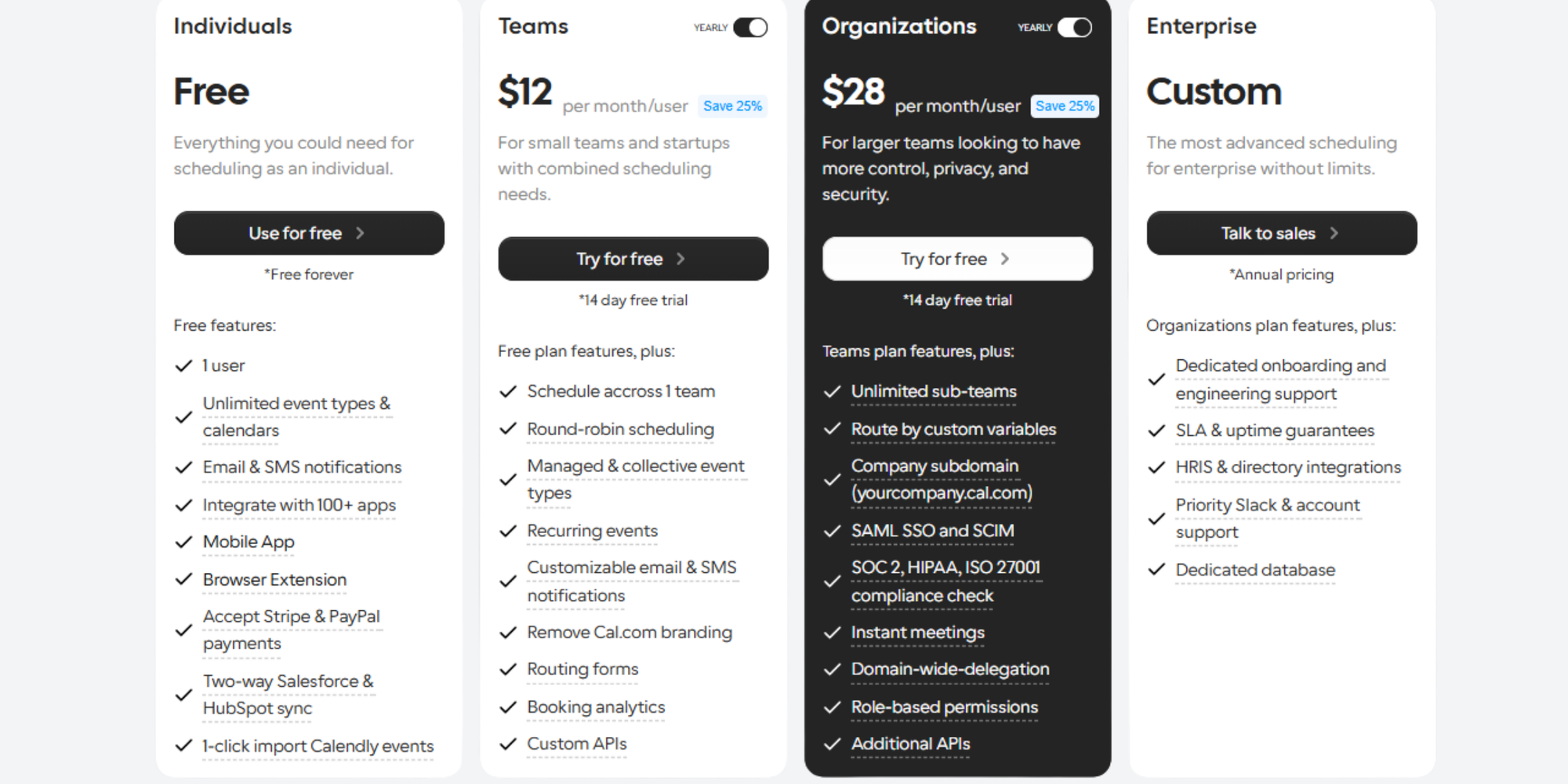
Cal.com’s Free plan is designed for individuals. According to Cal.com’s current pricing page, it includes one user, unlimited event types and calendars, email and SMS notifications, 100+ app integrations, mobile app access, browser extension access, Stripe and PayPal payments, two-way Salesforce and HubSpot sync, and one-click Calendly import.
That makes the free tier genuinely useful for solo professionals. If you are a freelancer, coach, consultant, recruiter, or founder who mainly needs people to book time with you, the Free plan may cover the basics.
The main question is not “Can I schedule meetings for free?” You can. The better question is: how much control, branding, team coordination, automation, and ease of adoption do you need as you grow?
Teams
The Teams plan is $12 per user/month when billed yearly. It is designed for small teams and start-ups with shared scheduling needs.
This plan adds collaborative features, including:
- Scheduling across one team
- Round-robin scheduling
- Managed event types
- Collective event types
- Recurring events
- Customizable email and SMS notifications
- Removal of Cal.com branding
- Routing forms
- Booking analytics
- Custom APIs
This is where Cal.com starts to make sense for sales teams, support teams, recruiting teams, and start-ups that need scheduling to happen across multiple people.
The catch? It is per-user pricing. A two-person team is still affordable. A 20-person team should think carefully about the ongoing monthly cost.
Organizations
The Organizations plan is $28 per user/month when billed yearly ($37/month when billed monthly). It is built for larger teams that need more control, privacy, and security.
You get everything in Teams, plus:
- Unlimited sub-teams
- Routing by custom variables like location, role, language…
- Company subdomain
- SAML SSO and SCIM
- SOC 2, HIPAA, and ISO 27001 compliance checks
- Instant meetings
- Domain-wide delegation
- Role-based permissions
- Additional APIs
This plan is best for companies where scheduling is no longer just “send someone a link.” It becomes part of sales operations, customer success, recruiting, onboarding, or healthcare workflows.
For smaller teams, though, it may be more than you need.
Enterprise
Enterprise pricing is custom. Cal.com positions Enterprise for organizations that need advanced scheduling infrastructure, support, service-level agreements, security, and governance. Its enterprise page mentions features such as 99.9% SLA, Slack Connect support, compliance support, centralized controls, and advanced rollout support.
This tier is most relevant if scheduling is mission-critical across a large company.
For most freelancers, consultants, educators, service providers, and small businesses, Enterprise will likely be unnecessary.
What features do you get with each Cal.com plan?
The most important Cal.com features depend on how you use scheduling.
A solo consultant may only care about event types, reminders, calendar sync, and payment collection. A sales team may care more about round-robin routing, analytics, and managed event types. A healthcare organization may need compliance and access controls.
Here’s a simpler way to compare the Cal.com pricing plans.
What features do you get with each Cal.com plan?
| Feature | Free | Teams | Organizations | Enterprise |
| Individual scheduling | ✅ | ✅ | ✅ | ✅ |
| Unlimited event types | ✅ | ✅ | ✅ | ✅ |
| Calendar connections | ✅ | ✅ | ✅ | ✅ |
| Email/SMS notifications | ✅ | ✅ customizable | ✅ customizable | Custom |
| Team scheduling | ❌ | ✅ | ✅ | ✅ |
| Round-robin scheduling | ❌ | ✅ | ✅ | ✅ |
| Managed event types | ❌ | ✅ | ✅ | ✅ |
| Remove Cal.com branding | ❌ | ✅ | ✅ | ✅ |
| Routing forms | ❌ | ✅ | ✅ | ✅ |
| Booking analytics | ❌ | ✅ | ✅ | Advanced |
| SAML SSO and SCIM | ❌ | ❌ | ✅ | ✅ |
| Role-based permissions | ❌ | ❌ | ✅ | ✅ |
| Enterprise support | ❌ | ❌ | Limited | ✅ |
Cal.com gives you a lot of control. That is one of its biggest strengths. It is especially attractive for teams that want flexible workflows, APIs, routing, and technical customization.
But more control can also mean more setup.
If your main goal is to let people book you online, avoid double-bookings, send reminders, and keep your calendar tidy, a simpler scheduling tool may be a better fit.
The biggest drawbacks of Cal.com pricing
Cal.com is powerful. That does not automatically make it the easiest choice.
Here are the main trade-offs to think about.
Per-user pricing gets expensive as teams grow
Cal.com’s Teams plan starts at $12 per user/month on annual billing, while Organizations is $28 per user/month on annual billing.
That can be manageable for a small team. But costs rise quickly as you add users.
For example:
| Team size | Teams plan at $12/user/month | Organizations plan at $28/user/month |
| 3 users | $36/month | $84/month |
| 10 users | $120/month | $280/month |
| 25 users | $300/month | $700/month |
That does not mean Cal.com is overpriced. It means you should match the plan to the real value your team gets from those advanced features.
Advanced features sit behind paid tiers
If you want team scheduling, round-robin scheduling, routing forms, analytics, custom notifications, or removed branding, you will likely need Teams or above.
That is normal for scheduling software. Still, it matters if you are trying to keep costs low while getting more than basic individual scheduling.
It can be more technical than some teams need
Cal.com is powerful because it gives teams a lot of control. You can customize workflows, use routing, connect APIs, manage advanced team scheduling, and build more tailored booking experiences.
But that flexibility can also make it feel more technical than some teams need.
This is especially true now that Cal.com is no longer open source in the way many users may remember. In 2026, Cal.com moved its main product closed source and relaunched its free open-source code as Cal.diy, a separate community edition for self-hosting. That keeps a self-hosting path available, but it is more relevant for technical hobbyists or developers than teams looking for a simple managed scheduling tool.
For everyday teams, that distinction matters. Most professionals do not want to manage hosting, updates, security, or technical setup just to let people book a meeting. They want a tool that works quickly, feels intuitive, and does not require training.
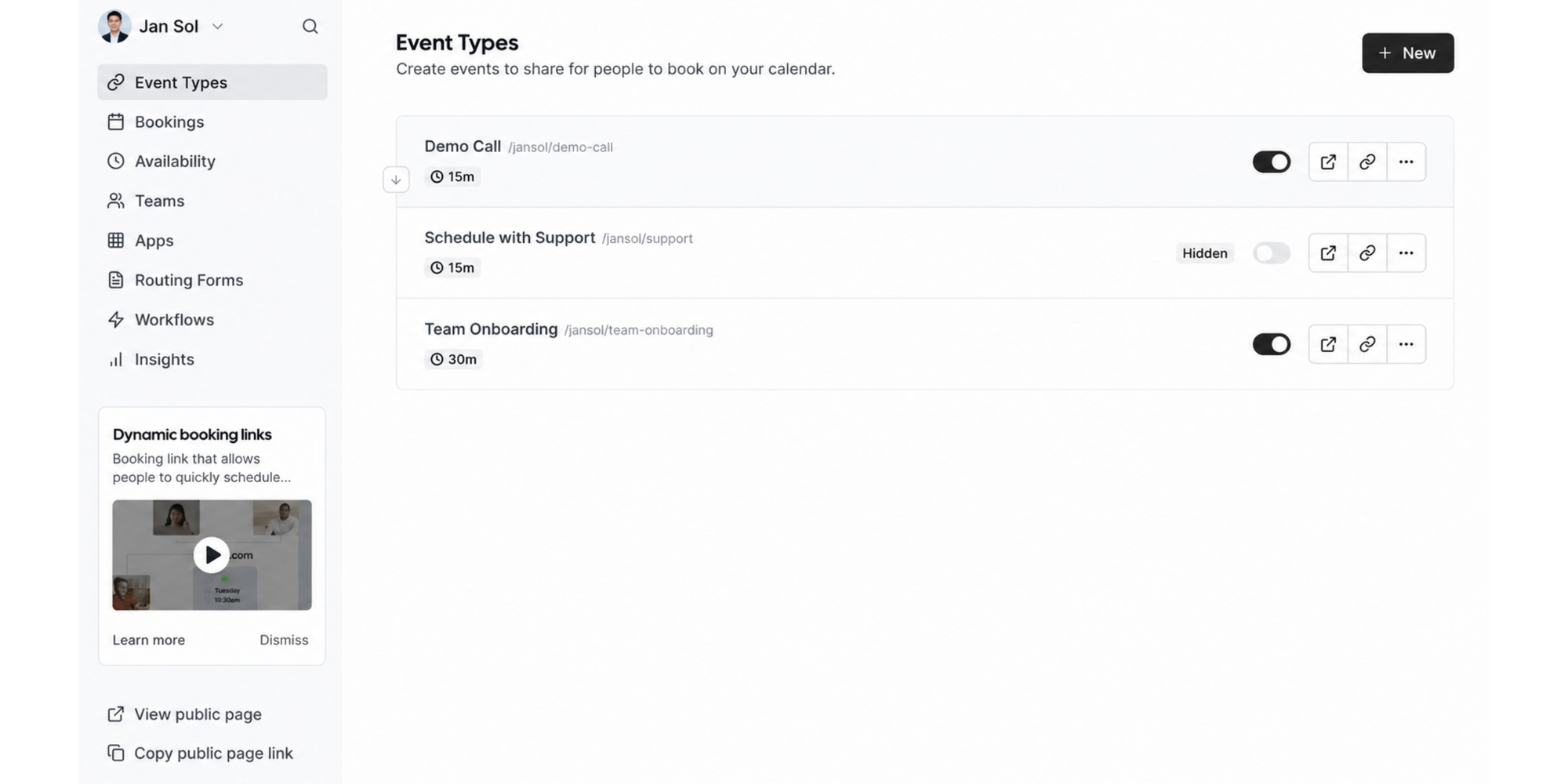
That is where a simpler scheduling tool can be a better fit. If your team only needs booking pages, calendar sync, reminders, and easy availability management, Cal.com may offer more control than you actually need.
More customization can mean more decisions
Custom APIs, routing rules, sub-teams, compliance settings, managed event types, and advanced permissions are useful when you need them.
But if you do not, they can slow you down.
Sometimes the best scheduling tool is not the one with the longest feature list. It is the one your team actually uses.
Is Cal.com worth it?
Cal.com can be worth it. The right answer depends on who you are and what kind of scheduling you need.
For freelancers
Cal.com’s Free plan may be enough if you need a personal booking link, event types, calendar connections, and basic notifications.
But if you want a simpler setup, a more beginner-friendly experience, and scheduling that feels less technical, Koalendar may be easier to live with day to day.
For consultants
Consultants often need a clean booking page, calendar sync, reminders, and maybe payment collection.
Cal.com is a good fit if you want more customization and technical flexibility. Koalendar is a good fit if you want to set up quickly, share your link, and let clients book without the back-and-forth, just like this tech-enabled firm explains:
For small businesses
Small businesses usually care about three things:
- Can clients book easily?
- Will it prevent double-bookings?
- Will it reduce no-shows?
If you need advanced routing, analytics, and team workflows, Cal.com’s paid plans are worth reviewing. If you mainly want easy online booking, Koalendar keeps things lighter.
Koalendar’s Free Forever plan includes unlimited bookings, scheduling links, and calendar sync with no trial limits or hidden upgrades.
For growing teams
Growing teams should look closely at cost and setup time.
Cal.com is stronger if you need advanced team scheduling, managed event types, routing forms, compliance, and APIs. Koalendar is stronger if your team wants a simpler tool that people can understand quickly.
And that matters. A scheduling tool only saves time if your team actually uses it. That’s where Koalendar stands out: it has no real learning curve, so people can create a booking page, sync their calendar, and start sharing their link without training, technical setup, or extra hand-holding.
A simpler alternative to Cal.com
Cal.com gives you more ways to customize scheduling.
Koalendar gives most professionals and teams what they need without the extra complexity.
That difference matters more than it might seem. A scheduling tool only works if your team actually uses it. If the setup feels too technical, the settings are hard to understand, or people need training before they can share a booking link, adoption slows down fast.
Koalendar is built for the opposite experience. There’s no real learning curve. Your team can create a booking page, sync their calendar, set availability, and start taking bookings without needing a long onboarding process.
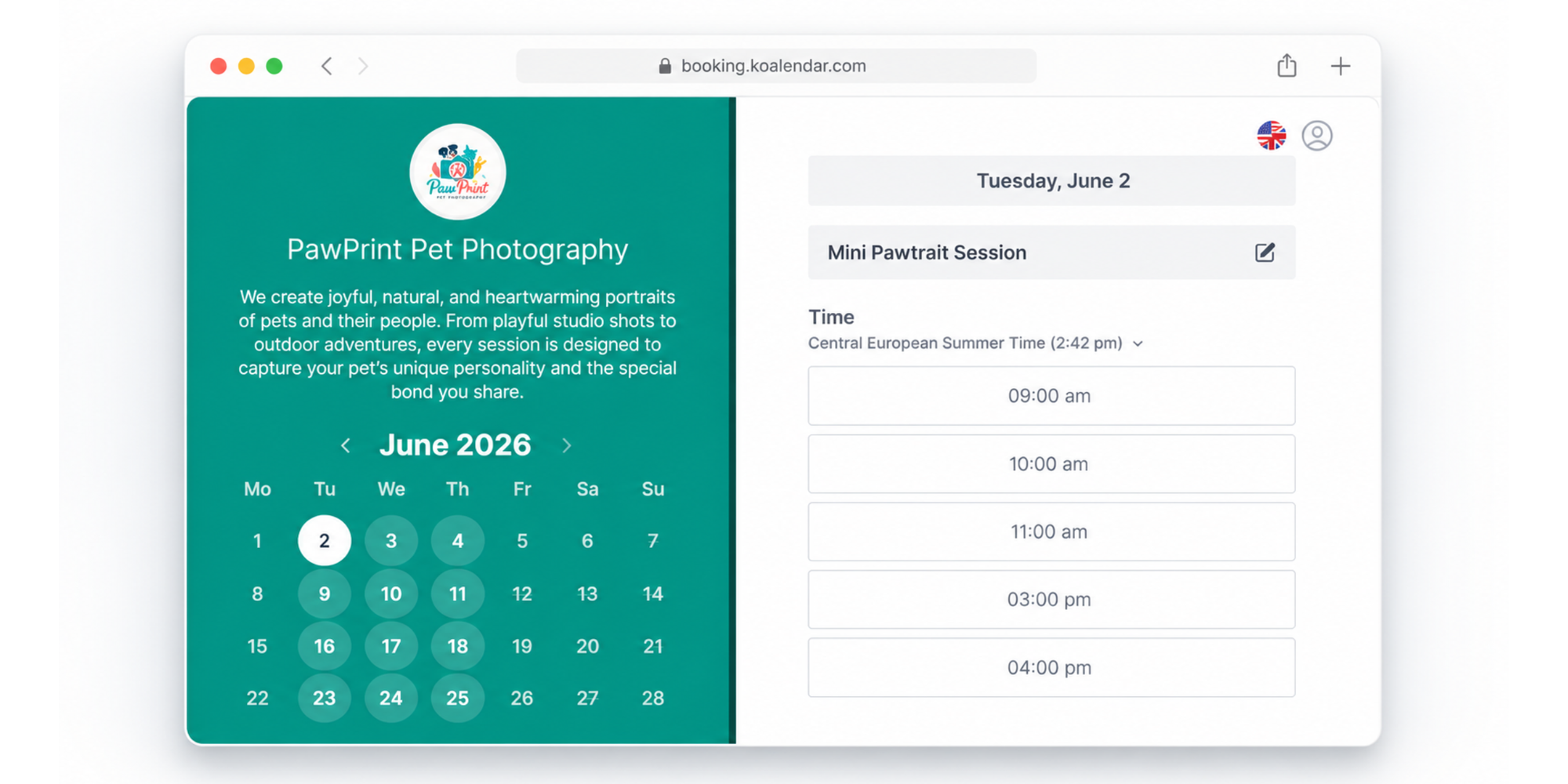
That makes Koalendar a strong choice if you want:
- A simple scheduling tool your team will actually use
- No learning curve for new users
- Fast setup without technical help
- 24/7 online booking so clients can book when it suits them
- Calendar sync with Google, Outlook, and iCloud calendars
- Automated reminders to help reduce no-shows
- Custom booking pages that feel polished and professional
- Branding and customization without a complicated setup
- Unlimited bookings and scheduling links on the free plan
- Integration with HubSpot or other CRMs through Zapier to keep your booking and client data connected
Cal.com is powerful when you need advanced routing, APIs, and deep customization. Koalendar is easier when you want everyone on your team to start scheduling confidently from day one.
Want to compare Koalendar plans? Explore the Koalendar Free Forever vs Pro plan guide.
Cal.com Pricing vs Koalendar
Here’s how the two compare for everyday scheduling needs.
The biggest difference is not just pricing. It is usability. Cal.com is built for teams that want more control and customization. Koalendar is built for teams that want a simple scheduling tool with no learning curve — the kind people can understand quickly and actually use.
| Feature |  |  |
| Free plan | ✅ | ✅ |
| Unlimited 1:1 bookings | ✅ | ✅ |
| Group bookings | Available depending on plan/use case | Available with Pro |
| Automatic reminders | Included; customization expands on paid plans | Available with Pro |
| Google Calendar sync | ✅ | ✅ |
| Outlook calendar sync | ✅ | ✅ |
| Custom booking pages | ✅ | ✅ |
| Branding customization | Paid plans remove Cal.com branding | Pro adds advanced customization |
| Team scheduling | Paid plans | Pro features |
| Ease of setup | More customizable, more technical | Beginner-friendly |
| Best fit | Technical teams, advanced routing, APIs | Professionals and teams that want simple scheduling |
| Pricing growth | Per user | More affordable for many simple scheduling needs |
Cal.com is the better fit if, aside from deep customization, you want developer-friendly workflows, routing, APIs, and advanced team infrastructure.
Koalendar is the better fit when you want scheduling to be simple, both for your team and your customers.
No complicated setup. No endless decisions. Just a clean booking page, synced calendars, helpful reminders, and fewer emails.
Which Cal.com plan should you choose?
Here’s a quick decision guide.
| Choose this plan | If you… |
| Free | Need individual scheduling with strong free features |
| Teams | Need team scheduling, round-robin, routing forms, analytics, and shared scheduling workflows |
| Organizations | Need admin controls, SSO, SCIM, compliance checks, sub-teams, and role-based permissions |
| Enterprise | Need custom infrastructure, SLAs, dedicated support, and enterprise rollout help |
| Koalendar | Want a simpler way to schedule meetings and appointments without extra complexity |
If you are comparing tools because you want fewer admin headaches, start by asking: What do we actually need?
If the answer is “advanced scheduling infrastructure,” Cal.com is worth a close look.
If the answer is “an easier way for people to book time with us,” Koalendar may be the simpler choice.
Conclusion
Cal.com is a powerful scheduling platform with strong free features and paid plans for teams that need routing, analytics, APIs, security, and admin control. For technical teams and larger organizations, Cal.com pricing can make sense because the platform is built for customization and scale.
But not every team needs that much complexity.
If you want a simple scheduling tool your team will actually use, Koalendar is the better fit. There’s no real learning curve, no complicated setup, and no need to train everyone before they can start taking bookings. Just create a booking page, sync your calendar, share your link, and let Koalendar handle the back-and-forth.
Want simpler scheduling without the back-and-forth? Try Koalendar free — no card needed.