TL;DR
Zoho Books pricing starts with a free plan for solopreneurs and micro businesses, then scales through Standard, Professional, Premium, Elite, and Ultimate plans. The best plan depends on your users, invoice volume, inventory needs, reporting depth, and whether you need features like multi-currency, projects, warehouse management, or advanced analytics. Zoho Books also offers a 14-day free trial before you choose a paid plan.
For many small business owners, the tricky part is not the headline price. It’s the real monthly cost once you add users, payment processing, receipt scans, support, and add-ons. Let’s break it down clearly so you can choose the right plan without surprise costs later.
What Zoho Books costs: monthly vs. annual pricing
Zoho Books plans are priced per organization, per month. The pricing page shows monthly and annual billing options, with annual billing lowering the effective monthly cost on paid plans. Prices are exclusive of local taxes.
Zoho Books prices as of the 28th of May 2026
| Zoho Books plan | Monthly price | Annual price equivalent | Included users | Best for |
| Free | $0 | $0 | 1 user + 1 accountant | Solopreneurs and micro businesses |
| Standard | $20/mo | $15/mo billed annually | 3 users | Small businesses needing bank feeds and stronger invoicing |
| Professional | $50/mo | $40/mo billed annually | 5 users | Service businesses, project work, multi-currency, and basic inventory |
| Premium | $70/mo | $60/mo billed annually | 10 users | Growing teams needing budgeting, vendor portal, and more automation |
| Elite | $150/mo | $120/mo billed annually | 10 users | Ecommerce and inventory-heavy businesses |
| Ultimate | $275/mo | $240/mo billed annually | 15 users | Teams needing advanced analytics and business intelligence |
The Ultimate plan shows as $240/month when billed annually because Zoho displays the annual-plan equivalent monthly cost alongside the standard monthly price. In other words, you pay annually but compare it as a monthly rate.
What capability each Zoho Books plan unlocks
The Zoho Books features you need usually fall into a few buckets: invoicing, client portal access, expenses, projects, inventory management, reporting, multi-currency, and automation. Here’s the clean version.
Free plan
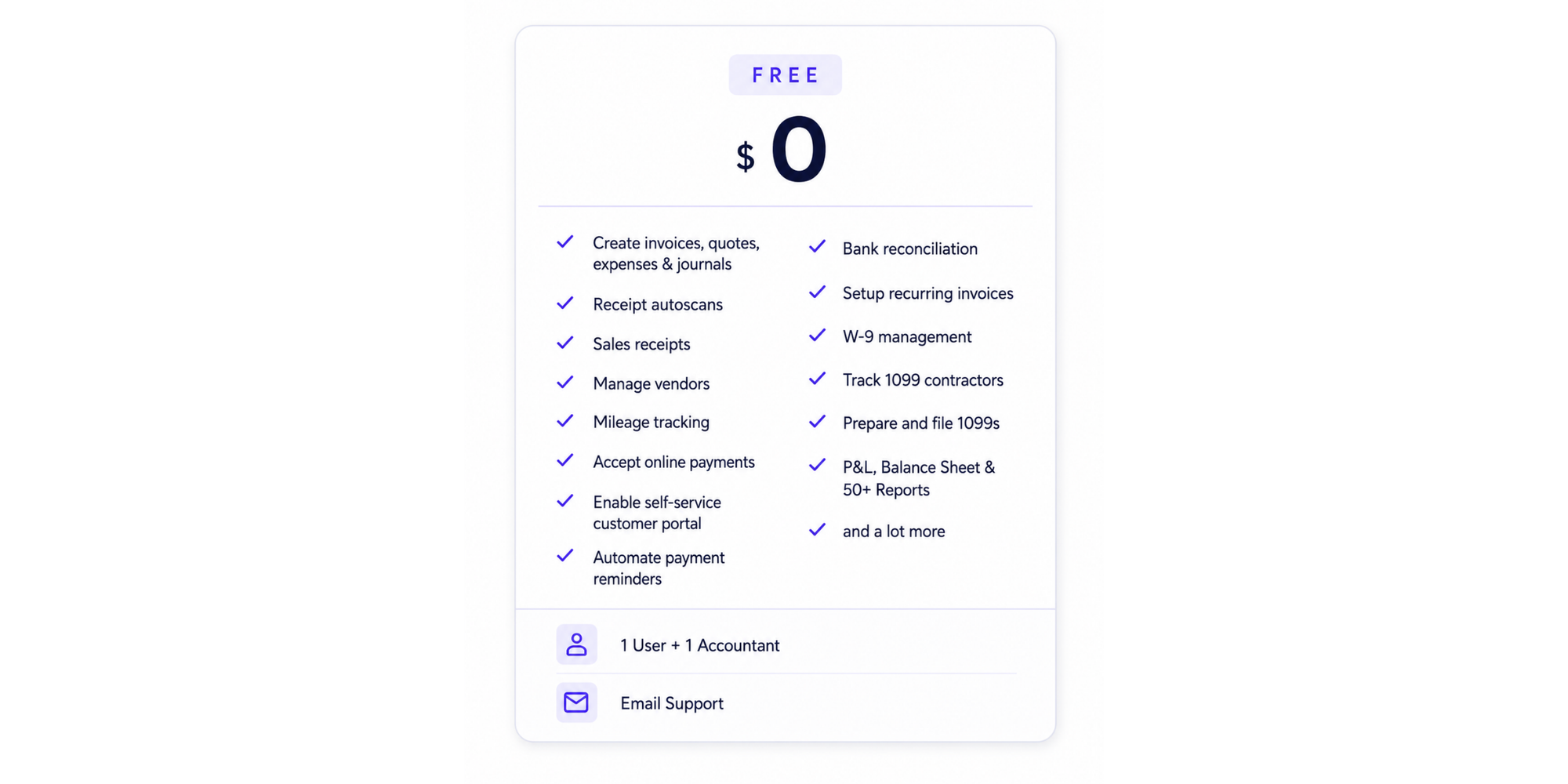
The Zoho Books free plan includes invoices, quotes, expenses, journals, sales receipts, vendor management, mileage tracking, online payments, customer portal, recurring invoices, payment reminders, bank reconciliation, W-9 management, 1099 contractor tracking, and 50+ reports. It includes 1 user plus 1 accountant and email support.
It is best for freelancers or micro businesses that want basic accounting software without a subscription. Zoho says the free plan is available indefinitely as long as your annual revenue stays within the stated threshold of $50K.
Upgrade when you need more users, bank feeds, stronger automation, project profitability, multi-currency, or inventory.
Standard plan
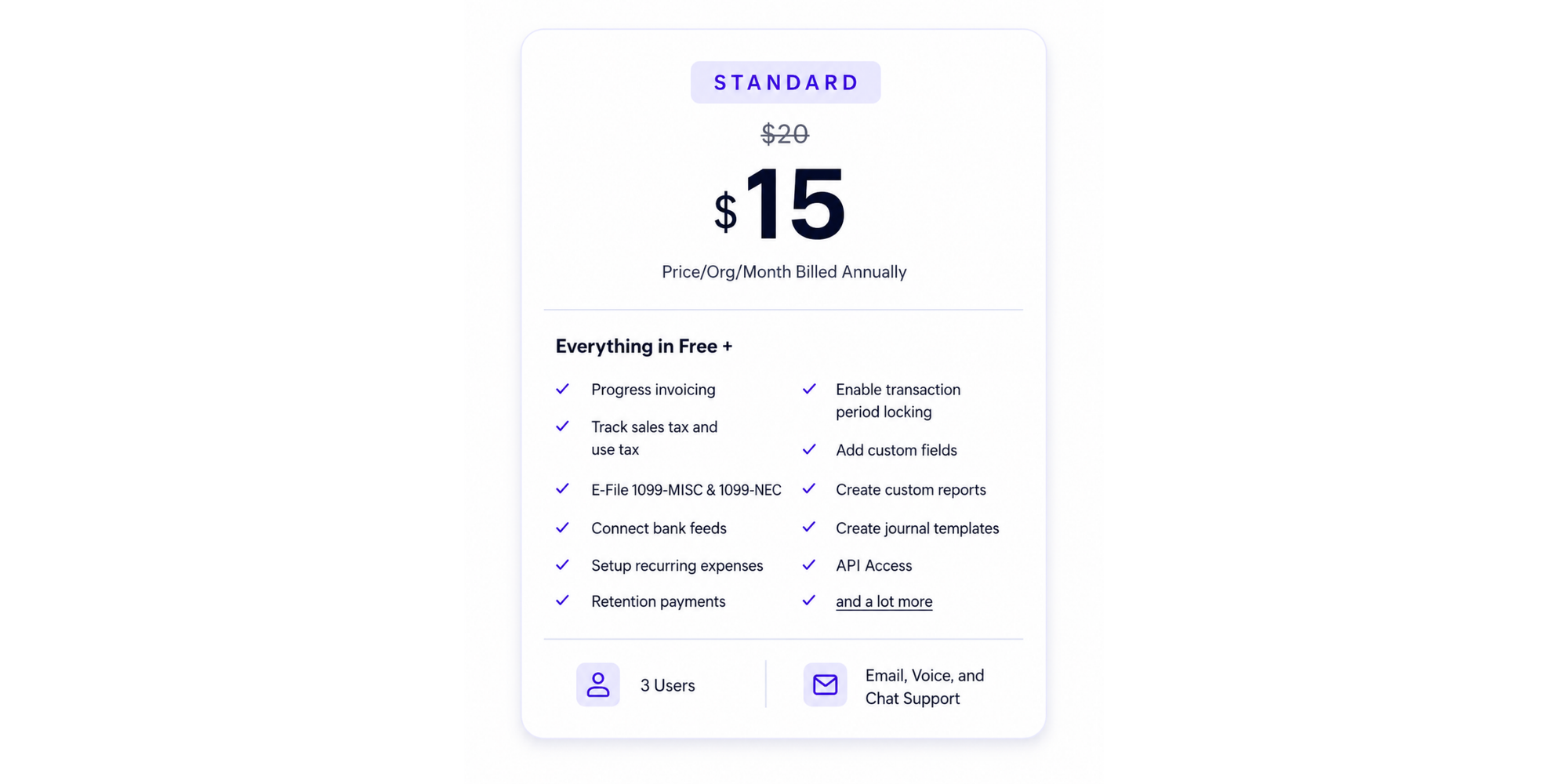
Standard adds useful day-to-day finance controls, including progress invoicing, sales and use tax tracking, bank feeds, recurring expenses, custom reports, journal templates, API access, and 3 users.
This plan fits small businesses that have moved beyond basic invoicing but do not yet need inventory, purchase orders, or project profitability.
Professional plan
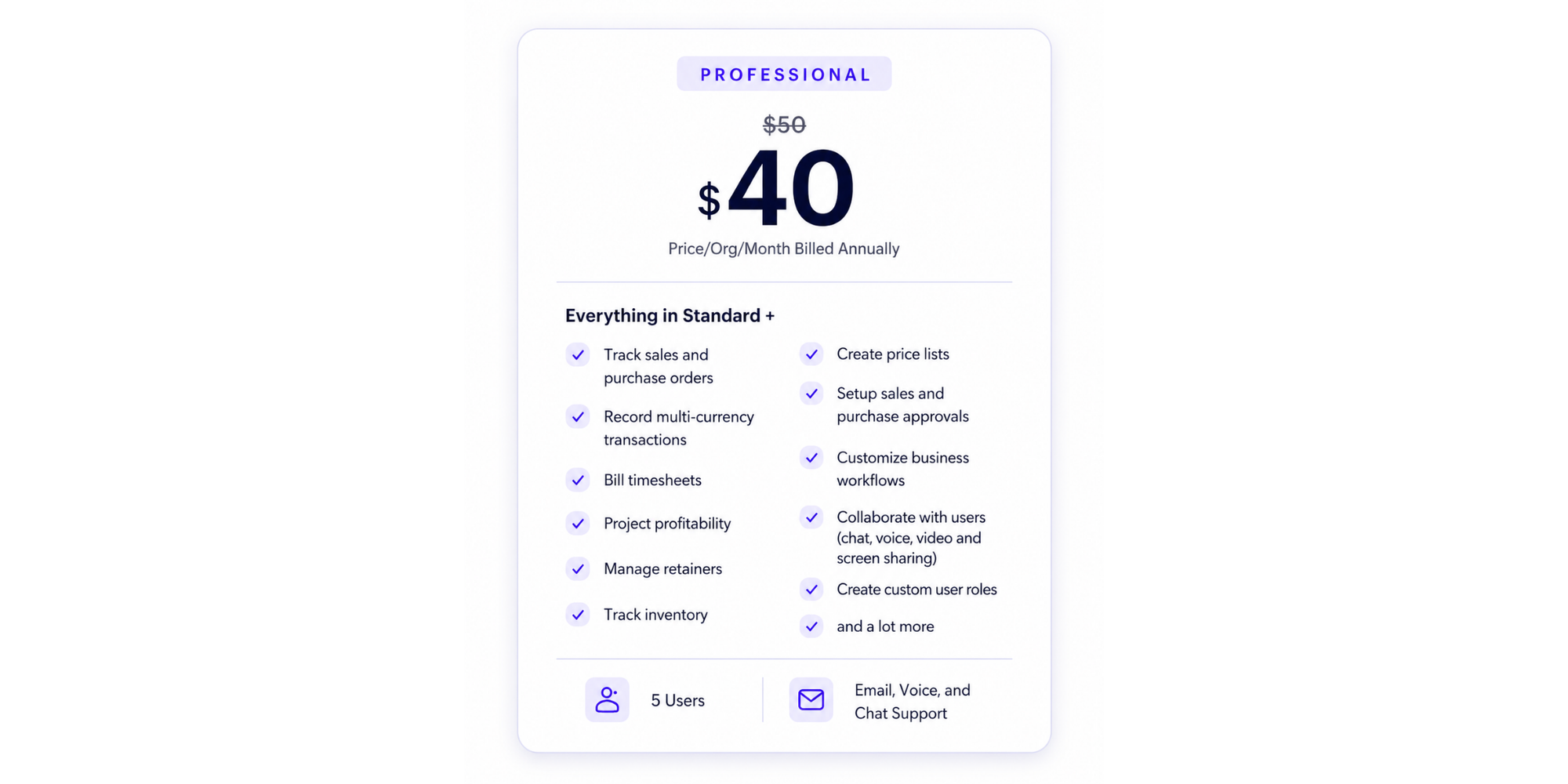
Professional is where Zoho Books plans become more useful for service businesses and growing SMBs. It adds sales orders, purchase orders, multi-currency transactions, billable timesheets, project profitability, retainers, inventory tracking, price lists, approvals, custom workflows, and custom user roles.
Choose this plan if your team bills time, works across currencies, manages projects, or needs light inventory management.
Premium plan
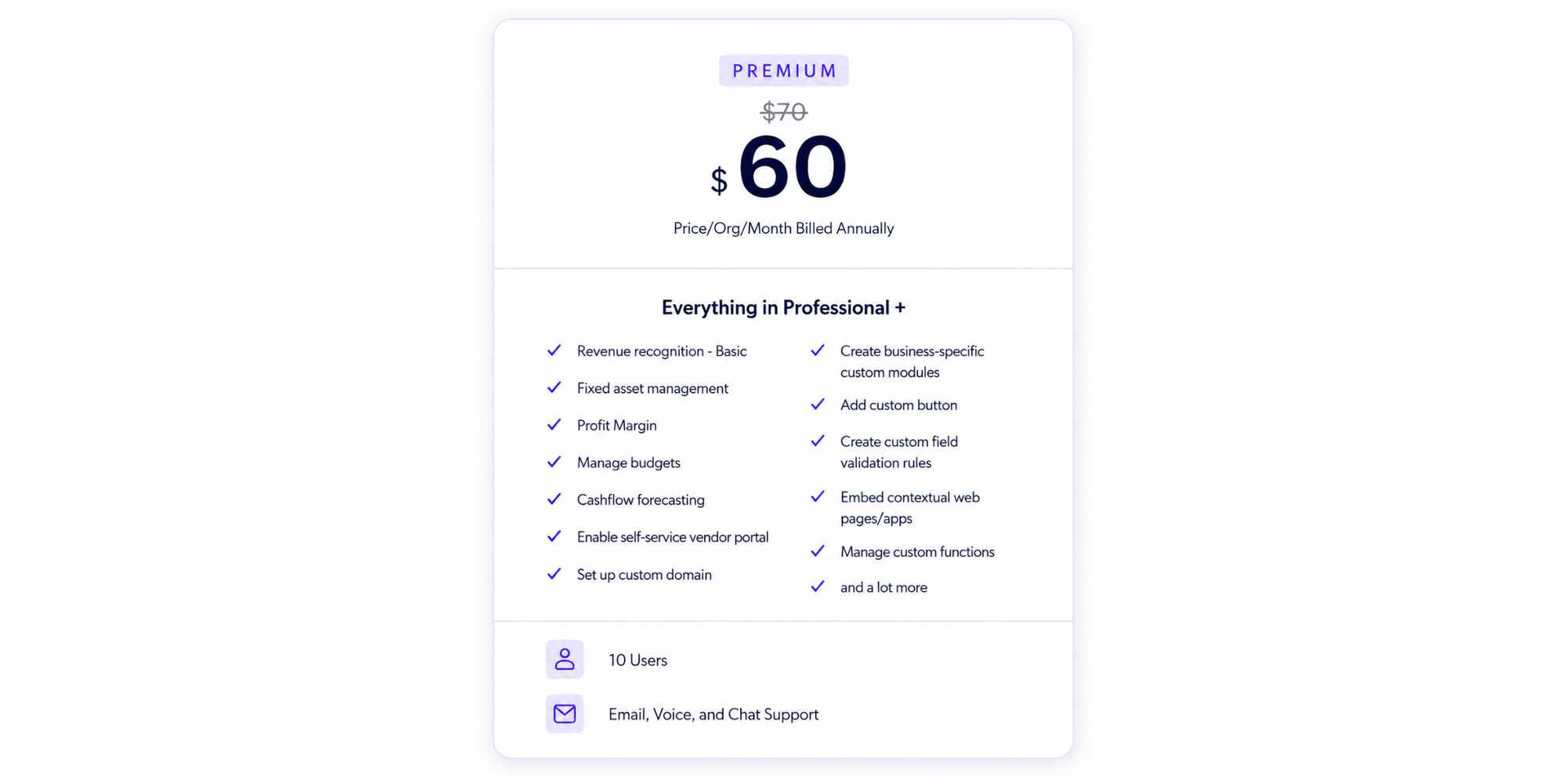
Premium adds more advanced finance and management features, including basic revenue recognition, fixed asset management, profit margin insights, budgeting, cash flow forecasting, vendor portal, custom domain, custom modules, validation rules, and custom functions.
It is a good fit for growing teams that need more structure, better reporting, and more automation without jumping into full warehouse operations.
Elite plan
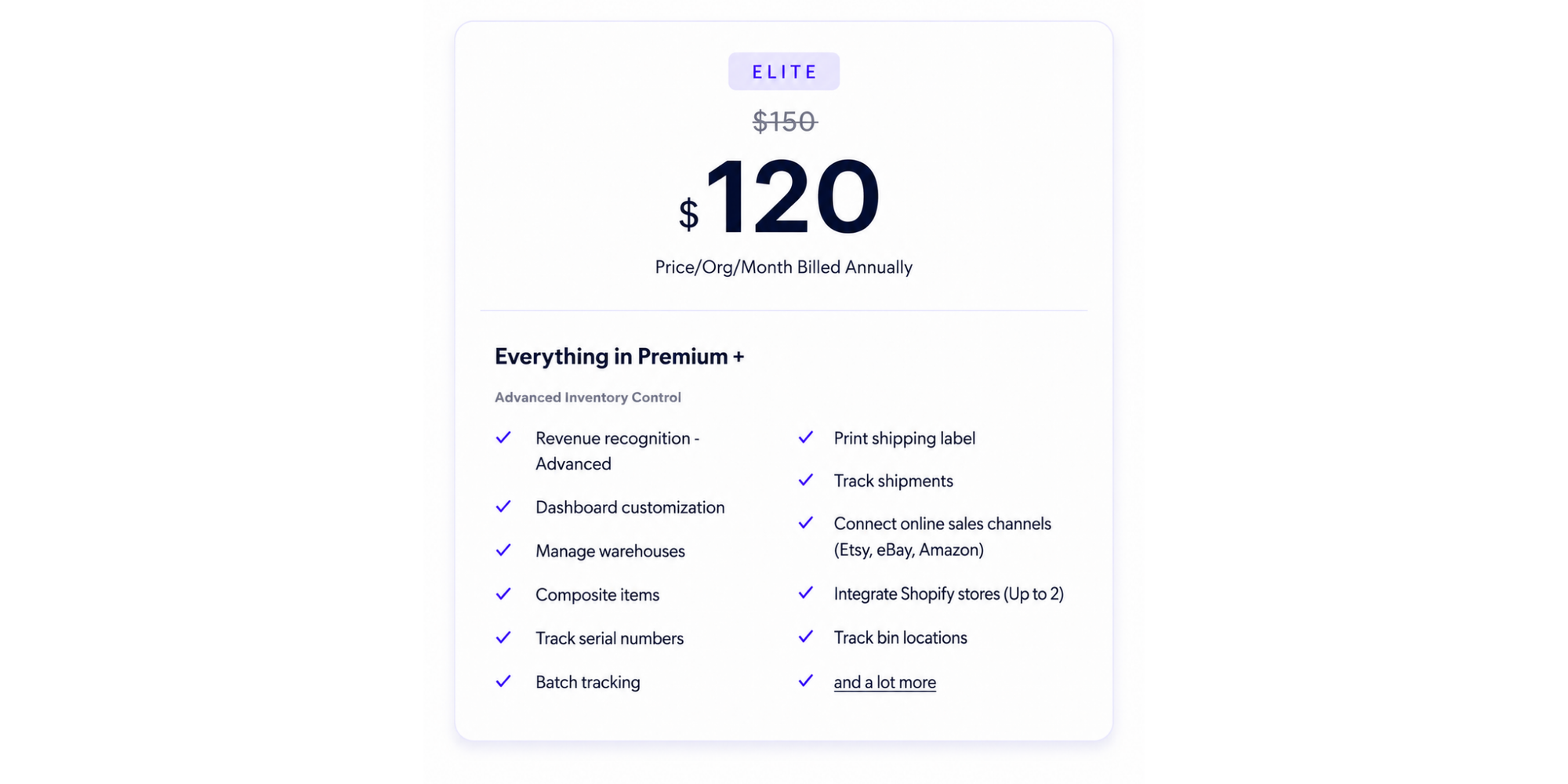
Elite is designed for advanced accounting bundled with fuller inventory management. It adds advanced revenue recognition, dashboard customization, advanced inventory control, warehouse management, composite items, serial number tracking, batch tracking, shipping labels, shipment tracking, online sales channel connections, Shopify integration for up to 2 stores, and bin locations.
This is the plan to compare closely if you:
- sell products
- manage vendors
- track warehouse stock
- run ecommerce operations.
Ultimate plan
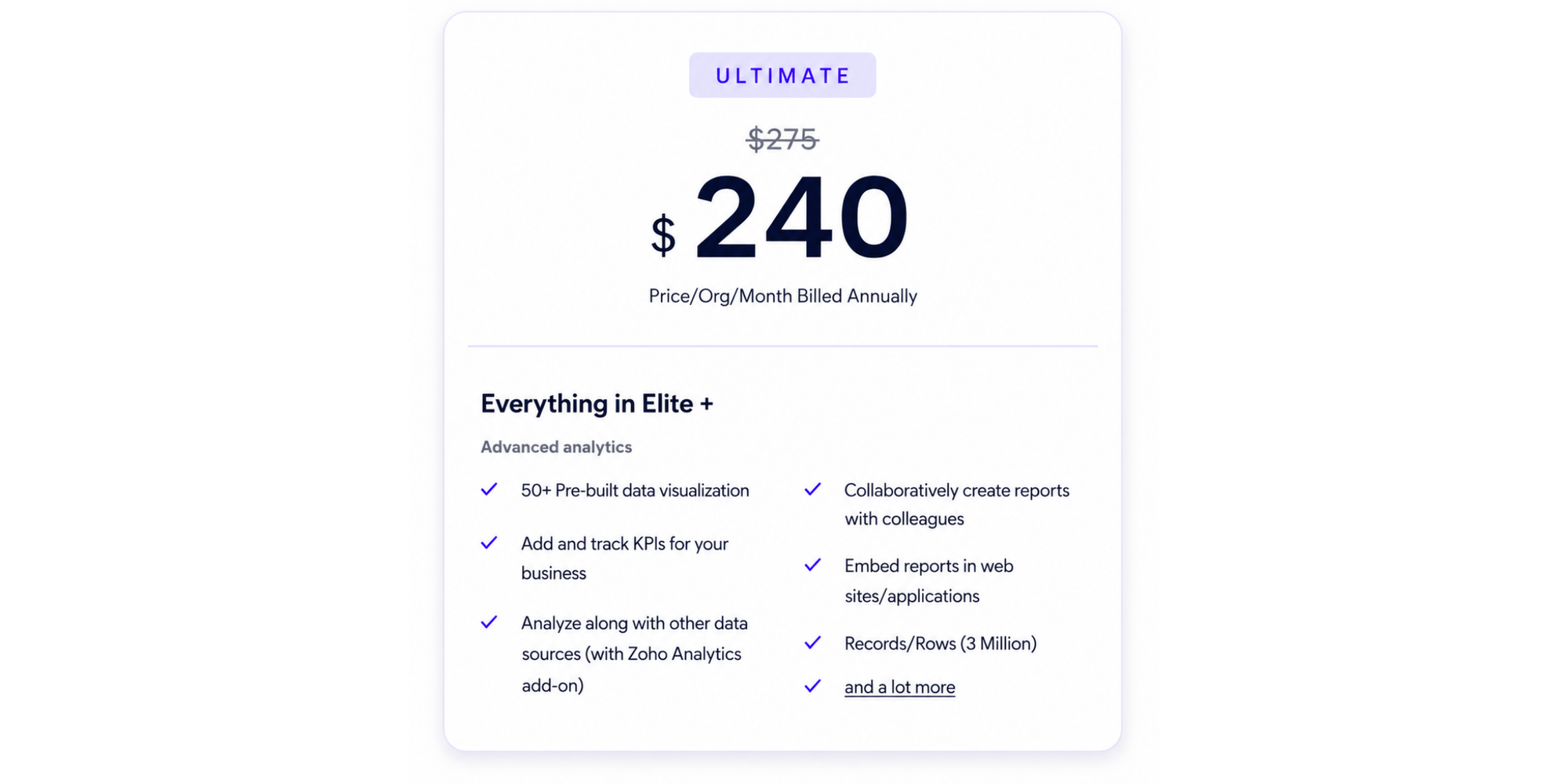
Ultimate adds advanced analytics, 50+ prebuilt data visualizations, KPI tracking, analytics with other data sources through the Zoho Analytics add-on, collaborative reports, embedded reports, and up to 3 million records or rows.
It is best for finance leads, larger SMBs, or enterprise-style teams that need deeper reporting and business intelligence.
Zoho Books plan limits that affect the real cost
The listed Zoho Books cost is only the starting point. Limits matter because they decide when you need to upgrade.
Users: Standard includes 3 users, Professional includes 5, Premium and Elite include 10, and Ultimate includes 15. Additional users cost $3/user/month, or $2.50/user/month when billed annually.
Invoices: Free supports up to 1,000 invoices annually. Standard supports 5,000, Professional supports 10,000, Premium supports 25,000, and Elite and Ultimate support 100,000.
Expenses and bills: Free allows up to 1,000 expenses per year. Standard allows 5,000. Professional allows 10,000 bills or expenses. Premium allows 25,000, while Elite and Ultimate allow 100,000.
Receipt autoscan: Free and trial users get 50 scans per month, Standard and Professional get 200, and Premium and above get 1,000.
Scheduled reports: Free includes 5 scheduled reports. Standard includes 50. Professional, Premium, Elite, and Ultimate include 200.
Extra Zoho Books costs to budget for
Here’s where the final bill can change.
| Extra cost | Current listed price | When it matters |
| Extra users | $3/user/month or $2.50/user/month billed annually | When you outgrow included user seats |
| Document autoscans | $10 per 50 scans/month or $8 billed annually | When receipt capture volume grows |
| Locations | $12/location/month or $10 billed annually | For multi-location businesses |
| Expense claims | $9/active user/month or $7 billed annually | For employee reimbursements |
| BillPay module | $69/month or $59 billed annually | For vendor payment workflows |
Zoho’s add-on repository also notes that add-ons are not supported on the Free plan, except for document autoscans.
Payment gateway transaction fees are separate from your accounting subscription. That means accepting card, wallet, ACH, or other online payments may increase your real monthly cost depending on your payment provider, transaction volume, and country.
Taxes can also change the final number. Zoho states that prices are exclusive of local taxes, so budget for sales tax or regional tax where applicable.
Zoho Books vs. QuickBooks, Xero, and FreshBooks on price
A Zoho Books pricing comparison is easiest when you look at the pricing model and bundled value, not just the cheapest plan.
| Tool | Entry paid plan | Higher-tier pricing | Pricing model takeaway |
| Zoho Books | Free, then $20/mo Standard | Up to $275/mo Ultimate | Strong free plan and lower entry pricing; user limits apply |
| QuickBooks Online | $38/mo Simple Start | $275/mo Advanced | Higher starting price; widely used; plan user limits vary |
| Xero | $25/mo Early | $90/mo Established | Unlimited users, but Early has invoice and bill limits |
| FreshBooks | Public pricing varies by plan and promotions | Select is custom | Strong service-business invoicing; add-ons for team members and advanced payments |
QuickBooks currently lists Simple Start at $38/month, Essentials at $75/month, Plus at $115/month, and Advanced at $275/month, with promotional discounts often shown for the first few months.
Xero is currently listing U.S. pricing as $5/month for Early (usually $25), $11/month for Growing (usually $55), and $18/month for Established (usually $90). Xero also highlights no per-user license fees, which can make it attractive for teams that need many users.
FreshBooks is also currently listing U.S. pricing as $6.30/month for Lite, $11.40/month for Plus, and $19/month for Premium during its promotional offer, with regular prices usually at $21/month, $38/month, and $65/month. FreshBooks also charges extra for some add-ons, including Advanced Payments at $20/month and additional team members at $11/person/month, so it can become more expensive for teams that need multiple users, recurring billing, or card-on-file payments.
So, which is cheaper? Zoho Books is often the lower-cost choice for micro businesses and SMBs that fit within its user and volume limits. Xero may be simpler for unlimited-user access. QuickBooks may fit teams that want a familiar accounting ecosystem. FreshBooks is worth comparing for client-heavy service businesses.
We covered the top 7 Zoho Books alternatives by business size in case you want to expand on the topic.
Which Zoho Books plan for which buyer?
Freelancers and solo operators
Start with Free. You get invoicing, expenses, customer portal, payment reminders, recurring invoices, mileage tracking, and reports without paying monthly. That’s plenty if your business is simple and under the free-plan revenue threshold.
Small service businesses
Look at Professional if you bill time, manage retainers, run paid consultations, or need project profitability. Pair it with scheduling software so clients can book calls without email back-and-forth.
With Koalendar’s booking payment system, service businesses can accept payments and deposits directly on the booking page through Stripe or PayPal. Koalendar says clients can schedule and pay in one step, with support for cards, wallets, bank transfers, deposits, prepaid sessions, and multi-currency payments through Stripe.
Growing teams
Premium is the safer pick when you need budgets, cash flow forecasting, vendor portal access, fixed asset management, custom modules, and more control. It gives you 10 users before you need user add-ons.
Ecommerce sellers
Elite is the plan to compare first. It unlocks advanced inventory control, warehouses, shipment tracking, marketplace connections, Shopify integration, serial numbers, batch tracking, and bin locations.
Inventory-heavy or multi-location businesses
Elite or Ultimate will usually make more sense than Professional. Professional gives you inventory tracking, but Elite adds warehouse and advanced inventory management. If you also need deep reporting across locations, Ultimate becomes more attractive.
Teams that need advanced analytics
Ultimate is built for advanced reporting, KPI tracking, data visualizations, and business intelligence workflows. It is the better fit when reporting is not just “nice to have” but part of how your finance lead runs the business.
Features worth checking before you pay
Invoicing and client payments
Every buyer should check invoice volume, recurring invoices, payment reminders, and online payment options. If you sell services, make sure your accounting workflow connects cleanly with how customers actually pay you.
Client portal and vendor portal
The free plan includes a self-service customer portal, while Premium adds a vendor portal. That matters if you want customers or vendors to access records without asking your team for every update.
Projects and time tracking
Professional is where project profitability and billable timesheets arrive. This makes it the first serious plan for consultants, agencies, bookkeepers, and service providers billing by time or milestone.
Inventory and warehouse management
Professional includes inventory tracking, but Elite adds the stronger warehouse and ecommerce features. Choose based on how complex your products, vendors, and fulfillment process are.
Reporting and analytics
Free includes 50+ reports, but scheduled reports and advanced analytics are plan-dependent. If reporting drives decisions, compare Premium, Elite, and Ultimate carefully.
The U.S. Small Business Administration notes that financial statements like balance sheets help businesses account for costs, track assets, liabilities, and equity, and analyze business segments. That’s a good reminder: the right reporting plan is not just an admin choice. It shapes how clearly you can manage the business.
Integrations and automation
Professional adds custom workflows and collaboration tools. Premium adds custom functions, modules, and validation rules. If you already use the wider Zoho ecosystem, Zoho Books may feel especially convenient.
What user reviews say about Zoho Books value
Review sites tend to highlight Zoho Books as affordable and feature-rich, especially for small businesses already using Zoho tools.
NerdWallet says Zoho Books can be a strong option for businesses that prefer a single platform for multiple business software needs, while noting that companies needing broader third-party integrations may want to compare alternatives carefully.
Capterra reviews also surface a common theme: users like the value, customer portal, invoicing, workflow automation, and Zoho ecosystem, but some non-accountants may feel a learning curve once they move beyond basic bookkeeping.
That’s the honest takeaway: Zoho Books offers strong value, but the best plan is the one your team can actually use well.
Is Zoho Books worth the cost for your business?
When Zoho Books is the right fit
Zoho Books is worth considering when you want affordable accounting software that can grow with your business. It is especially appealing if you:
- Want to start free before upgrading.
- Need invoicing, expense tracking, reporting, and payment reminders.
- Already use Zoho apps.
- Need project tracking, multi-currency, or inventory without jumping straight to a high-cost plan.
- Want advanced options later, such as warehouse management or analytics.
When another accounting tool fits better
Another tool may fit better if you need unlimited users at a predictable price, a very familiar accountant ecosystem, or broader third-party integrations. QuickBooks is often popular with accountants. Xero’s no per-user license fees may suit larger collaborative teams. FreshBooks can work well for service businesses focused on client billing, time tracking, and simple payment workflows.
Pair Zoho Books with a free scheduling tool
Zoho Books helps you manage invoices, expenses, payments, reporting, vendors, and customer records. But for service businesses, there’s another cost that rarely shows up on an accounting software pricing page: the time spent getting clients into meetings in the first place.
That’s where a free scheduling tool can make the Zoho Books setup work harder. Instead of using Zoho Books to manage the financial side while your team still chases clients by email, Koalendar helps clients book calls, reschedule when needed, and receive reminders automatically.
A good example is Beany, a tech-enabled accounting, tax, and advisory firm working across New Zealand, Australia, and the UK. Before Koalendar, its client-facing accountants were losing time to no-shows, rescheduling chaos, and long email threads. After connecting Koalendar with Zapier and HubSpot, Beany used booking links across automated client communications, triggered workflows from booked meetings, and kept tasks updated inside HubSpot. The result: around 30 hours saved per week across roughly 20 client-facing team members
That matters when you’re comparing Zoho Books cost because software value is not just about the accounting subscription. It’s also about the admin work around it. For accountants, consultants, agencies, bookkeepers, and service-based small businesses, every missed call or manual reschedule can turn into lost billable time.
What Koalendar’s free plan includes
Koalendar’s free forever scheduling plan includes unlimited bookings, unlimited event types, unlimited scheduling links, calendar sync, smart time zone detection, instant booking notifications, video conferencing, website embeds, 30+ languages, and no credit card requirement.
For paid consultations or client calls, Koalendar also supports booking payments through Stripe and PayPal, so clients can book an appointment and pay a deposit or fee before they show up. That’s especially useful if you use Zoho Books to manage invoices and records, but want Koalendar to handle the front-end booking experience.
Together, the workflow is simple:
| Business task | Tool that helps |
| Track invoices, expenses, reports, and vendors | Zoho Books |
| Let clients book calls without back-and-forth emails | Koalendar |
| Reduce no-shows with reminders and easy rescheduling | Koalendar |
| Accept deposits or paid consultation fees before meetings | Koalendar |
| Keep client meeting workflows moving through integrations | Koalendar + Zapier/HubSpot |
So, if you’re choosing Zoho Books for the financial side of your business, pairing it with Koalendar helps keep scheduling costs low too. You get a simple way to book client calls, reduce admin, collect deposits, and protect your team’s time without adding another expensive tool to the stack.
Conclusion
Zoho Books pricing is flexible because you can start free, move into Standard or Professional as your operations grow, and upgrade to Premium, Elite, or Ultimate when you need deeper management, inventory, or analytics. The smart move is to calculate the full Zoho Books cost: plan price, users, invoice volume, receipt scans, payment fees, add-ons, taxes, and setup time.
And if you run a service business, don’t let scheduling become the hidden cost. Koalendar is the simple solution for keeping bookings, client calls, deposits, and paid appointments easy from day one.
Keep scheduling costs low - create a free Koalendar account so clients can book appointments and pay deposits before they show up.