TL;DR
Square Appointments offers a free plan for solo practitioners, but the real cost climbs when you add payment processing fees, staff add-ons, and hardware. For simpler scheduling with lower costs, Koalendar's Free Forever plan includes unlimited bookings, calendar sync, automated reminders, and team scheduling, making it a stronger value for many businesses.
Many wellness and fitness businesses look to Square Appointments for session scheduling. If you're managing appointments and already use Square for payments, Square Appointments seems like the obvious next step. Same platform, same login, one dashboard.
But before you commit, it's worth understanding what you'll actually pay. The $49 or $149 monthly tiers don't tell the whole story. Payment processing fees, per-location charges, and hidden scalability costs can catch you off guard.
So, if you’re looking for a scheduling and payment app, this guide breaks down every pricing tier, shows you the real total cost at different business sizes, and compares it to simpler alternatives that deliver the same core features for less.
How much does Square Appointments cost?
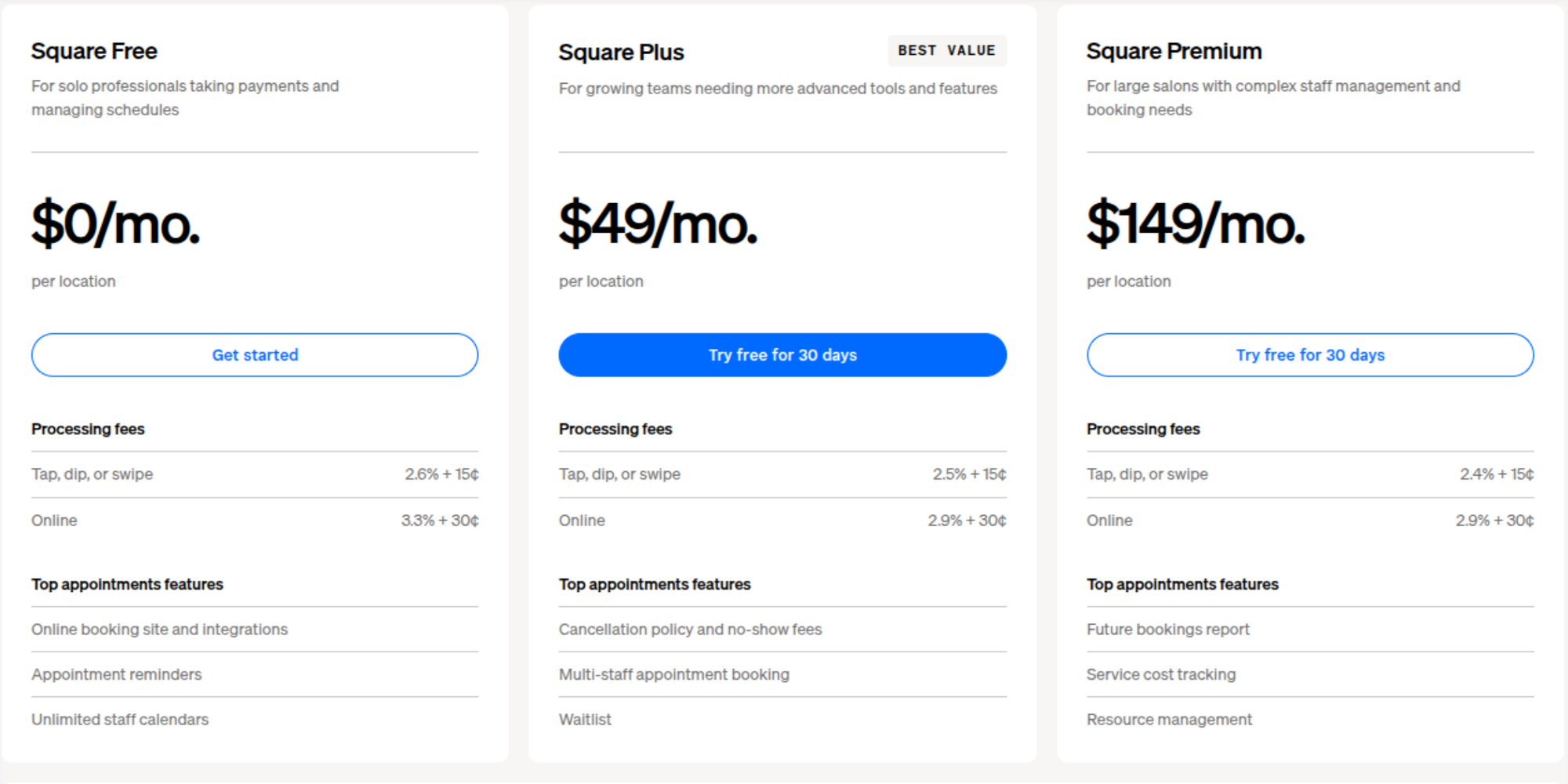
Square Appointments subscriptions options consist of three pricing tiers. Here's what you pay and what each plan includes.
Free plan
Square Appointments Free plan is genuinely free. You get one location, basic online booking, calendar sync with Google and Outlook, automated reminders, and the ability to accept payments. Payment processing fees still apply (2.6% + 15¢ for in-person, 3.3% + 30¢ for online).
There are no email or SMS marketing tools, no team staff management, and no advanced reporting included.
For a solo yoga instructor, personal trainer, or consultant with minimal bookings, the Free plan works but bear in mind you'll be paying transaction fees. This means that Square Appointments Free plan does not have subscriptions costs but you will be paying for every booking you get.
Plus plan
The Plus plan costs $49/month per location. This tier adds multiple staff calendars, appointment reminders, class bookings, waitlist functionality, and cancellation policies. Payment processing fees drop slightly: 2.5% + 15¢ for in-person, 2.9% + 30¢ for online. Email marketing is included, and SMS marketing is also available (500 messages included, then 3¢ per message).
Growing teams with 2–3 staff members usually land here. You get basic team coordination without enterprise pricing.
Premium plan
The Premium plan is $149/month per location. This includes everything in Plus plus advanced staff management, resource scheduling (managing rooms, equipment, or chairs), time tracking, and advanced reporting. Custom permissions let you control what each staff member can see. Payment processing fees match Plus: 2.5% + 15¢ in-person, 2.9% + 30¢ online.
Email and SMS marketing are also included at this tier (2,500 messages included, then 1.5¢ per message for SMS).
Premium makes sense for salons, spas, or studios with complex scheduling needs and multiple staff.
Square Appointments pricing at a glance
| Monthly cost (per location) | Best for | Key features | |
| Free | $0 | Solo professionals | 1 location, basic booking, calendar sync, reminders |
| Plus | $49 | Small teams (2–3 staff) | Multiple calendars, class bookings, waitlist, cancellations |
| Premium | $149 | Growing studios (5+ staff) | Resource management, time tracking, advanced permissions |
Square Appointments features by plan
Here are some of the key features of Square Appointments you’ll find within the different plan tiers.
Online booking
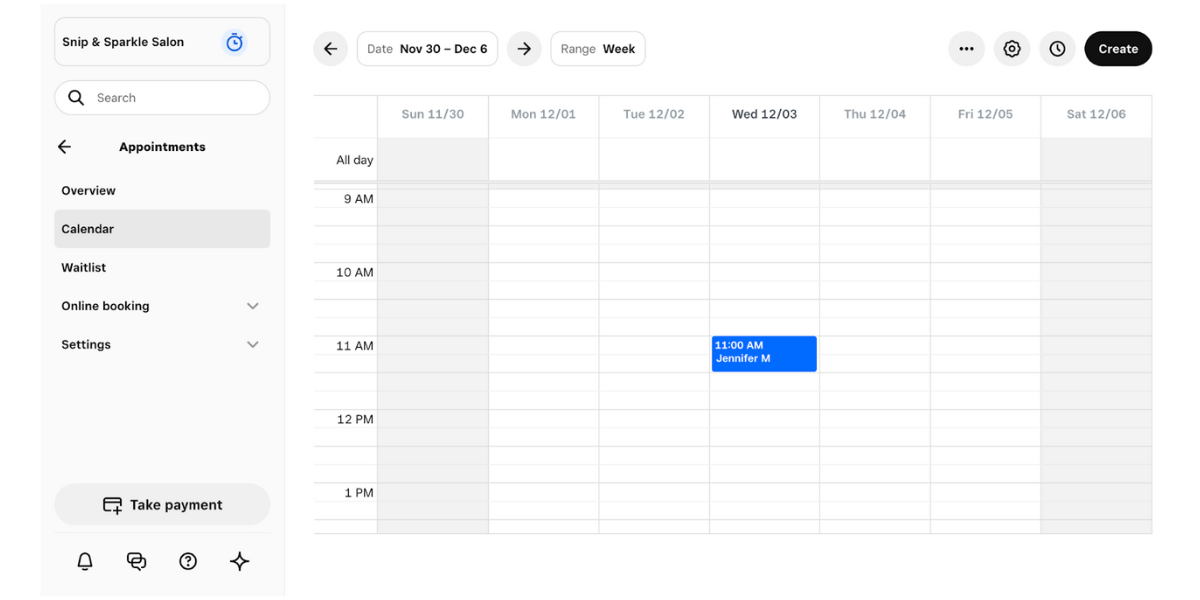
All plans include 24/7 online booking with a customizable booking page. Clients can book directly from your website or via links shared on Instagram, Facebook, or Google Business Profile. The Free plan's booking page is basic; Plus and Premium offer more customization options.
Calendar sync
All plans sync with Google Calendar and Outlook in real time. Your availability stays current across devices (preventing surprise double bookings). Integrations with Zoom and Google Meet are included on all tiers.
Automated reminders
All plans send automated appointment reminders via email. SMS reminders require the Premium plan. If you're on Free or Plus and want text reminders, you'll need a workaround or upgrade.
Staff management
- Free plan: One person only.
- Plus plan: Multiple staff calendars, but limited permissions.
- Premium plan: Granular staff permissions, time tracking, and role-based access control.
If you need to control what team members can see or do, Premium is required.
Payment processing
All plans accept card payments, Google Pay, Apple Pay, and Afterpay. Payment processing fees vary by plan and transaction type (card-present vs. online vs. manual keying). Premium has slightly better rates than Plus and Free.
Is Square Appointments free?
Yes. The Free plan truly is free with no hidden subscription costs. You only pay payment processing fees on transactions.
What you get for free
One location, online booking page, calendar sync (Google, Outlook), automated email reminders, appointment scheduling, cancellation policies, and in-app messaging with clients.
Limitations of the Free plan
There are several limitations with Square Appointments’ Free tier:
- One location only
- No team calendars (solo practitioners only)
- No SMS reminders
- No email or SMS marketing
- No time tracking or advanced reporting
- No custom permissions
- No resource management
When it's time to upgrade
Once you hire a second person, upgrade to Plus ($49/month). Once you need SMS reminders or email marketing, upgrade to Premium ($149/month). Once you have 5+ staff with complex scheduling, Premium's resource management becomes essential.
Hidden costs to consider
The subscription price isn't the full picture. Here's what actually impacts your bottom line.
Payment processing fees
Square Appointments charges 2.4%–3.3% per transaction depending on your plan and how payments are processed.
On the Free plan, online transactions cost 3.3% + 30¢. On Plus and Premium, in-person payments are 2.5% + 15¢, while online payments are 2.9% + 30¢.
If you process $5,000 in monthly bookings, that will add $120–$165 in processing fees on top of your subscription.
Additional staff costs
Square Appointments charges per location, not per staff member. But if you open a second location, that's another $49–$149 per month. Scaling multiple locations gets expensive fast.
Scaling costs
Square Hardware (card readers, stands, terminals) isn't included. A basic card reader is free; a full Square Terminal costs $299 upfront. iPad stands for a booking kiosk cost extra. These add up if you're managing multiple locations or devices.
Square Appointments cost for different business types
Here's what different businesses actually pay monthly.
Solo professional
- Setup: 1 location, 10 appointments/month, no staff
- Free plan: $0/month Processing fees: ~$3–$5 at 3.3% + 30¢ per online transaction
- Total: $3–$5/month
Small team (2–3 staff)
- Setup: 1 location, 50 appointments/month, 2–3 staff
- Plus plan: $49/month Processing fees: ~$50 at 2.5%–2.9% average
- Total: ~$99–$120/month
Service business (salon, studio)
- Setup: 1 location, 100 appointments/month, 4–5 staff, online + in-person payments
- Premium plan: $149/month Processing fees: ~$100–$130 at 2.5%–2.9% average
- Hardware (card reader, iPad stand): ~$100 one-time
- Total: ~$250–$280/month
Growing company (multi-location)
- Setup: 2 locations, 200+ appointments/month, 10+ staff
- Premium (2 locations): $298/month ($149 × 2) Processing fees: ~$250–$300 at average transaction volume
- Hardware (per location): ~$200 one-time per location
- Total: ~$550–$600/month+
Square Appointments vs Koalendar
Square Appointments works well if you're already in the Square ecosystem. But if you're choosing booking software purely on value, Koalendar often delivers more for less.
Square Appointments is a strong option, especially if you're already using Square's POS or payments system. But you may be paying for features you don't actually use.
Most businesses need three things from scheduling software: reliable booking, payment collection, and automated reminders. Square delivers all three, but it bundles them with resource management, advanced staff permissions, and marketing automation that small teams often never touch.
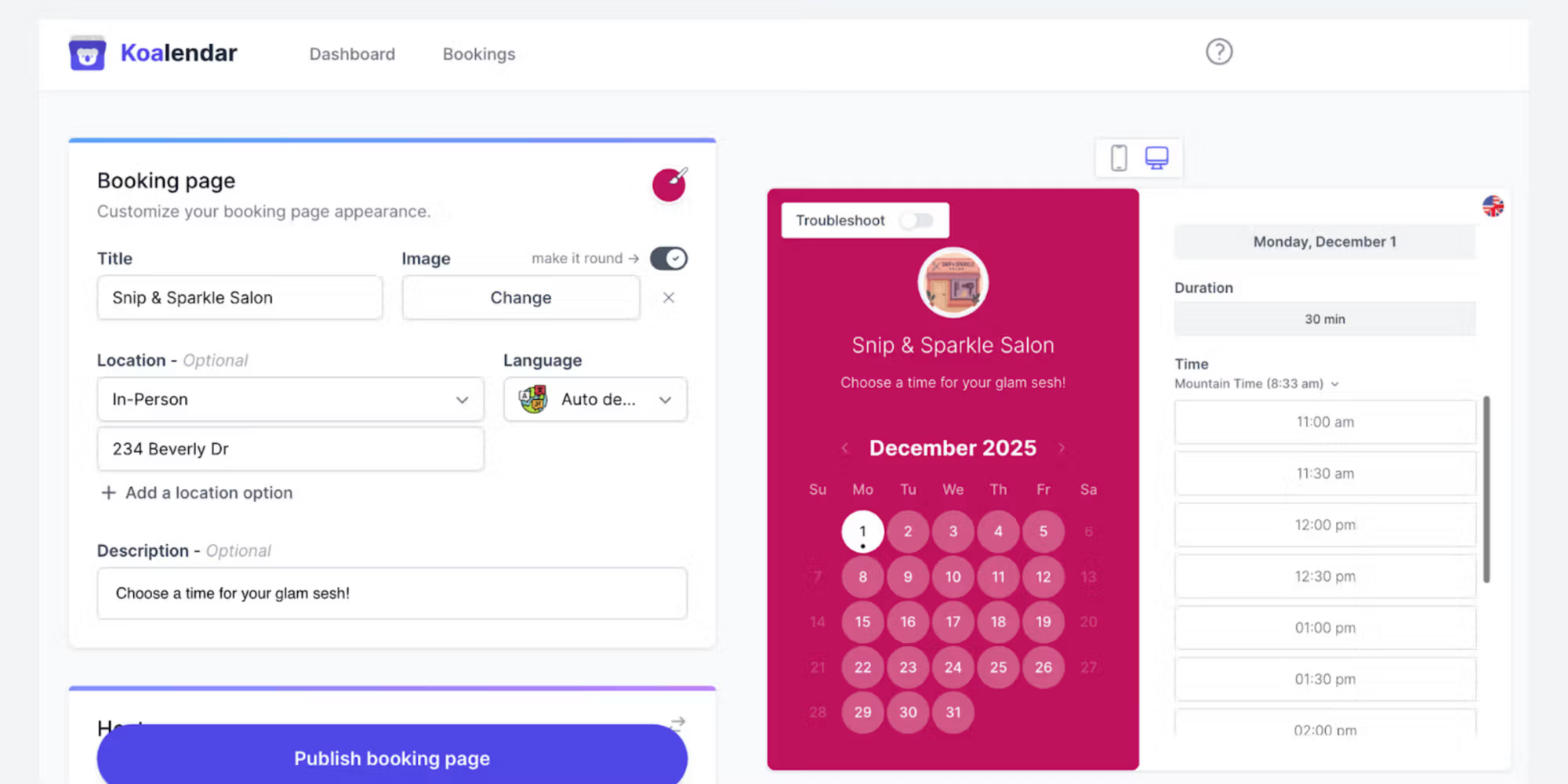
Koalendar helps salons, wellness businesses, and independent beauty professionals simplify appointments, manage staff shifts, and deliver easy-to-use appointment booking for clients at a more affordable price.
Pricing comparison
 |  | |
| Free Plan | ✅ (1 location) | ✅ (unlimited locations) |
| Free Plan Features | Basic booking, reminders | Unlimited 1:1 bookings, 2 calendar syncs |
| Plus/Pro Plan | $49/month | $6.99/month (billed annually) |
| Payments | ✅ (2.4%–3.3% fees) | Optional (use Stripe,etc.) |
| Google Calendar Sync | ✅ | ✅ |
| Outlook Sync | ✅ | ✅ |
| Automated Reminders | ✅ (email only on Free/Plus) | ✅ (email + SMS on paid) |
| Team Scheduling | ✅ | ✅ |
| Per-staff cost | Charged per location, not seat | 1 owner with 2 calendar syncs included in free plan; from $6.99/seat/month for additional users |
| Custom Booking Page | ✅ | ✅ |
| Integrations | Zoom, Google Meet, Square | Zoom, Google Meet, Stripe, PayPal, 8,000+ via Zapier |
| SMS Reminders | Premium only | Included in paid plan |
| Email Marketing | Premium only | Via integrations |
| Starting Price | Free | Free |
Pricing & free plans
Square Appointments offers a free plan for solo practitioners, but as your business grows, the price increases at quite a rate. Once you add a second team member or need SMS reminders, you are forced onto the Plus ($49/mo) or Premium ($149/mo) tiers per location, quickly inflating your overhead.
In contrast, Koalendar offers a true Free Forever plan with unlimited bookings. Upgrading to the Pro tier costs just $6.99/month, delivering advanced features at a fraction of Square’s monthly subscription costs.
Payment processing
Square Appointments is fully integrated but rigid. You are tied to Square’s transaction rates, which range from 2.4% to 3.3% plus fixed fees depending on the plan. High booking volumes mean hundreds of dollars out of your pocket each month in processing fees alone.
Koalendar connects easily to popular global payment gateways like Stripe and PayPal. This keeps your booking software costs flat while letting you choose the processor that makes the most financial sense for your business.
Calendar sync & reminders
Both tools sync in real time with Google Calendar and Outlook to eliminate double bookings, but client communication features differ drastically. Square Appointments limits you to email reminders on lower tiers; SMS reminders require their $149/month Premium plan.
Koalendar includes automated email and SMS reminders directly in the $6.99/mo Pro plan, ensuring low no-show rates without forcing you into an enterprise-level subscription tier.
Ease of setup
Square Appointments handles complex multi-staffing, but requires granular permission setups and tier upgrades to coordinate schedules effectively. Hardware requirements like buying a Square Terminal or iPad stands add extra friction and upfront costs to the onboarding process.
Koalendar is built to support business owners with little-to-no technical skill. It features straightforward team coordination and custom booking pages that can be embedded into your website or shared on social media in less than five minutes.
Which offers better value?
The best option here depends on your business’ size and growth plans.
- Choose Square Appointments if: You operate a multi-location salon, need intense asset/resource management (like assigning specific chairs or rooms), and already use Square hardware for your daily retail operations.
- Choose Koalendar if: You want a clean, lightning-fast booking system or professional schedule without hidden costs. It delivers unlimited bookings, team scheduling, waitlists and SMS automation without forcing you into an expensive per-location payment trap.
Check how Sion nails uses Koalendar to scale her business, reduce admin, and gain peace of mind.
Is Square Appointments worth it?
For many larger or rapidly growing businesses, Square Appointments is a worthwhile investment. However, in some cases, it can be expensive and there are more suitable options available.
Pros of Square Appointments
- Built into Square ecosystem: If you use Square's POS or payments, one dashboard for everything
- Solid payment processing: Payments are integrated; clients can pay at booking
- Advanced staff management: Premium plan offers granular permissions and time tracking
- Free plan genuinely works: Solo professionals can use it forever with zero cost
- Integrations with Zoom, Google Meet: Video conferencing built in
Cons of Square Appointments
- Processing fees are high: 2.4%–3.3% per transaction adds up quickly
- Per-location pricing scales poorly: Each additional location is $49–$149/month more
- Premium required for SMS reminders: Even basic SMS messaging costs you the full Premium tier
- Email and SMS marketing only on Premium: Plus plan lacks these features
- Hardware costs stack up: Card readers, iPad stands, terminals aren't free
- Simplicity gets complicated: More staff and locations mean higher complexity and cost
Who should use Square Appointments?
Square Appointments is a popular and sensible choice for businesses already integrated with Square's POS or payments. Salons and studios with complex resource scheduling needs may find it useful. Companies with multiple locations where keeping everything in one dashboard matters will also benefit from many of the features available.
Who might prefer Koalendar?
Koalendar appeals to solo professionals and small teams (2–10 people) who want a straightforward scheduling and booking payment system without complexity. It’s ideal for businesses that are cost-conscious about payment processing fees, and anyone valuing simplicity over an all-in-one approach.
Conclusion: Is Square Appointments worth the investment?
Square Appointments is a solid beauty salon booking system and scheduling tool, especially for businesses already using Square for payments. The Free plan genuinely offers value. But the real cost (when you add processing fees, staff add-ons, and hardware) often exceeds what smaller teams expect to pay.
If you're comparing scheduling tools based on value, not just brand recognition, alternatives like Koalendar are worth exploring. Koalendar's Free Forever plan includes unlimited bookings, calendar sync, and at zero cost.
Its Pro plan starts at $6.99/month; a fraction of Square's Plus tier. You get online scheduling, payments, calendar sync, automated reminders, and team scheduling at a price that's often more affordable for growing businesses.
The choice comes down to this: Do you need Square's full ecosystem integration? If yes, Square Appointments works. If you just need reliable booking software at the lowest cost, Koalendar delivers more value.
Create your free Koalendar booking page today and start accepting appointments online.