Results at a glance
⏱️ Smooth scheduling for a high-volume content pipeline — often up to 15 weekly partner outreaches
👥 Team using Koalendar: Social strategy + content team (shared Outlook calendar; Sandra & Antonia are the primary day-to-day users)
📅 Years using Koalendar: 1+
⭐ Top benefit: “For us, it’s a lot of volume… If we had to do that manually, it would be such a time sucker.”
Overview
Visit Las Vegas is the destination marketing organization behind the city’s official tourism marketing, promoting Las Vegas for both leisure and business travel.
Inside the organization, Antonia and Sandra (social strategy) plan and coordinate social content with hotel partners, attractions, and shows, making sure what’s happening across the destination gets captured and shared on time.
The challenge: High-volume scheduling across partners (and creators)
The social team works months ahead, coordinating shoots with a long list of partners. With multiple creators in the mix, scheduling manually would mean checking availability across people, then relaying options back to partners, over and over.
As Antonia put it:
“For us to book this manual… Sandra has to check with every creator when they are available, go back to the partner… [it’s] times and dates… back and forth.”
They also ran into a few workflow snags along the way:
- Busy internal blocks accidentally reducing booking capacity (they allow two bookings per hour, and internal reminders could “take away” a slot)
- Rescheduling friction (partners would ask Sandra to change bookings for them)
- Follow-ups still needed when partners don’t schedule after outreach
- A growing interest in automation and AI to reduce manual steps beyond scheduling (“We’re trying to automate as much as we can.”)
The solution: One Koalendar link, connected to Outlook, built for partner self-booking
The team uses one booking link connected to a shared Outlook calendar that multiple team members can access. Partners receive the link, pick an available time, and book without waiting on a chain of emails.
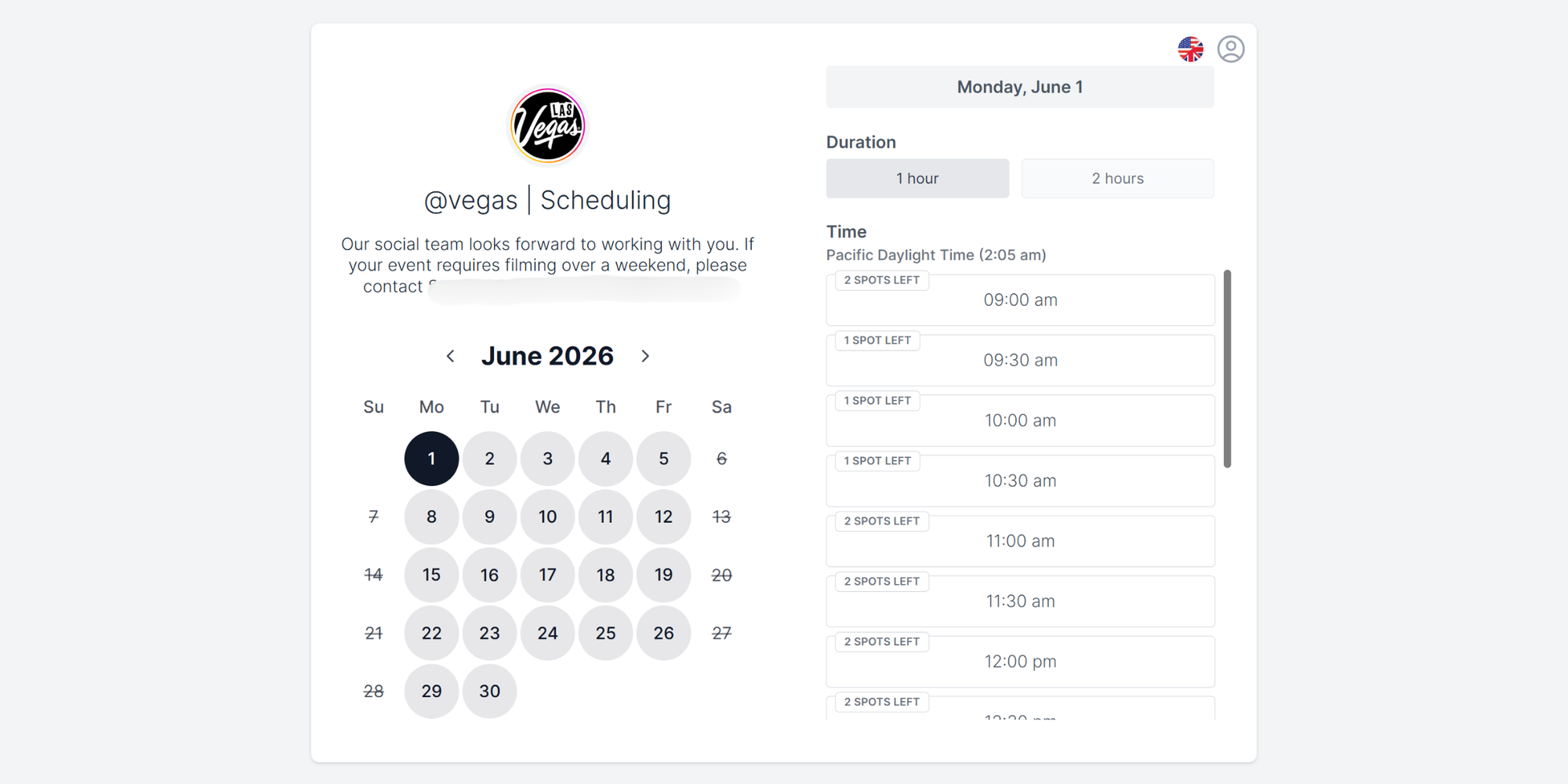
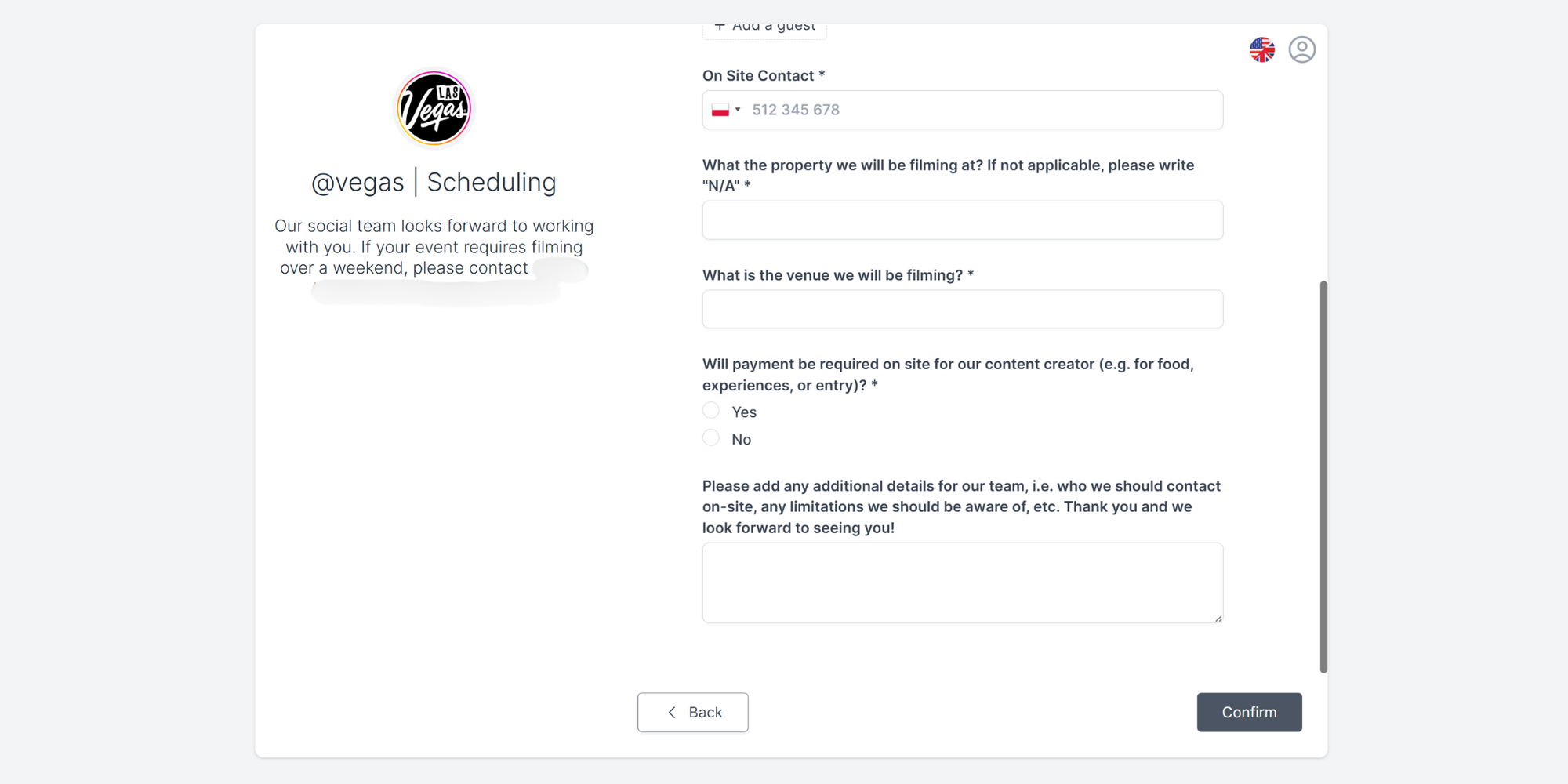
To make each booking useful (not just a time on the calendar), they added intake questions partners complete during scheduling, including:
- Who’s booking
- On-site contact
- Where they’re filming
- Payment or additional details
“Now… a partner can see our availability and they can just book it—there’s no… going back and forth about schedules and things like that.”
They also set Koalendar up to support their volume by allowing multiple bookings per hour, and they use blocks to protect key internal time (like weekly brainstorms) or to shut down scheduling during peak moments (like Formula One week).
The outcome: Faster scheduling, fewer reminders to chase, and more control in busy weeks
Koalendar became the team’s “single door” for partner scheduling, especially valuable when volume spikes.
“It’s super helpful—easy to use, integrates with Outlook, sends booking notifications and reminders, and it saves us a ton of time because partners can book directly from our availability."

Antonia Genov
Social Strategy Team
Day to day, Koalendar took scheduling off the team’s plate and turned it into a simple, repeatable workflow. In practice, this means:
✅Partners book directly from availability, instead of waiting on back-and-forth
✅ Automatic notifications and reminders help everyone stay on track (“…the event is coming in a day… coming in three hours… so that helps.”)
✅ Busy times are protected with blocks (brainstorms, major event weeks, etc.)
✅ Scheduling stays organized even with multiple creators, since the booking lands on the shared calendar and the team assigns a creator internally afterward
✅ Self-serve rescheduling from the confirmation email to make the workflow even smoother
Conclusion
In a destination like Las Vegas (where partner needs change fast and timelines can be tight) Koalendar gives the Visit Las Vegas social team a simple way to keep shoots on track without getting buried in scheduling admin.
With one link tied to a shared Outlook calendar, partners can book when it works for them, the team stays protected during busy internal blocks and major event weeks, and everyone gets the reminders they need to show up prepared.
The result is a smoother workflow, less back-and-forth, and more time for what matters most: planning, capturing, and publishing great content that keeps the destination top of mind.
Ready to simplify high-volume scheduling? Create a booking page, share your link, and let Koalendar handle the coordination.