TL;DR
Microsoft Bookings does not have its own standalone price. It comes with selected Microsoft 365 and Office 365 subscriptions.
For small businesses in the US, the cheapest Microsoft 365 plan with Bookings is currently Business Basic at $7 per user per month with an annual subscription, or $8.40 per user on a flexible monthly subscription. Business Standard costs $14 annually or $16.80 monthly, while Business Premium costs $22 annually or $26.40 monthly.
Microsoft Bookings can offer good value when your business already uses Outlook, Teams, Word, and the rest of Microsoft 365. But when you only need scheduling, paying for a complete productivity suite may be unnecessary.
Koalendar is the simpler alternative for scheduling alone. It has a free plan, works with Google Calendar, Outlook, and iCal and lets you start accepting bookings in minutes without a Microsoft 365 subscription.
Trying to understand Microsoft Bookings pricing can feel more complicated than setting up the booking page itself. There is no simple Bookings price tag because Microsoft bundles the tool with selected Microsoft 365 subscriptions.
That means the real Microsoft Bookings cost depends on which productivity package you choose, how many people need licenses, whether you pay annually, and whether your plan includes Microsoft Teams. Below, we break down the plans, explain the main Microsoft Bookings features, and compare the platform with Koalendar so you can choose the right booking software for you without paying for tools you do not need.
What is Microsoft Bookings?
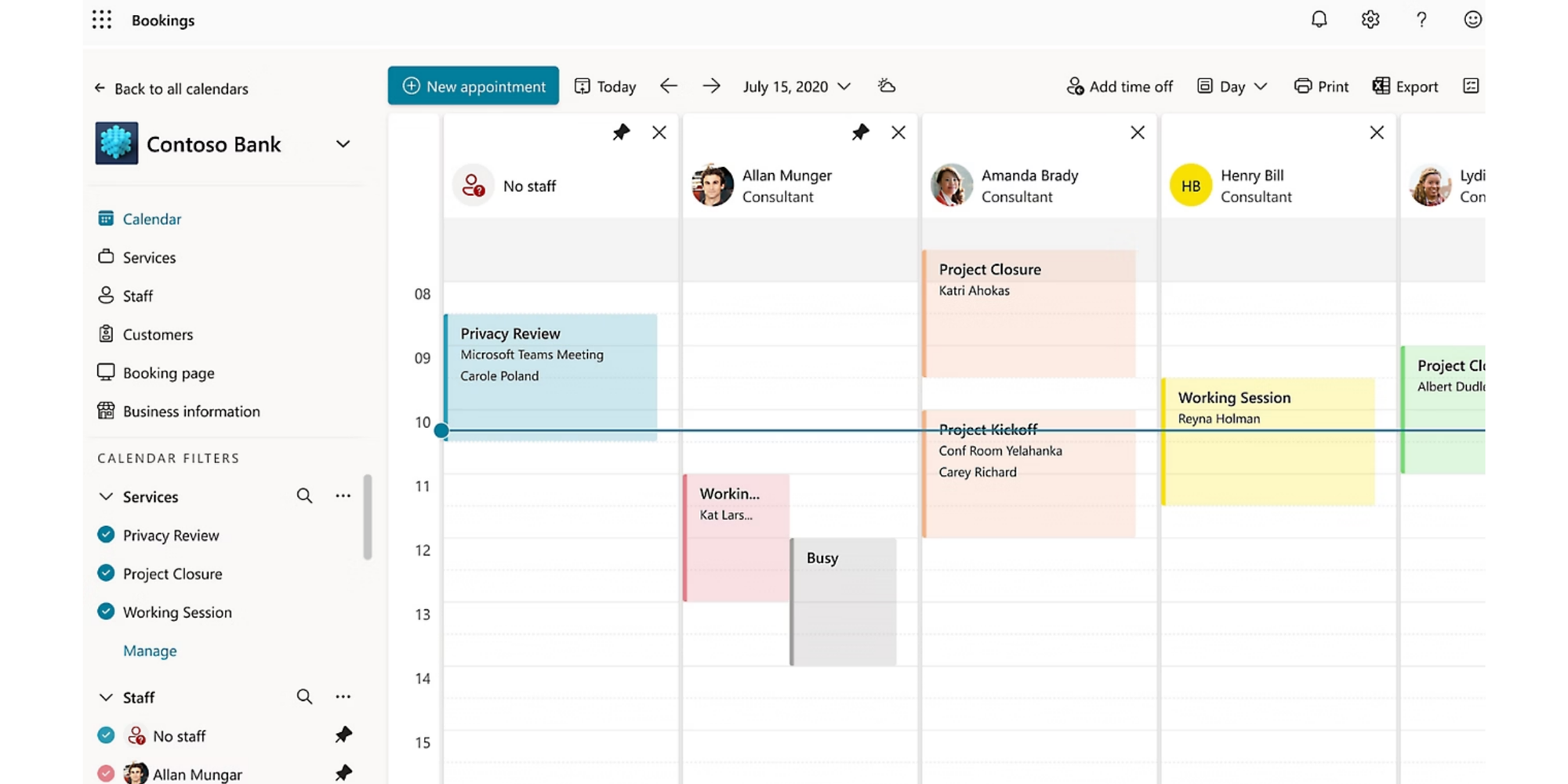
Microsoft Bookings is an online appointment scheduling tool included with selected Microsoft 365 subscriptions. It lets customers, clients, and candidates choose an available time through a booking page, while appointments are added to the relevant Outlook calendars.
Businesses can use Microsoft Bookings to manage services, staff availability, meeting lengths, buffer times, confirmations, and reminders. It also works closely with Microsoft Teams, making it useful for virtual consultations, interviews, sales calls, support sessions, and other scheduled meetings.
The main thing to know is that Microsoft Bookings is not purchased on its own. Access comes through an eligible Microsoft 365 plan, which is why understanding the full subscription cost matters before you choose it.
Microsoft Bookings pricing at a glance
Microsoft Bookings is included with eligible Microsoft subscriptions rather than sold as a separate scheduling product. Microsoft currently lists Business Basic at $7 annually or $8.40 on a monthly subscription, Business Standard at $14 or $16.80, and Business Premium at $22 or $26.40. For most small businesses, Microsoft 365 Business Basic is the lowest-priced route to Bookings.
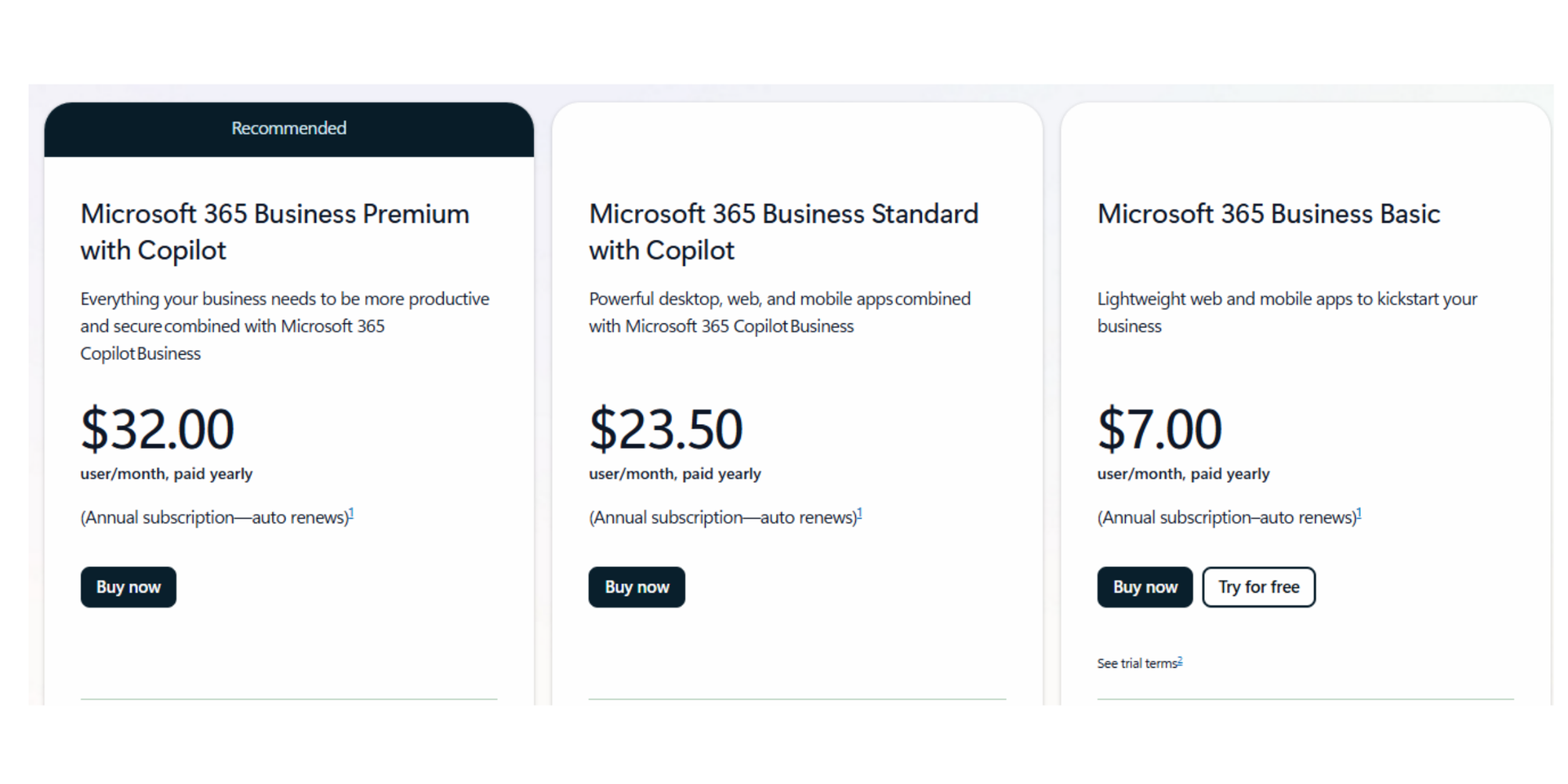
The table below uses Microsoft’s US list prices as of July 22, 2026. Annual prices are shown as a monthly per-user amount but require an annual subscription. Taxes are not included.
| Microsoft 365 Business Basic | Microsoft 365 Business Standard | Microsoft 365 Business Premium | Office 365 E1 | Office 365 E3 | Office 365 E5 | Standalone Microsoft Bookings | |
| Annual subscription | $7/user/month | $14/user/month | $22/user/month | $10/user/month annually | $26/user/month annually | $41/user/month annually | Not available |
| Flexible monthly subscription | $8.40/user/month | $16.80/user/month | $26.40/user/month | Check with Microsoft | Check with Microsoft | Check with Microsoft | Not available |
| Bookings included? | ✅ | ✅ | ✅ | ✅ | ✅ | ✅ | ❌ |
| Best suited to | Businesses needing web apps, email, Teams, and scheduling | Teams needing desktop Office apps | Businesses needing advanced security and device management | Larger organizations using cloud-based Office services | Enterprises needing desktop apps and compliance tools | Enterprises needing advanced security and analytics | — |
Microsoft pricing page confirms that Bookings is available with Business Basic, Business Standard, Business Premium (included in the version with Teams) and several enterprise, frontline, education and government subscriptions. It also states that Bookings is not available as a standalone app.
Is Microsoft Bookings sold separately?
No. Microsoft does not currently sell a standalone Microsoft Bookings license. You need an eligible Microsoft 365, Office 365, Teams Essentials, or Teams Premium subscription, and Outlook on the web must be enabled for the service to work.
This is why Microsoft Bookings can appear free. You do not see an extra Bookings charge on your bill, but you are still paying for the Microsoft plan that provides access.
For a big company already using Microsoft 365, that bundle may represent excellent value. For a freelancer or a smaller company who only wants clients to schedule calls, the bundle can make a relatively simple requirement more expensive.
How much does Microsoft Bookings cost?
Microsoft Bookings costs at least $7 per licensed user per month in the US when purchased through Microsoft 365 Business Basic on an annual subscription. It is included rather than billed separately, and there is no standalone free version.
Do you really need Microsoft 365 for Microsoft Bookings?
Yes, you need an eligible Microsoft subscription, although it does not always have to be one of the three Microsoft 365 Business plans.
Microsoft also includes Bookings in selected Office 365 Enterprise, Microsoft 365 Enterprise, frontline, education, government and Teams plans. However, most freelancers and small businesses will choose between Business Basic, Business Standard and Business Premium.
One licensing detail matters here: the people managing Bookings may need eligible Microsoft licenses as your team grows. Your customers do not normally need a Microsoft account or license to use your public booking page, but internal staff access and administration depend on your organization’s Microsoft setup.
That can make the total cost less obvious than a standalone scheduler with a clearly defined free or per-seat plan.
Microsoft 365 Business Basic
Business Basic is the cheapest conventional small-business Microsoft plan that includes Bookings.
At $7 per user per month with annual billing, it includes web and mobile versions of Word, Excel, PowerPoint and Outlook, business email, cloud storage, Teams meetings and additional apps such as Bookings, Planner and Forms. Microsoft also offers a flexible monthly subscription at $8.40 per user.
Choose Business Basic when you want:
- Microsoft Bookings and Outlook scheduling
- Professional Microsoft-hosted email
- Browser-based Office apps
- Microsoft Teams meetings
- OneDrive and SharePoint storage
It is less suitable when you only need a booking link. A five-person team would pay $420 per year at the annual rate, even if scheduling were the only feature everyone used.
Microsoft 365 Business Standard
Business Standard is designed for businesses that also need desktop versions of Microsoft Office.
It costs $14 per user per month with an annual subscription or $16.80 on a flexible monthly subscription. Alongside Bookings, email, storage and Teams, it provides installed desktop versions of Word, Excel, PowerPoint and Outlook.
This plan makes sense for consultants, agencies and professional-service teams already relying on Office documents and spreadsheets. It is harder to justify when your company works mainly in Google Workspace or uses separate tools for documents and communication.
At the annual rate, five users cost $840 per year. Ten users cost $1,680 per year.
Microsoft 365 Business Premium
Business Premium adds security and device-management capabilities rather than significantly upgrading the core scheduling experience.
The plan costs $22 per user per month annually or $26.40 with a monthly subscription. It includes the Business Standard productivity apps alongside advanced identity, device management and threat protection.
Business Premium may be appropriate for healthcare practices, financial services firms and businesses with stricter security requirements. However, upgrading solely to improve appointment scheduling is unlikely to offer good value.
A ten-person team would pay $2,640 per year at the annual rate.
Enterprise plans
Microsoft Bookings is also available through several enterprise subscriptions, but scheduling is only one small part of those packages.
Microsoft lists Bookings for Office 365 E1, E3 and E5, as well as Microsoft 365 E1, E3 and E5 and selected frontline plans. Office 365 E1, E3 and E5 currently start at $10, $26 and $41 per user per month respectively with annual billing.
Microsoft 365 E3 is currently listed at $39 per user per month annually and includes broader Windows, security and device-management capabilities.
These plans are built for larger organizations with IT, compliance and governance requirements. They are rarely the most economical way for a small team to get appointment scheduling.
Microsoft Bookings features
Microsoft Bookings covers the essential scheduling tasks most Outlook-based organizations need.
Microsoft describes Bookings as an online scheduling and appointment application that lets businesses customize appointment details, define booking requirements and assign service providers.
Public and personal booking pages
You can create a public-facing page where customers choose a service, staff member and available time. Microsoft also offers personal booking pages for individual scheduling scenarios.
You can control appointment duration, lead time, cancellation rules, buffer time and availability. This reduces back-and-forth emails and gives customers a clear way to find a suitable slot.
Outlook calendar integration
Bookings is closely connected to Microsoft Outlook. Existing calendar commitments can block unavailable times, while new appointments appear in the relevant staff calendars.
This is one of the platform’s strongest advantages. Teams already working inside Microsoft Exchange and Outlook can keep appointments and availability within the same ecosystem.
Microsoft notes that Outlook on the web must be enabled because Bookings stores its data within Outlook.
Microsoft Teams meetings
Bookings can add Microsoft Teams meeting details to virtual appointments. Customers receive the online meeting information as part of their confirmation, reducing manual setup.
This works especially well for recruiters scheduling interviews, support teams arranging onboarding calls and consultants meeting clients remotely.
Staff scheduling
Shared booking pages can connect multiple employees to different services and availability rules. You can let customers select a staff member or allow Bookings to assign an available person.
This supports common workflows such as:
- Sales consultations
- Candidate interviews
- Customer-support appointments
- Healthcare consultations
- Coaching sessions
- Agency discovery calls
Notifications and reminders
Microsoft Bookings sends confirmations and can send reminder emails before appointments. These messages help customers arrive prepared and can reduce forgotten meetings.
Organizations can also collect information from customers during the booking process, so staff have useful context before the appointment begins.
Calendar availability management
Administrators can define business hours, staff availability, minimum notice, maximum advance-booking windows and time between meetings. Microsoft’s documentation explains that service availability can be combined with staff availability to determine when customers may book.
If these features are all you need, Microsoft Bookings can be a good option—especially if you are already paying for Microsoft 365. If you are starting from scratch or only need scheduling software, there are simpler alternatives worth considering.
Microsoft Bookings vs Koalendar
The main difference is simple: Microsoft Bookings is part of a productivity suite and it’s more basic, while Koalendar is purpose-built scheduling software for when scheduling directly affects revenue or service delivery.
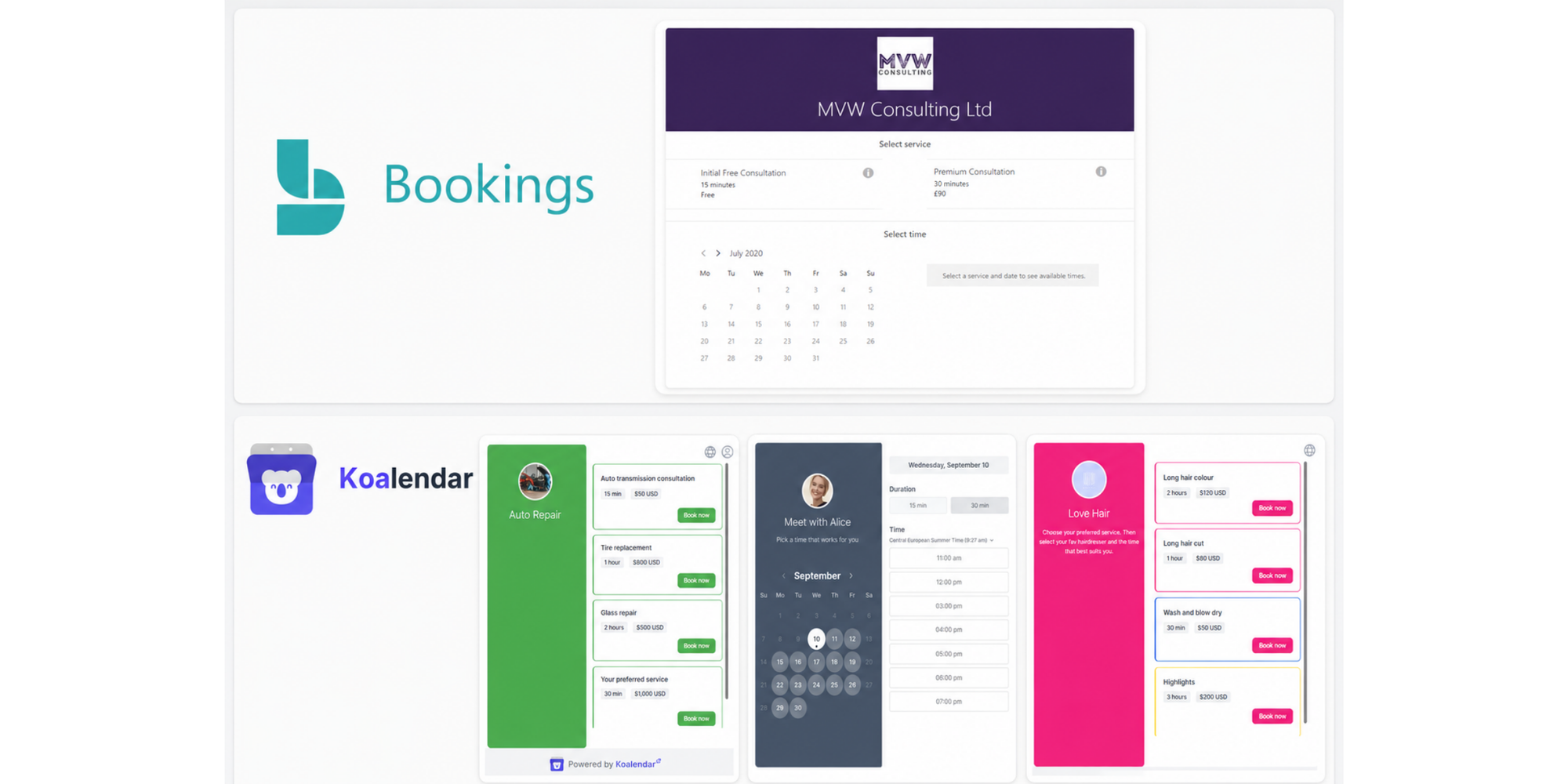
Choose Koalendar if you’re a freelancer or a small team for whom scheduling directly affects revenue or service delivery.
 |  | |
| Standalone scheduling product | ❌ | ✅ |
| Free plan | ❌ No standalone free plan | ✅ Free forever |
| Lowest entry cost | $7/user/month annually | $0 |
| Setup experience | Microsoft account and administration may be required | Designed for setup in minutes |
| Google Calendar sync | Limited compared with Microsoft ecosystem | ✅ |
| Outlook Calendar sync | ✅ | ✅ |
| Microsoft Teams integration | ✅ | ✅ |
| Zoom integration | Limited/native workflow depends on setup | ✅ |
| Google Meet integration | ❌ Not a core Microsoft integration | ✅ |
| Stripe payments | ❌ No native checkout in standard Bookings | ✅ |
| Unlimited booking links/pages | Depends on Microsoft configuration | ✅ |
| Automatic reminders | ✅ | ✅ |
| Time-zone detection | ✅ | ✅ |
| Buffer times | ✅ | ✅ |
| Group bookings | ✅ | ✅ |
| Round robin scheduling | Staff assignment available | ✅ |
| Team scheduling | ✅ | ✅ |
| Website embedding | ✅ | ✅ |
| Custom branding | Partial | ✅ |
| Multi-language booking pages | Supported options | 30+ languages |
| Works without Microsoft 365 | ❌ | ✅ |
| Best for | Businesses already standardized on Microsoft 365 | Freelancers, professionals and small teams wanting straightforward scheduling |
Koalendar’s Free Forever plan includes unlimited bookings and scheduling links, two calendar connections across Google, Outlook or iCloud, video conferencing, booking-page embedding and support for more than 30 languages.
Choose Microsoft Bookings if…
- Your business already runs on Microsoft 365
- Your staff use Outlook as their main calendar
- Microsoft Teams is your standard meeting platform
- Your IT team prefers to manage scheduling inside the Microsoft environment
- You also need business email, Office apps, storage and security tools
Choose Koalendar if…
- You want scheduling software without buying Microsoft 365
- You use Google Workspace, Outlook or both
- You want to start with a generous free plan
- You need integrations such as Zoom, Google Meet or Stripe
- You want an easy setup without Microsoft administration knowledge
- You prefer a tool designed specifically for scheduling
Verdict: Microsoft Bookings can be the more logical choice for an established Microsoft organization who has simple booking needs. Koalendar is usually the better-value option for a freelancer, consultant, coach or small team that wants scheduling without the surrounding software suite.
Why many small businesses choose Koalendar instead
Small businesses often need dedicated scheduling software that is easy to configure, flexible enough to grow, and reliable enough to run important client-facing workflows. Koalendar focuses on that job without requiring you to adopt or administer an entire productivity suite.
That can make it a better fit even when your business already has Microsoft 365. You can keep Outlook, Teams, and your existing Microsoft tools while using Koalendar for more tailored booking pages, Google Calendar connections, Zoom meetings, round robin scheduling, payments, and advanced availability controls.
No Microsoft 365 subscription required
You can create a Koalendar account and start scheduling without purchasing Microsoft email, storage, documents or security software.
That keeps your scheduling decision separate from your company’s broader technology choices. You can continue using the tools you already know instead of moving your workflow into Microsoft 365 just to access Bookings.
Works with Google and Outlook calendars
Koalendar connects with both Google Calendar and Outlook Calendar, making it practical for mixed environments.
A consultant might manage personal availability in Google Calendar while a client-facing team uses Outlook. Koalendar can provide one scheduling workflow without forcing everyone onto the same productivity platform.
One simple booking link can replace hours of coordination
A clear self-booking process can save time well beyond the initial appointment. It can support onboarding, training, presentations, interviews, and other multi-step workflows.
Financial planner Raphael Krug used Koalendar after restrictions in his organization’s Microsoft environment made it difficult to create the multiple calendars and bookable schedules he needed. Setting up an additional Microsoft account and license reportedly led to six to eight hours of unsuccessful troubleshooting.
With Koalendar, he created a straightforward system that directed candidates, trainees, and clients to the right booking path. Some links led to his own sessions, while others directed people to colleagues or shared scheduling flows. The result was one clear place for people to choose the correct presentation, workshop, or onboarding step.
For a small business, the lesson is simple: the right booking tool can support a complete process rather than only placing an event on a calendar.
Fewer follow-ups and more reliable attendance
Automated confirmations, reminders, and payments help make bookings feel more definite. They also reduce the need to chase every attendee manually. As Raphael put it:
“With Koalendar booking has become more binding, because people enter their details and actively commit. They also receive reminders. Now, if 20 people say they are coming, around 19 will actually come.”

Raphael Krug
Financial Expert
That added reliability makes it easier to plan workshops, demos, training sessions, and group appointments. Your team can prepare based on confirmed capacity instead of guessing who will show up.
Clear visibility into capacity and upcoming bookings
Koalendar gives small businesses a clearer view of what is happening across the week. From his phone, Raphael could see how many people had booked upcoming presentations, which workshops were full, and whether enough colleagues were available to run each session.
This is especially helpful when your scheduling affects staffing or capacity. A coach can check whether a group session is full. A recruiter can see how many interviews are confirmed. An agency can check whether the right team members are assigned before a client meeting.
Measurable time savings
Better scheduling should give you time back—not create another system to manage.
In Koalendar’s financial-planner case study, the automated workflow saved approximately two to three hours per week by reducing follow-ups and manual coordination. It also improved the tracking of attendance, invitations, workshop history, and consultant performance.
Those savings can be meaningful for a small business. Two hours spent arranging meetings is two hours not spent serving clients, closing sales, training staff, or growing the business.
Free plan with powerful scheduling features
Koalendar’s Free Forever plan includes unlimited bookings and scheduling links, two calendar syncs, video conferencing, support for more than 30 languages, and website embedding. There is no time limit on the plan.
This gives freelancers and small businesses a practical way to launch their scheduling process before paying for more advanced capabilities.
You can start with:
- Unlimited booking pages and appointments
- Google, Outlook, or Apple calendar connections
- Video-meeting options
- Automatic time-zone and language detection
- Availability rules and minimum-notice settings
- Booking-page embedding
- More than 30 supported languages
Easy setup without complicated administration
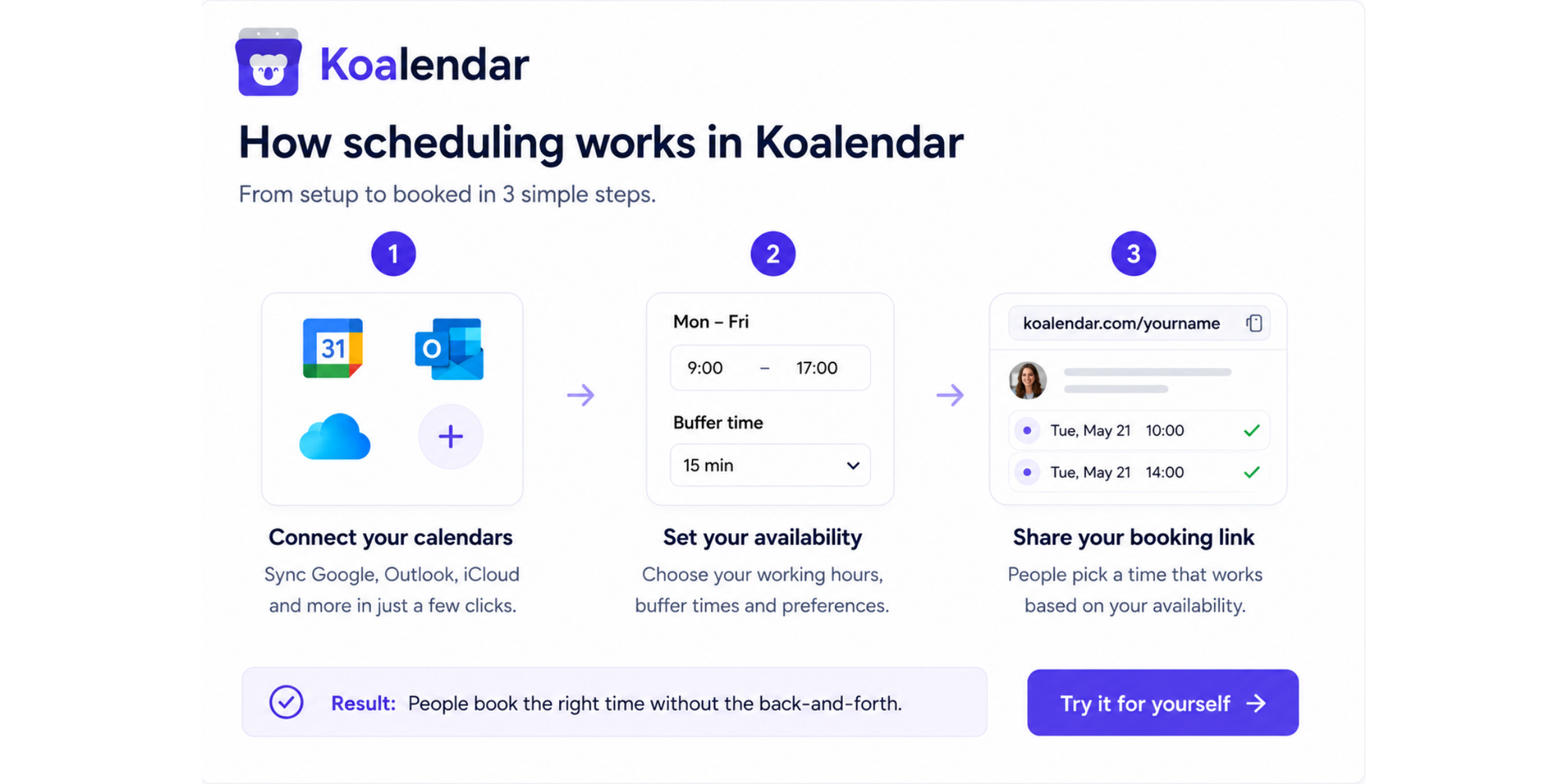
Koalendar is designed to keep setup straightforward. Connect your calendar, set your availability, build a booking page, and share the link.
The financial-planner case study illustrates the difference this can make. After struggling with licensing and calendar restrictions in Microsoft, Raphael found that Koalendar worked with Google Calendar without requiring complex “room” email configurations. He tested it, saw that it suited his workflow, and upgraded to Pro on the same day.
That simplicity matters when you do not have a dedicated IT administrator—or when your time is better spent running the business.
Koalendar Pro adds advanced scheduling without enterprise complexity
Koalendar Pro is built for professionals and small businesses that have outgrown basic one-to-one scheduling. It costs $6.99 per seat per month with annual billing. Koalendar offers a seven-day Pro trial without requiring a credit card.
Pro includes everything in the free plan, plus:
- Unlimited calendar connections
- Round robin meeting distribution
- Collective scheduling with multiple hosts
- Group sessions and recurring bookings
- Custom email and SMS reminders
- Stripe and other payment methods
- Custom services, durations, pricing, hosts, and resources
- Booking limits and advanced availability controls
- Approval workflows
- CSV booking exports
- Provider or resource selection
- Removal of Koalendar branding
This makes Pro a stronger fit when scheduling directly affects revenue or service delivery. A consultancy can route enquiries between available advisors. A recruiter can distribute interviews across a hiring team. A wellness or healthcare practice can let patients choose a provider. A coach can accept payment when someone books a session.
The plan can also be useful when you already pay for Microsoft 365 but need more from your booking software. You can continue using Outlook or Teams while adding Zoom, Google Calendar, tailored services, payment collection, advanced reminders, and team-based scheduling through Koalendar.
Is Microsoft Bookings worth the price?
Microsoft Bookings is worth using when its surrounding Microsoft 365 plan already delivers value to your business. It is less compelling when scheduling is the only problem you need to solve.
Consultants
Choose Microsoft Bookings when your consultancy already uses Outlook, Teams and Microsoft Office for client work.
Choose Koalendar when you want a polished booking experience, Google and Outlook flexibility, payment collection or a free way to start scheduling.
Recruiters
Microsoft Bookings suits recruitment teams operating inside Microsoft 365 because interview appointments can connect closely with Outlook and Teams.
Koalendar may be easier for independent recruiters and agencies that schedule across several client calendars, use Zoom or Google Meet, or want to launch booking pages without help from an IT administrator.
Coaches
Coaches often need recurring availability, reminders, video calls, group sessions, payments and branded booking pages.
Koalendar is usually the more direct fit for this workflow, especially when the coach does not need Microsoft’s email, storage and desktop applications.
Agencies
Microsoft Bookings works for agencies whose staff already have Microsoft 365 licenses and primarily schedule Teams meetings.
Koalendar is likely to be more flexible when an agency serves clients across Google Workspace and Microsoft environments or wants separate booking pages for discovery calls, onboarding, reviews and support.
Small businesses and professional practices
Microsoft Bookings can offer strong value when the company needs professional Microsoft email, Office apps, storage, security and scheduling together.
A standalone scheduler may be more economical when only a few team members handle appointments or when most employees do not need Microsoft 365. Compare the full annual cost—not just the per-user monthly headline—before purchasing.
Microsoft Bookings pricing: the final verdict
Microsoft Bookings pricing starts with the cost of an eligible Microsoft 365 subscription because Bookings is not sold as a standalone product. That can make it a sensible choice when your business already uses Outlook, Teams, Exchange, and the wider Microsoft 365 ecosystem.
For simple appointment scheduling, Microsoft Bookings covers the essentials. You can create booking pages, manage staff availability, send reminders, and add Microsoft Teams links to virtual meetings. When those are the main features you need, using a tool already included in your subscription may feel convenient.
However, Koalendar can still be the better choice even when you already pay for Microsoft 365. It is dedicated booking software, so it gives you more flexibility to tailor booking pages, manage round robin scheduling, connect with Zoom, and sync with Google Calendar and Outlook. That makes it easier to create a scheduling experience that fits your team, your clients, and the way you work.
Choose Microsoft Bookings when you want straightforward scheduling inside the Microsoft ecosystem. Choose Koalendar when booking is an important part of your workflow and you want more control, broader integrations, and a purpose-built platform that is easy to set up.
For professionals and small businesses comparing Microsoft Bookings pricing, Koalendar offers a simpler and more flexible alternative. You can start free, create unlimited booking pages, connect the calendars and meeting tools you already use, and begin accepting bookings in minutes.