
TL;DR
If you need to ask a client, prospect, teammate, executive, recruiter, or new contact for a meeting, this guide gives you the exact wording. You get a simple four-part formula, copy-and-paste examples for every situation and channel, and a faster option Koalendar lets people pick a time from your real availability, so you can stop trading dates by email.
You want to set up a meeting, but the first message is the tricky part. Ask too bluntly and you sound demanding. Ask too vaguely and you get a slow reply, or none at all. The right words land that meeting fast, while one wrong move starts the spiral, endless back-and-forth emails, hunting for a time that works.
Here is how to ask for availability for a meeting, with an example for every situation you are likely to face. Clients and prospects, your own team, executives, recruiters, networking contacts, and the quiet follow-up that will get you that vital reply.
We will start with a formula you can reuse, work through ready-to-send templates for email and for LinkedIn, Slack, and Teams, and finish with a scheduling link approach that skips the email chain entirely. Whether you send one meeting request a month or a dozen a day, the goal is the same, make it easy for the other person to say yes.
How to ask for availability for a meeting
To ask for availability for a meeting, state your purpose, ask about the other person's availability, offer flexibility, and end with a clear next step. That order matters: it lowers the effort of replying, because the reader sees why you want to meet, a bounded choice, and an easy way to respond.
A good how to ask for availability for a meeting example does four things:
- State the purpose so the reader knows why the meeting is worth their time.
- Ask about availability with a concrete window, like "early next week," not an open "whenever."
- Offer flexibility so the other person does not feel boxed into your two slots.
- Include a clear next step so the reply is a single, simple action.
Knowing how to ask someone for their availability for a meeting really does come down to those four moves. As a copy-and-paste formula, that is purpose, then availability request, then suggested times, then a call to action:
Hi Sarah,
I'd love to discuss the project timeline for Q3. Would you be available for a 30-minute meeting next week?
I'm available Tuesday at 10 AM or Thursday at 2 PM, but I'm happy to work around your schedule.
Looking forward to hearing from you.
That is the whole skeleton. Every template below is a variation on it, tuned to who you are writing to.
How do you politely ask to schedule a meeting?
Politeness is mostly about who carries the work. "When are you free?" hands the other person a blank calendar and asks them to fill it in. A small rewrite turns the same request into something easy and warm. So how do you politely ask to schedule a meeting? You swap the demands for invitations and let the reader choose.
| Instead of | Say |
| When are you free? | Would you be available next week? |
| Let me know your schedule | Please let me know what time works best for you |
| I need to meet | I'd appreciate the opportunity to discuss |
Each rewrite does the same thing: it softens the ask and signals that you respect the other person's time. Match the register to the relationship. A client or executive earns a slightly more formal line; a teammate is fine with something short and casual. The four-part shape stays the same underneath.
Professional meeting request examples
Here’s how to request a meeting for every professional situation you might come across. Each example uses the formula above, adjusted for the relationship and the moment. Lift the one that fits, change the names and details, and you’ll find success.
Client meetings
With clients, lead with their benefit and be brief. You are asking a busy person to book time, so make the value clear and the reply easy.
Hi Jordan,
I'd like to walk through last quarter's results and plan the next one with you. Are you available for 30 minutes early next week?
I'm open Tuesday morning or Wednesday afternoon, but happy to work around your calendar.
Hi Priya,
Now that the contract is signed, I'd love to set up a kickoff so we start on the same page.
Does sometime this week suit you?
Let me know and I'll send an invite.
Hi Marcus,
A quick check-in would help me keep your project on track.
Could we book a short call in the next few days?
Just tell me a window that suits you.
Sales prospect
With prospects, keep it short, tie the meeting to something they care about, and ask for a small commitment. A 15-minute ask beats a vague "let's connect."
Hi Dana,
I noticed your team is hiring fast, which is usually when scheduling gets messy.
Would you be open to a 15-minute call next week to see if we can help? Tuesday or Thursday work well for me.
Hi Tom,
Thanks for downloading our guide. I'd be glad to answer any questions live. Are you free for a brief call in the next few days?
Happy to fit around your schedule.
Hi Lena,
Following our chat at the expo, I'd love to show you how this would work for your team.
Could we schedule 20 minutes this week or next?
Just send a time that suits you.
Internal team meeting
Inside your own team, be direct and informal, and make the reply a one-liner.
Hey Sam,
Got 20 minutes tomorrow to walk through the Q3 plan?
Morning is better for me, but I'll flex to whatever fits your day.
Hi team,
I'd like to align on the launch timeline before Friday.
Could we schedule 30 minutes this week?
Reply with a slot and I'll lock it in.
Executive or senior leader
With senior leaders, be brief, respect their time, and make the purpose and the ask unmistakable in the first two lines.
Hi Ms. Chen,
I'd appreciate 15 minutes for your input on the budget proposal before it goes out.
Would any time Wednesday or Thursday suit you?
I'll work entirely around your schedule.
Hi David,
Could I borrow 20 minutes this week to review the hiring plan?
I know your calendar is full, so tell me the window that is easiest.
Recruiter or interview scheduling
Recruiting runs in both directions. Whether you are the recruiter or the candidate replying, name the role and offer real options.
Hi Alex,
Thanks for your interest in the Product Manager role.
I'd like to schedule a 30-minute first interview.
Are you available Tuesday or Wednesday afternoon? I'll send the details.
Hi Taylor,
Thank you for the invitation to interview.
I'm available most mornings this week and Thursday afternoon, but happy to fit your team's schedule.
Hi Morgan,
To keep the panel interview moving, could you share two or three windows that work next week?
I'll line them up against the interviewers' calendars and confirm.
Networking meeting
Networking asks should feel light and low-pressure, so a yes is easy. Reference where you met and keep the commitment small.
Hi Robin,
It was great talking at the conference. I'd love to continue over a short call. Would you be open to 20 minutes in the next couple of weeks?
No rush on timing.
Hi Sasha,
I enjoyed your talk on remote teams. I'd value 15 minutes to hear more about your approach.
Does a quick call sometime this month work for you?
Follow-up after no response
When a request goes quiet, assume a busy inbox is the problem, not the person. Keep the nudge friendly and make replying even easier than before.
Hi Jordan,
Just floating my note back to the top of your inbox.
Still happy to find 30 minutes whenever suits you, even a quick call later in the month.
Hi Dana,
I know things get busy, so no pressure.
If a 15-minute call is still useful, send me any time that works and I'll make it happen.
Hi Priya,
Circling back on the kickoff. If it's easier I can send a couple of specific times, or just tell me the day that suits you best.
LinkedIn, Slack and Teams
Shorter channels need shorter asks. On LinkedIn lead with context; on Slack and Teams, one line is plenty.
LinkedIn: Hi Casey, great to connect after the panel.
I'd love to swap notes on hiring. Open to a 20-minute call in the next couple of weeks?
Slack: Hey Riley, free for 15 minutes today or tomorrow to unblock the design review? Whatever time suits you.
Teams: Hi Jules, could we grab 20 minutes this week to align on the report? Drop a time that works and I'll send the invite.
The fastest way to schedule meetings without asking for availability
Even the best-worded request still kicks off a small negotiation. You suggest two times, one is taken, they suggest two more, and a meeting that needed five minutes of coordination eats a day. The reliable fix is to stop asking entirely and let people pick from your real availability.
Why manual scheduling creates friction
Trading times by hand fails in predictable ways, and most of them are out of your control once the thread starts:
- Long email chains. Every round adds a reply, and communication already fills most of the workday. Microsoft’s Work Trend Index found the average employee spends 57 percent of their time in meetings, email, and chat, so one more thread is easy to lose.
- Delayed responses. A buried availability question can sit for hours. Meeting load is high to begin with, around 23 hours a week for executives in a Harvard Business Review analysis of meeting time, so the people you most want to reach are the slowest to reply.
- Scheduling conflicts. A slot you offered on Monday is gone by Wednesday, and you start over.
- Time zone issues. Name "2 PM" without a zone and a remote contact has to stop and ask, adding another round trip.
Let people pick a time that works for them
A scheduling link is a personal URL that shows your genuine open times and writes the booking straight to your calendar. Instead of proposing slots and hoping, you share one link and the other person self-selects. The wording gets shorter too:
Instead of: "Would Tuesday at 10 AM or Thursday at 2 PM work for you?" Simply say: "Feel free to choose a time that works best for you using my scheduling link."
That single change removes the endless exchange, the time-zone math, and the conflict, because the link only ever offers times you are actually free.
How Koalendar makes scheduling easier
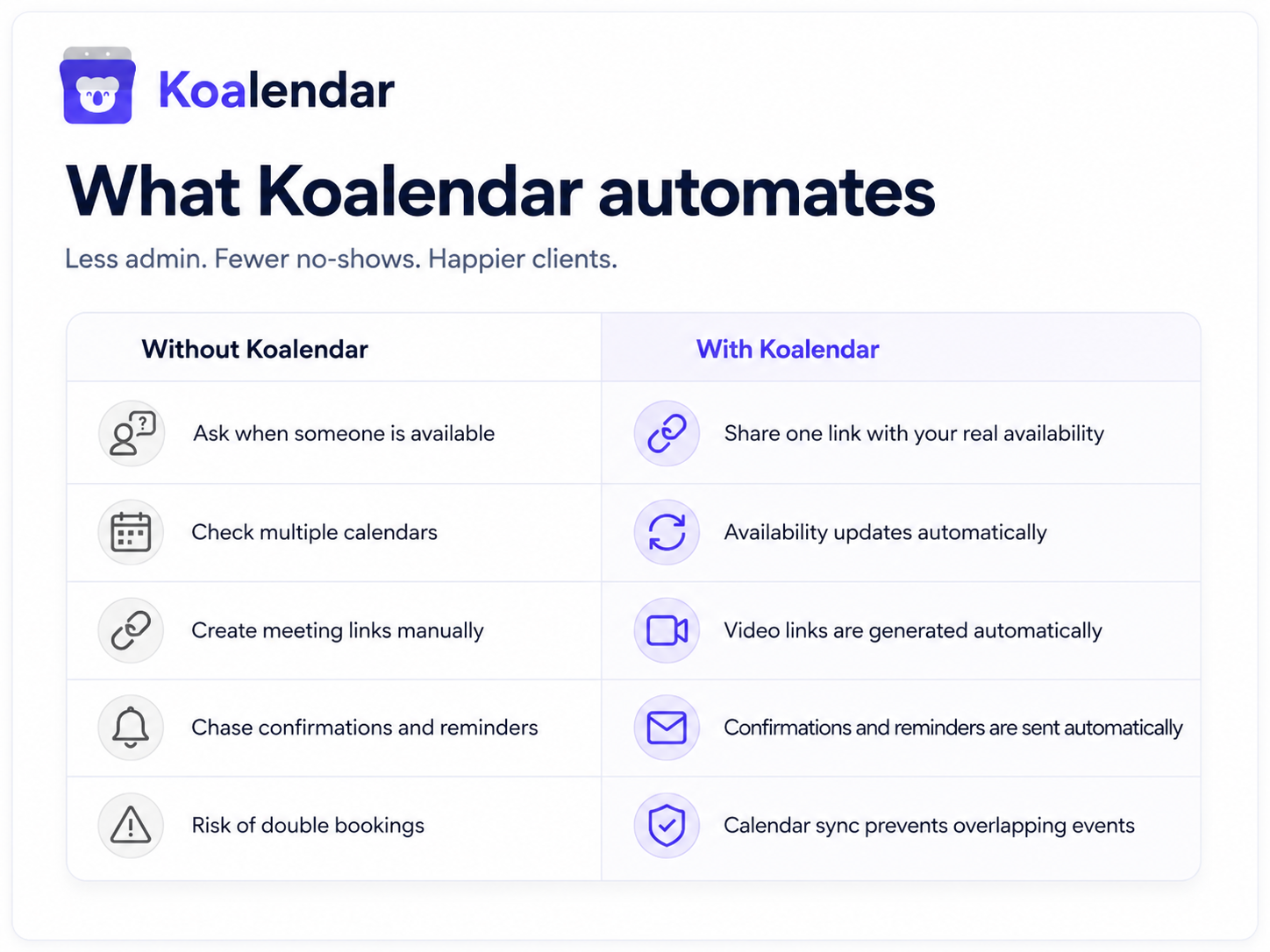
This is where a piece of calendar scheduling software earns its keep. Koalendar gives you an online booking page with your own scheduling link, so clients, candidates, and colleagues book a time that works for them and it lands on your calendar automatically. The page takes bookings 24/7, even while you sleep, and works on any device, so someone can book you from their phone in seconds. There are no per-booking fees and no cap, so unlimited scheduling is the default, not an upgrade.
It connects to the calendars you already use. Calendar sync with Google and Outlook checks your real availability before offering a slot, so the page never double-books you. The free plan connects up to two calendars, which covers most people running a work and a personal calendar side by side. Automatic time zone detection shows each visitor times in their own zone, so nobody has to do the math.
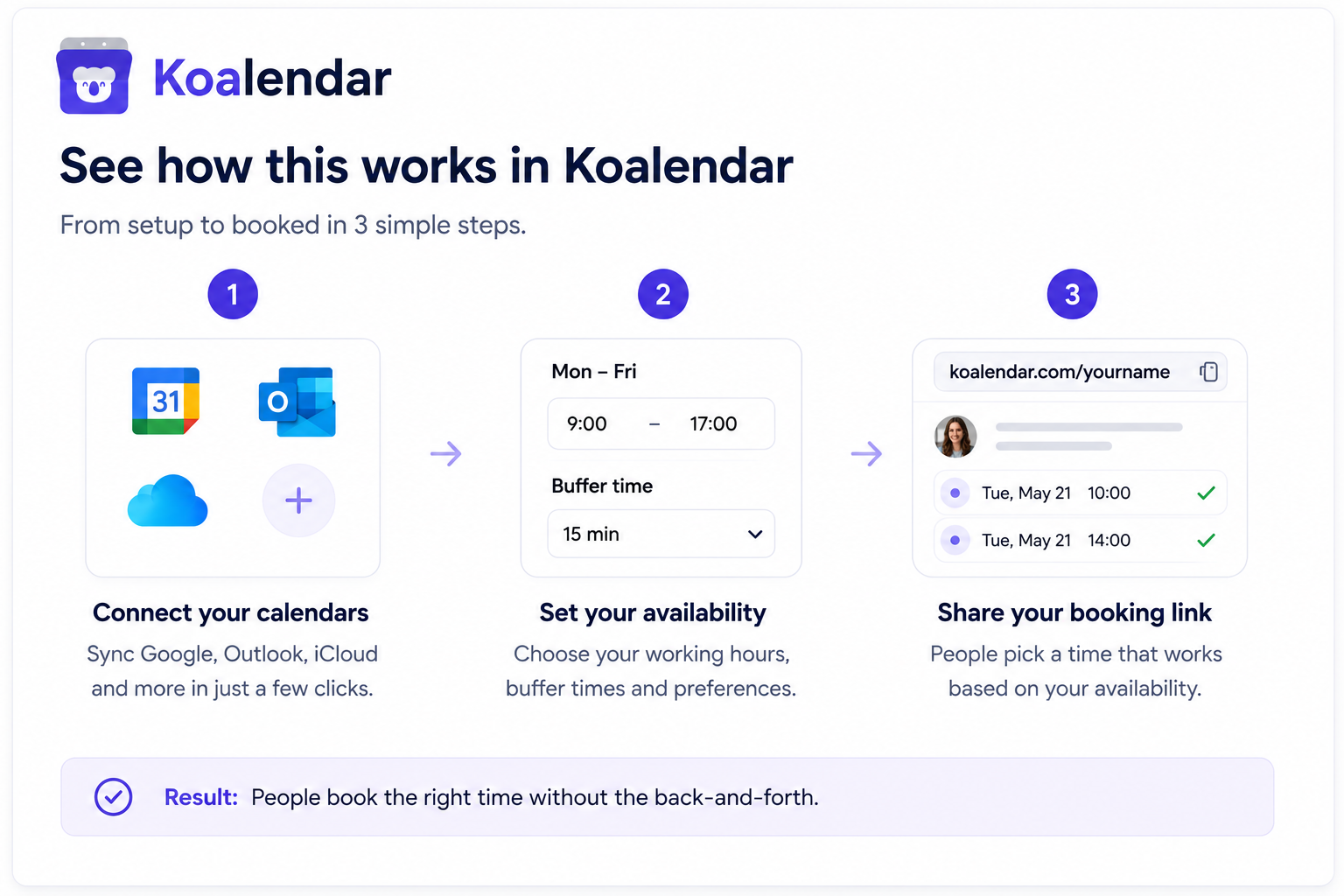
Every booking triggers automatic meeting confirmations to both sides, so you save time scheduling meetings instead of chasing acknowledgements and eliminate back-and-forth emails for good. You can add a booking calendar to your website with a no-code embed, or drop a booking link in LinkedIn, your email signature, or a Slack message. Mobile app access is also available for free.
The Pro plan adds branding and customization, so you can match the booking page to your own logo, colors, and brand, and send automated reminders that cut no-shows. It also offers round robin to split reservations amongst your team, waitlist, packages and much more. The core booking page that delivers a professional client experience is free.
That free tier is the part most people do not expect. It needs no credit card and no trial clock, and you can see exactly where it stops in Koalendar’s free vs Pro plan comparison. That same one-link simplicity is how one financial planner streamlined their client onboarding instead of trading times by email. Set it up once and the asking mostly takes care of itself.
How to ask for availability for a meeting example: final thoughts
Asking for availability does not have to be awkward. Start with the four-part formula, pick the template that fits your reader, and soften the wording so a yes is easy. For clients and prospects, lead with the value; for executives, keep it short; for teammates, one casual line will do.
When the back-and-forth itself becomes the problem, hand the choosing to the other person. A scheduling link turns a multi-email negotiation into a single message and keeps your calendar clean.
Stop the back-and-forth. Share your scheduling link and let people book a meeting when they're available. Try Koalendar free and get your booking page live in minutes.