
TL;DR
The most reliable way to add Outlook Calendar to Apple Calendar is to connect your Outlook account directly on iPhone, iPad, or Mac, which syncs both ways automatically; a calendar subscription gives only a slower, read-only view. This guide covers Outlook.com, Microsoft 365, and Exchange accounts, fixing sync problems, choosing your primary calendar, and skipping the manual calendar updates that cause conflicting appointments. And if you want one simple way to bring calendars from different providers together and let people book time with you, Koalendar is a great option: it syncs your calendars, shares your availability, and helps you avoid the back-and-forth.
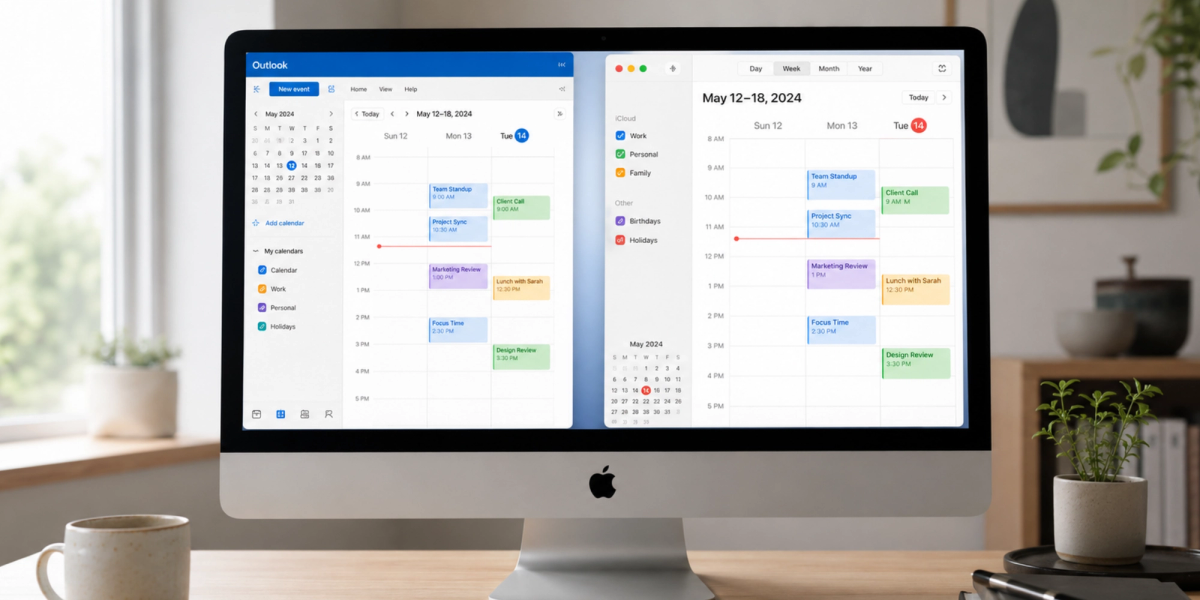
Plenty of professionals keep work in Outlook and personal life in Apple Calendar, and the two rarely talk to each other. A work meeting and a personal errand can land on the same hour with neither app noticing. Connecting Outlook Calendar to Apple Calendar puts every event in one view, on every device you carry. The result? Your day runs great.
The right method depends on whether you want full two-way syncing or just a read-only view. We will cover whether your account can connect, the steps on iPhone, iPad, and Mac, the account types and corporate restrictions, and how to keep both calendars working together.
Can you connect Outlook Calendar to Apple Calendar?
Yes, in almost every case. Two-way sync means a change on either side updates the other, and three methods cover almost everyone:
| Method | Best for | Two-way sync | Difficulty |
| Add your Outlook account to Apple Calendar | Everyday use on iPhone, iPad, and Mac | Yes | Easy |
| Calendar subscription | A read-only view of a shared calendar | No (view-only) | Medium |
| Third-party sync tool | Cross-calendar or advanced workflows | Yes | Medium |
How Outlook and Apple Calendar work together
Add your Outlook account to your Apple device and Apple Calendar pulls events straight from Microsoft's servers. Edit something in either app and the change flows both ways within a minute, staying current across your iPhone, iPad, and Mac at once.
Which Outlook accounts can be synced?
Apple Calendar syncs three kinds of Outlook accounts. A personal Outlook.com address connects as a Microsoft account, while Microsoft 365 work accounts and traditional Exchange accounts connect through Microsoft Exchange sync, the technology behind most company email.
Benefits of syncing Outlook with Apple Calendar
Syncing pays off in four ways. The first is one calendar view instead of flipping between apps, so work meetings and personal plans sit side by side and nothing hides in the app you forgot to open. That alone means fewer missed meetings, because the event you miss is usually the one sitting in the calendar you did not check.
You also get mobile access from whichever device is in your hand, because a change made on your Mac reaches your iPhone within a minute. And you get a clear sight of a clash before you agree to anything, which matters because scheduling conflicts often start with two calendars that cannot see each other.
If colleagues need that same visibility into your day, our guide on how to share your calendar on Outlook explains how. Remember, sharing is separate from syncing. Syncing puts your Outlook events on your own Apple devices, while sharing lets colleagues view your Outlook calendar from theirs, and you can set up both at the same time.
How to add Outlook Calendar to Apple Calendar on iPhone and iPad
Your iPhone is the quickest place to set this up, and the iPad uses the same steps.
Add your Outlook account to your device
Start in the Settings app, not the Calendar app:
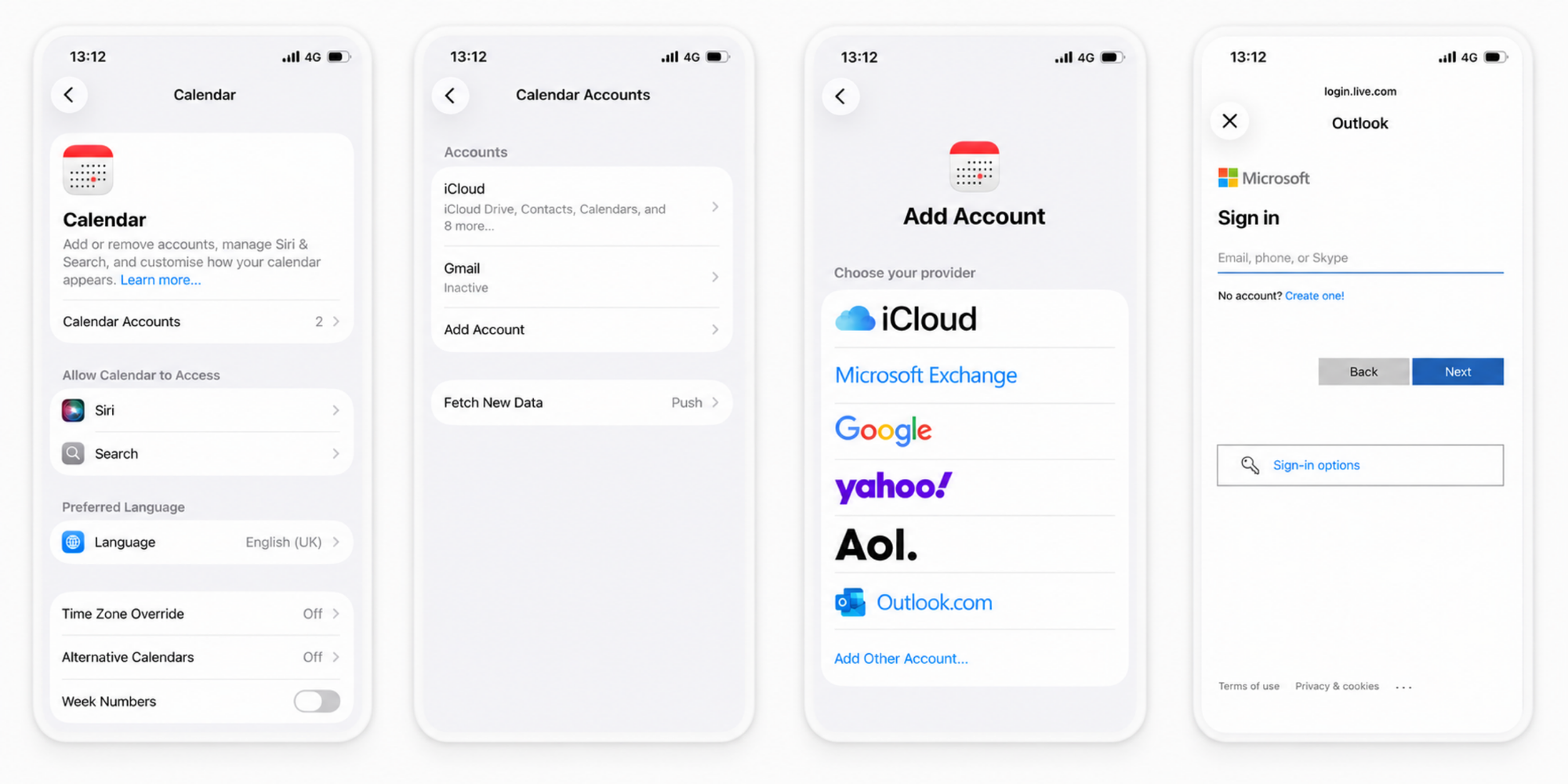
1. Open Settings, tap Apps, then Calendar.
2. Tap Calendar Accounts, then Add Account.
3. Choose Outlook.com for a personal address, or Microsoft Exchange for a Microsoft 365 or Exchange work account.
4. Enter your email and password, then approve any sign-in prompt.
Apple's steps for adding a calendar account on iPhone match this path, and the iPad is identical.
Turn on calendar synchronization
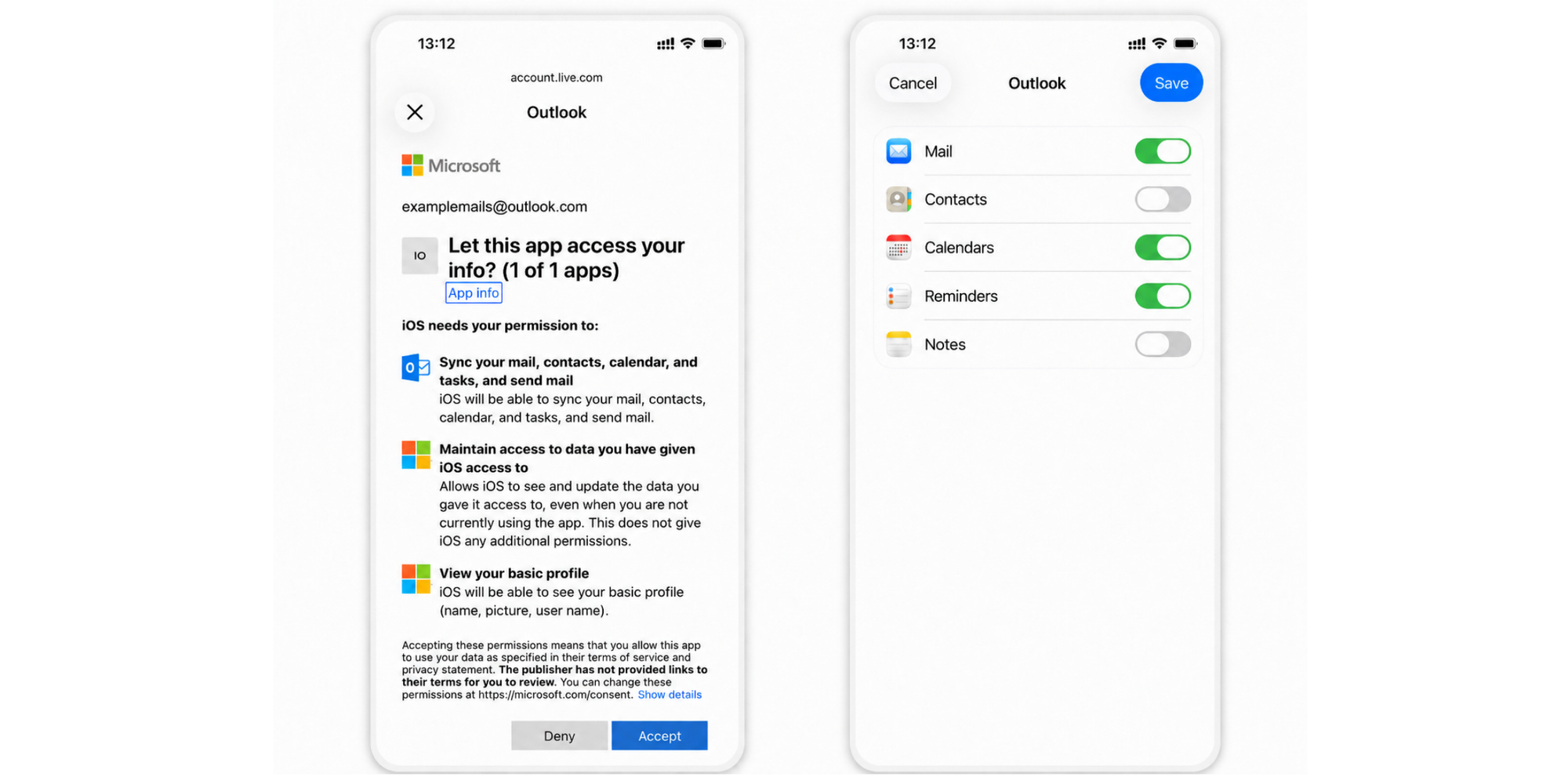
Adding the account is only half the job. After you sign in, iOS asks what to sync, and Calendars have to be switched on for events to appear. Turn it on, leave Mail off if you only want the schedule, then tap Save.
Verify your Outlook events are appearing
Open Apple Calendar and check a day you know is busy. Tap the Calendars button to see your account listed with its own color dot. If it shows but looks empty, pull down to refresh and give a new connection a minute.
How long does Outlook Calendar sync take?
Most accounts finish the first sync within minutes, and many appear almost instantly. A calendar with years of history takes longer the first time only. Nothing after five minutes points to a setting rather than a slow sync.
How do I add Outlook Calendar to Apple Calendar on iPhone?
Here is the short version:
1. Open Settings.
2. Tap Apps -> Calendar.
3. Select Calendar Accounts.
4. Tap Add Account.
5. Choose Outlook or Exchange.
6. Sign in.
7. Enable Calendars.
8. Open Apple Calendar.
Can I sync my Outlook Calendar with my iPhone Calendar?
Yes, and your account type decides the exact path. Personal, work, and Exchange accounts all reach Apple Calendar but authenticate differently.
Syncing a personal Outlook.com account
A personal Outlook.com or Hotmail address is the simplest. Add it as an Outlook.com account, sign in with your Microsoft password, approve the login, and turn Calendars on. No administrator is involved, so nothing can block it.
Syncing a Microsoft 365 work account
A Microsoft 365 work account connects through Microsoft Exchange. Choose Microsoft Exchange, enter your work email, and let automatic setup find your organization's server. Your employer sets the rules, so it may sync fully, partly, or not at all.
Syncing an Exchange account
A traditional Exchange account, run on a company's own server, also uses the Microsoft Exchange option. Enter your address and password and let autodiscover locate the server. If it cannot, add the server details by hand, with help from IT.
What happens if your organization restricts syncing?
Some work accounts will not sync, by design. Companies can switch off external sharing or device sync to protect internal schedules. These corporate account restrictions are set by your IT team, as Microsoft's documentation on Exchange ActiveSync policies describes, so ask your administrator whether mobile sync is allowed.
How to connect Outlook Calendar to Apple Calendar on Mac
On a Mac the idea is the same, but the account lives in System Settings.
Add an Outlook account through System Settings
Open System Settings, then Internet Accounts, and click Add Account. Choose Microsoft Exchange for a work or Exchange address, or Outlook.com for a personal one, then enter your email and password and approve the sign-in.
Enable calendar sync on macOS
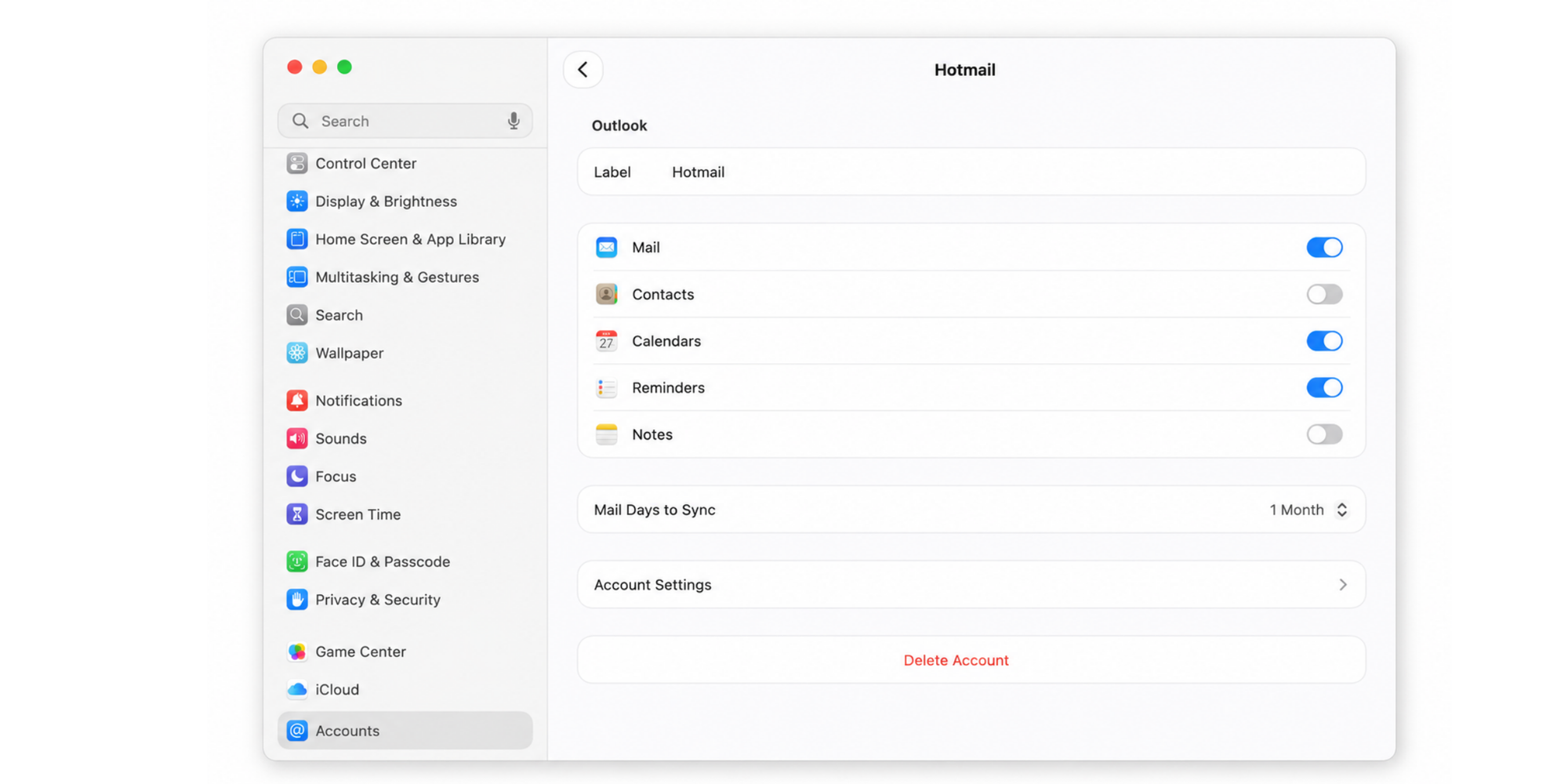
After the account connects, macOS asks which apps to use with it. Check Calendars, click Done, and uncheck Mail or Contacts if you only want the schedule. The account then appears in the Calendar sidebar.
Choose which calendars to display
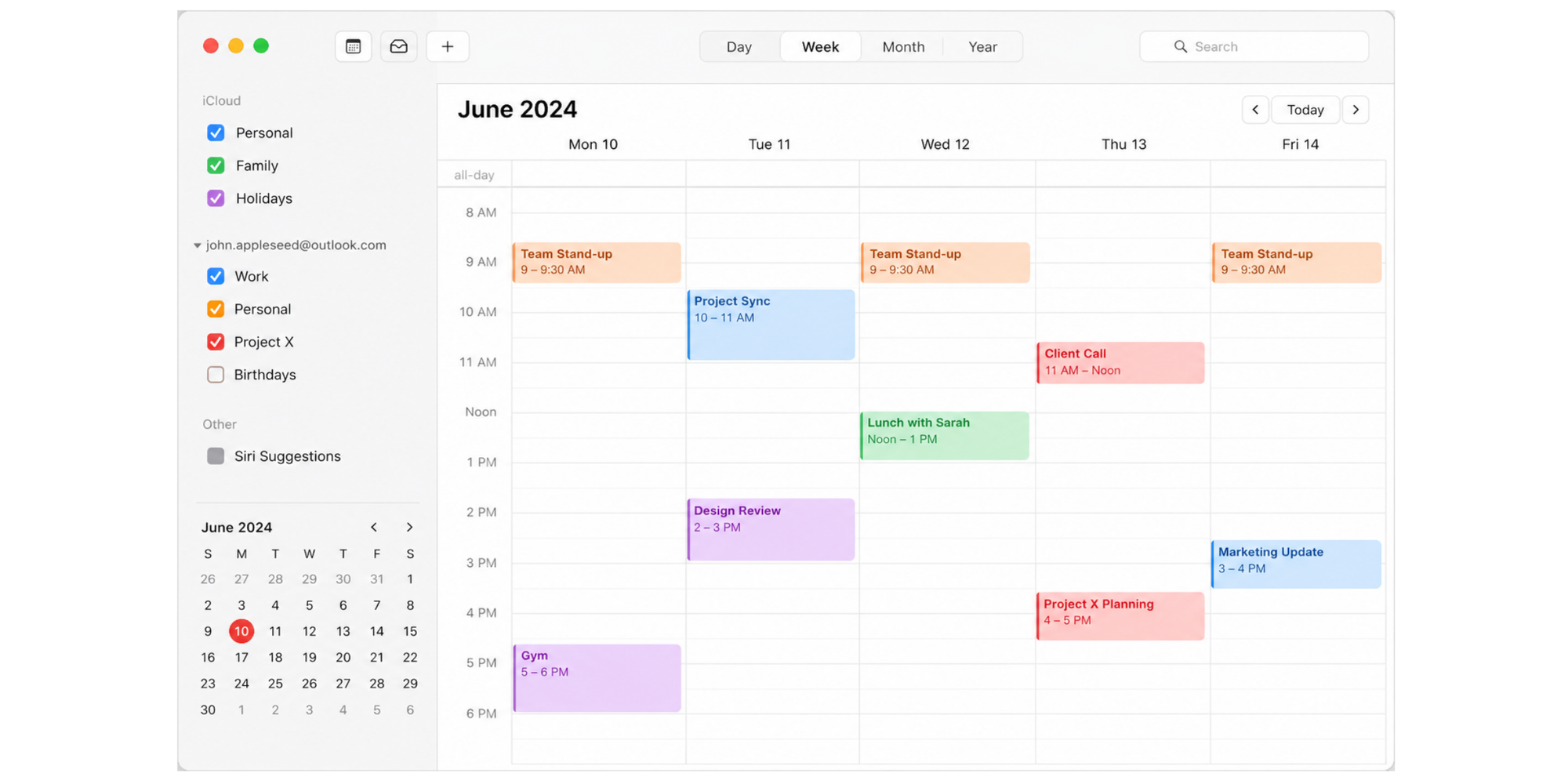
One Outlook account can hold several calendars. In the Calendar sidebar, your account appears as a group; tick or untick each calendar under it, and give each a distinct color so a work block never blends into a personal one.
Verify Outlook events are updating correctly
Test it both ways. Edit an event on your Mac and watch it update on your iPhone, then create one on your phone and confirm it lands back on the Mac. If updates lag, choose Refresh Calendars from the View menu.
Import Outlook Calendar to Apple Calendar using a calendar subscription
A calendar subscription is the other route, and it suits a narrower job. You subscribe to a published link from Outlook, read-only, for seeing a calendar rather than managing it.
What is an ICS calendar subscription?
An ICS subscription is a read-only calendar feed. Outlook publishes your calendar as a web address ending in .ics, and any app that reads the iCalendar standard, including Apple Calendar, can follow that link. It flows one way and refreshes on a schedule.
How to import Outlook Calendar to Apple Calendar
Publish from Outlook on the web, then subscribe on your Apple device:
1. In Outlook on the web, open Settings, then Calendar settings, then Shared calendars.
2. Under Publish a calendar, pick the calendar, click Publish, and copy the ICS link.
3. On a Mac, open Calendar, choose File, then New Calendar Subscription, and paste the link.
4. Set a name, color, and refresh interval, then click OK.
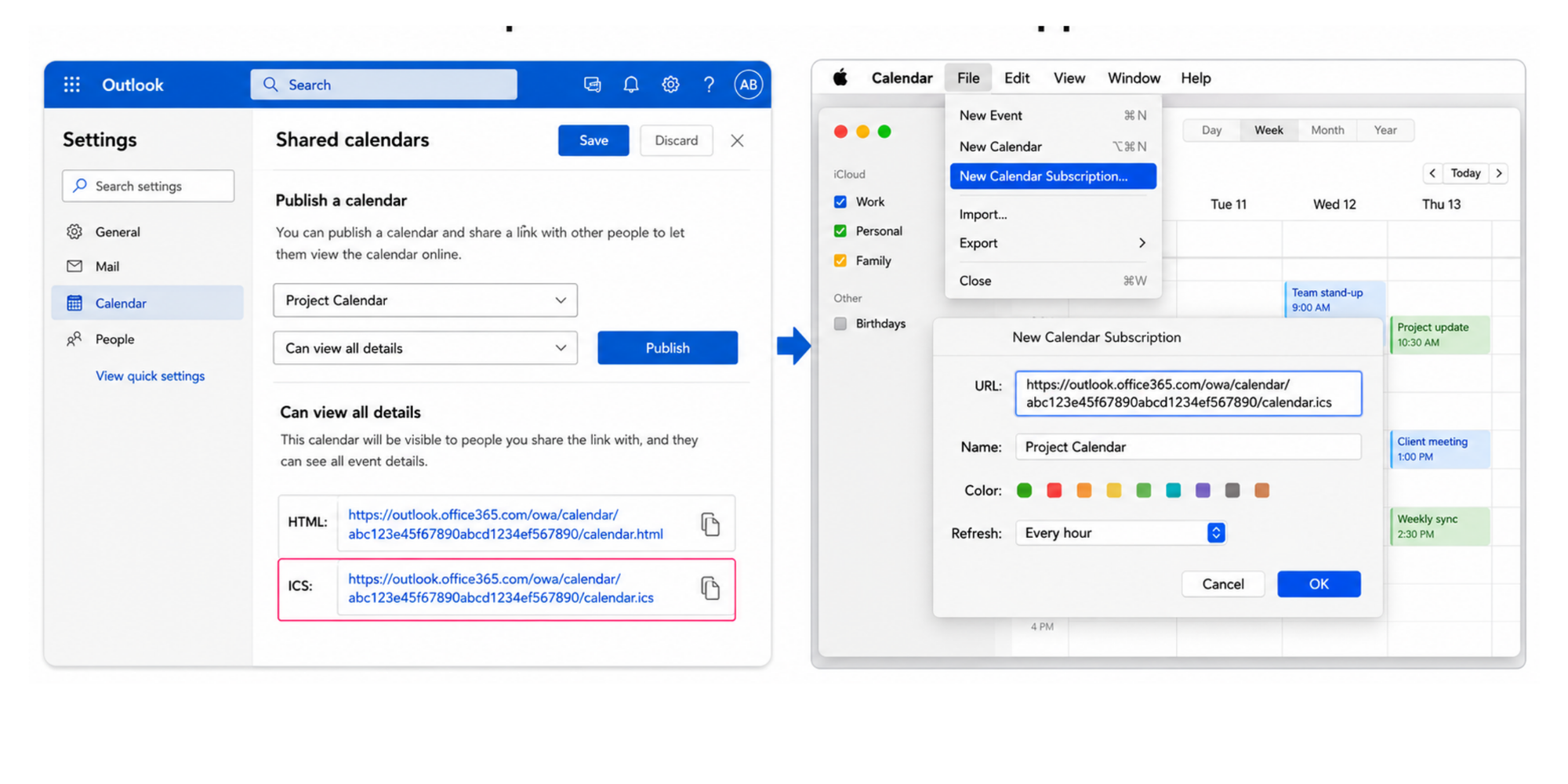
Microsoft's guide to publishing an Outlook calendar and Apple's guide to subscribing on Mac cover both sides. On iPhone, the link goes under Settings, Apps, Calendar, Calendar Accounts, Add Account, Other, Add Subscribed Calendar.
Subscription vs full account sync
The two methods solve different problems: a subscription is view-only and slow to refresh, while a full account sync is the better default for a calendar you use day to day.
| Capability | Account sync | Calendar subscription |
| Two-way updates | Yes | No (view-only) |
| Edit events from Apple Calendar | Yes | No |
| How updates arrive | Automatically, near real time | Delayed, often a few hours |
| Best for | Daily use as your main calendar | Following a shared, read-only calendar |
Outlook Calendar not syncing with Apple Calendar? Try these fixes
When events stop appearing, the cause is almost always a setting rather than a fault. Work through these checks in order, quickest first.
Check calendar permissions
Start with the toggle that trips up most people. Open the account under Settings on iOS or Internet Accounts on a Mac and confirm Calendars is switched on, because mail can sync while calendars stay off.
Confirm you're signed into the correct account
It is easy to sign in with the wrong address when you keep personal and work accounts side by side, so check that the email shown matches the calendar you expect. With two-factor sign-in, account authentication issues can block the connection until you approve the login or create an app-specific password.
Refresh your Outlook connection
A connection can stall without dropping, often after a patchy network moment. On iPhone, pull down in the Calendar app to refresh; on a Mac, choose Refresh Calendars from the View menu.
Update iOS or macOS
An out-of-date system can break sync after Microsoft changes something on its end. Install any waiting update under Software Update, then restart the device, which often clears a sync stuck on the old version.
Remove and re-add the account
When a connection is genuinely stuck, removing the account and adding it again gives a clean start. Delete it from Settings or Internet Accounts, restart, then add it back. This also clears duplicate calendar entries from the same calendar connecting twice.
Verify Exchange server settings
Most accounts configure themselves through autodiscover, so you rarely touch this. When a work or Exchange account will not connect automatically, open its advanced settings and confirm the server address and username, since a single typo stops the calendar loading.
Contact your Microsoft 365 administrator
If every fix fails and a work calendar still will not appear, the block is above your control. Your Microsoft 365 administrator can see whether a policy is preventing sync and lift it if your role allows, so reach out before spending more time on settings you cannot change.
Here is a quick reference for the most common problems:
| Problem | Possible cause | Fix |
| Events missing | Calendar sync turned off | Enable Calendars for the account |
| Delayed updates | Poor or dropped connection | Refresh the account or check your network |
| Duplicate meetings | The same calendar added on two accounts | Remove the duplicate calendar |
| Calendar unavailable | Admin restriction on a work account | Contact your IT administrator |
Outlook Calendar vs Apple Calendar: which should be your primary calendar?
There is no single right answer; it depends on where you spend your day. Once both calendars sync, you can lean on one as your main view while the other feeds in.
When Outlook makes more sense
Outlook earns the primary spot when your work runs on Microsoft. If your team schedules through Outlook, books meeting rooms, and relies on Teams, keeping Outlook as the source of truth keeps you aligned with everyone else.
When Apple Calendar works better
Apple Calendar suits people who live on Apple devices and want one personal hub. If most of your day runs on an iPhone and a Mac, and your work account is one of several you track, Apple Calendar is the comfortable home base.
Why most professionals use both
Running both sounds like extra work, yet for most people it is the realistic setup. The hidden cost is the mental switching between them. The American Psychological Association's research on task switching found that brief mental blocks from flipping between tasks can eat up to 40 percent of your productive time, and checking two calendars to confirm one slot is exactly that switch. Syncing them into one view turns running both into better productivity rather than a daily tax.
Best practices for managing Outlook and Apple Calendars together
Syncing is the setup; these habits keep it useful over time.
Keep work and personal calendars separate
Resist pouring everything into one calendar. Keeping your Outlook work calendar and personal Apple calendar as separate, color-coded layers shows both in one view without blurring them, and you can hide the work layer on a weekend with one tap.
Avoid double bookings
Double bookings happen when one calendar cannot see the other the moment you say yes. With both synced into Apple Calendar, glance at the full day before accepting anything, so a client call and a dentist appointment never claim the same slot.
Use multiple calendar syncing
Once Outlook and Apple Calendar are talking, the same idea scales to any other calendar. If you also run a Google Calendar, here is how to link Google Calendar to Apple Calendar without creating double bookings.
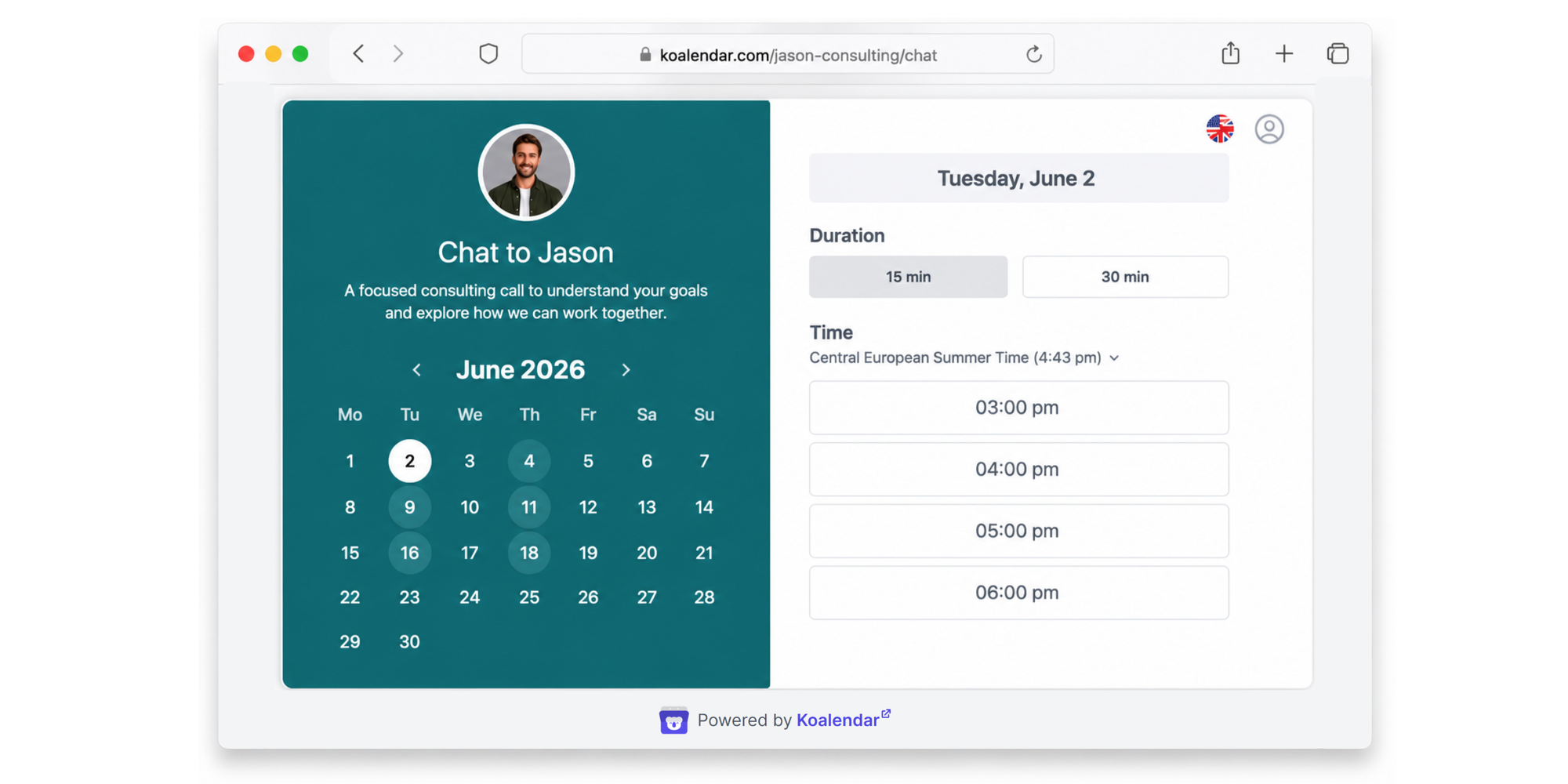
Linking calendars pair by pair is not the only route. Koalendar is a scheduling tool that gives you a booking page, so instead of trading emails to find a time, people pick a slot from a link you share.
When several calendars from different providers need to stay in sync, that's when a dedicated scheduling tool like Koalendar makes sense too. Koalendar syncs your Google, Outlook, and iCloud calendars and reads them together, so it only offers times when you are genuinely free. Additionally, you get centralized admin controls so you can see and manage different calendars and teams.
Automate meeting scheduling
Syncing fixes your own view, but it does not help the people trying to book time with you. If you regularly schedule client meetings, interviews, or demos, an automatic scheduling tool closes the gap. Because it checks every connected calendar at once, a new event blocks that slot in real time, which prevents double bookings. The free plan connects up to two calendars, enough for an Outlook work account and an Apple iCloud calendar together; three or more are on the paid plan.

It detects each booker's time zone automatically, so people book a time 24/7 on one booking page around your real schedule, with separate booking links for different meeting types. The paid plan adds automated email and SMS reminders that cut no-shows, booking caps that limit how many bookings you take per day or week, and your own logo and colors on the booking page, with the Koalendar branding removed. For a whole team, Koalendar's admin controls let an admin run everyone's availability and bookings from one place.
Conclusion
Outlook and Apple Calendar can sync on iPhone, iPad, and Mac, and for most people adding the account directly beats a subscription because it works both ways and updates on its own. When something looks off, confirm Calendars is on, check the right account, and refresh or re-add it. Now that you know how to add Outlook Calendar to Apple Calendar, you can keep your schedules aligned across all your devices and avoid managing multiple calendars manually.
Want to go beyond calendar syncing? Koalendar helps you automate scheduling, connect multiple calendars, prevent double bookings, and let people book time with you instantly. Start free and simplify scheduling today.

.png?w=800&fit=max&auto=format)