TL;DR
The best tool depends on how much complexity you actually need. Koalendar is the top pick for ease of use and set up for facility scheduling, Skedda stands out for visual space management, CourtReserve suits racquet and paddle sports clubs, 25Live handles complex university scheduling, and Robin and OfficeRnD are built around modern workplace management. If your main goal is letting people see availability and reserve a space without double bookings or endless admin, start with the simplest tool that solves that problem.
If you manage conference rooms, classrooms, courts, studios, or community spaces, the wrong facility scheduling software can create almost as much work as a spreadsheet. You need an easy way to control availability, prevent conflicts, and let people reserve spaces themselves—not another system that takes weeks to learn.
Good facility booking software should make that process easier. For sports clubs, the right sports facility scheduling software may also need memberships, payments, leagues, or lessons.
How we chose these tools: We researched each platform against the criteria that matter most for facility scheduling: room and resource booking, double-booking prevention, calendar sync, approvals, recurring reservations, reminders, payments, security, ease of setup, and pricing. We also looked at where each tool fits best, so the list reflects real use cases rather than simply rewarding the longest feature list. Koalendar is included in the comparison, but it won't be the right choice for every organization—and we'll show you where the alternatives make more sense.
What is facility scheduling software?
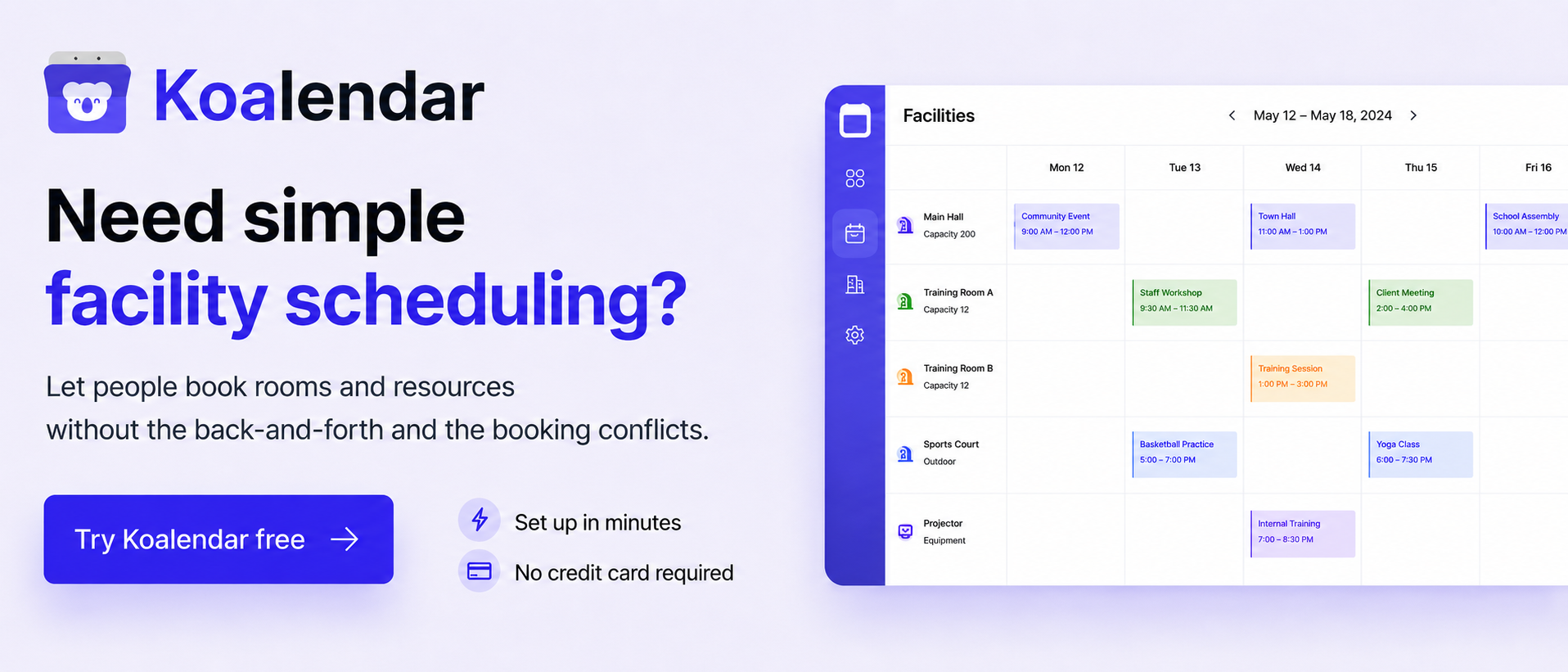
Facility scheduling software is a tool that lets people view availability and reserve shared spaces such as conference rooms, classrooms, courts, studios, and community facilities. It centralizes reservations, helps prevent double bookings, and reduces the manual work required to manage shared spaces.
The best facility booking software also connects reservations with your existing calendars and gives you control over when and how each resource can be booked.
Best facility scheduling software at a glance
For straightforward room and resource reservations, Koalendar is the simplest option on this list. If you need interactive floor plans, club management, university-wide event coordination, or broader workplace operations, one of the more specialized platforms may be a better fit.
| Best for | Key strength | Pricing* | Free option | |
| Koalendar | Simple room & resource scheduling | Easy to setup and easy self-service reservations | Free; Pro $6.99/seat/month (billed annually); Teams custom | ✅ Yes |
| Skedda | Visual space management | Interactive floor plans & booking rules | From $99/month billed annually | ❌ |
| Accruent EMS | Enterprise rooms & events | Complex workplace/campus scheduling | Contact sales | ❌ |
| OfficeRnD Workplace | Hybrid workplaces | Desks, rooms & workplace coordination | From $99/month annually | ❌ |
| CourtReserve | Racquet & paddle sports clubs | Courts, memberships & club operations | From $159/month annually | ❌ |
| 25Live by CollegeNet | Colleges & universities | Campus-wide academic/event scheduling | Contact CollegeNET | ❌ |
| Robin | Hybrid workplace operations | Resource booking & space management | Custom quote | ❌ No public free plan |
*Pricing checked August 14, 2026. Vendors can change plans and pricing, so confirm current costs before purchasing. Koalendar has a Free Forever plan with unlimited bookings and two calendar syncs, while Pro is $6.99 per seat per month with annual billing. Skedda's annual plans start at $99 per month, OfficeRnD Workplace starts at $99 per month annually, and CourtReserve starts at $159 per month when billed annually.
Here's the quickest way to narrow down your shortlist:
| If you need... | Consider |
| Simple room, classroom, studio, or resource scheduling | Koalendar |
| Interactive floor-plan booking | Skedda |
| Enterprise room and event management | Accruent EMS |
| Hybrid workplace and desk management | OfficeRnD Workplace |
| Court booking plus memberships and leagues | CourtReserve |
| Campus-wide academic and event scheduling | 25Live |
| Workplace booking plus space planning | Robin |
The key question isn't “Which platform has the most features?” It's “Which platform solves the scheduling problem I actually have?”
Facility scheduling software comparison
The most useful comparison isn't the number of features—it's whether the software covers the workflows you actually need.
 |  | Accruent EMS | OfficeRnD Workplace | CourtReserve | 25Live | Robin | |
| Best for | Simple room & resource scheduling | Visual space management | Enterprise room & event scheduling | Hybrid workplaces | Racquet & paddle sports clubs | University-wide scheduling | Workplace operations |
| Room/resource booking | ✅ | ✅ | ✅ | ✅ | ✅ Courts/resources | ✅ | ✅ |
| Calendar sync / integrations | ✅ Google, Outlook, iCloud | ✅ Calendar integrations | ✅ Outlook and workplace integrations | ✅ Microsoft, Google, Slack | ✅ Integrations; availability varies by plan | ✅ SIS/calendar ecosystem | ✅ Google & Microsoft |
| Approvals | ✅ | ✅ Booking approvals | ✅ | ✅ Booking policies/workflows | ✅ Rules/permissions | ✅ Configurable approvals | ✅ Meeting-room approvals |
| Recurring bookings | ✅ | ✅ | ✅ | ✅ | ✅ Reservations/programming | ✅ | ✅ |
| Automated reminders / notifications | ✅ Pro custom reminders; basic notifications on Free | ✅ Notifications | ✅ Alerts/notifications | ✅ | ✅ | ✅ Automated communication | ✅ Reminders/check-ins |
| Payments | ✅ Pro | ✅ via Skedda/AllBooked payment capabilities | ⚠️ Not clearly a core EMS booking feature | ✅ | ✅ | ⚠️ Event pricing supported; don't describe as general online payments without qualification | ❌ Not a core booking-payment feature |
| Interactive floor plans | ❌ | ✅ | ⚠️ Broader space-management capabilities exist; not verified as a core EMS feature | ✅ | ❌ | ❌ | ✅ Workplace maps/space planning |
| Membership management | ❌ | ⚠️ No public HIPAA/BAA commitment found | ❌ | ✅ in the OfficeRnD Flex | ✅ | ❌ | ❌ |
| GDPR | ✅ | ✅ | ✅ | ✅ | ✅ | ✅ | ✅ |
| HIPAA / BAA | ✅ HIPAA support; BAA available as add-on | ⚠️ No public HIPAA/BAA commitment found | ⚠️ Accruent discusses HIPAA across healthcare solutions, but I did not find an EMS-specific BAA/HIPAA statement | ⚠️ No public Workplace HIPAA/BAA commitment found | ⚠️ No public HIPAA/BAA commitment found | ⚠️ No public 25Live HIPAA/BAA commitment found | ❌ Robin states it does not store data with HIPAA regulatory requirements |
| Free plan | ✅ Free Forever, but shared room/resource scheduling requires Pro | ❌ 30-day trial, not a permanent free plan | ❌ No public free plan found | ❌ | ❌ | ❌ No public free plan found | ❌ |
| Starting price | Free; Pro $6.99/seat/month annually | $99/month annually, 15 spaces | Contact sales | From €99/month annually on current pricing page; resource-based | annually | Contact sales | quote |
| Best reason to choose it | Straightforward self-service scheduling without facility-management bloat | Interactive floor plans + sophisticated rules | Complex enterprise/campus room and event operations | Desks + rooms + hybrid-work coordination | Courts + memberships + payments + leagues | Campus-wide event/course scheduling | Workplace booking + operations + space planning |
The 7 best facility scheduling software tools
The strongest facility reservation software makes shared spaces easier to use, but these seven tools solve very different versions of that problem.
1. Koalendar — best for ease of use and setup
Choose Koalendar if your main goal is letting people see availability and reserve rooms or resources without emails, spreadsheets, or scheduling conflicts.
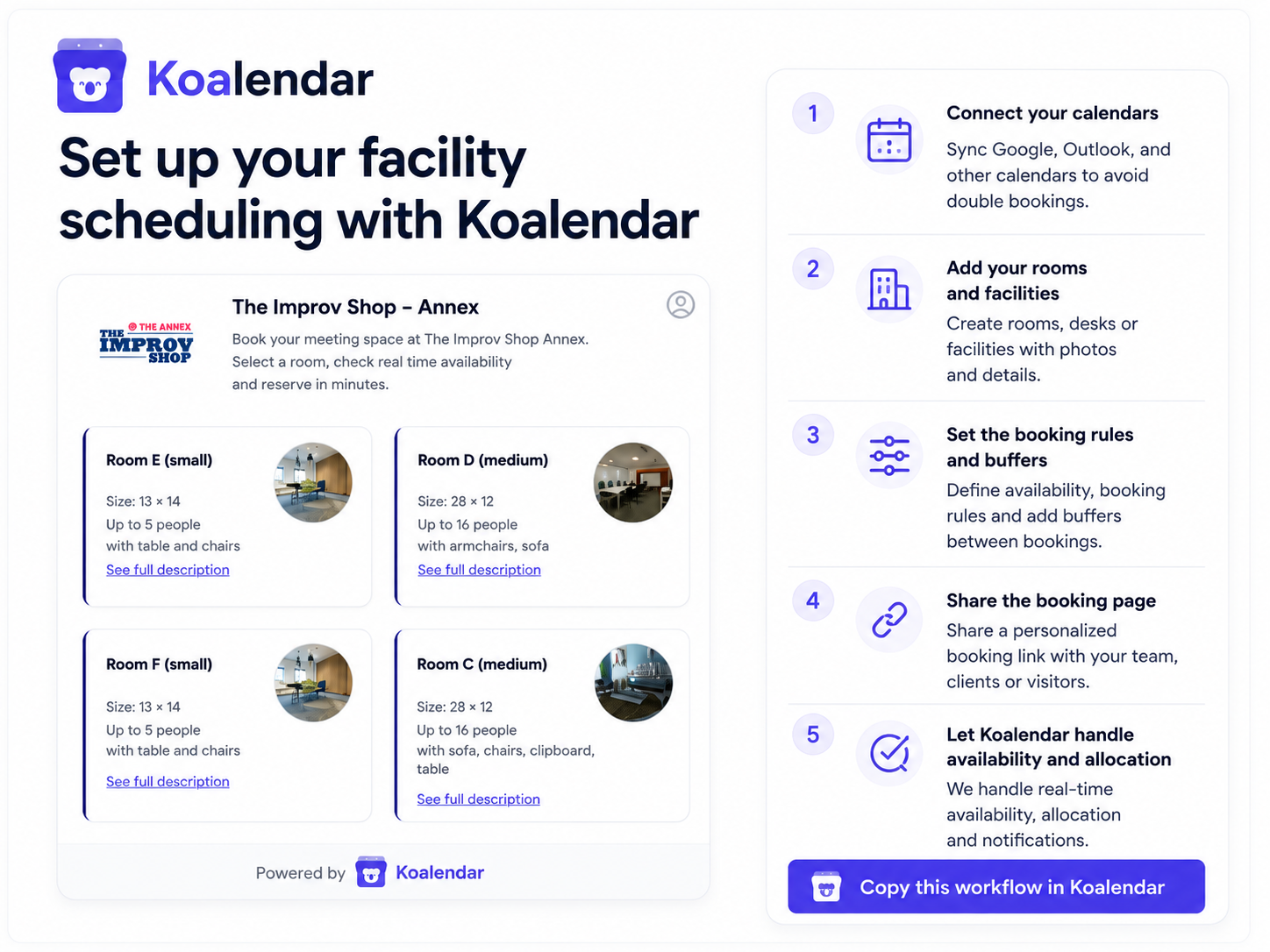
How to set up a facility booking system with Koalendar in minutes:
Koalendar lets you turn your existing calendars into a self-service facility booking system, then layer in rooms, booking rules, approvals, payments, and automations as needed. You can keep the setup simple with separate booking pages for each space, or manage multiple rooms and resources from one booking page.
- Connect the calendars that control your facilities. Start by connecting your Google, Outlook, or iCloud calendars. Koalendar uses those calendars to understand when spaces are already unavailable, helping prevent conflicts before you start accepting reservations.
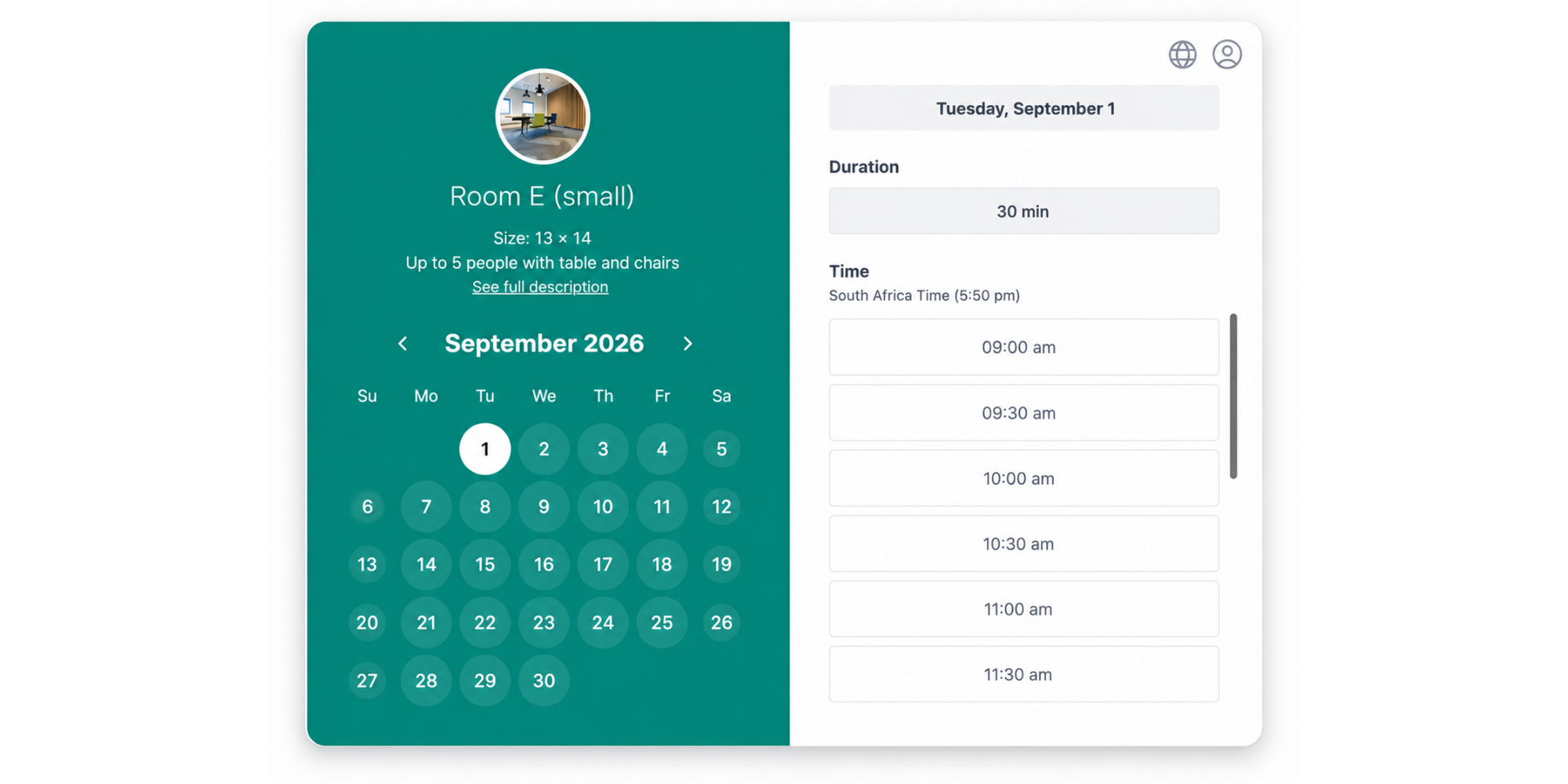
- Choose how you want people to book your spaces. You can create a separate booking page for each facility—such as Conference Room A, Court 2, or Studio 3—or create one booking page with multiple rooms or resources available to choose from. That gives you flexibility depending on how many spaces you manage and how you want the booking experience to feel.
- Set the booking lengths and operating hours. Define when each facility can be reserved and offer the durations that make sense for the space. A conference room might allow 30-, 60-, and 90-minute bookings, while a court or auditorium may use longer blocks. Add minimum notice and buffer times for cleaning, setup, or turnaround between reservations.
- Automatically allocate interchangeable rooms with round-robin. If several spaces can serve the same purpose, you don't have to make the booker choose a specific one. Use round-robin scheduling to assign an available room or resource automatically based on availability. Someone can simply request a meeting room, for example, and Koalendar can allocate one that's free.
- Add approval where a reservation needs a human check. For facilities that shouldn't be instantly confirmed, turn on booking approval. This works well when you need to verify eligibility, staffing, access requirements, group size, or the type of activity before accepting a request.
- Collect the details you need upfront. Add custom booking questions for information such as group size, organization name, equipment needs, event type, or setup requirements. That means fewer follow-up emails after somebody submits a reservation.
- Collect payment when required. Connect Stripe if you charge rental fees, deposits, court fees, or other booking costs. Payment becomes part of the reservation flow instead of another admin task to handle later.
- Automate what happens after a booking. Koalendar can send confirmations and automated reminders to reduce forgotten reservations. You can also use webhooks to trigger workflows when a booking is created, rescheduled, or canceled, helping connect facility reservations with the other systems your team already uses.
That gives you the control of a facility booking system without requiring a full facility-management platform just to manage reservations.
Best for: offices, conference rooms, classrooms, libraries, coworking spaces, studios, community facilities, and organizations that need straightforward resource reservations.
Standout features:
- 24/7 online booking
- Google, Outlook, and iCloud calendar sync
- Automated email and SMS reminders
- Custom booking pages and intake forms
- Recurring scheduling
- Booking limits, buffers, and round-robin
- Approval and tentative-booking workflows
- Branding and customization
- Payment collection on Pro
Pros:
- Easy to set up and share
- Free Forever plan with unlimited bookings
- Two calendar syncs included free
- Self-service booking reduces admin
- No need to implement a heavyweight facilities platform
- Pro adds unlimited calendar syncs, payments, custom reminders, and branding controls
Considerations:
- Not an all-in-one IWMS, maintenance, or asset-management system
- Organizations needing interactive floor plans or complex building operations should look at more specialized software
Pricing: Free Forever; Pro is $6.99 per seat/month with annual billing; Teams uses custom pricing.
Choose Koalendar if: your problem sounds like, “I just need people to reserve my rooms without double booking them.”
Think twice if: you also need preventative maintenance, work orders, asset tracking, or detailed workplace utilization planning.
Check out how this theater handles bookings for 6 rooms with Koalendar
2. Skedda — best for visual space management
Choose Skedda when floor plans and detailed rules are central to how people find and reserve spaces.
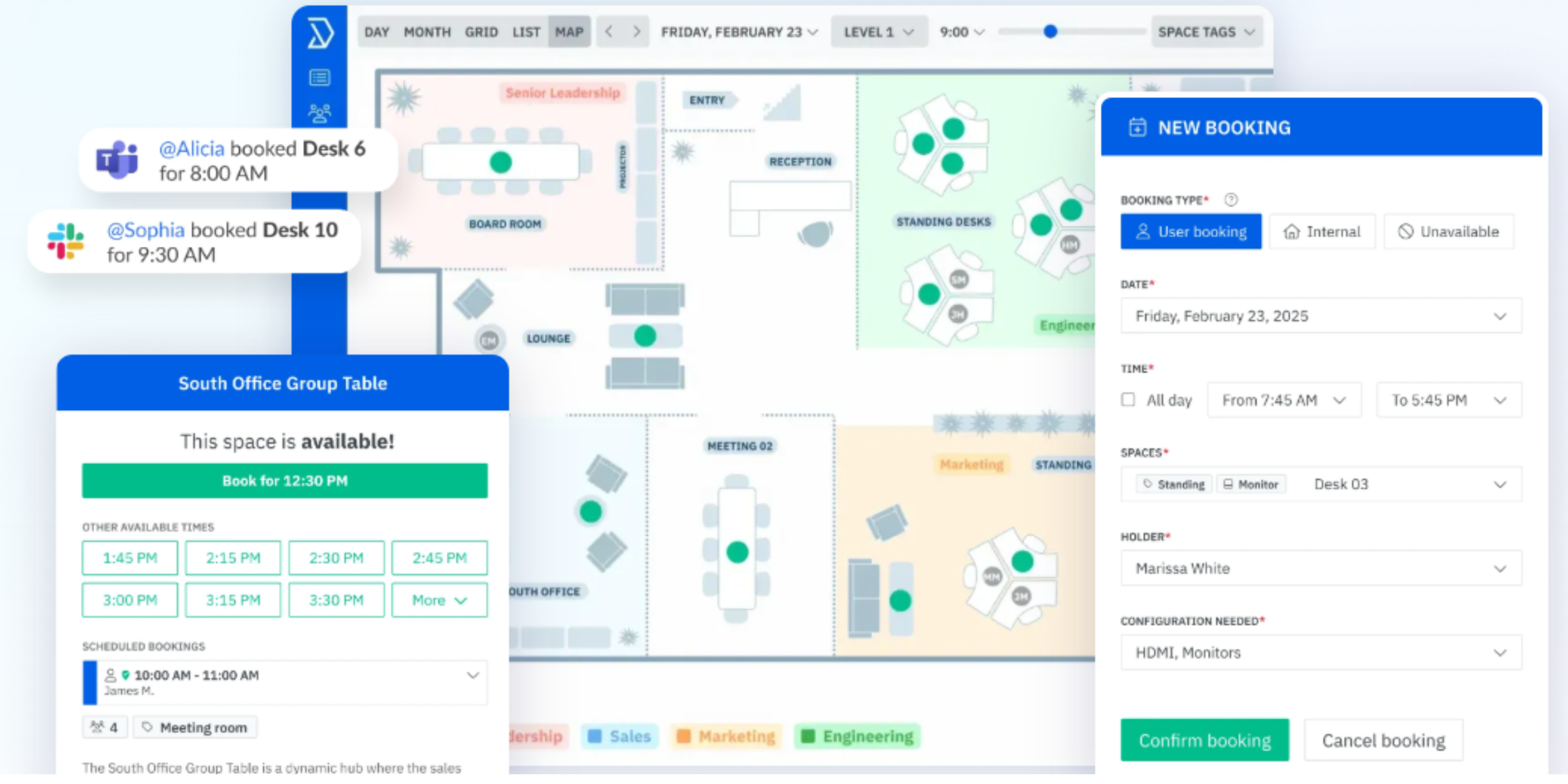
Skedda combines room, desk, and resource booking with custom interactive floor plans. Its rule system can control who books particular spaces and under what conditions, and Skedda added booking-approval workflows for request-first reservations in 2026. It also supports two-way synchronization with Google Workspace room resources.
That makes it a stronger fit than a lightweight scheduler when users need to see where a room, desk, or resource is before reserving it.
Best for: offices, universities, healthcare organizations, shared workplaces, and facilities with visually mapped spaces.
Standout features:
- Interactive floor plans
- Rules and roles
- Booking approvals
- Unlimited bookings on listed plans
- Google and Microsoft calendar integrations
- Space-management reporting
Pros:
- Strong visual booking experience
- Useful for complex access and reservation policies
- Handles many types of bookable spaces
- More space-management depth than a basic scheduler
Considerations:
- More functionality—and therefore more setup—than many small teams need
- Pricing starts significantly above simple scheduling tools
Pricing: Starter begins at $99/month billed annually for 15 spaces; higher plans add deeper rules, analytics, and space-management controls.
Choose Skedda if: an interactive map is an important part of your booking process.
Think twice if: you just need a link where people can check availability and reserve a room.
3. Accruent EMS — best for enterprise room and event scheduling
Choose Accruent EMS when room booking is part of a much larger enterprise or campus scheduling operation.
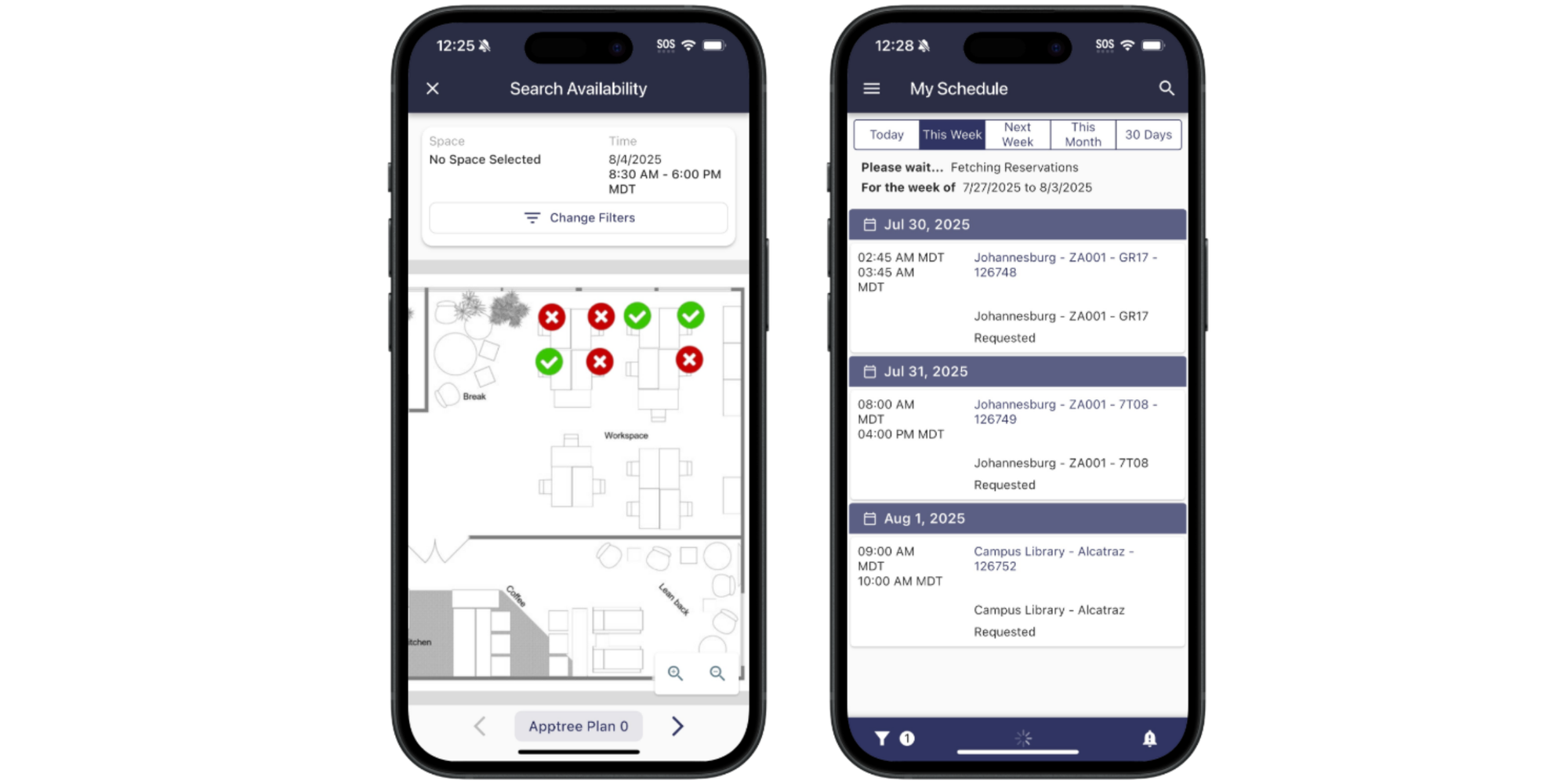
EMS manages desks, rooms, events, workspaces, and shared resources from a centralized platform. Accruent positions it for organizations that need scalability, reporting, permissions, multi-site management, and integrations with tools such as Outlook, Microsoft Teams, and Zoom.
This is the enterprise end of the market. If a facilities team manages thousands of employees, multiple buildings, events, and different booking permissions, the extra depth can be useful.
Best for: large enterprises, campuses, conference centers, and organizations with complex room and event requirements.
Standout features:
- Room, desk, event, and resource scheduling
- Permission controls
- Calendar integrations
- Mobile booking
- Room-usage metrics
- Multi-site capabilities
Pros:
- Built for complex organizations
- Strong room and event scheduling depth
- Enterprise integrations and reporting
- Appropriate for large-scale implementations
Considerations:
- Likely excessive if your requirement is simple room reservations
- Purchasing and implementation are more sales-led than self-service tools
Pricing: Contact Accruent for EMS pricing.
Choose EMS if: scheduling is an enterprise operation involving multiple departments, sites, and policies.
Think twice if: you'd rather be live quickly with a straightforward booking page.
4. OfficeRnD Workplace — best for hybrid workplaces
Choose OfficeRnD Workplace when your room reservations are closely connected to desks, attendance, office maps, and hybrid-work policies.
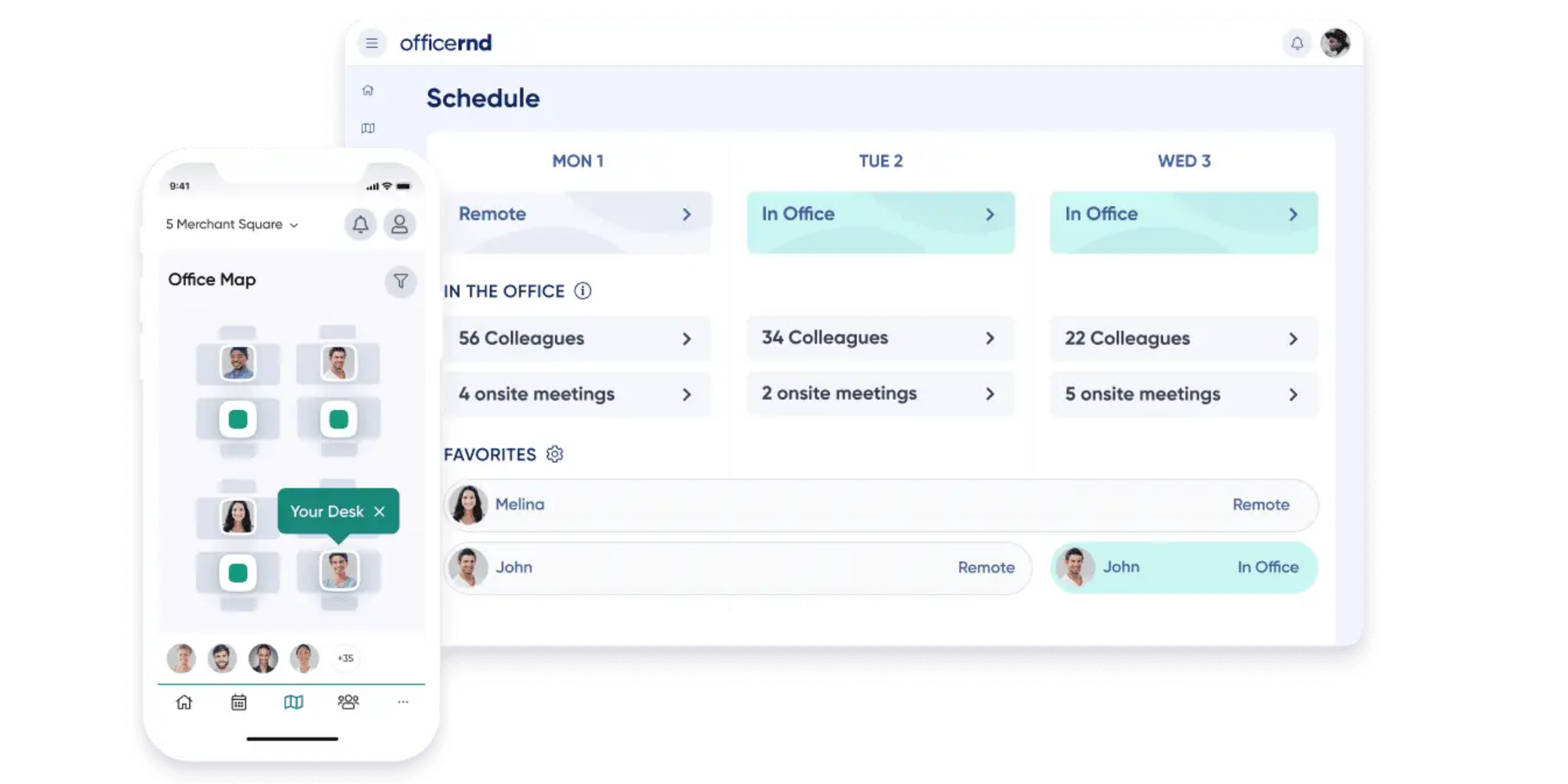
Its Start plan includes desk and meeting-room booking, recurring bookings, interactive office maps, workplace-utilization analytics, and Microsoft, Google, and Slack integrations. Professional adds advanced booking policies, QR check-ins, multi-location management, and other workplace controls.
This makes OfficeRnD a broader workplace platform rather than simply a room scheduler.
Best for: hybrid companies coordinating desks, meeting rooms, employees, and multiple office locations.
Standout features:
- Meeting-room and desk booking
- Recurring reservations
- Interactive office maps
- Utilization analytics
- Automatic release of unused spaces
- Google, Outlook, Teams, and Slack integrations
- Workplace policies and check-ins
Pros:
- Brings room and desk management together
- Strong hybrid-work functionality
- Visual maps help employees choose spaces
- Deeper utilization data than a simple scheduler
Considerations:
- More expensive and operationally complex if you only need rooms
- Some enterprise capabilities sit on higher tiers or add-ons
Pricing: Start begins at $99/month when billed annually, with pricing influenced by bookable resources and meeting rooms. Professional starts at $399/month annually; Enterprise is custom.
Choose OfficeRnD if: you need to coordinate who is coming into the office as well as what they're booking.
Think twice if: desk management and workplace analytics aren't part of the problem.
5. CourtReserve — best sports facility scheduling software for racquet and paddle clubs
CourtReserve is the strongest specialist option here when facility reservations are tied to running a tennis, pickleball, or other racquet and paddle sports club.
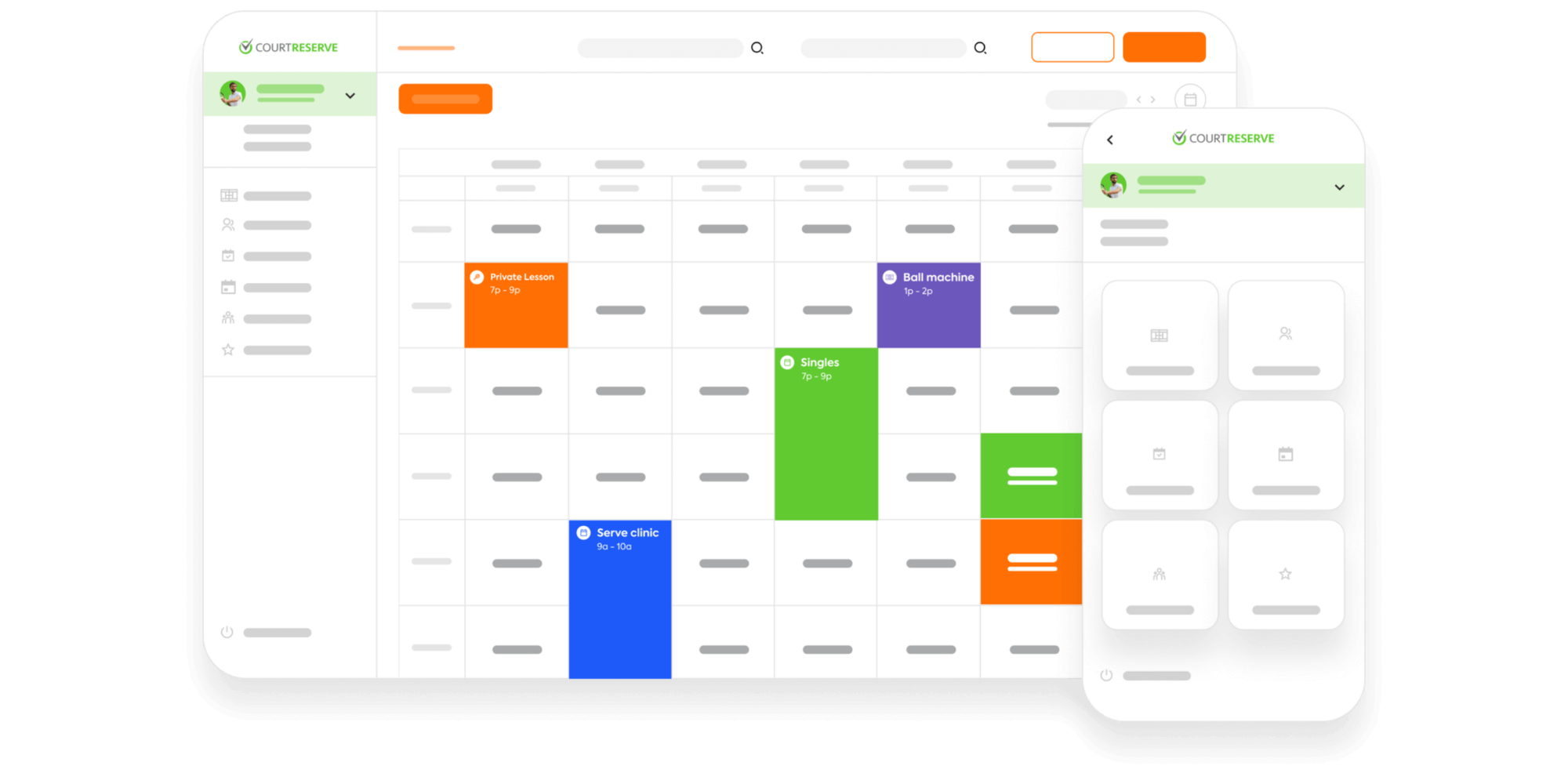
CourtReserve goes beyond court scheduling to manage lessons, programming, memberships, payments, leagues, and player experiences. Its current positioning is explicitly focused on racquet and paddle sports rather than general-purpose facility management.
That specialization is both its biggest advantage and the clearest reason not to choose it for a regular office, classroom, or community room.
Best for: tennis clubs, pickleball facilities, racquet clubs, and multi-court sports businesses.
Standout features:
- Court reservations and lessons
- Public booking
- Membership management
- Events and programming
- Payments
- Player portal and mobile app
- League functionality on higher plans
Pros:
- Designed around sports-club workflows
- Combines scheduling and membership operations
- Built-in payments
- Unlimited reservations and lessons are listed across current plans
Considerations:
- Much more than you need for basic court or room reservations
- Focused on racquet and paddle sports rather than general facilities
- Higher starting price than simple scheduling software
Pricing: Launch starts at $199/month or $159/month billed annually for up to eight courts. Advance starts at $329/month annually for 16 courts, and Momentum at $499/month annually for 32 courts.
Choose CourtReserve if: memberships, lessons, events, leagues, and court bookings all need to live together.
Think twice if: you're simply giving a local group, team, or community access to book a sports space. For a lighter approach, see how one organization brought a village-wide sports event into one Koalendar booking hub.
6. 25Live — best for university-wide scheduling
Choose 25Live when you're coordinating academic rooms, events, resources, and institutional scheduling across a college or university.
25Live is built for complex scheduling environments where lots of departments compete for the same spaces. You can manage room availability, capacities, layouts, event requirements, and approval workflows from one system, which makes it a better fit for campus-wide coordination than simple room booking.
Best for: universities, colleges, and large academic institutions with complex scheduling needs.
Standout features:
- Class and event scheduling
- Room and resource management
- Capacity and layout controls
- Approval workflows
- Conflict checking
- Campus-wide scheduling administration
Pros:
- Well suited to large, multi-department institutions
- Handles academic and event scheduling in one place
- Strong controls for complex room requirements
- Built for high-volume scheduling
Considerations:
- More complex than most small organizations need
- Not designed for teams that simply want a quick self-service booking page
- Pricing is not publicly listed
Pricing: Contact CollegeNET for a quote.
Choose 25Live if: you need one system to coordinate scheduling across an entire campus.
Think twice if: you only manage a small number of classrooms, study rooms, or shared spaces and want something easier to set up and maintain. For that use case, Koalendar may be a much lighter fit.
7. Robin — best for hybrid workplace operations
Choose Robin when room and desk reservations form part of a wider workplace-experience and space-planning strategy.
Robin combines resource booking with space management, visitor management, employee experience, and workplace operations. Users can reserve desks, rooms, parking, and other resources, while facilities and operations teams can use broader space-planning tools.
Robin also integrates with Microsoft 365 for room scheduling and calendar synchronization.
Best for: medium and large businesses managing hybrid offices.
Standout features:
- Desk, room, parking, and resource booking
- Space planning
- Visitor management
- Microsoft 365 integrations
- Workplace analytics
- Employee experience tools
Pros:
- Broad workplace-management scope
- Strong fit for hybrid work
- Supports more resources than meeting rooms alone
- Useful for workplace and facilities teams needing utilization context
Considerations:
- More platform than a small team needs for room booking
- Public pricing isn't listed
Pricing: Robin provides custom pricing based on the organization.
Choose Robin if: your goal includes understanding and optimizing how people use the workplace.
Think twice if: the problem begins and ends with “Is this room available?”
Which facility scheduling software is right for you?
Start with the operational problem, then buy only as much software as you need to solve it.
Choose Koalendar if you want simple facility scheduling
Koalendar fits the straightforward version of the problem:
“I want people to see when a room or resource is free, choose a time, and reserve it without contacting me.”
That's especially useful when bookings involve external guests, students, community members, or customers—not just employees inside one Microsoft 365 environment.
For example, you can give a meeting room, classroom, simulator, or studio its own booking page, sync availability with your existing calendars, collect information through custom fields, and automatically send confirmations and reminders.
That means fewer “Is it free at 4?” messages and less time manually moving reservations between systems.
You can also see how this marketing agency helped a customer rent out spaces on their website with Koalendar or how Miner's Nine manages golf simulator bookings with Koalendar.
Choose a facility management platform if you also need maintenance and asset management
A booking problem and a facility-management problem aren't automatically the same thing.
If your responsibilities include preventative maintenance, work orders, asset lifecycle management, inspections, building operations, real-estate planning, or detailed utilization reporting, look beyond simple facility reservation software.
You may need a comprehensive facilities management system or IWMS rather than a scheduling tool.
That's not a reason to buy the biggest platform by default. It's a reason to define the job clearly before comparing products.
Choose specialist software if your facility has industry-specific requirements
Some facilities need workflows that go well beyond a calendar.
A tennis or pickleball club may need memberships, league management, lesson scheduling, and payments. CourtReserve is built for exactly that environment.
A university may need to coordinate academic timetables, room capacities, event resources, and campus-wide administration. That's where a system such as 25Live makes more sense.
And a large hybrid office may need desks, employee attendance, floor maps, visitor management, and room utilization—all areas covered more deeply by OfficeRnD or Robin.
The point is simple: specialist complexity is valuable when you genuinely need it. Otherwise, it becomes extra software to configure, pay for, and manage.
Sports facility scheduling software: when do you need a specialist tool?
Choose specialist sports scheduling software when court reservations are only one part of running the facility.
If you manage a commercial tennis or pickleball club, for example, you may also need membership renewals, court fees, lesson bookings, leagues, player matching, programming, and payment processing. A sports-specific platform such as CourtReserve puts those workflows together.
But not every court, gym, studio, or recreation space needs club-management software.
If your requirement is simply to make a facility available at defined times, collect booking details, prevent conflicting reservations, and send reminders, a general scheduler can be easier to run.
Read how this company brought a village-wide event with several sports into one simple booking system.
That distinction is worth making before you buy. The best sports facility scheduling software is the one that matches how the facility operates—not the one with the longest feature list.
What to look for in facility scheduling software
Prioritize conflict prevention, self-service booking, calendar compatibility, useful controls, and ease of adoption before advanced extras.
Does it prevent double bookings?
This is the baseline.
When someone reserves a space, its availability should update so another person can't take the same slot. If you're already using Outlook or Google Calendar, check exactly how the software synchronizes with those calendars.
Microsoft even documents scenarios where incorrectly configured room processing can allow a conflicting reservation, which is a useful reminder to test your real booking workflow rather than assuming every integration behaves the same way.
Can people book without contacting an administrator?
A good system should remove you from routine reservations.
Ask whether employees, students, members, or visitors can:
- Check availability themselves
- Choose a suitable time
- Provide the information you need
- Receive a confirmation
- Reschedule or cancel when permitted
Every booking that still requires an email defeats part of the point.
Does it work with your existing calendars?
You probably don't want a second calendar that somebody has to remember to update.
Look for synchronization with the systems your team already uses. Koalendar, for example, supports Google, Outlook, and iCloud calendar sync, while workplace-focused platforms such as OfficeRnD and Robin provide deeper integrations aimed at organizational Microsoft and Google environments.
Can you control when and how facilities are booked?
Different spaces need different rules.
You may need:
- Minimum or maximum reservation lengths
- Buffer time for setup and cleanup
- Advance-booking limits
- Approval before confirmation
- Recurring reservations
- Capacity controls
- Questions or custom fields
- Different availability for each space
Don't buy a tool before checking the rules that matter to your real facility.
How quickly can your team actually adopt it?
More functionality isn't helpful if nobody uses it.
Think about the experience for both administrators and bookers. Can you create the first resource without a lengthy implementation? Can a visitor understand the booking page without training? Can staff see what's available without asking for help?
For simpler operations, adoption speed may matter more than an impressive list of enterprise controls.
Are you paying for facility-management features you don't need?
This is the easiest question to overlook.
Interactive maps, visitor systems, utilization analytics, workplace policies, maintenance tools, membership billing, and event-management systems can all be valuable.
But they're only valuable if they're part of your job.
If you're managing a handful of rooms, courts, classrooms, or studios, a focused scheduler may solve the problem at a fraction of the complexity.
For more help comparing room-specific tools, see our guide to the best conference room booking software and these practical approaches to meeting room management.
Why Koalendar is a simpler alternative for facility scheduling
Koalendar makes the most sense when your booking problem is simple and you'd like to keep the solution that way.
“I don't want another complicated system”
You can create a booking page, define availability, connect your calendar, and share the link.
People choose an available time themselves. You get the reservation in your calendar. No new facility-management process is required.
For shared offices, you can also explore coworking space scheduling software built around the same self-service approach.
“I need to stop double bookings”
Give each room or resource clear availability and connect the calendars that already contain your commitments.
When availability stays synchronized, bookers see times they can actually use rather than requesting a slot and waiting for someone to check it manually.
“I don't want to pay for features I won't use”
Koalendar's Free Forever plan includes unlimited bookings and scheduling links, two calendar connections, embedded booking pages, and other core scheduling features. Pro charges per seat or bookable resource and allows unlimited calendar syncs, custom email, and SMS reminders, payment support, and the ability to remove Koalendar branding.
That makes it possible to start with the scheduling problem first and upgrade only if you need more.
Start scheduling facilities without the manual work
The best facility scheduling software is the one that matches the complexity of the spaces you actually manage.
Choose CourtReserve if running a sports club means managing memberships and leagues. Look at 25Live for university-wide scheduling, Skedda for visual floor plans, or Robin and OfficeRnD when rooms are part of a broader workplace-management strategy.
But if your priority is simply making rooms and resources easy to reserve while avoiding conflicts, Koalendar gives you the scheduling essentials without turning facility booking into another system your team has to learn and manage.