
TL;DR
Improving speed to lead in real estate takes more than responding to inquiries within five minutes. It means giving interested buyers and sellers an easy way to take the next step.
- Automate initial lead responses so inquiries don't go unanswered, even after hours.
- Include booking links in your follow-up messages to turn interest into appointments.
- Use round-robin scheduling and calendar synchronization to connect prospects with available agents.
- Automate appointment reminders and let clients reschedule without the back-and-forth.
- Measure both your lead response time and lead-to-appointment conversion rate to understand whether your strategy is working.
Combining your existing CRM with scheduling software like Koalendar helps you put these strategies into practice without adding more admin to your day.
You're halfway through a property showing when your phone buzzes with a new buyer inquiry. By the time you've finished the tour, answered your client's questions, and checked your messages, an hour has passed. And that potential buyer? They may already be talking to another agent.
That's what makes speed to lead in real estate so challenging. You know responding quickly matters, but you can't be available every minute of the day.
Even when you improve your real estate lead response time, there's another hurdle: finding a time to actually meet your prospect.
Fortunately, combining lead response automation with online appointment scheduling can help you tackle both challenges.
The impact can be significant. UofSCRentals, a South Carolina property management company, reported an approximately 85% reduction in its tour and inquiry scheduling process after adopting Koalendar. By letting prospects book directly, the team removed unnecessary steps between property interest and confirmed viewings.
Here's how to turn more incoming inquiries into booked property showings, buyer consultations, and listing appointments without spending your day chasing leads.
What is speed to lead in real estate and why does it matter?
Speed to lead in real estate is the time between receiving a new buyer or seller inquiry and making your first attempt to contact that prospect.
The shorter that window, the sooner you can start a conversation, understand what your prospect needs, and move them toward an appointment.
Yet many real estate professionals struggle to respond consistently. A 2024 secret shopper study by real estate analyst Mike DelPrete found that 47% of online property inquiries received no human response. Among those that received a reply, the median response time was 39 minutes.
That's a significant opportunity for agents who can build a more reliable follow-up process.
Understanding the five-minute rule for real estate leads
The five-minute rule recommends making initial contact with a new lead within five minutes of receiving their inquiry.
The recommendation draws on a 2007 Lead Response Management Study by InsideSales.com and researcher James Oldroyd, which reported that the odds of qualifying an online lead were 21 times higher when the first call was made after five minutes rather than 30 minutes.
Similarly, research published in Harvard Business Review in 2011 found that businesses attempting to contact leads within an hour had substantially better qualification outcomes than those waiting longer.
It's worth putting these findings into perspective. Both studies examined online sales leads across businesses, rather than real estate transactions specifically. They measured lead qualification, not completed property sales.
Still, the takeaway is useful: the sooner you engage an interested prospect, the sooner you can find out whether there's a genuine opportunity to work together.
Speed to lead vs. speed to appointment: why you need both
A quick response opens the conversation. A booked appointment gives it somewhere to go.
Alongside speed to lead, consider tracking another metric: speed to appointment, or the time between receiving an inquiry and confirming an appointment with that prospect.
| Metric | What it measures |
| Speed to lead | Time from inquiry to first contact attempt |
| Speed to appointment | Time from inquiry to confirmed appointment |
| Lead-to-appointment conversion | Percentage of incoming leads that book an appointment |
| Lead-to-sale conversion | Percentage of incoming leads that become completed sales |
Speed to appointment isn't a standardized industry benchmark. It's a practical complementary metric that helps you understand what happens after your initial response.
For example, you might reply to a property inquiry in two minutes but spend the next two days exchanging messages to arrange a viewing.
Improving the first metric gets you into the conversation faster. Improving the second helps you keep it moving.
What's slowing down your real estate lead conversion?
Missed inquiries, inefficient lead distribution, and manual appointment scheduling can all create unnecessary delays between a prospect expressing interest and meeting with an agent.
Here are five common bottlenecks worth addressing.
Delayed responses during property showings and client meetings
Your working day rarely revolves around your inbox. Between property tours, inspections, listing presentations, and negotiations, responding to every new inquiry immediately isn't always realistic.
And interrupting a showing to answer your phone isn't a great experience for your existing clients, either.
Automated lead acknowledgments and booking links help you stay responsive while giving the people you're already working with your full attention.
Missed leads outside business hours
Buyers don't necessarily browse property listings between nine and five. They might be exploring Zillow after dinner or researching neighborhoods on a Sunday morning.
If your follow-up process depends entirely on an agent being available, those inquiries can sit unanswered for hours.
An automated response paired with 24/7 online booking gives prospects a useful next step, even when your team is offline.
Inefficient lead distribution across real estate teams
When multiple agents share incoming inquiries, it isn't always clear who should respond.
A lead might be assigned to an agent who's out of the office, while another agent has time available. Or several team members might assume someone else is handling the inquiry.
Automating lead assignment through your CRM and appointment distribution through round-robin scheduling helps reduce these unnecessary handoffs.
Manual scheduling and back-and-forth communication
You've made contact with an interested buyer. Now comes the familiar exchange:
“Does Thursday work for you?”
“Not really. What about Friday afternoon?”
“I'm booked then. How about Saturday?”
Every extra message creates another opportunity for the conversation to stall.
Self-service appointment scheduling removes much of this friction by letting buyers choose from your available time slots directly.
Appointment cancellations and no-shows
A booked property viewing doesn't always turn into an attended viewing. Plans change, appointments get forgotten, and buyers sometimes struggle to find time to rearrange a meeting.
Meanwhile, you've set aside time and potentially traveled to the property.
Automated appointment reminders and self-rescheduling options help clients stay on track while making it easier to adjust plans when something comes up.
7 ways to improve speed to lead in real estate with automation
The most effective real estate speed to lead automation strategy connects your initial response, lead distribution, and appointment scheduling into one continuous process.
You don't need to overhaul your entire technology stack to make that happen. Start by automating the repetitive steps that slow your team down.
1. Automate your initial lead response
Use your CRM or lead management software to acknowledge new property inquiries automatically through email or, where appropriate, SMS.
Set up automated responses for leads coming from property portals, website contact forms, social media campaigns, and paid advertising.
A useful first response should:
- Acknowledge the prospect's inquiry.
- Reference the property or service they're interested in.
- Set clear expectations about when an agent will follow up.
- Offer a relevant next step, such as booking a consultation or requesting a showing.
Keep your messages short, helpful, and personal.
For example:
Hi Sarah! Thanks for your interest in the property on Oak Street. I'm currently with a client, but I'd love to help you learn more about the home. You can book a quick call at a time that works for you here: [booking link]. I'll also be in touch personally as soon as I'm available.
Remember that an automated acknowledgment isn't the same as a meaningful conversation. Use automation to keep prospects engaged until an agent can provide the personal guidance they need.
2. Route new leads to the right real estate agents
Getting an inquiry in front of the right agent quickly is just as important as acknowledging it.
Your CRM can distribute incoming leads based on criteria such as property location, buyer or seller interest, agent specialization, or existing client relationships.
But once a prospect is ready to book, you also need to consider who's available to meet them.
That's where round-robin scheduling comes in.
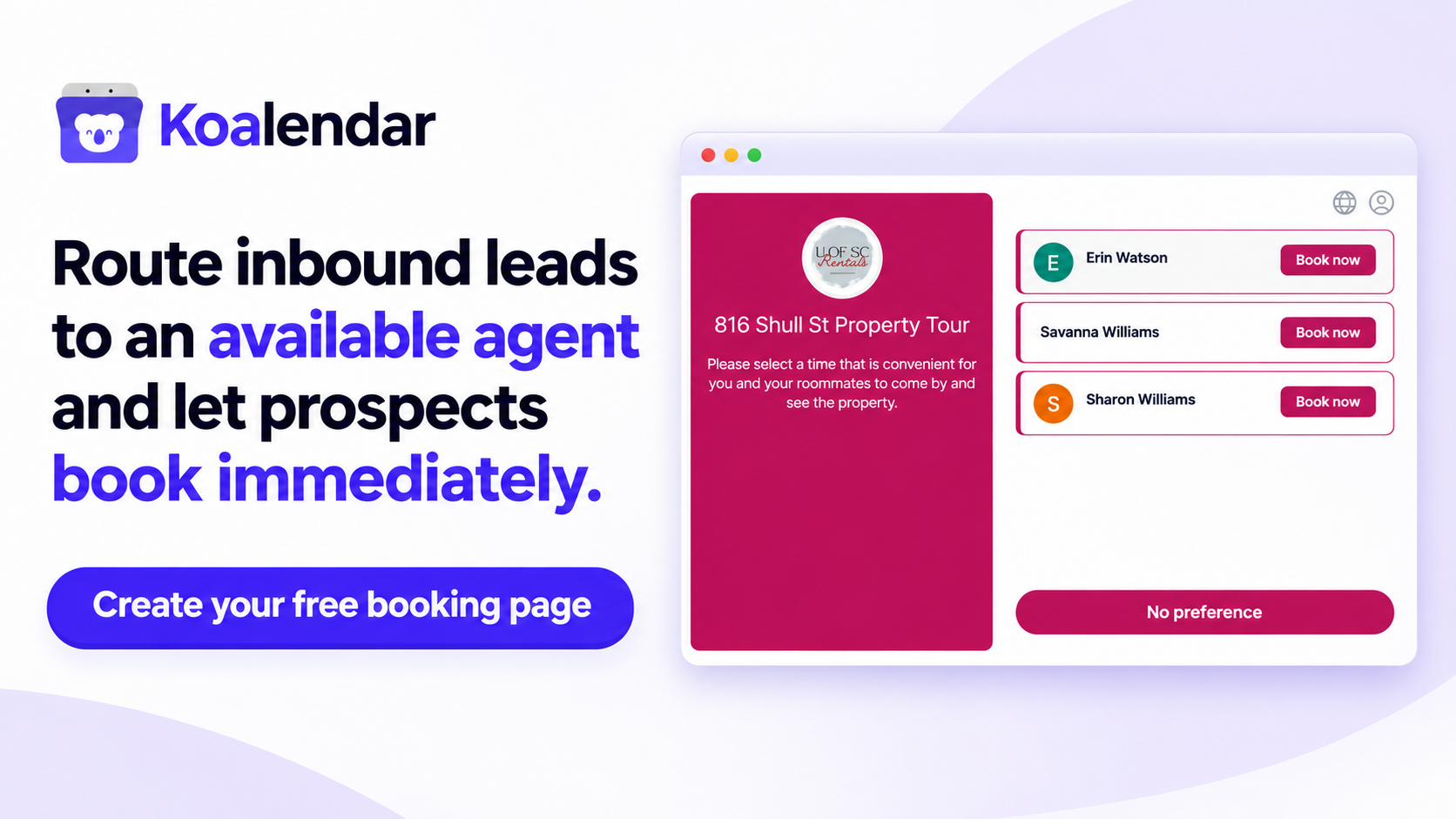
Instead of asking someone to coordinate multiple agents' calendars manually, a shared booking page allows prospects to choose a time when an eligible team member is available. The appointment is then assigned according to your scheduling rules.
Lead routing assigns responsibility for an inquiry. Round-robin scheduling assigns an appointment. Used together, they help your team move from first contact to a booked meeting with fewer delays.
3. Include scheduling links in your first response
Adding a booking link to your initial follow-up is one of the simplest ways to shorten the time between receiving an inquiry and securing an appointment.
Rather than asking prospects when they're free, give them a direct link to your availability.
With Koalendar's property showing scheduler, you can create dedicated booking pages for different types of real estate appointments, including:
- Residential property showings.
- First-time buyer consultations.
- Seller and listing presentations.
- Virtual property tours.
- Investment property consultations.
Share your booking links through automated CRM emails, text messages, property listings, and email signatures.
Once a prospect selects an available time and completes their booking, the appointment is added to your connected calendar.
Less back-and-forth for you. A quicker, simpler experience for your prospects.
4. Let prospects book property showings 24/7
A buyer who discovers a property at 10 p.m. shouldn't necessarily have to wait until the next morning to arrange a showing.
Online appointment scheduling gives interested prospects access to your available time slots at any time of day, from their phone or computer.
With Koalendar, you can create a custom booking page for individual listings or different appointment types, add your agency's branding, and set specific showing hours.
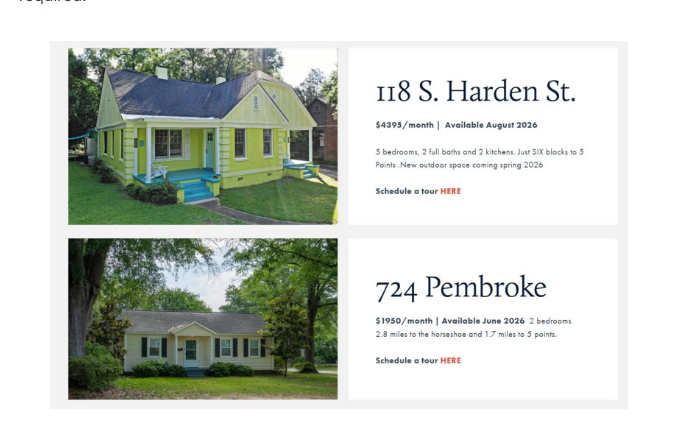
For properties that require seller permission or tenant coordination, you can use booking approval settings rather than automatically confirming every appointment.
This gives prospects the convenience of online booking without taking away your control over property access.
5. Turn open house interest into booked appointments
Open houses create opportunities to meet prospective buyers face-to-face. But capturing their interest is only the beginning.
In Mike DelPrete's 2024 secret shopper research, hosting agents didn't ask visitors for their contact details in 42% of open house interactions.
Giving attendees an easy way to register and arrange a follow-up can help you avoid losing touch after the event.
For example, you could create an open house registration page and generate a QR code for your property brochures, signage, or welcome table.
Visitors can scan the code, choose an available session, or access a separate booking page for a private showing.
After the event, include a relevant booking link in your CRM follow-up message so interested buyers can arrange their next appointment without having to call you.
6. Sync your real estate team's calendars
Calendar synchronization helps ensure that the appointments you offer prospects actually fit around your existing commitments.
Instead of checking several calendars before confirming each viewing, connect your appointment scheduling software to Google Calendar, Outlook, or Apple Calendar.
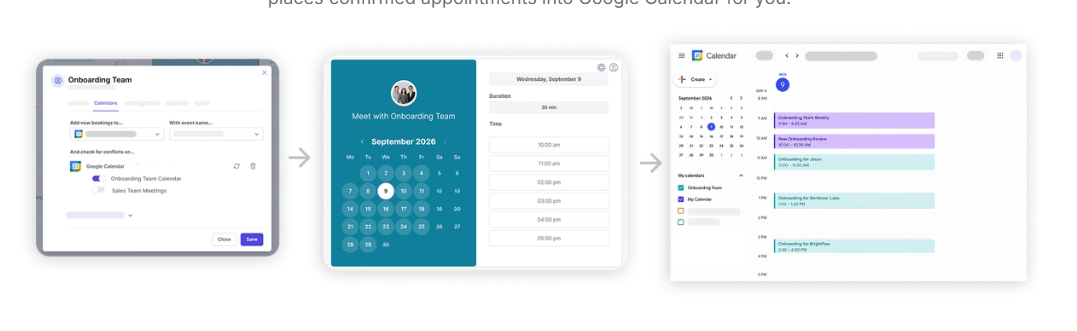
Koalendar checks your connected calendars for conflicts and updates them when new appointments are booked.
You can also use scheduling rules to:
- Add buffer time for traveling between properties.
- Set minimum booking notice.
- Limit the number of appointments you accept each day.
- Define availability for specific listings or team members.
For instance, if you need 30 minutes to travel between two neighborhoods, adding a buffer between property showings helps prevent an unrealistic schedule.
The result is a more reliable booking experience for both your clients and your team.
7. Automate appointment confirmations and reminders
Your lead conversion strategy shouldn't stop once a prospect books an appointment.
Automated confirmations help clients know exactly when and where they're meeting you. Reminders keep the appointment on their radar as the date approaches.
Depending on your scheduling tool and plan, you can send email or SMS reminders that include the property address, meeting time, agent contact details, and any relevant access instructions.
And if a buyer's plans change, allowing them to reschedule through their booking link can help you save an appointment that might otherwise be canceled.
You spend less time sending reminder messages, and your clients have a convenient way to manage their bookings.
Laura Malloy, admin manager in UofSCRentals, experienced this firsthand:
“We used to have a lot of no shows… this year, thanks to Koalendar and its reminders, we had maybe a handful.”
Laura Malloy
Admin at propety management agency
For property professionals, fewer no-shows mean fewer wasted trips, less disruption for current tenants, and more time for other interested buyers or renters.
Manual vs. automated real estate lead-to-appointment scheduling
Automating your real estate lead-to-appointment process helps you respond faster, remove unnecessary booking steps, and turn more property interest into meetings with potential clients.
But what does that actually look like in your day-to-day work?
| Process | Manual workflow | Automated workflow |
| Lead capture | Prospects submit an inquiry or call an agent | Prospects submit an inquiry or book directly through your marketing channels |
| Initial response | Prospects wait until an agent is available | Immediate acknowledgment or booking confirmation |
| Appointment scheduling | Multiple calls and emails to find a suitable time | Self-service booking with real-time availability |
| Appointment distribution | Agents manually coordinate who's available | Round-robin scheduling assigns appointments to available agents |
| CRM data entry | Agents manually enter contact details | Connected workflows create or update CRM contacts |
| After-hours inquiries | Prospects wait until business hours | Prospects can book appointments 24/7 |
| Rescheduling | Additional calls and messages | Prospects choose another available time independently |
| Appointment reminders | Agents send individual follow-up messages | Automated reminders help reduce no-shows |
| Agent workload | Time spent coordinating appointments and updating records | More time for property showings and client relationships |
The biggest difference? With an automated workflow, your prospects don't always need to wait for you to respond before taking the next step.
Whether you're showing a property, meeting with a seller, or taking a well-deserved day off, your booking pages can keep turning property interest into appointments.
So, which software capabilities do you actually need to make this happen?
What to look for in real estate speed-to-lead software
The best real estate speed-to-lead setup combines lead management capabilities with appointment scheduling features that help prospects take action.
Some tools specialize in capturing, contacting, and qualifying new leads. Others make it easier to turn those leads into booked appointments.
Here's what to look for when evaluating your options.
Automated lead response and CRM integrations
Your CRM should help you capture inquiries, trigger follow-up messages, assign leads, and track conversations.
Tools such as Follow Up Boss, HubSpot, and other real estate CRM platforms can form the foundation of this process, depending on your team's needs.
Look for scheduling software that complements your existing system. For example, Koalendar supports CRM and software integrations through tools such as Zapier and Make, allowing you to build connected workflows without replacing your CRM.
Self-service appointment scheduling and booking pages
Choose software that allows buyers and sellers to book appointments independently from any device.
Ideally, you'll be able to create multiple booking pages for individual properties, different appointment types, or specific agents.
Branding and customization options also help your booking pages feel like a natural extension of your real estate website rather than an unfamiliar third-party experience.
Round-robin scheduling and team availability management
If you manage a real estate team, look for round-robin scheduling that takes agents' availability into account.
This allows you to share one booking link across a team while distributing appointments among eligible agents.
You should also be able to manage individual availability and create separate booking pages for agents working with different property types or locations.
Custom lead qualification forms
Booking forms help you collect useful information before meeting a prospect, making appointments easier to prepare for.
Depending on the type of appointment, you might ask:
- Which property are you interested in?
- What's your approximate budget?
- Are you looking to buy, sell, or rent?
- What's your preferred moving timeline?
- Have you started exploring financing options?
Keep your questions relevant and consistent with applicable fair housing requirements. Too many mandatory fields can create unnecessary friction, particularly for buyers who are early in their search.
Booking questions supplement your CRM's lead qualification process rather than replacing it.
Real-time calendar synchronization
Your scheduling software should work with the calendars your team already uses, such as Google Calendar and Microsoft Outlook.
Look for automatic conflict checking, calendar updates, customizable availability, and buffer times.
These features help you avoid offering appointments that clash with property tours, client meetings, or personal commitments.
Automated appointment reminders
Look for booking confirmations, customizable email reminders, SMS notifications where available, and self-rescheduling options.
It's also worth checking whether reminders can include appointment-specific information, such as the property address or a virtual tour link.
Small details like these can make the booking experience smoother for prospective buyers.
Ease of use, pricing, and scalability
Your scheduling software shouldn't create another complicated process for your team to manage.
Look for an intuitive interface, straightforward pricing, and a plan that supports your current appointment volume.
Koalendar offers a free plan with unlimited bookings, unlimited booking pages, and calendar synchronization. Advanced features, including round-robin scheduling, additional booking questions, and SMS reminders, are available on selected paid plans.
You can start with the essentials and explore Koalendar's scheduling plans as your team's needs evolve.
How to automate your real estate lead-to-appointment workflow with Koalendar
How to automate your real estate lead-to-appointment workflow with Koalendar
With Koalendar, you can automate your real estate lead-to-appointment conversion in two ways: by helping existing leads book appointments faster or by letting prospects book directly through your marketing channels.
Both approaches work alongside your existing CRM, but they tackle scheduling from different starting points.
Workflow 1: Turn incoming real estate leads into booked appointments
If you already generate leads through property portals, paid advertising, or website contact forms, this workflow helps you move prospects from inquiry to appointment with fewer manual steps.
- Capture a new lead. A prospect submits an inquiry, and their contact details are captured in your CRM.
- Trigger an automated response. Your CRM sends a personalized email or SMS containing your Koalendar booking link.
- Let prospects choose a time. Buyers select an available slot and answer any relevant custom booking questions.
- Automatically sync the appointment. Koalendar adds the booking to your connected calendar and sends confirmations to both parties.
- Send automated reminders. Keep the appointment on your prospect's radar and let them reschedule independently if their plans change.
Your CRM handles the lead management, while Koalendar takes care of the scheduling.
Workflow 2: Let prospects book appointments before you even follow up
What if you could skip the back-and-forth between receiving a lead and arranging an appointment altogether?
By making your booking pages accessible across your marketing channels, you can turn property interest directly into booked appointments — even while you're busy with other clients.
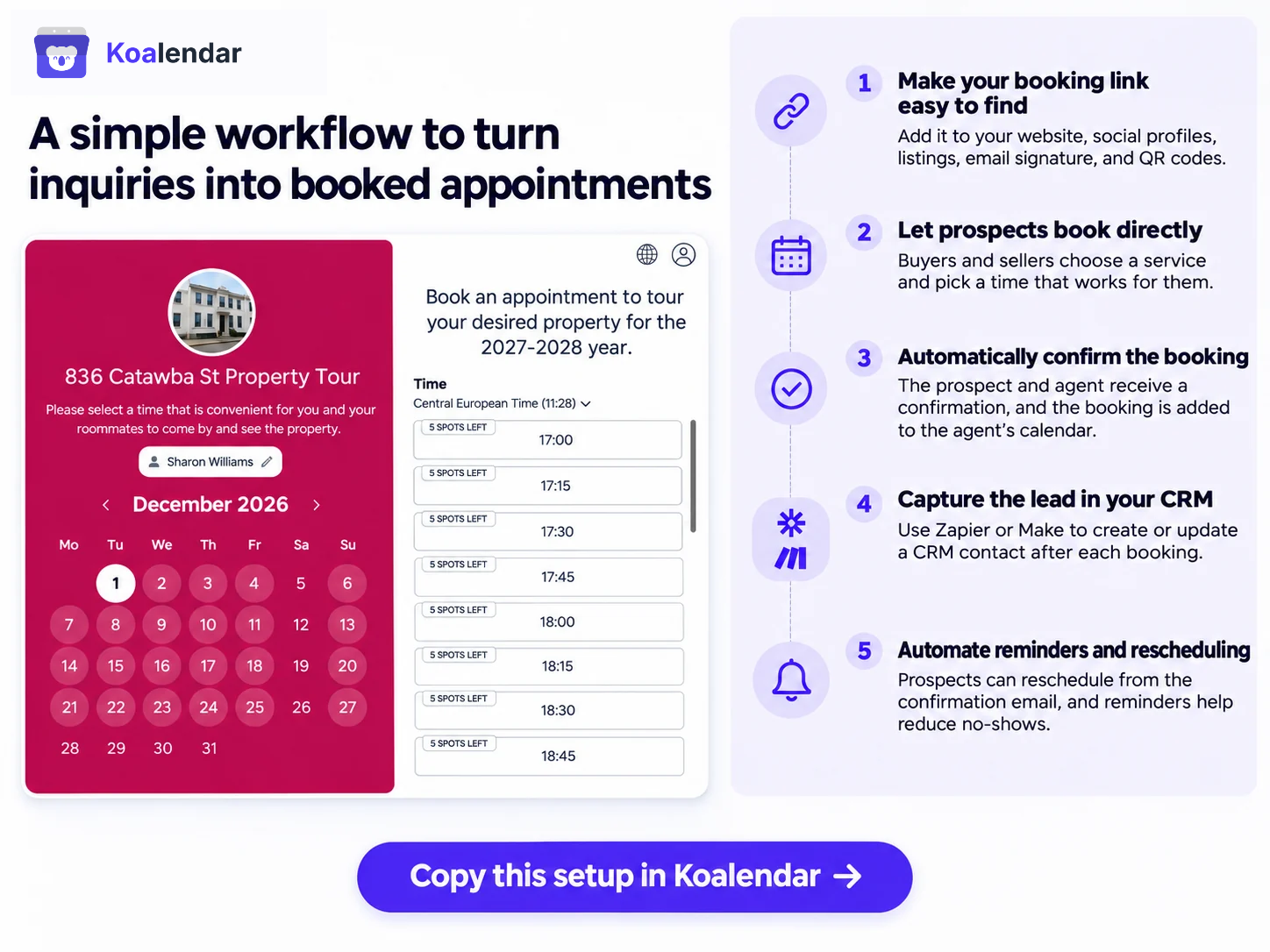
- Make your booking link easy to find. Add it to your website, social media profiles, property listings, and email signature. You can also include a QR code on property brochures and open house signage.
- Let prospects book directly. Interested buyers or sellers choose a property viewing, consultation, or other service and select a time that works for them.
- Automatically confirm the booking. Both the prospect and the assigned agent receive a booking confirmation, and the appointment is added to the agent's connected calendar.
- Capture the lead in your CRM. Using an integration platform like Zapier or Make, each new booking can trigger a workflow that creates or updates a contact in your CRM.
- Automate reminders and rescheduling. Prospects can use the rescheduling link in their booking confirmation to choose another time. Automatic appointment reminders help reduce the risk of no-shows.
With this approach, you don't have to wait for an inquiry to start converting prospects. Your booking page becomes both a lead capture and an appointment scheduling tool.
Which real estate automation workflow is right for you?
| CRM-first workflow | Booking-first workflow | |
| Starting point | New lead inquiry | Prospect interest |
| Lead capture | CRM or lead generation platform | Koalendar booking page |
| Ideal for | Property portals, paid lead generation, inquiry forms | Websites, social media, property brochures, email signatures |
| Appointment scheduling | Through a follow-up booking link | Directly through a booking page |
| CRM contact creation | Before the appointment is booked | Triggered by the booking |
| Available 24/7 | ✅ | ✅ |
| Automated reminders and rescheduling | ✅ | ✅ |
You don't have to choose between the two. Combining both workflows helps you capture more appointment opportunities across your marketing channels while making the most of your existing real estate leads.
With Koalendar's scheduling software for real estate teams, you can bring both approaches together without replacing the tools you already use.
Real estate scheduling automation in action: How UofSCRentals simplified property tours
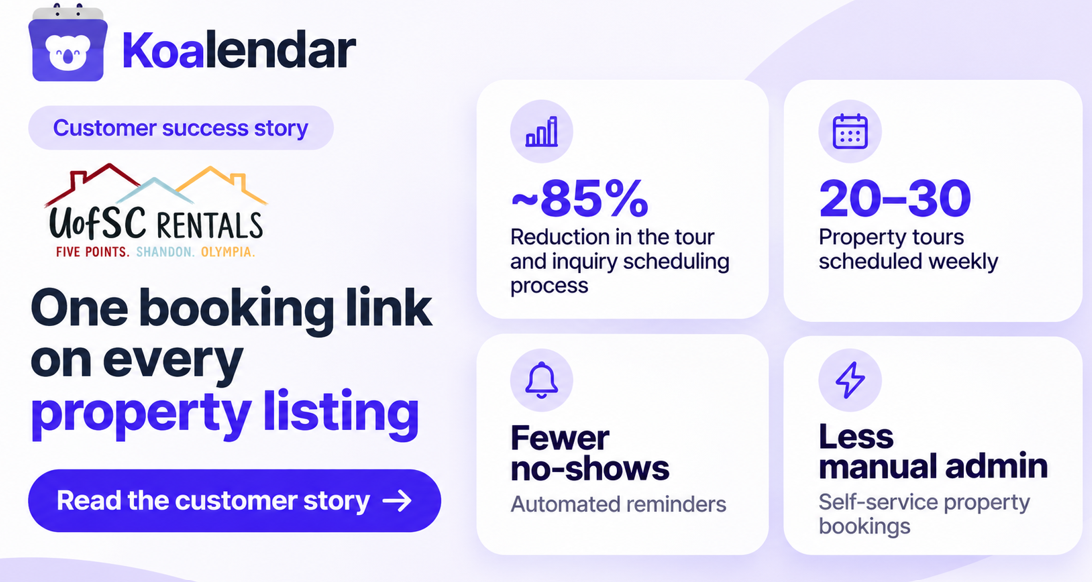
For UofSCRentals, a property management company specializing in student housing in South Carolina, coordinating property tours through emails, calls, and text messages was taking up too much of the team's time.
Their solution? Embed a Koalendar booking link directly on every property listing.
Prospective renters could book tours independently, while the team automated scheduling, reminders, and tenant notifications.
The results:
- 20–30 property tours scheduled weekly.
- Approximately 85% reduction in the tour and inquiry scheduling process.
- Fewer no-shows thanks to automated appointment reminders.
- Less disruption for existing tenants during property showings.
By giving prospects direct access to their availability, the team removed the need to manually coordinate every new viewing.
So, how can you measure the impact of scheduling automation on your own real estate business?
How to measure the ROI of your real estate speed-to-lead strategy
To understand whether your automation strategy is working, track how quickly leads receive a response, how many book appointments, and how many actually attend.
These five metrics can help you identify where prospects are dropping out of your sales pipeline and whether your investment in automation is paying off.
Average lead response time
Average lead response time measures how long it takes your team to make an initial contact attempt after receiving an inquiry.
Formula: Total lead response time ÷ Number of leads contacted
Example: If your combined response time for 20 leads is 100 minutes, your average response time is five minutes.
Track automated acknowledgments and personal contact attempts separately. You should also monitor unanswered inquiries so they aren't hidden by a low average response time.
Lead-to-appointment conversion rate
Your real estate lead-to-appointment conversion rate measures the percentage of incoming prospects who book a meeting, consultation, or property showing.
Formula: (Number of unique leads who book an appointment ÷ Total number of leads) × 100
Example: If 30 out of 200 incoming leads book an appointment, your lead-to-appointment conversion rate is 15%.
If that figure increases to 20% after introducing scheduling automation, you're securing 10 additional appointments from the same number of leads.
That's an opportunity to get more value from your existing lead generation budget.
Time from inquiry to confirmed appointment
Speed to appointment measures how long a prospect takes to move from their initial inquiry to a confirmed booking.
Formula: Total time from inquiry to booking confirmation ÷ Number of leads who book
Example: If five leads take a combined 150 minutes to confirm their appointments, your average speed to appointment is 30 minutes.
Measure when the booking is confirmed, not when the appointment actually takes place.
This metric helps you understand whether scheduling friction is slowing down your real estate lead conversion process, even when your initial responses are fast.
Appointment attendance rate
Your appointment attendance rate measures how many scheduled appointments result in an actual meeting.
Formula: (Number of appointments attended ÷ Number of confirmed appointments due in the period) × 100
Example: If 45 of 50 scheduled property showings take place, your attendance rate is 90%.
Track cancellations, rescheduled appointments, and no-shows separately to better understand why appointments don't go ahead.
Cost per booked appointment
Cost per booked appointment helps you evaluate how efficiently your lead generation and automation investments turn into meetings with potential clients.
Formula: Total lead generation and relevant lead management and scheduling costs ÷ Number of unique leads who book
Example: If you spend $1,000 on lead generation and the relevant software costs and secure 25 appointments, your cost per booked appointment is $40.
If your appointments increase to 40 while costs remain unchanged, that figure drops to $25.
What could better real estate lead conversion look like in practice?
Consider this hypothetical example of a real estate team introducing lead response and appointment scheduling automation.
| Monthly metric | Before automation | After automation |
| Incoming leads | 200 | 200 |
| Relevant monthly costs | $1,000 | $1,050 |
| Average personal response time | 45 minutes | 10 minutes |
| Booked appointments | 30 | 40 |
| Lead-to-appointment conversion rate | 15% | 20% |
| Attended appointments | 24 | 36 |
| Appointment attendance rate | 80% | 90% |
| Cost per booked appointment | $33.33 | $26.25 |
In this example, the team secures 10 additional appointments and 12 additional attended appointments without increasing its lead volume.
These figures are illustrative, not guaranteed results. To calculate your actual financial ROI, you'll also need to track completed transactions, attributable net commission, and the additional costs of implementing automation.
Start by collecting your current performance data, then compare it against a similar period after introducing your new workflow.
Turn faster lead responses into more booked appointments with Koalendar
Improving speed to lead in real estate starts with being responsive, but the opportunity doesn't end when you send that first message.
Making it easier for prospects to book a showing or consultation helps you turn more of your existing inquiries into meaningful conversations.
With Koalendar working alongside your CRM, you can give buyers and sellers a simpler booking experience, reduce repetitive scheduling tasks, and make better use of the leads you're already investing in.
And instead of spending your afternoon coordinating calendars, you can get back to showing properties, understanding your clients' needs, and helping them find the right home.