We compared pricing models, free plans, limits, and additional costs across leading scheduling tools to understand what scheduling software really costs. We’ve also categorized tools by the type of business they are designed for and who we believe they are best suited for.
Data checked: August 7, 2026
TL;DR
Scheduling software can cost nothing, a few dollars per user each month, or hundreds of dollars per location, depending on what you need and how the provider charges.
The difficult part is that scheduling software pricing is rarely directly comparable. Calendly and Koalendar charge per seat per month, Cal.com charges per user. SimplyBook.me combines plan tiers with limits on bookings and providers. Square Appointments charges by location and adds payment-processing fees. Mindbody starts at a monthly price per location and can add optional services and transaction-related costs.
Our analysis of 11 scheduling platforms found:
- 7 of 11 offer a permanent free plan rather than only a temporary trial.
- Per-user or per-seat pricing is one of the most common paid models, particularly for meeting and team scheduling tools.
- Booking limits are not universal. Some platforms provide unlimited scheduling, while others use monthly appointments as part of the plan structure.
- Payments, SMS, extra staff, advanced routing, branding, integrations, and enterprise controls can change the final cost considerably.
- Team size changes the equation. A $10-per-user product costs $10 a month for one person but $200 a month for a 20-person scheduling team before extras.
- The cheapest headline price is therefore not necessarily the lowest scheduling software cost for your business.
The useful question isn't simply, “Which scheduling app pricing starts lowest?”
It’s what will this software cost for the way we actually schedule?
Scheduling software pricing report: key findings
Scheduling software ranges from genuinely free tools to custom-priced platforms, but the biggest difference is how each provider makes its price grow.
That matters because two products advertised at similar monthly prices can have very different costs once you add staff, bookings, calendars, reminders, payments, or locations.
Capterra’s Scheduling Software Buyers Guide, updated July 16, 2026, says most scheduling products are priced per user, per month, with entry-level plans commonly starting at roughly $2.50 to $10+ per user per month. That benchmark is useful, but our comparison shows it doesn’t capture the whole market: location-based, booking-limited, feature-tiered, and custom pricing are also common. It isn't unique to scheduling software. García-Fernández and colleagues studied more than 150 SaaS pricing models and described modern software pricing as a combination of plans, features, usage limits, and add-ons that can create a large number of possible configurations. In other words, comparing subscription prices really is more complicated than lining up three numbers in a table.
How much does scheduling software cost?
Scheduling software can cost $0 for a permanent free plan, around $5–$20 per user per month for many paid scheduling products, or significantly more for advanced service-business and enterprise platforms.
For example, Calendly Standard currently lists at $10 per seat/month with annual billing, Cal.com Teams at $12 per user/month annually, and Koalendar Pro at $9.99 per seat/month on its pricing page, with a lower effective rate under annual billing. Meanwhile, Mindbody starts at $79/month per location in the US. However, all these aren't equivalent products or billing models, which is exactly the point.
What is the most common pricing model?
Per-user or per-seat subscription pricing is a common model, especially for tools designed around meetings and team scheduling.
Koalendar, Calendly, Cal.com, Microsoft 365, and paid team plans from several other providers make the number of users or schedulable team members/resources an important part of the price.
But dedicated service-focused booking platforms often work differently. Square Appointments prices by location, for example, while SimplyBook.me's tiers combine monthly booking allowances, provider allowances, and access to features.
Is scheduling software actually free?
Sometimes. But “free” tells you almost nothing about the limits of the plan.
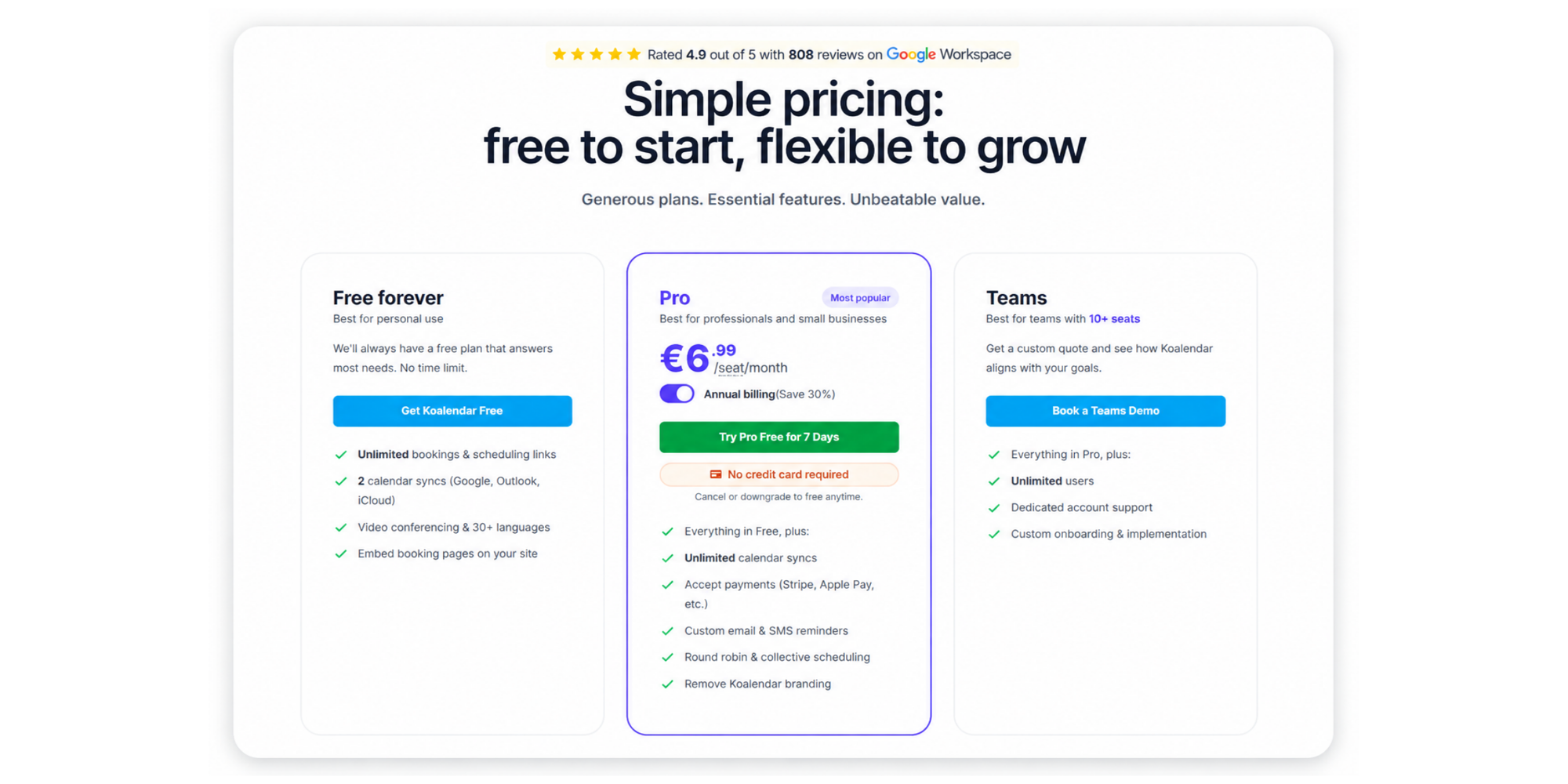
Calendly Free allows unlimited meetings but one event type and one connected calendar. SimplyBook.me Free allows up to 50 bookings, one provider, and one custom feature. YouCanBookMe Free includes one calendar connection and one booking page. Cal.com gives individual users unlimited event types and calendars. Koalendar Free Forever includes unlimited bookings and scheduling links, two calendar connections, video conferencing, support for 30+ languages, and website booking-page embeds.
When it comes to comparing free plans, ask a better question: Free to do what?
What affects pricing of scheduling software?
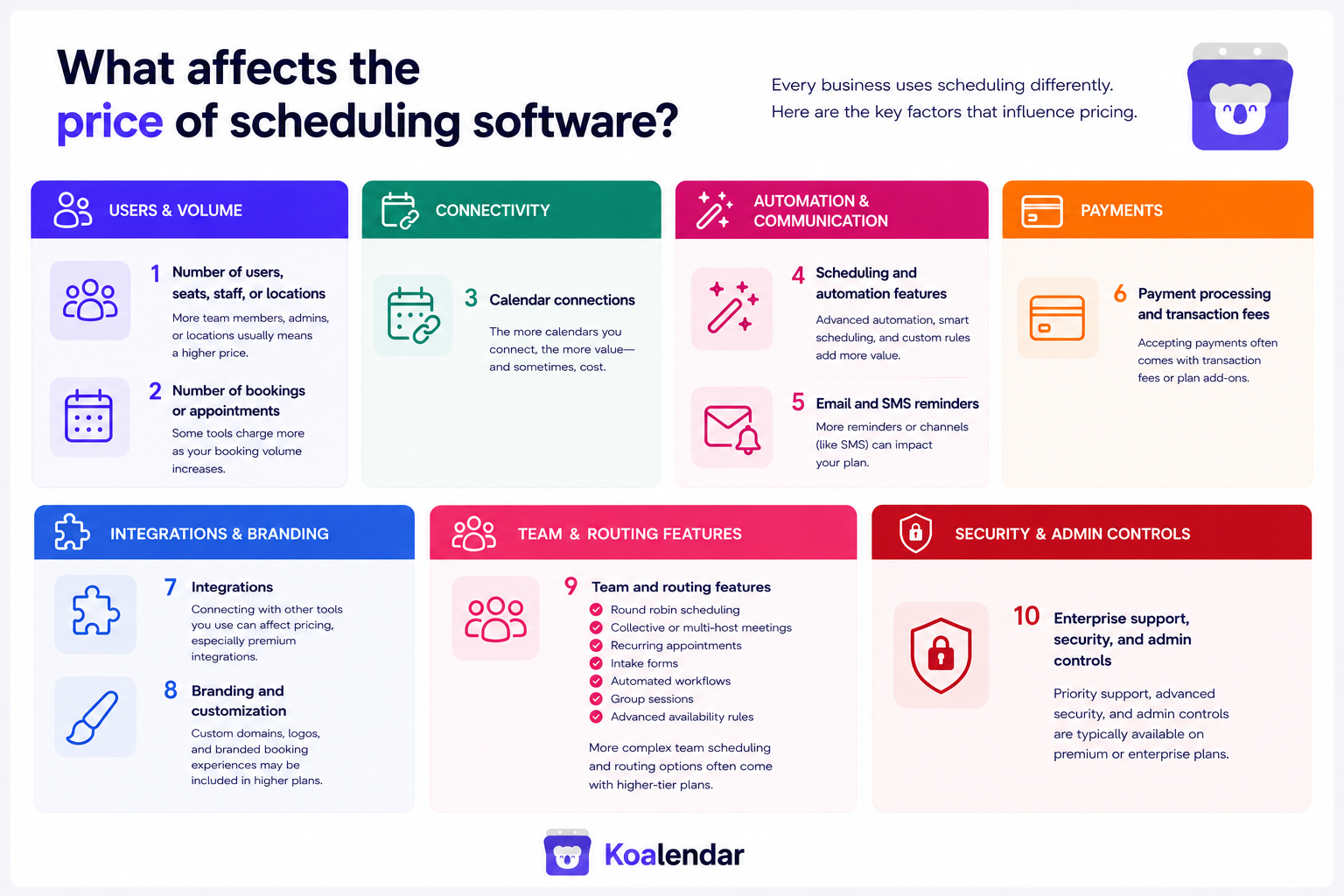
The main factors affecting scheduling software pricing are team size, booking volume, calendar connections, automation, reminders, payments, integrations, branding, team scheduling, and enterprise requirements.
Here’s how each one can affect what you actually pay.
Number of users, seats, or staff
Per-seat pricing is simple when one person needs scheduling software. It becomes more important as a team grows.
A plan priced at $10 per seat/month means:
| Schedulable seats (users or resources) | Monthly subscription | Annual subscription |
| 1 | $10 | $120 |
| 6 | $50 | $600 |
| 20 | $200 | $2,400 |
That is why businesses should take into account their needs and compare the team cost, not just the advertised price for one user.
Also check who requires a paid seat. Depending on the product, a seat may mean a bookable host, an administrator, an employee, or another managed resource, like a room or facility.
Number of bookings or appointments
Not every provider charges based on booking volume, but appointment limits can determine which tier you need.
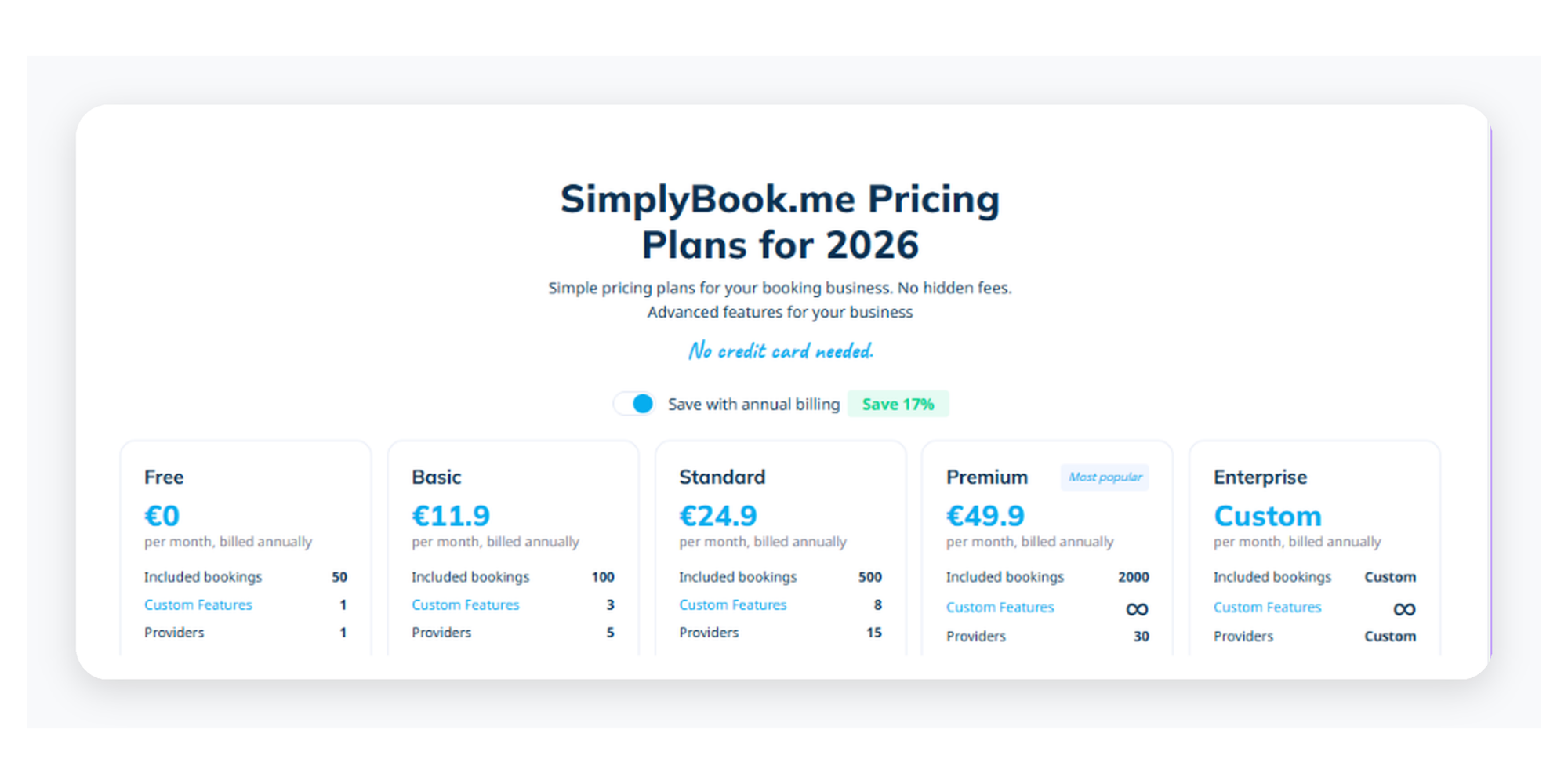
SimplyBook.me illustrates this model clearly. Its Free tier currently includes 50 bookings per month, while Basic includes 100, Standard 500, and Premium 2,000. Provider allowances also increase at higher tiers.
In other instances, booking volume doesn't determine charges. For example, Koalendar's seat-based model doesn’t charge customers according to the number of bookings, invitees, booking pages, or scheduling links.This distinction matters for businesses where appointment volume grows faster than headcount.
Calendar connections
A free plan might connect one calendar. Another might connect two. Another may offer unlimited connections.
That sounds like a small detail until you need to check a work calendar, personal calendar, shared calendar, and another calendar for conflicts.
Calendar limits can therefore turn a free product into a paid one without your scheduling volume changing at all.
Scheduling and automation features
Basic 1:1 scheduling is often available cheaply or free. Advanced workflows are where paid tiers become more common.
These can include:
- round robin scheduling
- collective or multi-host meetings
- recurring appointments
- intake forms
- automated workflows
- group sessions
- advanced availability rules
Cal.com, Calendly, and Koalendar, for instance, keep their individual plans free but place round robin scheduling, collective event types, recurring events, and intake forms in their paid tiers.
The question is not whether a paid plan has “more features.” It’s whether those features remove work your team currently does manually, and whether you need them or not.
Email and SMS reminders
Email confirmations are commonly included at lower tiers. Custom reminders and SMS are more likely to create plan or usage costs.
Always check both questions:
- Does my plan include the reminder feature?
- Is sending the message itself included?
A plan can include SMS functionality while messages, credits, or communication volumes carry separate limits or charges.
Payment processing and transaction fees
Taking payment during booking can be valuable for consultants, classes, salons, healthcare providers, and other service businesses.
But subscription price and payment-processing cost are separate numbers.
Square Appointments makes this particularly visible in its pricing page.
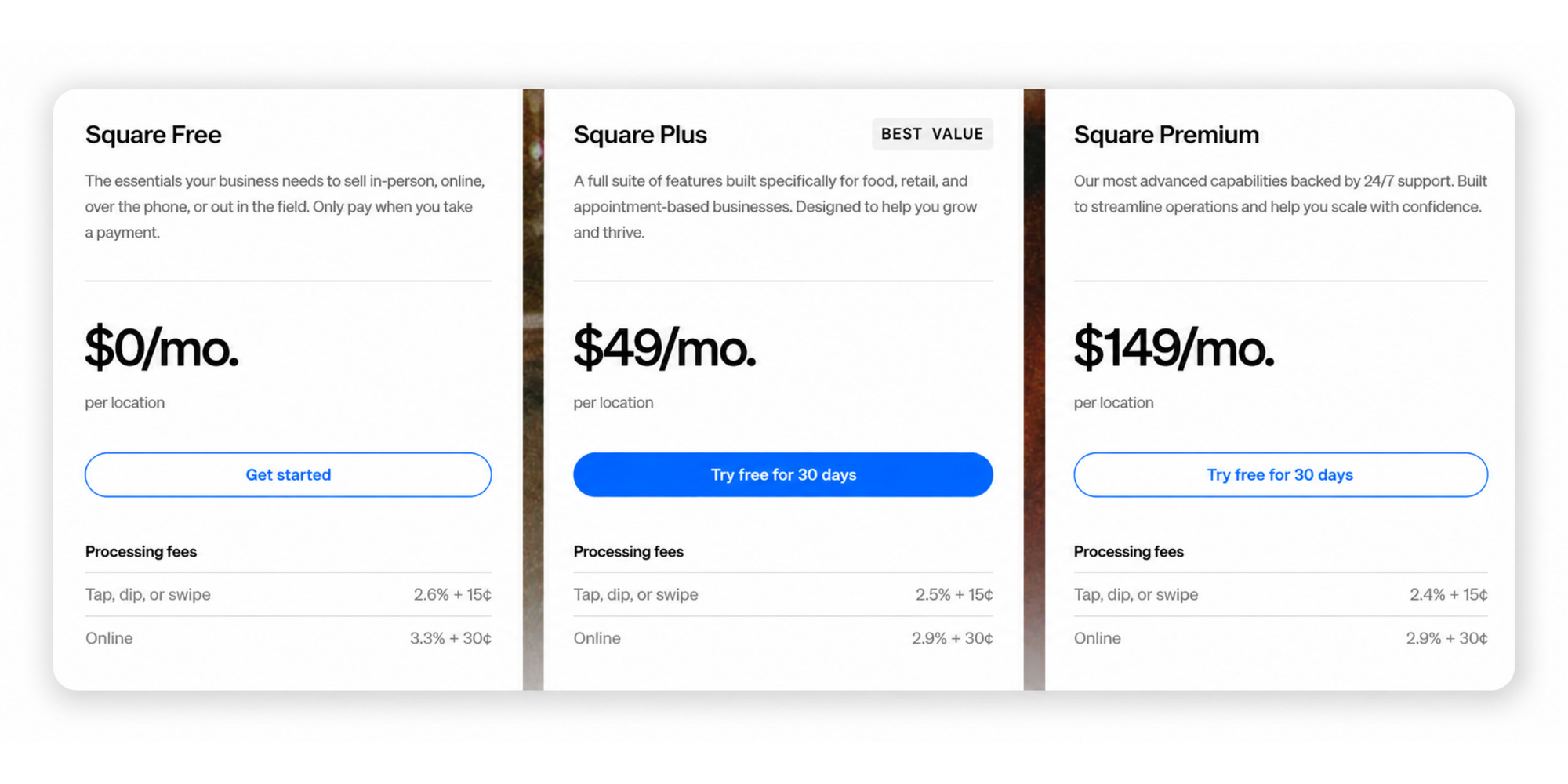
Most scheduling platforms connect to payment providers such as Stripe, PayPal, or Square. Payment-provider fees may still apply even when the scheduling software does not add its own transaction fee.
Integrations
Google Calendar and basic video conferencing are often standard. CRM connections, automation platforms, webhooks, accounting tools, and advanced business integrations may require higher tiers.
Before paying for “more integrations,” list what you actually use and need.
A product with 100 integrations isn't better value than one with five if you only need Google Calendar, Zoom, and Stripe.
Branding and customization
Removing vendor branding is a classic paid-plan feature.
Customization may also include branded colors, custom domains, email branding, page layouts, redirect pages, and white-label experiences.
For a freelancer scheduling a few internal calls, these may add little value.
For a customer-facing consultancy or service business, they can be part of the client experience and worth paying for.
Team and routing features
The step from “let someone schedule me” to “send this booking to the right person on my team” can be a major pricing threshold.
Round robin distribution, collective scheduling, departmental booking pages, admin roles, centralized billing, reporting, and routing rules usually matter more as the business grows.
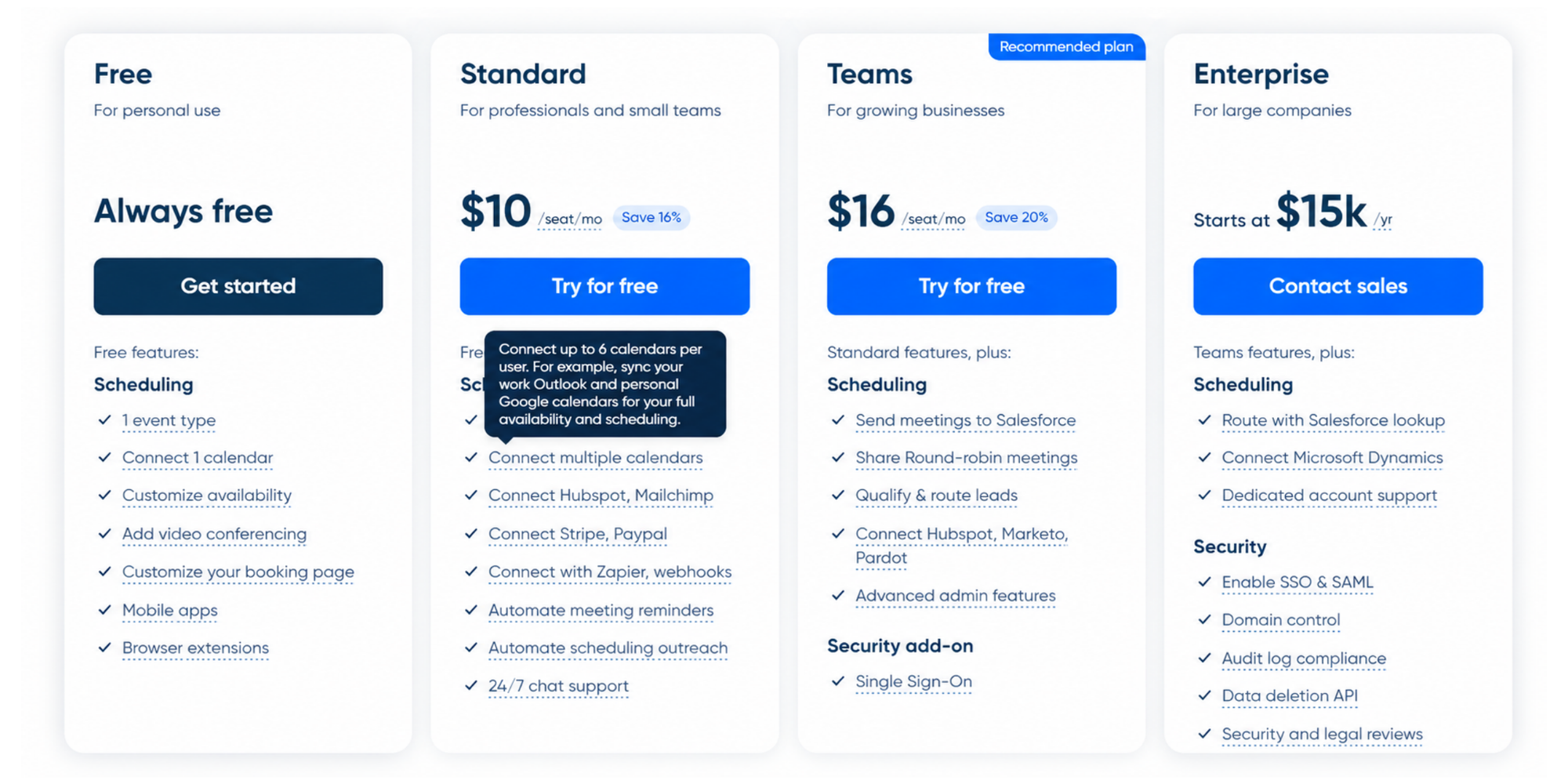
Cal.com and Calendly, for example, both offer round-robin and routing in their Teams or Organization/Enterprise plans, starting at $12 per user and $16 per seat respectively (billed annually), because they target bigger enterprises.
Other tools, like Koalendar for example, only have round robin at $6.99 per seat/month (billed annually), not routing, as it targets smaller companies.
This is why team scheduling features need to be looked at in detail; additionally, costs should be analyzed at 5, 10, or 20… users rather than judging a plan by its single-seat rate.
Enterprise support, security, and admin controls
Enterprise tiers frequently add capabilities such as SAML SSO, SCIM provisioning, audit controls, advanced compliance features, onboarding, SLAs, dedicated support, and negotiated contracts.
Calendly Enterprise, for example, currently starts at $15,000 per year and adds enterprise security, account support, and integrations beyond its Teams plan. Cal.com offers custom Enterprise pricing above its Organizations tier. Most businesses will not need these enterprise features until their scheduling needs become more complex.
The main scheduling software pricing models
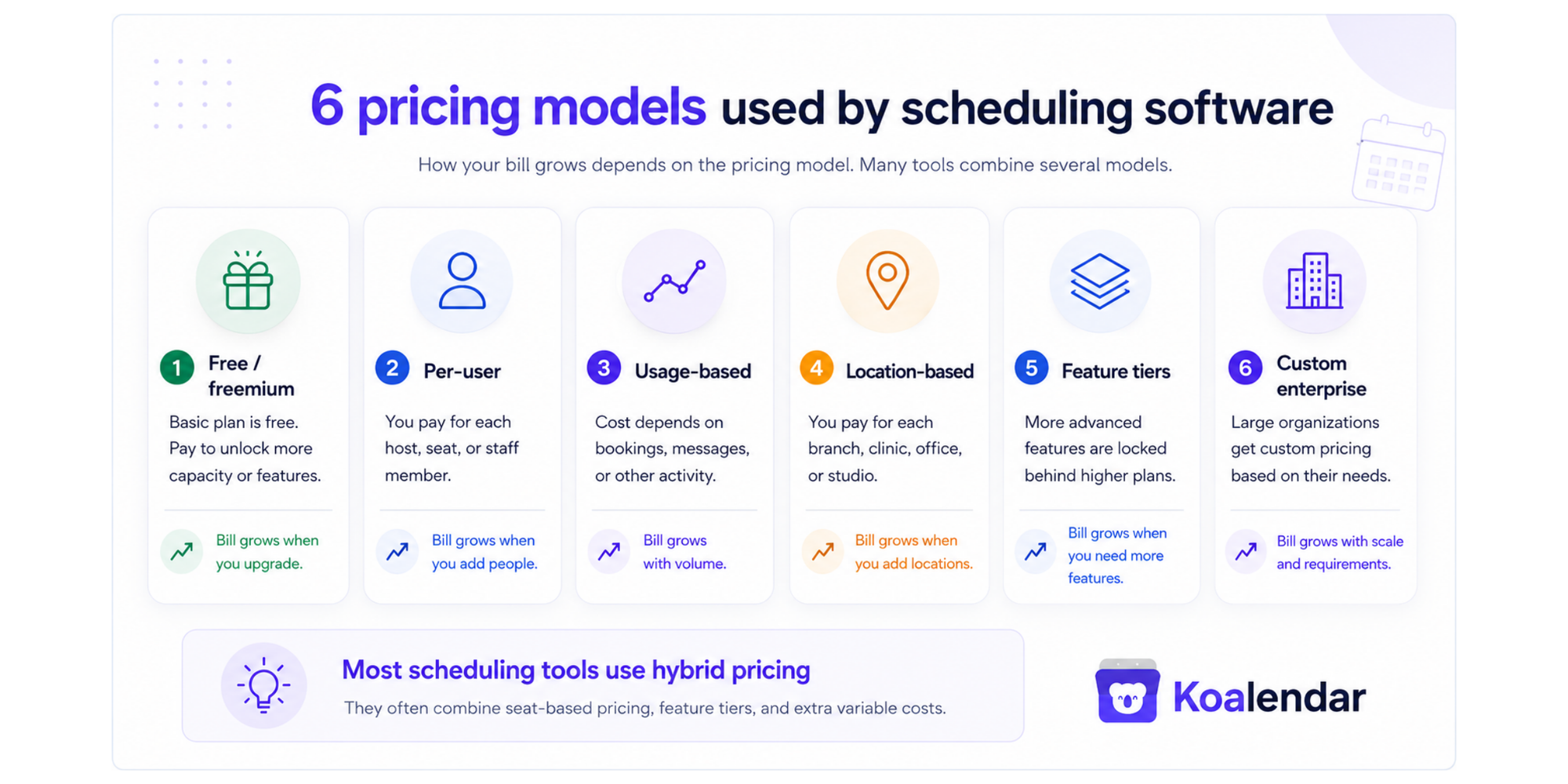
Scheduling software providers use six main pricing models: freemium, per-user, usage-based, location-based, feature-tiered, and custom enterprise pricing. Many companies combine several models, so always check what makes the price increase.
A platform might charge per user while also reserving advanced features for higher tiers. Another might charge per location but add transaction fees. The model tells you what happens to your bill as your business grows.
Free and freemium pricing
Free and freemium pricing gives users permanent access to a basic version of the software, with paid plans available for additional capacity or functionality.
Examples in this report include:
- Koalendar
- Calendly
- YouCanBookMe
- SimplyBook.me
- Setmore
- Cal.com
- Square Appointments
However, these free plans are not equivalent.
Calendly’s free plan limits users to one event type and one calendar connection. SimplyBook.me’s free plan includes 50 monthly bookings, one provider, and one custom feature. Square Appointments provides a free plan for a single location but applies payment-processing fees when businesses accept transactions. Koalendar offers unlimited bookings and event types and 2 calendar synchronization.
Best suited to: solo professionals, small businesses, and teams with straightforward scheduling needs.
Main cost trigger: upgrading for more calendars, bookings, team features, customization, or automation.
Per-user or per-seat pricing
Per-user pricing charges according to the number of people/resources who need a software license or can be booked through the platform.
Example: $10 × 5 users = $50/month.
Companies using this model include:
- Koalendar
- Calendly
- Cal.com
- Setmore
- Microsoft 365, through the licenses that include Microsoft Bookings
For example, Calendly bills organizations according to the number of seats in the account. A business with 10 purchased seats pays for all 10, even when some seats are currently unoccupied.
Best suited to: meeting-based businesses where appointment volume is high but the number of schedulable hosts is predictable.
Main cost trigger: adding employees, hosts, administrators, or bookable resources that require paid seats.
Usage-based pricing
Usage-based pricing makes appointment volume, messages, or another measurable activity part of the cost.
Example: one tier allows 100 bookings while the next allows 500.
Usage pricing can make sense when your requirements genuinely grow with appointment volume. But businesses with large numbers of low-value bookings should pay particularly close attention to the limits.
SimplyBook.me’s plans currently include different monthly booking allowances. Its Free plan includes 50 bookings, Basic includes 100, Standard includes 500, and Premium includes 2,000. Customers can also purchase additional booking packages and communication credits.
Other platforms may use usage pricing for only part of the product. For example, a subscription might include scheduling but charge separately for SMS messages, WhatsApp messages, AI booking credits, or payment transactions.
Best suited to: businesses with predictable appointment or communication volumes.
Main cost trigger: exceeding included bookings, messages, credits, or transactions.
Location-based pricing
Location-based pricing charges for each physical branch, studio, office, clinic, or business site rather than for every employee.
Companies using this model include:
- Square Appointments
- Mindbody
Square Appointments offers Free, Plus, and Premium subscriptions priced per location. A business operating from three locations would generally need to account for the relevant subscription charge three times, even when each site has several staff calendars.
Mindbody also prices its core subscription per location. Pricing starts at €99 per month per location and the plans include unlimited users at that location. Subscription costs increase when the business adds locations rather than when it adds people to an existing site.
A simple example looks like this:
Monthly software cost = price per location × number of locations
| Locations | Price per location | Monthly cost |
| 1 | €99 | €99 |
| 3 | €99 | €297 |
| 10 | €99 | €999 |
This model can be good value for a busy location with many employees. It can be relatively expensive for a small business operating several low-volume sites.
Best suited to: salons, gyms, wellness studios, clinics, franchises, and other businesses organized around physical premises.
Main cost trigger: opening or adding another location.
Feature-based pricing tiers
Feature-based pricing places capabilities into progressively more expensive plans, such as Free, Standard, Teams, and Enterprise.
Almost every company in this report uses feature tiers to some extent, including:
- Koalendar
- Calendly
- Acuity Scheduling
- YouCanBookMe
- SimplyBook.me
- Setmore
- Cal.com
- Square Appointments
- Mindbody
Koalendar uses the simplest feature-tier structure in this comparison. It offers a Free Forever plan and just one standard paid plan, Pro. Users do not need to compare several paid tiers or work out which upgrade contains the features they need. Pro brings the main advanced capabilities together in one plan, including unlimited calendar syncs, payments, custom email and SMS reminders, round robin scheduling, collective scheduling, and branding removal.
Other platforms divide paid functionality across several plans. The features commonly reserved for higher tiers include:
- additional calendar connections
- automated workflows
- SMS reminders
- payment collection
- branding removal
- round robin scheduling
- collective scheduling
- routing forms
- reporting
- administrative permissions
- security controls
Calendly, for example, combines per-seat billing with several feature tiers. Moving from Free to Standard, Teams, or Enterprise unlocks progressively more event types, calendars, workflows, routing options, security controls, and team functionality.
SimplyBook.me combines feature tiers with usage limits. Higher plans increase the number of bookings, providers, and custom features available.
Best suited to: businesses that want to pay for capabilities as their scheduling requirements become more advanced.
Main cost trigger: needing a feature that is only available on a paid or higher-tier plan.
Custom enterprise pricing
Custom enterprise pricing replaces a public fixed price with a quote based on the organization’s size, requirements, contract, and implementation needs.
Companies offering custom or enterprise pricing include:
- Koalendar, for larger Teams requirements
- Calendly
- Cal.com
- SimplyBook.me
- Square Appointments
- Mindbody
- Microsoft, for larger enterprise agreements
Custom quotes may account for:
- large numbers of seats or locations
- security and compliance requirements
- SAML SSO or user provisioning
- onboarding and data migration
- account management
- service-level agreements
- custom integrations
- payment volume
- franchise or multi-location management
Square, for example, offers custom plans for qualifying businesses with higher payment volume. SimplyBook.me offers custom booking volumes and provider allowances for enterprise customers, while Mindbody creates tailored plans for multi-location businesses and franchises.
Best suited to: large organizations, franchises, regulated businesses, and teams with complex technical or administrative requirements.
Main cost trigger: negotiated scale, support, security, implementation, and contract requirements.
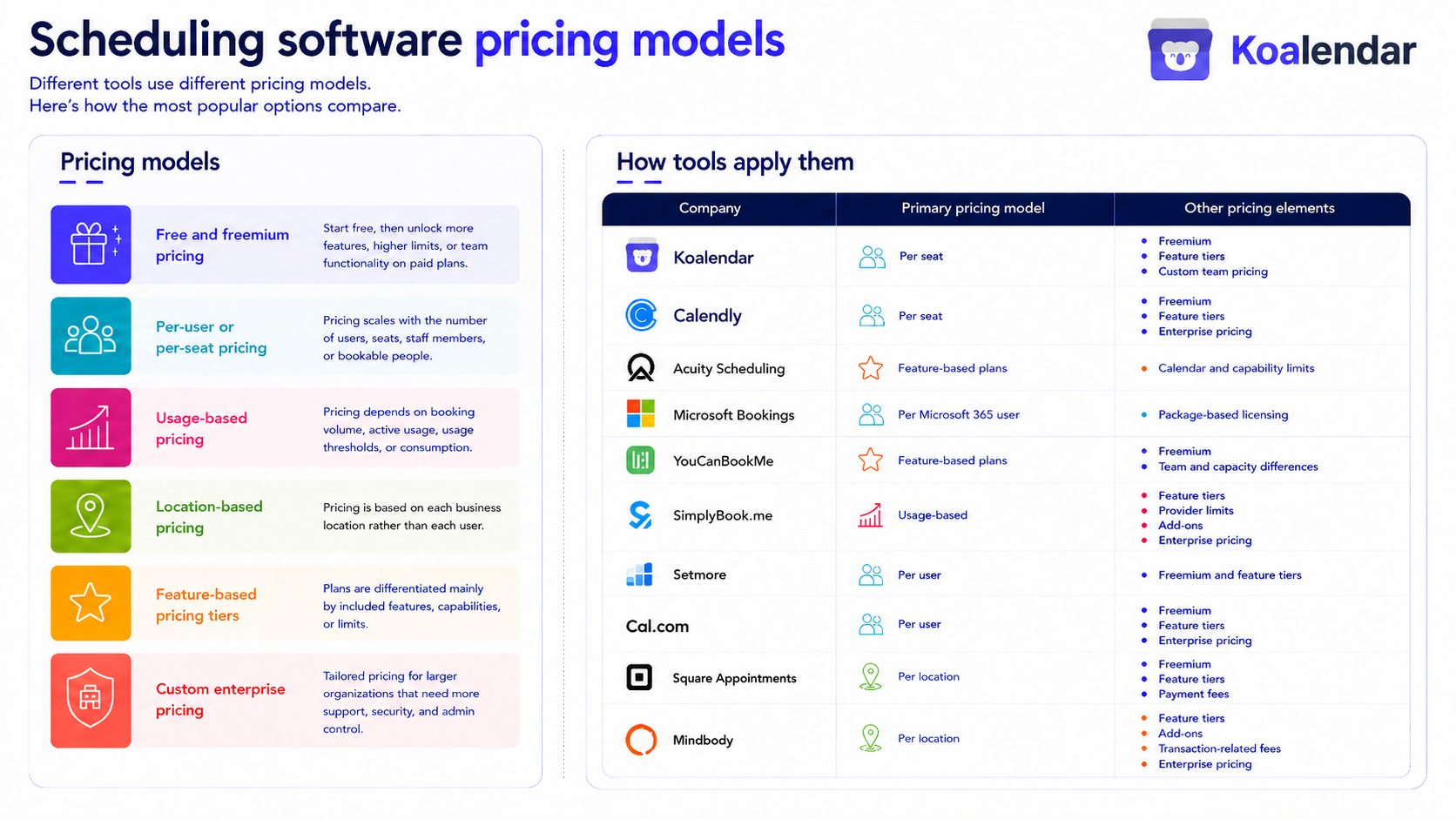
Most scheduling tools use hybrid pricing
A scheduling platform rarely fits neatly into only one category. Most providers combine a billing unit with feature tiers and additional variable costs.
| Primary pricing model | Other pricing elements | |
| Koalendar | Per seat | Freemium, feature tiers, custom team pricing |
| Calendly | Per seat | Freemium, feature tiers, enterprise pricing |
| Acuity Scheduling | Feature-based plans | Calendar and capability limits |
| Microsoft Bookings | Per Microsoft 365 user | Package-based licensing |
| YouCanBookMe | Feature-based plans | Freemium, team and capacity differences |
| SimplyBook.me | Usage-based | Feature tiers, provider limits, add-ons, enterprise pricing |
| Setmore | Per user | Freemium and feature tiers |
| Cal.com | Per user | Freemium, feature tiers, enterprise pricing |
| Square Appointments | Per location | Freemium, feature tiers, payment fees |
| Booksy | Base business subscription | Additional employee charges and optional services |
| Mindbody | Per location | Feature tiers, add-ons, transaction-related fees, enterprise pricing |
This is why the headline subscription price is only the starting point. To compare plans properly, identify:
- What is the main billing unit?
- What usage is limited?
- Which features require an upgrade?
- Which charges sit outside the subscription?
- What will make the cost rise as the business grows?
A $20-per-location plan, a $10-per-seat plan, and a $20 plan with booking limits may display a similar starting price. They can produce completely different annual costs.
Free scheduling software plans compared
Seven of the 11 platforms in this report currently advertise a permanent free scheduling option, but the scope of those plans varies significantly.
 |  | YouCanBookMe |  |  |  |  | |
| Permanent free plan | ✅ | ✅ | ✅ | ✅ | ✅ | ✅ | ✅ Transaction charges apply |
| Booking limit | Unlimited | Unlimited | No published booking cap on pricing page | 50/month | 200 appointments | Unlimited | No published appointment cap |
| Event types or booking pages | Unlimited event types and booking pages | 1 event type | 1 booking page | Services and events supported; free-plan quantity not clearly stated | Branded booking page | Unlimited event types | Online booking site |
| Calendar connections | 2 | 1 | 1 | Not clearly stated on pricing page | Two-way calendar sync requires Pro | Multiple calendars | Unlimited staff calendars |
| Users, staff, or providers | 1 primary free user; paid team features | Individual use | Individual free account | Up to 5 users/providers | Up to 4 users | 1 individual user | Unlimited staff calendars at one location |
| Email confirmations | ✅ Instant booking notifications | ✅ | ✅ Customizable | ✅ Default templates; sending limits apply | ✅ | ✅ Through workflows | ✅ Appointment reminders |
| Email or SMS reminders | Custom email and SMS reminders require Pro | Advanced reminders and text notifications require paid plans | Confirmation SMS included; additional reminder workflows require paid plans | Default notifications; communication limits apply | Email reminders included; SMS requires Pro | ✅ Workflows and automation included | ✅ Appointment reminders; exact channels vary |
| Accept payments | ❌ Pro | ❌ Paid plan | ✅ Stripe, including cards and digital wallets | Available through payment-related features; custom-feature limits apply | ✅ | ✅ | ✅ Processing fees apply |
| Video meetings | ✅ | ✅ Basic integrations | ✅ Zoom, Microsoft Teams and Google Meet | Depends on integrations and custom features | Available through integrations | ✅ Cal Video and integrations | Primarily appointment and in-person service focused |
| Website embed | ✅ | ✅ | ✅ Customizable embeds | ✅ Booking widget | ✅ Booking button | ✅ | ✅ Online booking integrations |
| Team scheduling | ❌ Pro | ❌ Paid plan | ❌ Paid Team plan | Limited by free provider and feature allowances | ✅ Up to 4 users | ❌ Paid Teams plan | ✅ Unlimited staff calendars at one location |
| Key free-plan strength | Super simple scheduling, unlimited bookings, pages and 1:! event types with 2 calendar connections | Simple, familiar scheduling with unlimited meetings for 1 event type | Payments, customization and form questions despite the one-page limit | Supports service businesses with up to 5 providers | Up to 4 users, payments and a branded booking page | Multiple calendars, unlimited event types, payments, workflows, embeds and integrations | Unlimited staff calendars and payments for one location |
| Main limitation | Payments, custom reminders and advanced team scheduling require Pro | Only 1 event type and 1 calendar | Only 1 booking page and 1 calendar connection | 50 monthly bookings and 1 custom feature | 200 appointments; two-way calendar sync and SMS require Pro | Team collaboration requires a paid plan | Free plan is tied to one location and payment-processing fees remain |
Which free scheduling plan offers the best value?
Koalendar is the best all-round free option for professionals who want generous core scheduling without a complicated setup or restrictive booking limits, while Cal.com is a strong alternative for more technical users and developers who want deeper customization and advanced workflows.
In this comparison, value means getting the scheduling features you genuinely need at the lowest practical cost, without unnecessary limits, complexity, or paid extras.
Cal.com includes more advanced features on its free plan, particularly for technical users who want workflows, payments, and deeper customization. Setmore and Square Appointments can work well for service businesses that need several staff calendars, while YouCanBookMe offers useful customization despite tighter limits on booking pages and calendar connections.
Koalendar stands out by keeping the essentials simple and genuinely generous. Free users can create unlimited booking pages and event types, accept unlimited bookings, connect two calendars, add video conferencing, embed scheduling pages on a website, and support clients in more than 30 languages.
There is no appointment cap to watch, no need to ration event types, and no confusing ladder of paid plans. When more advanced features are needed, such as payments, custom email and SMS reminders, round robin scheduling, collective scheduling, or branding removal, Koalendar offers one clear paid option: Pro.
For most solo professionals and small businesses, that balance of unlimited core scheduling, ease of use, and a simple upgrade path makes Koalendar the strongest practical choice.
Scheduling software pricing comparison
Scheduling software prices are easier to compare when they use the same currency and billing period, but the billing unit still matters. A $10-per-user plan, a $49-per-location plan, and an $11.90 plan with booking limits create very different costs as a business grows.
| |  |  | YouCanBookMe | | | | |  |  | |
| Free plan | ✅ | ✅ | ❌ | ❌ standalone | ✅ | ✅ | ✅ | ✅ | ✅ | ❌ | ❌ |
| Starting paid price | $6.99 | $10 | $16 | $5.40 | $8.10 | $11.90 | $5 | $12 | $49* | $29.99* | From $79* |
| Price basis | Per seat/monthPer seat/month | Per seat/month | Per account/month | Per user/month | Per account/month | Per plan/month | Per user/month | Per user/month | Per location/month | Base business/month | Per location/month |
| Billing basis shown | Billed annually | Billed annually | Billed annually | Paid yearly | Billed annually | Billed annually | Billed annually | Billed annually | Monthly billing* | Monthly billing* | Contract pricing varies* |
| Entry paid plan | Pro | Standard | Starter | Microsoft 365 Business Basic without Teams | Individual | Basic | Pro | Teams | Plus | Booksy subscription | Starter |
| Main pricing model | Per seat | Per seat | Feature tier | Microsoft 365 user license | Feature tier | Usage and feature tier | Per user | Per user | Per location | Base subscription plus staff | location |
| Main cost driver | Bookable users or resources | Paid seats | Calendars and features | Licensed Microsoft 365 users | Calendars, booking pages and features | Bookings, providers and features | Paid users | Team members and plan tier | Locations and payment fees | Additional staff and optional services | Locations, plan level and add-ons |
| Booking limit on entry plan | Unlimited | Unlimited | Unlimited | Not priced by bookings | No published booking cap | 100/month | 200 | Unlimited | Unlimited | Unlimited | Not priced by bookings |
| Best suited to | Professionals wanting simple, predictable pricing | Individuals and teams using meeting workflows | Service businesses needing payments and client management | Businesses already using Microsoft 365 | Professionals wanting customizable booking pages | Appointment businesses with predictable volume | Small service teams | Technical users and collaborative teams | Salons and service businesses taking payments | Beauty and wellness providers | Fitness, wellness and multi-location businesses |
*Square Appointments, Booksy, and Mindbody do not publish an equivalent entry price based on annual billing on the US pricing pages reviewed. Their published monthly starting prices are shown instead, so as not to give an invented annual rate.
How the starting prices were standardized
The comparison uses the lowest publicly listed paid option that provides scheduling access, expressed as a monthly amount in US dollars.
- Koalendar Pro: $6.99 per seat/month with annual billing.
- Calendly Standard: $10 per seat/month with annual billing.
- Acuity Starter: $16/month with annual billing.
- Microsoft Bookings: included in Microsoft 365 Business Basic without Teams at $5.40 per user/month, paid yearly. The version including Teams costs $7 per user/month.
- YouCanBookMe Individual: from $8.10/month with annual billing.
- SimplyBook.me Basic: $11.90/month with annual billing.
- Setmore Pro: $5 per user/month with annual billing.
- Cal.com Teams: $12 per user/month with annual billing.
- Square Appointments Plus: $49 per location/month on the US pricing page.
- Booksy: $29.99/month for the business, plus $20/month for each additional user.
- Mindbody: starts at $79/month per location, with final pricing and discounts discussed with sales.
What the table reveals
Koalendar and Setmore have the lowest published annual-billing entry prices in this comparison, although Setmore caps the booking limit to 200 and Koalendar is unlimited. Setmore charges $5 per user/month, while Koalendar charges $6.99 per bookable seat or resource each month.
Koalendar’s pricing is particularly straightforward. It offers Free Forever, one standard paid plan called Pro, and custom pricing for larger teams. Users do not need to compare several paid feature tiers, and costs are not based on bookings, invitees, booking pages, or scheduling links.
Microsoft Bookings appears inexpensive at $5.40 per user/month, but it is not a standalone scheduling subscription. The price covers a broader Microsoft 365 package, and every relevant user needs a Microsoft 365 license.
SimplyBook.me’s $11.90 starting price covers up to 100 monthly bookings and five providers. Its cost grows when a business needs more bookings, providers, or premium features rather than increasing immediately with each employee.
Square Appointments and Mindbody use location-based pricing. This can provide good value for a busy site with many employees, but the total subscription rises when the business opens another branch, studio, salon, or clinic.
Booksy uses a base subscription plus additional-user charges. Its published US price is $29.99/month for the business and $20/month for each additional team member, before payment-processing or optional promotional costs.
The headline price is only the starting point. The fairest comparison is the total cost at your expected number of seats, staff members, bookings, calendars, and locations.
Calendly combines a permanent Free plan with per-seat paid plans. Standard is currently $10 per seat/month when billed annually, Teams $16, while Enterprise starts at $15,000/year. The Free plan includes unlimited meetings but only one event type and one connected calendar.
Acuity doesn't currently offer a permanent free plan, but users can test plans for seven days. Its Starter plan begins at $16/month with annual billing or $20 monthly and includes one calendar plus integrated payment options.
Microsoft Bookings is unusual because scheduling is part of the broader Microsoft 365 package rather than simply a standalone scheduling subscription.
Microsoft 365 Business Basic currently costs €5.20 per user/month with annual payment in Spain and includes Bookings alongside Teams, Outlook, Forms, Planner, and other Microsoft 365 applications.
YouCanBookMe pricing
YouCanBookMe offers a permanent Free plan with one calendar connection and one booking page. Its paid tiers increase calendar connections, booking pages, workflows, integrations, analytics, and team management capabilities. Its Team offering adds round robin scheduling, centralized administration, roles, and expanded API access.
SimplyBook.me pricing
SimplyBook.me is a useful example of multi-dimensional pricing. Its tiers increase not just functionality but booking and provider allowances.
Free includes 50 bookings and one provider, Basic 100 bookings and five providers, Standard 500 and 15, and Premium 2,000 and 30. Annual billing currently carries a 17% saving compared with monthly pricing.
Setmore and Cal.com pricing
Both Setmore and Cal.com offer permanent free options alongside paid team capabilities.
Setmore advertises paid Pro pricing from $5 per user/month with annual billing, while Cal.com Teams costs $12 per user/month annually. Cal.com's paid team tier adds functionality such as round robin scheduling, managed and collective event types, recurring events, routing forms, custom notifications, and branding removal.
Square Appointments, Booksy, and Mindbody pricing
These tools show why a single “average scheduling app price” can be misleading.
Square Appointments plans are priced by location, starting at €0 for one location, with Plus at $49 + VAT/month and Premium at $149 + VAT/month. Payment-processing fees are separate.
Booksy charges $29.99 per month plus tax for its core business subscription, with each additional team member costing $20 per month. Payment-processing fees also apply when businesses take payments through Booksy.
Mindbody targets fitness, wellness, and appointment-based businesses. Midbody’s plans start at $79 per month per location, with the final cost depending on the selected plan, available discounts, premium add-ons, and transaction-related services.
The real scheduling software pricing costs
The advertised monthly price, then, only tells part of the story. Since some scheduling tools charge per user, while others price by location, booking volume, provider capacity or feature tier, final, real prices can vary greatly.
The comparison below shows how those models affect the cost of running the software with 5 or 10 people, and what could make the final price higher.
| | | | YouCanBookMe | | | | | | | |
| Pricing model | Per seat | Per seat | Feature + calendar-based tiers | Per Microsoft 365 user | Per member / plan | Providers + bookings + feature tiers | Per user | Per user | Per location | Base subscription + additional staff | Per location / feature tier |
| Monthly price, billed annually | $6.99/seat/mo | $10/seat/mo | From $16/mo | $6/user/mo | $8.10 individual; $16.20/member Teams | From $11.90/mo | $5/user/mo | $12/user/mo Teams | $49/location/mo Plus | $29.99 base + $20/additional user | From $79/location/mo |
| Monthly price, billed monthly | $9.99/seat/mo | $12/seat/mo | From $20/mo | $7.20/user/mo | $9 individual; $18/member Teams | From $13.90/mo | $12/user/mo | $16/user/mo Teams | $49/location/mo | $29.99 base + $20/additional user | From $79/location/mo |
| Team of 5, billed annually | $34.95/mo | $50/mo | $27/mo | $30/mo | $81/mo | $11.90/mo | $25/mo | $60/mo | $49/mo* | $109.99/mo | From $79/mo* |
| Team of 10, billed annually | Custom / team pricing | $100/mo | $49/mo | $60/mo | $162/mo | $24.90/mo | $50/mo | $120/mo | $49/mo* | $209.99/mo | From $79/mo* |
| What to know at this price | Cost scales primarily with the number of paid seats, not booking volume. Once you’re on the paid tier, the price does not increase based on which Pro features you use. Larger teams may qualify for custom pricing. | Standard scales per seat, but more advanced routing and team functionality can require a higher tier. | Plans limit calendars and functionality. More calendars can force an upgrade even if headcount stays the same. | Bookings is bundled with Microsoft 365, so total cost depends on the number of licences required. | Multi-user use requires Teams pricing. Plan choice can also affect available functionality. | Basic supports 5 providers but only 3 custom features. Standard supports 15 providers and 8 custom features. Plans also limit bookings, so volume or feature requirements can force an upgrade. | Costs scale with user count. Appointment limits and functionality also differ between tiers. | Team collaboration requires Teams. Enterprise functionality is custom priced. | Pricing is per location, not employee. Payment-processing fees are additional. More locations increase the subscription cost. | Additional staff directly increase the subscription. Payment processing and optional services can add further costs. | Headcount does not determine the base subscription. Location count, plan tier, add-ons and transaction fees can change the final price. |
* Assumes all team members operate from one location.
Which scheduling software is best for your needs?
There is no single best scheduling tool for every business. Our recommendations are based on the pricing structure, plan limits, included features, team and provider capacity, booking limits, payment and integration options, and the type of scheduling workflow each platform is designed to support.
We also considered how predictable the cost remains as a business grows. That includes what happens when you add users, increase booking volume, need more calendars or providers, require additional features, open new locations, or move into more advanced team scheduling.
The table below highlights the types of users and businesses each platform is likely to suit best based on those factors.
| | | | YouCanBookMe | | | | | | | |
| Recommended for | Freelancers, consultants, service businesses and growing teams that want the simplest setup and predictable pricing | Professionals and sales or business teams already comfortable with per-seat SaaS pricing | Appointment-based businesses that need intake forms, payments and multiple calendars | Organisations already paying for Microsoft 365 | Individuals and small teams that want highly configurable booking pages | Appointment businesses with several providers and relatively predictable booking volumes | Small service businesses looking for straightforward, low-cost scheduling | Technical teams and organisations that want flexibility and developer-friendly scheduling | Salons, beauty businesses, wellness providers and other location-based businesses using Square | Beauty, wellness and personal-service businesses that want scheduling and business-management tools together | Gyms, fitness studios, wellness businesses and larger multi-location operations |
| Why | The simplest option to get up and running without a complex configuration process. Koalendar combines an easy setup with unlimited booking volume and a straightforward paid tier, so you do not need to navigate multiple paid plans as your feature needs grow. Cost mainly scales with paid seats. | A familiar choice for individual and team scheduling, especially where integrations and routing matter. More advanced team functionality can require higher-priced tiers. | Particularly suitable for service businesses where scheduling is tied to client appointments rather than internal meetings. Pricing scales through plan and calendar limits rather than simply per user. | Makes the most sense when Microsoft 365 is already part of the business stack, since Bookings is included with eligible licences rather than purchased as a standalone tool. | A good fit when booking-page flexibility matters, although team pricing can rise quickly because members are charged separately. | Can be cost-effective for multi-provider businesses, particularly when the included feature allowance is enough. Businesses needing more custom features or bookings may have to upgrade even without adding staff. | Particularly attractive for smaller teams that need appointment scheduling without a complex setup. Costs increase directly as paid users are added. | Well suited to companies that value customisation, integrations and more technical control. Individual use can be free, while collaborative functionality moves into paid team plans. | Especially compelling when multiple staff work from the same location because the subscription is priced by location rather than employee. It also fits businesses already using Square for payments. | Designed around service providers rather than general-purpose meeting scheduling. Pricing increases as staff are added, with payment and optional service costs on top. | Best suited to businesses that need broader operational software around scheduling, memberships, payments and client management. Its pricing structure is less relevant to simple meeting scheduling. |
How we made these recommendations: We assessed each tool using the same factors covered in this report: pricing model, cost at different team sizes, booking and provider limits, feature restrictions, integrations, payments, team functionality, ease of setup, and the additional costs that can appear as requirements grow.
What should you prioritise?
The best scheduling software depends less on the lowest advertised price and more on what you need the tool to do.
If simplicity and fast setup are the priority, Koalendar is designed to get you from signup to a working booking page with minimal configuration. It also suits appointment-based service businesses because booking volume does not increase the subscription price. Koalendar does not impose booking limits, and once you move to Pro, you get the full paid feature set rather than having to upgrade again when you need a particular feature.
If you already work heavily within a specific ecosystem, that can influence the decision. Microsoft Bookings makes more sense for organisations already paying for Microsoft 365, while Square Appointments is particularly relevant for businesses already using Square and operating from physical locations.
For service businesses that need more specialised operational workflows, Acuity Scheduling, SimplyBook.me, Setmore, Booksy, and Mindbody may appeal because they combine scheduling with different combinations of provider management, payments, customer management, memberships, or location-based operations. Their pricing can also depend on factors beyond team size, such as bookings, feature allowances, locations, or add-ons.
For larger or more technically complex teams, Calendly and Cal.com offer more advanced routing, administrative, and enterprise capabilities, although those requirements can also move businesses into higher-priced plans.
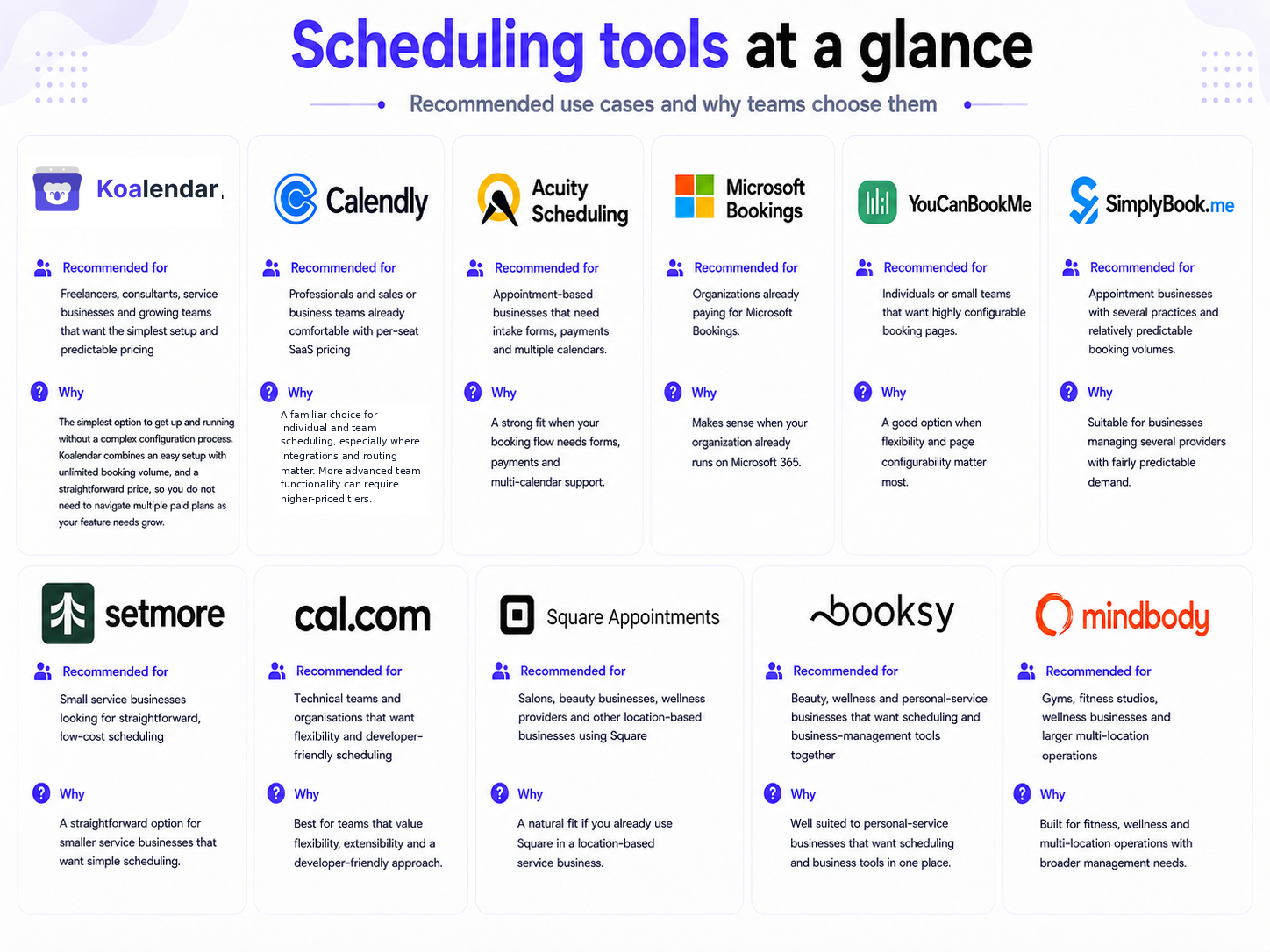
The right comparison is therefore not simply which tool starts cheapest, but which pricing model stays predictable as your bookings, team, locations, and feature requirements grow.
Hidden scheduling software costs to check before choosing
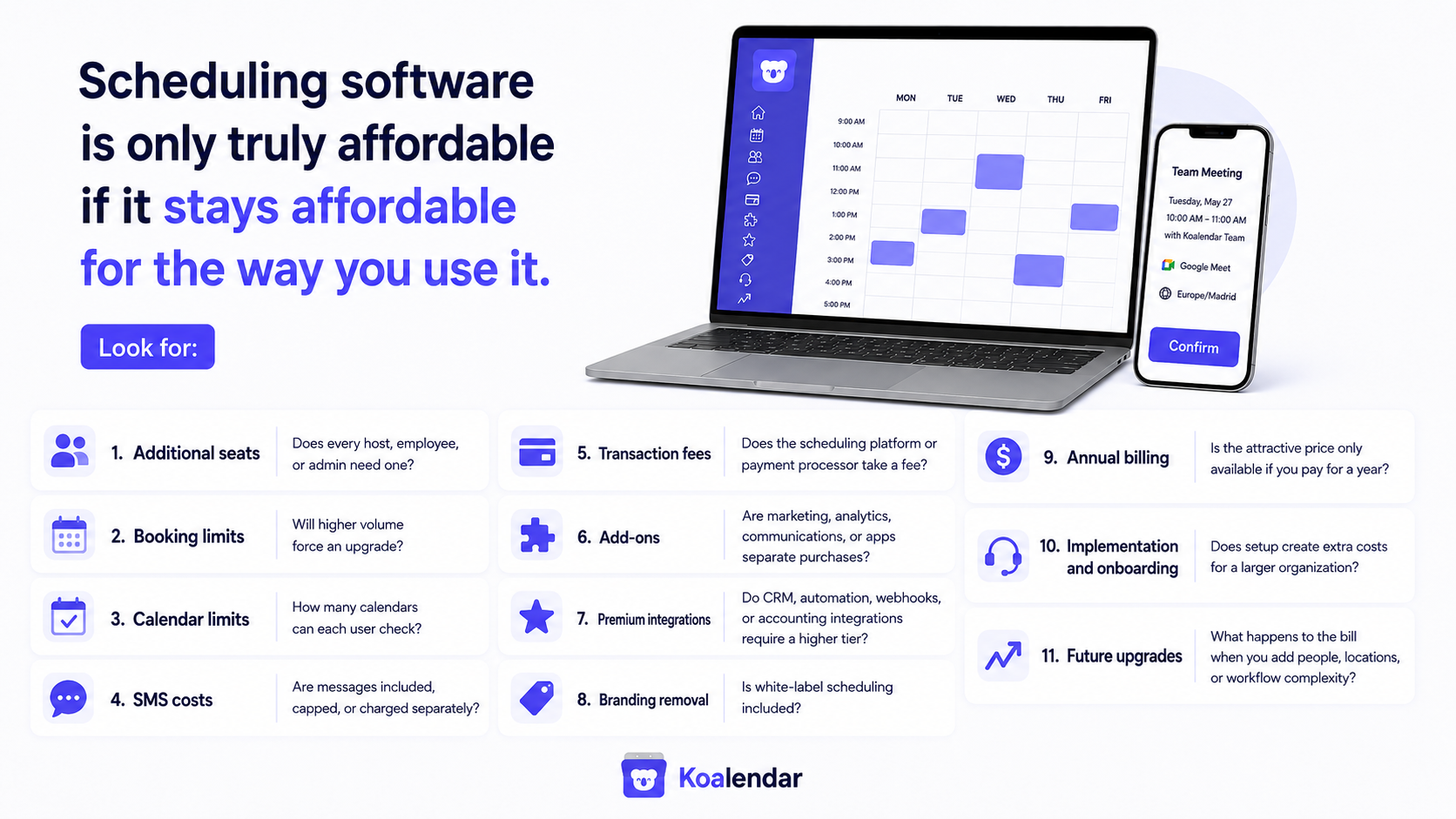
Your real bill can be higher than the number in the pricing card, so check variable and indirect costs before committing.
Look for:
- Additional seats: Does every host, employee, or admin need one?
- Booking limits: Will higher volume force an upgrade?
- Calendar limits: How many calendars can each user check?
- SMS costs: Are messages included, capped, or charged separately?
- Transaction fees: Does the scheduling platform or payment processor take a fee?
- Add-ons: Are marketing, analytics, communications, or apps separate purchases?
- Premium integrations: Do CRM, automation, webhooks, or accounting integrations require a higher tier?
- Branding removal: Is white-label scheduling included?
- Annual billing: Is the attractive price only available if you pay for a year?
- Implementation and onboarding: Does setup create extra costs for a larger organization?
- Future upgrades: What happens to the bill when you add people, locations, or workflow complexity?
This is particularly important with broader business-management platforms. Mindbody explicitly says its total price can consist of the base plan, premium add-ons, and transaction-related fees. Scheduling software is only truly affordable if it stays affordable for the way you use it.
Free vs paid scheduling software: when should you pay?
Pay when a paid feature saves more time, improves the customer experience, or solves an operational problem that your free plan cannot.
Don't upgrade just because the pricing page says Pro is “better.”
When a free plan is enough
A free plan may be all you need when:
- one person handles scheduling
- you schedule straightforward 1:1 meetings or appointments
- your booking volume fits comfortably within the plan
- basic calendar sync covers your availability
- vendor branding isn't a problem
- you don't need complex routing or team administration
For plenty of professionals, that's not a temporary stage. It's the entire requirement.
When paying makes sense
Consider paying when you need:
More calendars. Multiple work and personal calendars can make conflict prevention worth the upgrade.
Team scheduling. Round robin and collective scheduling can eliminate manual assignment.
Custom reminders. Useful when no-shows cost real money or time.
Payments. Taking deposits or full payment at booking can simplify service workflows.
Professional branding. Important when the booking experience is customer-facing.
Administration and security. Growing teams may need centralized controls, permissions, SSO, provisioning, or reporting.
Features worth paying for
A feature is worth paying for when you can connect it to an outcome.
“Advanced automations” sounds impressive.
“Automatically assign every sales demo to an available rep instead of coordinating it manually” is a business case.
Start with the problem. Then choose the plan.
How to calculate your real scheduling software cost
Calculate the full annual cost, not the advertised monthly starting price.
Use this formula:
Annual scheduling cost = base subscription + additional seats + usage fees + add-ons + messaging costs + transaction fees
Then model today's usage and tomorrow's.
Imagine a product costing $10 per schedulable user/month with no additional variable costs.
| Team size | Base monthly cost | Base annual cost |
| 1 person | $10 | $120 |
| 5 people | $50 | $600 |
| 20 people | $200 | $2,400 |
Now compare that with a hypothetical $40/month location-based product:
One user might pay considerably more.
Twenty users operating from one location might pay considerably less.
Neither pricing model is automatically better. Your usage determines the result.
For businesses taking payments, run one more calculation:
Annual total cost = software cost + expected payment fees + messaging fees + required add-ons
And when comparing annual discounts, compare the actual yearly cash commitment too. A lower monthly equivalent isn't useful if a 12-month commitment doesn't suit your business.
How Koalendar pricing compares
Koalendar doesn’t take scheduling volume into consideration, so more bookings don't mean a bigger software bill. Charges are per seat, so bookable person or resource or admin.
Koalendar currently offers three pricing levels: Free Forever, Pro, and custom Teams pricing for organizations with 10+ seats.
Free Forever includes:
- unlimited bookings
- unlimited scheduling links
- two calendar connections across Google, Outlook, and iCloud
- video conferencing
- support for 30+ languages
- embedded booking pages
Pro adds:
- unlimited calendar syncs
- payment collection
- custom email and SMS reminders
- round robin scheduling
- collective scheduling
- additional automation and integrations
- removal of Koalendar branding
The pricing distinction worth paying attention to is what doesn't increase your bill.
Koalendar doesn’t charge customers based on their number of bookings, invitees, booking pages, or scheduling links. Paid use is based on seats for bookable people/resources and relevant administrators instead. That makes Koalendar’s pricing model especially easy to forecast when booking volume fluctuates and the number of schedulable hosts stays relatively stable.
You can also compare Koalendar's Free Forever vs Pro plan to decide whether those paid capabilities solve a problem you have today.
Start free. Upgrade when the extra functionality earns its place.
How we researched scheduling software pricing
This report compares each product against the same pricing questions so that different billing models are easier to understand.
The research covers 11 scheduling platforms:
Koalendar, Calendly, Acuity Scheduling, Microsoft Bookings, YouCanBookMe, SimplyBook.me, Setmore, Cal.com, Square Appointments, Booksy, and Mindbody.
Pricing was checked on August 7, 2026.
We used current vendor pricing pages and vendor documentation wherever possible, with independent sources such as Capterra and G2 for category context and cross-checking.
For each platform, we considered:
- permanent free plan availability
- published starting paid price
- billing unit
- booking limits
- calendar or provider limits
- team pricing mechanics
- transaction costs where clearly published
- SMS or messaging costs where clearly published
- annual discounts
- significant plan-based feature restrictions
“Free plan” means a plan that can continue indefinitely at $0 or the local equivalent. A seven- or fourteen-day trial does not count as a free plan.
“Starting paid price” means the lowest publicly listed paid subscription relevant to scheduling at the billing interval stated in the table. It does not mean that plan is sufficient for every use case.
Taxes are excluded unless the vendor displays them within the listed price. Transaction charges, SMS costs, integrations, marketplace fees, optional add-ons, and implementation costs are only treated as included when the provider explicitly says so.
Pricing pages change. Always confirm the current vendor price before purchasing.
Finding the right scheduling software for your budget
The best-value scheduling tool is the one whose pricing model matches the way your business actually schedules.
Don't stop at the monthly number.
Check what happens when you add calendars, send reminders, accept payments, add five teammates, double appointment volume, or need round robin scheduling. That's where scheduling software pricing starts to look very different from the headline offer.
For solo professionals, a capable permanent free plan may be all you ever need. Teams should calculate the real multi-seat cost. Appointment-heavy businesses should look carefully at booking allowances. Service companies should include payments, staff, messaging, and locations in the calculation.
And if you want to start without worrying about appointment volume, Koalendar Free Forever gives you unlimited bookings and scheduling links, with paid features there when your needs become more advanced.
Find out if you actually need a paid scheduling plan.
Try Koalendar free, then upgrade only when the extra features make sense.